Helm is Matt Tytel’s free and open-source software synthesizer for Windows, macOS and GNU/Linux. It combines a visual subtractive workflow with modulation, step sequencing, formant processing, distortion, delay and reverb, and it can be downloaded for $0 under a pay-what-you-want model.
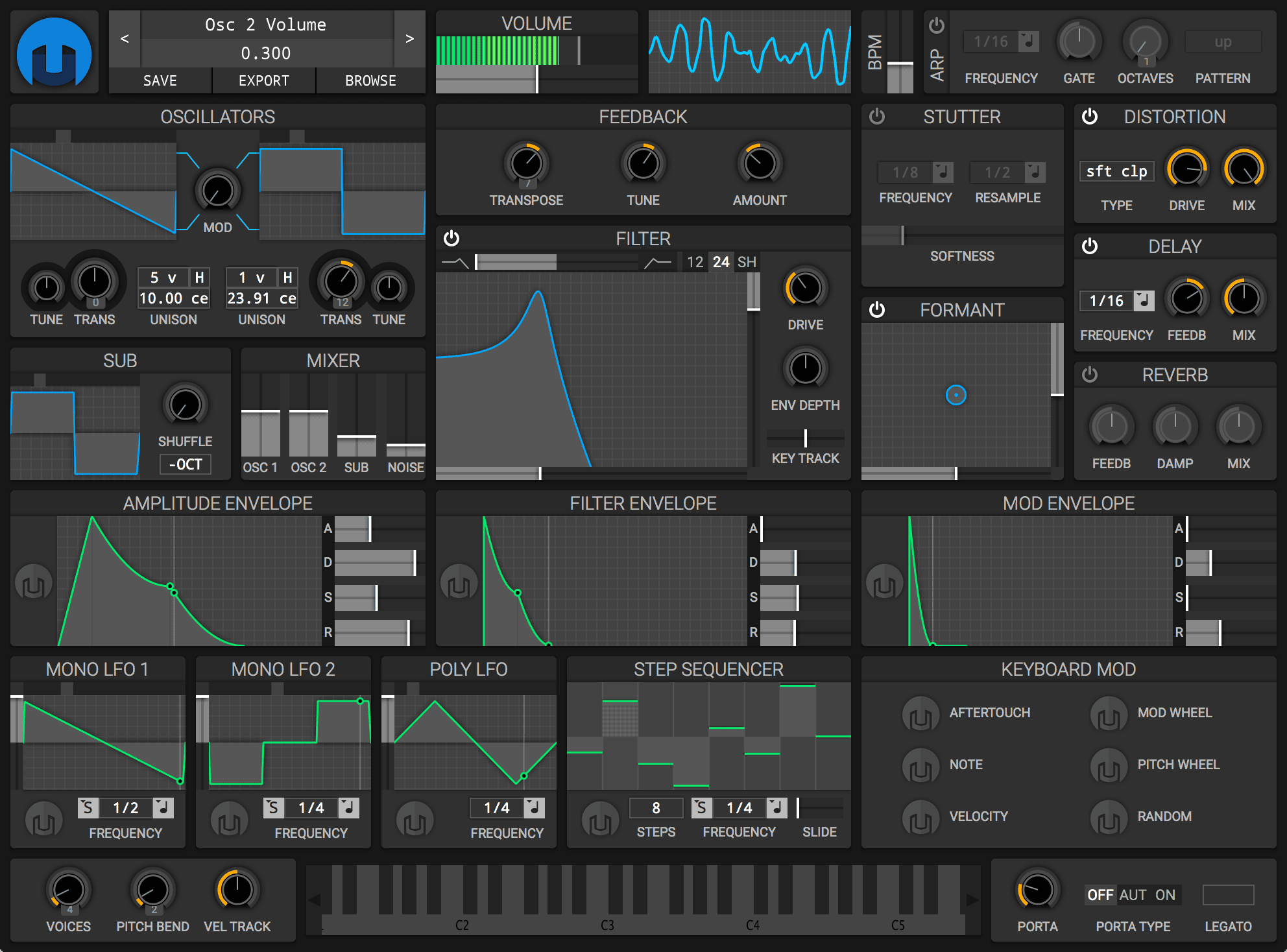
A visual synth built for modulation
Helm’s interface makes a lot of its signal flow visible at once. Oscillator shapes, filter response, envelopes, LFOs and modulation amounts are displayed graphically, which makes it useful both as a creative synth and as a learning tool. Instead of hiding modulation behind lists of source and destination names, the interface gives continuous visual feedback as the sound changes.
The architecture covers much more than basic subtractive synthesis. Alongside oscillators, sub oscillator, noise, filter and envelopes, Helm includes mono and poly LFOs, a step sequencer, arpeggiator, formant controls, stutter, distortion, delay and reverb. That makes it capable of animated basses, moving pads, rhythmic sequences and experimental digital textures without relying on external effects for every part of the patch.
Best uses
Multiple LFOs, envelopes and distortion make moving low-end patches easy to animate.
The step sequencer, arpeggiator and stutter section can create motion inside the instrument.
Formant processing, polyphonic modulation and onboard effects can create evolving layers.
The graphical interface makes the relationship between sources and destinations easier to follow.
Compatibility and license
Formats listed by the developer: standalone, LV2, VST, VST3 and AU.
Architecture: 32-bit and 64-bit versions are listed on the official site.
License: Helm is free software under the GPL and can be downloaded for $0. The developer’s FAQ also confirms that the sounds and music you create with Helm remain yours.
System requirements
Matt Tytel’s FAQ lists Windows 7 or later, macOS 10.7 or later, Ubuntu Trusty 14.04 or later and Debian Jessie or later. Those requirements reflect the official Helm documentation. On a very recent operating system, it is sensible to test Helm in your DAW before making it central to a long-term project, because the software is mature and its official pages are older than many current host versions.
Quick start
- Begin with a simple oscillator shape and set the filter before adding effects.
- Assign one envelope to amplitude and use another for filter or pitch movement.
- Map an LFO to a visible target and adjust its rate while watching the modulation feedback.
- Use the step sequencer or arpeggiator for rhythmic motion.
- Add distortion, delay or reverb last so the core patch remains easy to balance.
Official download
Helm is distributed from Matt Tytel’s official website using a pay-what-you-want model. You can enter $0 and download the full software, or support the developer with a payment if you choose.
A Producer’s Take
Helm is one of the synths I would hand to someone who wants to understand modulation because so much of the movement is visible. It is also surprisingly capable for aggressive basses, animated pads and rhythmic patches without needing a giant preset library.