AudiartistAudiartist
  • Home
  • Breaking News
  • 🎧 Free pitch music 🎧
  • Music
    • New music release
    • We love
    • Cinematic
    • Classical Music
    • Electro / House
    • Jazz
    • Lo-fi
    • Pop Music
    • Rock
    • Synthwave
    • Urban
    • We love
  • Music Production
  • Music Promotion
  • New music release
  • Freebie
    • FREE VST
    • Free Kontakt sound
    • Free Sample Pack
    • Free Preset
    • Free Serum Preset
  • Artists
    • Arpeggio Allegro
    • Mister BoO
    • Nodachi
    • Sebastian McQueen
    • Sébastien BACCI
  • No copyright music
  • Buy me a coffee
  • Our playlists
    • Submit your music for free with DailyPlaylist
    • Free Submission to Our Spotify Playlists
    • Afro music
    • Christmas Music
    • Cinematic Music
    • Classical Music
    • Dance Music
    • Electro Music
    • Hard Rock
    • House Music
    • Latina Music
    • Lo-fi
    • Mainstream
    • Pop Music
    • RAP & Hip Hop
    • Reggaeton
    • Rock Music
    • Synthwave
    • Urban Music
Font ResizerAa
AudiartistAudiartist
Font ResizerAa
Search
  • Home
  • Breaking News
  • 🎧 Free pitch music 🎧
  • Music
    • New music release
    • We love
    • Cinematic
    • Classical Music
    • Electro / House
    • Jazz
    • Lo-fi
    • Pop Music
    • Rock
    • Synthwave
    • Urban
    • We love
  • Music Production
  • Music Promotion
  • New music release
  • Freebie
    • FREE VST
    • Free Kontakt sound
    • Free Sample Pack
    • Free Preset
    • Free Serum Preset
  • Artists
    • Arpeggio Allegro
    • Mister BoO
    • Nodachi
    • Sebastian McQueen
    • Sébastien BACCI
  • No copyright music
  • Buy me a coffee
  • Our playlists
    • Submit your music for free with DailyPlaylist
    • Free Submission to Our Spotify Playlists
    • Afro music
    • Christmas Music
    • Cinematic Music
    • Classical Music
    • Dance Music
    • Electro Music
    • Hard Rock
    • House Music
    • Latina Music
    • Lo-fi
    • Mainstream
    • Pop Music
    • RAP & Hip Hop
    • Reggaeton
    • Rock Music
    • Synthwave
    • Urban Music
Follow US
Audiartist > Music Production > Panning and Stereo Imaging in Music Production
Music Production

Panning and Stereo Imaging in Music Production

audiartist
Last updated: 1 avril 2025 16h38
audiartist
Share
4 Min Read
SHARE

Panning and Stereo Imaging in Music Production: How to Create Width and Separation in Your Mix

Introduction
A great mix isn’t just about EQ and compression—it’s about space. Stereo space. Learning how to properly use panning and stereo imaging helps you place instruments across the left–right field, creating clarity, width, and emotional depth. Whether you’re mixing house, trap, pop, or ambient, this guide will teach you how to make your tracks sound bigger, wider, and more immersive.


What Is Panning?
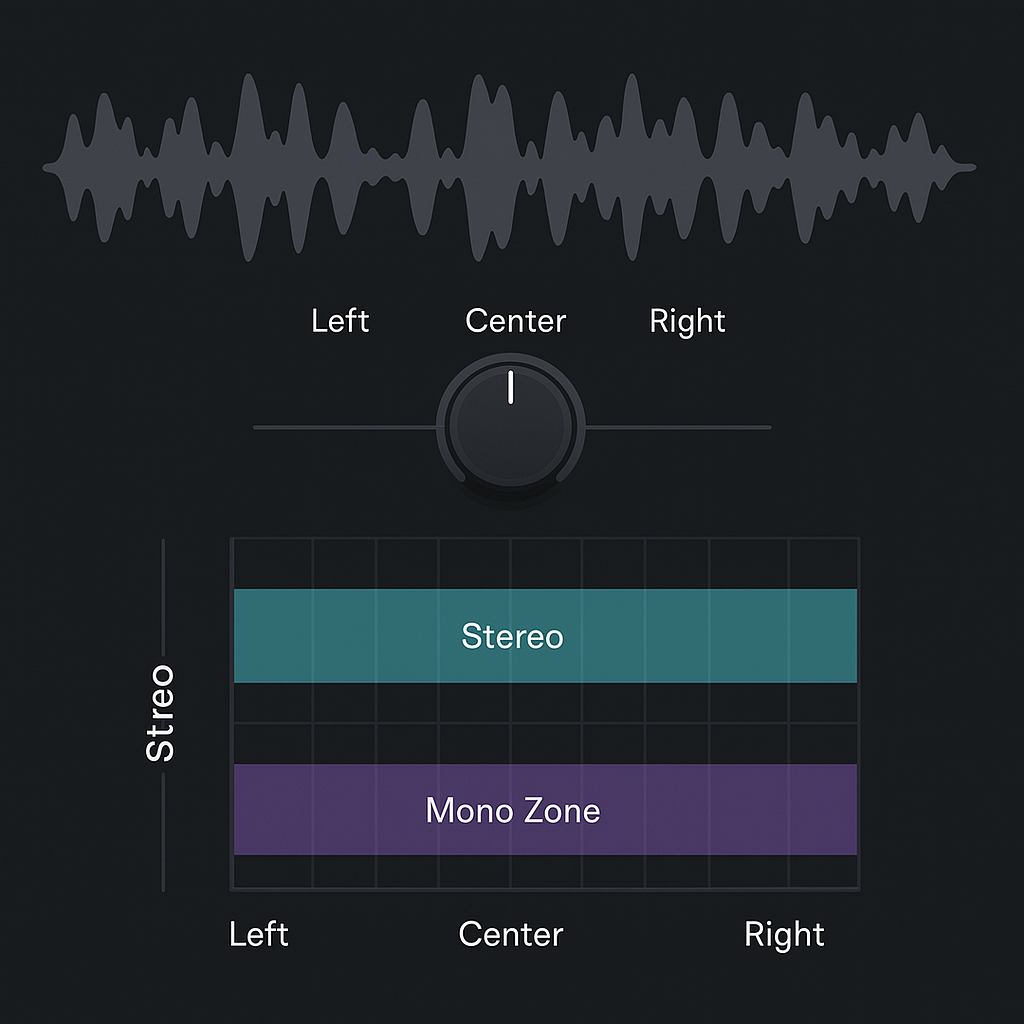
Panning refers to placing a sound between the left and right speakers in the stereo field. In most DAWs, every channel has a pan knob that lets you send a signal more to the left, center, or right.

Why panning matters:

  • Prevents frequency clashes in the center
  • Creates a wide, open mix
  • Mimics how we hear instruments in real space
  • Adds realism and movement

Basic Panning Guidelines for Beginners

  • Center (Mono Zone): Kick, snare, bass, lead vocals
  • Slightly off-center: Backing vocals, guitars, synths
  • Wide left/right: Hi-hats, shakers, ambient FX, keys, pads

🎯 Tip: Always check your mix in mono to make sure it still holds up.


What Is Stereo Imaging?
Stereo imaging enhances or manipulates the width and position of sounds in the stereo field. While panning places a mono signal left or right, stereo imaging can expand stereo signals or add artificial width to mono sounds.

Stereo imaging tools can:

  • Spread a stereo signal wider
  • Narrow overly wide sounds
  • Balance uneven stereo fields
  • Add dimension to synths, pads, or FX

Tools for Stereo Imaging

✅ DAW Panners – Basic L/R control
✅ Stereo Imaging Plugins – Widen or narrow stereo width
✅ Mid/Side EQ – Treat center (mono) and side (stereo) frequencies separately
✅ Reverb & Delay – Add width naturally
✅ Double Tracking – Record two takes and pan hard L/R

Free and Paid Stereo Imaging Plugins

Free Plugins

  • Ozone Imager – Visual stereo width control
    https://www.izotope.com/en/products/ozone-imager.html
  • A1StereoControl – Simple and powerful width adjustment
    https://www.alexhilton.net/A1AUDIO/index.php/a1stereocontrol
  • Voxengo Stereo Touch – Converts mono to stereo using delay/phase
    https://www.voxengo.com/product/stereotouch/

Paid Plugins

  • Waves S1 Stereo Imager – Industry standard for stereo balance
    https://www.waves.com/plugins/s1-stereo-imager
  • Nugen Stereoizer – Clean, precise stereo enhancement
    https://nugenaudio.com/stereoizer/
  • FabFilter Pro-Q 3 (Mid/Side Mode) – Use for spatial EQ control
    https://www.fabfilter.com/products/pro-q-3-equalizer-plug-in

Creative Panning & Imaging Techniques

  • LCR Mixing – Place sounds hard Left, Center, or Right for maximum space
  • Automation – Pan FX or risers during breakdowns/build-ups
  • Panning Percussion – Give bounce and groove to rhythm
  • Fake Width – Use stereo delays or phase tricks for mono synths
  • Dynamic Stereo Movement – Modulate pan or stereo field over time

Common Mistakes to Avoid

  • Too much width → Phase issues, weak mono compatibility
  • Unbalanced field → Mix feels lopsided
  • Over-reliance on stereo plugins → Bad translation to phones/small speakers
  • Panning bass elements → Weak low-end

Conclusion
Panning and stereo imaging give your mix space to breathe. Instead of stacking sounds on top of each other, spread them out—and let them play off each other. Whether it’s subtle panning or creative stereo tricks, these tools help your music feel wide, pro, and exciting. The stereo field is your canvas—paint with intention.

Download a free stereo plugin and start experimenting today.

Loading

TAGGED:beginner panning guidehow to pan instrumentsLCR panningmono vs stereo mixmusic mix separationpanning in music productionstereo imager pluginsstereo imaging tutorialstereo width tipswiden synths in mix
Share This Article
Facebook Pinterest Tumblr Reddit Copy Link Print

Support us by buying us a coffee.

News

Lunatronic – Pulse Engine: Drum & Bass with a beating heart
Electro / House Music Techno Music
PRÝNCESS Turns Toxic Love into a Girl-Power Battle Cry on “The Hook”
Music New music release Pop Music Rock We love
Nazaakunna: Afro-Gospel grooves that move bodies and lift souls
Afro Music Music New music release We love
“Ne doute pas”: Ness Toria’s Hypnotic Afro House Mantra in French
Electro / House Music New music release We love
The Best Free Percussion VST Plugins
FREE VST Freebie Music Production
Spotify Wrapped 2025 Is Everywhere – And the World Is Listening Together
Breaking News

Top Acticles

Top 7 Free Music Distributors in 2025 
Music Promotion
How Spotify Pays Artists in 2025: A Complete Breakdown
Music Promotion
You’ve Been On My Mind by #R!sK
Music New music release Pop Music Synthwave We love
NAM Universal
FREE VST Freebie
Spotify’s Free Tier Update
Music Promotion
Yuri Semenov’s Free VST Plugin Collection
FREE VST

You Might Also Like

Music Production

The Best Free VST Plugins for Hip-Hop Beatmaking in 2025

3 juin 2025
Music Production

The Best Free Online Mastering Tools for Music Producers

30 mars 2025
Music Production

Top 5 DAWs for Music Production

22 mai 2024
Music Production

🎚 Mastering DIY

4 septembre 2025

Find Us on Socials

Artists

  • Nodachi
  • Snake Russell
  • Spycho Fox
  • Mister BoO
  • Sebastian McQueen

Freebie (Vst, Preset, Sample)

  • Freebie
  • Free FL Studio template
  • Free Kontakt sound
  • Free Preset
  • Free Sample Pack
  • Free Serum Preset
  • FREE VST

Free Spotify Playlist Pitching

  • Afro music
  • Christmas Music
  • Cinematic Music
  • Classical Music
  • Dance Music
  • Electro Music
  • Hard Rock
  • House Music
  • Latina Music
  • Lo-fi
  • Mainstream
  • Pop Music
  • RAP & Hip Hop
  • Reggaeton
  • Rock Music
  • Synthwave
  • Urban Music
Welcome Back!

Sign in to your account

Username or Email Address
Password

Lost your password?