APD Compressor: A Free Adaptive Vocal Compressor VST
Program-dependent compression, harmonic texture and a focused workflow for clearer, more controlled vocal mixes.
APD Compressor is a free vocal compression plugin developed by Fabio “Shadaloo” Caterino of Shadaloo Audio DSP. Released in August 2026, it combines program-dependent dynamics processing with an optional harmonic texture stage inside a direct and accessible interface.
The plugin is designed primarily for vocals, although it can also be tested on instruments, drum rooms, basses and other sources that benefit from controlled dynamics and added density.
APD Compressor is available through a pay-what-you-want system. Producers can enter zero and download the complete plugin without a mandatory payment, time limit or restricted feature set.
What Is APD Compressor?
APD Compressor is built around a program-dependent compression system. Its response changes according to the incoming audio and the amount of gain reduction being applied.
This means that the Threshold, Attack and Release controls do not behave as completely isolated parameters. The envelope response adapts as the signal level and compression intensity change, helping the plugin follow the natural movement of a vocal performance.
The objective is not to remove every dynamic variation. Instead, APD Compressor is intended to control excessive peaks, stabilise the vocal level and add consistency while preserving musical movement.
This focused approach can be particularly useful for producers who understand what they want from a vocal compressor but do not want to build a long chain of separate dynamics and saturation processors.
Main Controls
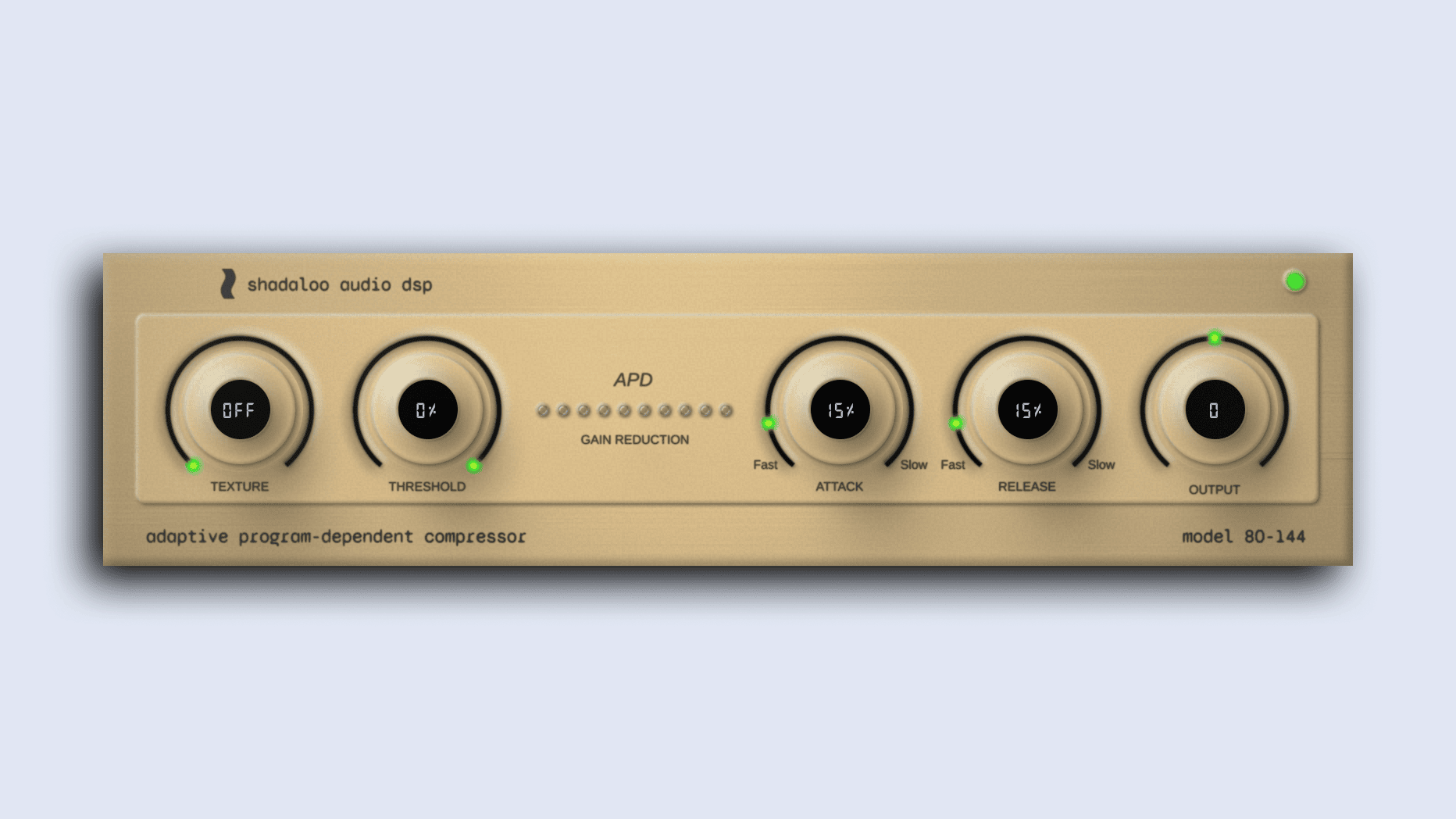
The interface contains five principal controls and a ten-segment gain-reduction meter. The limited control set keeps the workflow fast while still providing enough flexibility for different vocal performances.
- Texture: Adds a level-dependent harmonic saturation stage before the compressor.
- Threshold: Determines how strongly the incoming signal enters compression.
- Attack: Controls how quickly the compressor responds to louder vocal peaks.
- Release: Adjusts how quickly the gain reduction returns after the signal falls.
- Output: Restores or reduces the final signal level after compression.
The Threshold range extends from approximately 0 dB to -40 dB. Attack can be adjusted from around 0.1 milliseconds to 100 milliseconds, while Release covers approximately 10 milliseconds to 2000 milliseconds.
The Output control provides up to 24 dB of gain in either direction, making it easier to level-match the processed and unprocessed signals.
Harmonic Texture and Saturation
The Texture control introduces a saturation stage before the main compression process. At its minimum position, this stage is completely bypassed.
As Texture is increased, the plugin generates additional harmonic content in response to the input level. The processing concentrates mainly on second, third and fourth-order harmonics while keeping stronger higher-order distortion under control.
This can help a vocal feel denser, more present and slightly more forward in the mix. Because the saturation happens before compression, the harmonic character also influences how the dynamics section reacts.
The Texture stage uses 4x oversampling to reduce unwanted digital artifacts during nonlinear processing. It can be used gently for subtle warmth or pushed further when a vocal needs more edge and character.
For transparent compression, leave Texture switched off. For a more finished vocal sound, increase it gradually while comparing the processed signal at a similar output level.
Best Uses
Lead vocals are the primary application. APD Compressor can reduce large level differences between quieter phrases and louder words while retaining enough movement for an expressive performance.
Rap vocals may benefit from a faster attack and controlled release when individual syllables need to remain consistent over a dense instrumental.
Pop and electronic vocals can use the Texture stage to add density before entering additional EQ, de-essing, delay and reverb processing.
Backing vocals often need stronger control than the lead. A lower threshold and slightly faster envelope can help several layers behave as one unified section.
Acoustic instruments such as guitar or piano may also respond well to the adaptive envelope, particularly when the performance contains uneven peaks. The plugin is vocal-focused, but the compressor police are unlikely to arrive if it works elsewhere.
How to Use It on Vocals
Begin with Texture disabled and Output at unity gain. Lower the Threshold until the gain-reduction meter starts responding to the louder sections of the performance.
For natural vocals, aim for moderate gain reduction and allow some variation between phrases. Compression should improve consistency without making every word feel exactly the same size.
Use a slower Attack when the vocal needs more clarity and initial consonant definition. A faster Attack can control sharp peaks, but extreme settings may reduce energy and make the performance feel less immediate.
Adjust Release while listening to the spaces between words. A release that is too slow may keep the vocal permanently reduced. A release that is too fast can create audible pumping or unnatural level movement.
Once the compression is working, introduce Texture carefully. Increase it until the vocal gains useful body, then stop before the saturation becomes the main feature of the performance.
Finally, use Output to match the perceived level with the bypassed signal. A louder signal almost always appears more impressive, which is why level matching remains the least glamorous but most honest person in the studio.
Mixing Tips
APD Compressor can be placed after corrective EQ when unwanted resonances cause inconsistent compression. It can also be used before tonal EQ when the objective is to stabilise the signal before shaping its overall colour.
A separate de-esser may still be required. Compression can raise the apparent level of sibilance because quieter details become more audible after gain reduction and output compensation.
For aggressive vocal production, try two stages of lighter compression rather than forcing one compressor to perform all the gain reduction. APD Compressor can control the main performance before a second processor handles peaks or adds additional character.
When using Texture, check the upper mids carefully. Saturation can improve presence, but too much harmonic content may exaggerate harshness around consonants and energetic notes.
Always compare the processed and bypassed signals at similar loudness. The objective is to hear whether the vocal is genuinely more controlled and musical, not simply louder.
Compatibility
APD Compressor is available for 64-bit Windows and macOS systems.
- Windows: 64-bit VST3
- macOS: VST3 and Audio Unit
- Mac processors: Universal build for Intel and Apple Silicon
- Price: Free with optional contribution
- Copy protection: No subscription or recurring payment required
The Windows version is supplied as a VST3 file that can be copied into the standard VST3 plugin folder before rescanning the DAW.
The current Windows build is not digitally signed, so Windows may display a security warning during installation. Producers should download the plugin only from the official Shadaloo Audio DSP page.
Final Verdict
APD Compressor is a focused free dynamics processor for producers who want faster vocal control without an overloaded interface.
Its program-dependent behavior gives the compression a more responsive character, while the Texture stage adds optional harmonic weight without requiring a separate saturation plugin.
The limited number of controls makes APD Compressor suitable for beginners, but its adaptive response and level-dependent saturation can also make it useful in experienced mixing workflows.
It does not attempt to replace every compressor in a complete studio collection. Instead, it concentrates on one frequent task and provides a quick route to a more stable, present and controlled vocal.
For a genuinely free plugin released in 2026, APD Compressor offers a practical balance between simplicity and musical processing. Your vocalist may still ask for more reverb, but at least the dynamics will be under control.
Download APD Compressor from the official website: