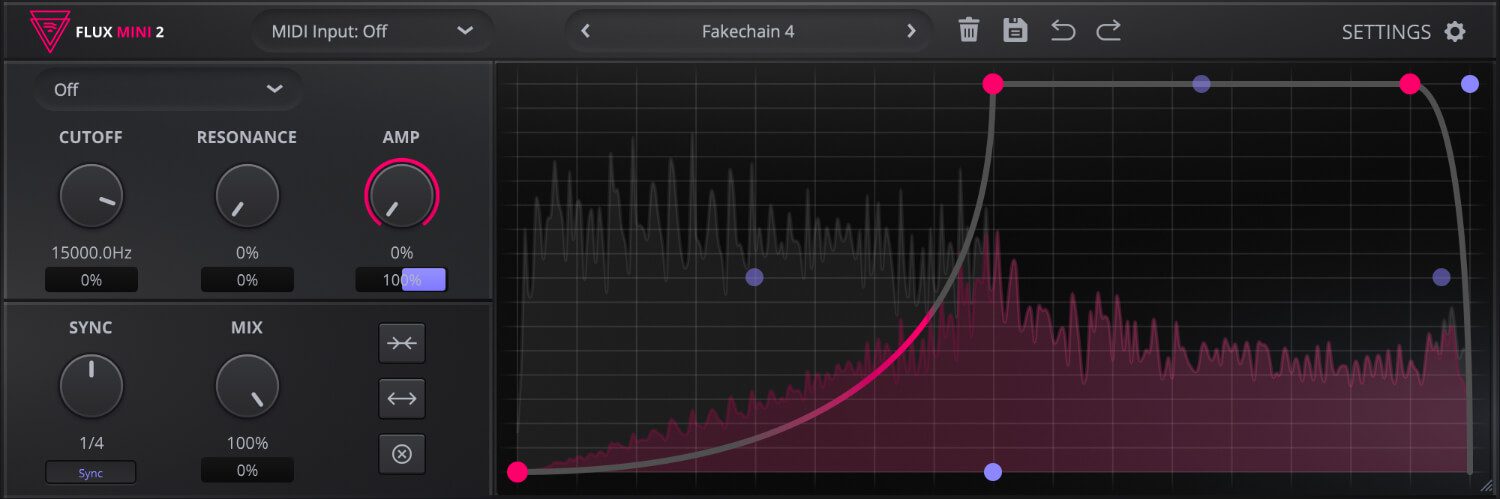

Some free plugins are made to fill a gap. Others instantly become part of a producer’s everyday workflow. Flux Mini 2 sits comfortably in the second category. Developed by Caelum Audio, this free VST is designed to bring motion, rhythm, and shape to static sounds through an intuitive modulation system that feels creative rather than complicated. It is the kind of plugin that can wake up a dull synth, turn a plain pad into something alive, or inject bounce into a track without forcing you through a maze of menus.
Available on the official Flux Mini 2 page, with access to the free download area, the plugin is built around a customizable graph that can modulate key parameters and create everything from subtle groove enhancement to bold rhythmic movement. For producers working in electronic music, lo-fi, pop, ambient, hip-hop, cinematic scoring, or modern beatmaking, it is one of those rare free tools that feels genuinely useful from the first session.
What Flux Mini 2 Actually Does
Flux Mini 2 is an audio effect plugin built to add life, character, and dynamism to a sound. Its core idea is simple: you draw a shape on an automation graph, then use that movement to modulate parameters such as filter cutoff, resonance, amplitude, and mix. In practice, that means one plugin can help you create pumping sidechain-style motion, rhythmic filtering, evolving amplitude patterns, and animated transitions that keep a track from feeling flat.
What makes the plugin immediately appealing is the balance between visual clarity and musical flexibility. You are not programming modulation in a dry, technical way. You are sketching movement directly. That makes Flux Mini 2 feel less like a utility and more like a creative performance tool hidden inside a deceptively compact interface.
A Workflow Built Around Fast Musical Results
The standout feature here is the plugin’s graph system. Using bezier curves, you can draw intricate automation shapes and assign them to multiple destinations. That immediately opens the door to more expressive motion than a standard up-and-down gate effect. Want a gentle swell on a pad, a sharper groove on a bass line, or a more complex pulse on a synth chord? Flux Mini 2 makes those changes feel visual, intuitive, and fast.
The plugin also allows producers to work either in sync with the host tempo or in milliseconds, which is a practical detail that matters more than it sounds. Tempo sync keeps things clean inside beat-driven productions, while millisecond control is useful for more custom timing moves, experimental shaping, and transitions that need to sit just off the grid. It is a small design choice that gives the plugin more depth than many freeware modulation effects.
Filter Motion, Amplitude Shape, and More
Flux Mini 2 includes selectable low-pass, high-pass, and band-pass filtering, which makes it especially useful for tonal movement. A static sound can suddenly breathe, open, tighten, or pulse with far more intent. On a melodic loop, that can create an evolving top end. On a bass part, it can add groove without rewriting the MIDI. On transitions, it can produce the kind of sweeping motion that helps sections feel connected instead of abruptly stitched together.
Amplitude modulation is just as useful. Producers looking for sidechain-inspired movement without setting up a compressor will appreciate how quickly Flux Mini 2 can introduce bounce and space. It is not simply a one-trick pumping plugin, though. Depending on the graph shape, it can become choppy, smooth, syncopated, or subtly breathing. That versatility is what makes it feel relevant across so many genres.
Why Beatmakers and Producers Will Enjoy It
This is the kind of free VST that appeals to producers who like movement in their arrangements. Beatmakers can use it to add bounce to keys, texture to samples, or tension to intros. Electronic producers can shape pads, leads, and FX with rhythmic motion that feels deliberate instead of generic. Ambient and cinematic composers can use slower, more organic curves to create evolving tonal changes that make sustained sounds feel alive. Even pop and indie producers can find real value in the way Flux Mini 2 introduces subtle motion without overcrowding the mix.
Mixing engineers may also appreciate it as a creative utility. It is not a corrective tool in the traditional sense, but it can be extremely useful for making a part occupy space more musically. Sometimes a sound does not need more EQ or saturation. It simply needs movement. Flux Mini 2 understands that beautifully.
MIDI Features That Expand Its Role
One of the more interesting aspects of Flux Mini 2 is its MIDI behavior. The plugin supports MIDI triggering for one-shot and retrigger modulation, and it can output its graph as MIDI CC to control other plugins. That moves it beyond being just a filter-and-volume shaper. For producers who enjoy building interactive chains or using automation as a deeper compositional element, this gives Flux Mini 2 more reach than its modest interface initially suggests.
That extra flexibility is one reason it stands out in the crowded world of free production tools. A lot of freeware is useful for one narrow task. Flux Mini 2 feels broader. It can behave like a sidechain alternative, a modulation sequencer, a filter animator, a creative transition tool, or even a control hub for shaping the behavior of other plugins.
A Free Plugin That Encourages Experimentation
Caelum Audio also includes 20 presets, which gives users a quick way into the plugin before drawing their own shapes. That is a sensible touch. Flux Mini 2 is easy enough to understand, but presets help show how dramatically it can transform a sound depending on the curve, timing, and modulation depth. From simple pulsing effects to much more frantic movement, the plugin clearly wants users to experiment rather than stay safe.
And that may be its biggest strength. Flux Mini 2 does not feel intimidating, but it does feel open-ended. It gives producers an accessible way to introduce rhythm and animation into their tracks, which is often where flat productions begin to sound more finished, more intentional, and frankly more alive.
Watch Flux Mini 2 in Action
The video above offers a clear look at how Flux Mini 2 behaves in practice, especially for producers who want to hear how its modulation can shape a sound before installing it. For a plugin built around movement, hearing it work is naturally half the story.
Why Flux Mini 2 Is Worth Downloading
There is no shortage of free plugins competing for space in a producer’s folder, but very few feel as immediately practical as Flux Mini 2. It is focused, creative, easy to grasp, and versatile enough to be useful across genres and workflows. Whether you want sidechain-style motion, animated filters, rhythmic mix movement, or a more experimental modulation tool, this free VST delivers a lot without pretending to be more complicated than it needs to be.
For producers who enjoy shaping energy and movement inside a track, Flux Mini 2 is absolutely worth trying. You can explore it on the official Caelum Audio page and access it through the free download section. For a plugin dedicated to motion, it gets to the point with refreshing speed.