
A Free Optical Compressor Plugin Worth Adding to Your Mix Chain
Finding a free plugin that actually feels useful in a real-world session is still one of the best little victories in music production. Every producer knows the difference between a throwaway freebie and a tool that genuinely earns a place in the template. LAEA by Analog Obsession falls into the second category. It is free, practical, easy to understand, and built for producers who want musical control without turning every mix decision into a science experiment.
- Why Free Resources Still Matter in Modern Music Production
- Main Selection: LAEA by Analog Obsession
- What LAEA Is
- Why This Free Compressor Plugin Stands Out
- Main Features and What They Mean in Practice
- How to Use LAEA in Real Creative Situations
- Who This Free Plugin Is Best For
- Formats, Compatibility, and Download Options
- Tips on How to Use This Free Tool Effectively
- Start With a Clear Job in Mind
- Use Gentle Compression First
- Test the HPF Sidechain on Low-End Material
- Compare With Bypass Often
- Use Free Tools as Learning Tools
- Conclusion
In a market flooded with expensive subscriptions, premium bundles, and endless upgrade offers, a free compressor plugin that sounds relevant and workflow-friendly still matters. A lot. Whether you produce house, lo-fi, pop, hip-hop, cinematic music, or singer-songwriter sessions, dynamics are a huge part of what makes a track feel polished and emotionally balanced. LAEA enters that space with a focused concept: a free solid-state optical compressor designed to smooth, control, and shape signal in a way that feels musical instead of clinical.
If you are always looking for the best free VST plugins, free music production tools, or free mixing plugins that can bring real value to your sessions, this is exactly the kind of release worth checking out.
Why Free Resources Still Matter in Modern Music Production
Free music production resources still matter because they lower the barrier to creativity. Not everyone wants to spend hundreds on plugins before finishing a single track. Students, independent artists, bedroom producers, content creators, and even experienced engineers regularly rely on free tools to sketch ideas, test workflows, and build efficient setups without draining their budget.

But the value of free plugins is not only financial. Free tools encourage experimentation. They let producers try new approaches, discover new textures, and refine their technique without pressure. A free optical compressor can become the reason a vocal sits better, a bassline feels more controlled, or a drum bus suddenly locks into the groove. That is the real beauty of free resources: accessibility meets possibility.
And when a developer consistently offers useful tools at no cost, it changes the conversation. Free stops meaning “limited” and starts meaning “smart.” In that sense, LAEA is a strong reminder that free plugins can still be serious creative tools.
Main Selection: LAEA by Analog Obsession
What LAEA Is
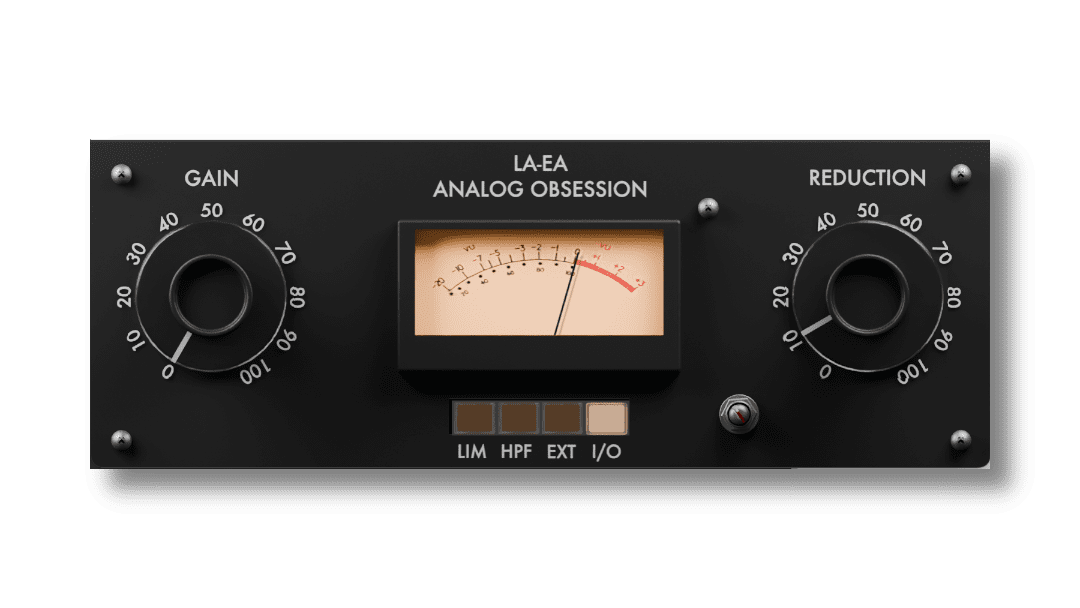
LAEA is a free solid-state optical compressor plugin from Analog Obsession. That description may sound simple, but in practice it tells you a lot. Optical-style compression is often appreciated for its smoother and more natural behavior compared to more aggressive compressor types. It is the kind of dynamic control many producers reach for when they want movement to feel tamed without crushing the life out of the performance.
That makes LAEA especially appealing for producers who want a compressor that feels musical, approachable, and fast to use. It is not trying to bury the user under endless menus or feature overload. Instead, it gives you a compact workflow that can help shape a signal quickly and effectively.
Official website:
https://analogobsession.com/
Official product access page:
https://www.patreon.com/posts/laea-153437904
Why This Free Compressor Plugin Stands Out
What makes LAEA interesting is not just the fact that it is free. It is the combination of free access and focused usefulness. Some free plugins feel like demos disguised as tools. LAEA does not come across that way. It looks like a plugin designed to be used, not merely downloaded and forgotten in a folder of abandoned experiments.
For many producers, that matters more than huge feature lists. A compressor becomes valuable when it helps solve familiar problems: vocals jumping out too hard, bass feeling inconsistent, guitars needing more control, pads requiring smoother movement, or buses needing a little discipline without losing vibe. LAEA seems built for exactly that kind of practical role.
It also fits into a broader truth about modern production: speed matters. When inspiration is there, you want tools that help you move. Free plugins that are simple, direct, and musically useful can often be more valuable than expensive tools that interrupt the creative flow.
Main Features and What They Mean in Practice
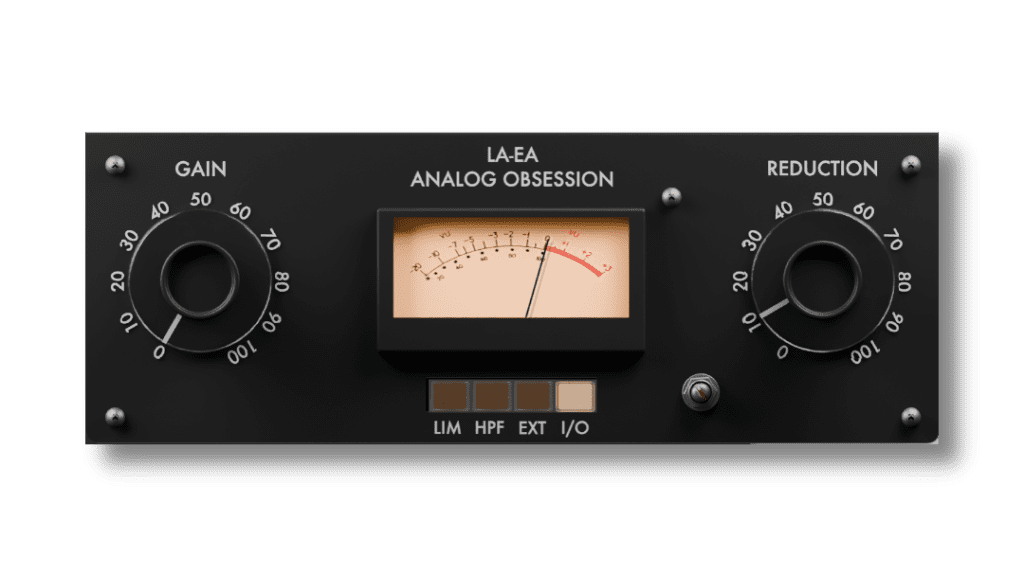
LAEA includes a focused set of controls that make it easy to understand and quick to integrate into a real session. That simplicity is one of its strengths.
Reduction
This control sets the amount of gain reduction. In practical terms, this is where you decide how firmly the signal is being controlled. Light settings can help smooth out performance inconsistencies, while stronger settings can create a more obvious leveling effect.
Gain
The output gain lets you restore level after compression. This is useful when you want to compare processed and unprocessed levels more fairly, or simply bring the signal back up in the mix without reaching for another plugin immediately after.
LIM
This switches the plugin into limiter mode. For producers, this expands the creative use case. It means LAEA can go beyond gentle control and move into firmer signal restraint when needed, which can be useful on sharper peaks or more demanding material.
HPF
The sidechain high-pass filter helps reduce unnecessary low-frequency triggering. This is especially helpful when working with bass-heavy material, kick-rich grooves, or full mixes where low-end energy can cause a compressor to react too aggressively.
EXT
The external sidechain option opens the door to more creative compression workflows. That means you can think beyond correction and move into production techniques such as rhythmic pumping or targeted control driven by another signal.
I/O
A simple bypass function may sound ordinary, but it is essential. Fast A/B comparison is one of the best habits any producer can build, and it helps you make better decisions without fooling yourself into loving a plugin just because it is louder.
LAEA also features a resizable interface, which is a small but very welcome detail. Free plugins sometimes ignore usability. A resizable GUI is a real workflow improvement, especially for long sessions, larger displays, or producers who hate squinting at tiny knobs after hour three of tweaking a snare chain.
How to Use LAEA in Real Creative Situations
One of the reasons free plugins become favorites is simple: they prove themselves in actual sessions. LAEA looks like the kind of plugin that can slide into multiple roles without drama.
Vocals
If a vocal performance needs smoother control without sounding overly squeezed, LAEA can be a smart choice. Optical-style behavior is often appreciated on voices because it tends to feel more natural and less harsh. For singers, rappers, spoken-word creators, podcasters, and topline producers, that kind of smooth control is often exactly what the mix needs.
Bass
Basslines often need consistency more than aggression. A free compressor plugin like LAEA can help tighten the performance and keep low-end energy more even, especially when the HPF sidechain option is used intelligently to avoid overreaction to sub-heavy content.
Guitars and Keys
Electric guitars, acoustic parts, pianos, and keyboards often benefit from gentle dynamic shaping. LAEA can help tame uneven peaks while keeping the musical feel intact, which is valuable when you want the part to stay present without sounding mechanically flattened.
Drum Bus or Percussion Layers
While some producers will still prefer faster, punchier compressor types on drums, LAEA may work nicely when the goal is not aggression but control and glue. For layered percussion, soft bus shaping can make the groove feel more coherent without stripping away motion.
Creative Sidechain Work
Because LAEA includes external sidechain support, it also has potential in more rhythmic or modern production setups. In electronic music, this opens doors to groove shaping, pumping effects, and dynamic interaction between kick, bass, pads, and textures.
Who This Free Plugin Is Best For
LAEA is especially attractive for producers who want useful free plugins without complexity overload. It makes sense for beginners who are still learning compression, because the control set is manageable and direct. It also makes sense for more experienced users who already own larger plugin collections but still appreciate efficient tools that solve problems quickly.
Beatmakers, independent artists, mixing engineers, home studio musicians, and content creators can all find value here. Anyone building a serious budget-friendly setup should pay attention to releases like this. The best free VST plugins are not always the most hyped ones. They are the ones you keep opening because they do the job well.
Formats, Compatibility, and Download Options
LAEA is available in formats that make it usable across many modern workflows, which is another reason it stands out among free music production tools. That matters because accessibility is not only about price. It is also about whether a plugin fits the systems and DAWs producers actually use.
Available formats and platforms:
- Mac: VST3 / AU / AAX Native – Audiosuite
- Windows: VST3 / AAX Native – Audiosuite
Official download links:
- Mac Installer: https://analogobsession.com/wp-content/uploads/2026/03/LAEA_1.0.pkg
- Windows Installer: https://analogobsession.com/wp-content/uploads/2026/03/LAEA_1.0.exe
- Windows ZIP: https://analogobsession.com/wp-content/uploads/2026/03/LAEA_1.0.zip
Tips on How to Use This Free Tool Effectively
Start With a Clear Job in Mind
Before loading any compressor, ask what the signal actually needs. Is it too jumpy, too loose, too peaky, or simply lacking consistency? The better your intention, the better your settings will be. LAEA is likely to shine when used with purpose rather than habit.
Use Gentle Compression First
Free plugins are often underestimated because users push them too hard too fast. Start conservatively. A little compression often goes a long way, especially when the goal is polish rather than obvious effect. Let the plugin support the performance instead of overpowering it.
Test the HPF Sidechain on Low-End Material
If you are working on bass, synths, drums, or a mix bus with strong low frequencies, try the HPF option. This can help the compressor react more musically and avoid unnecessary pumping triggered by sub energy.
Compare With Bypass Often
The fastest way to improve your mixing decisions is to compare constantly. Toggle the plugin in and out. Ask yourself whether the source sounds more controlled, more confident, and more mix-ready. If the answer is yes, keep going. If not, adjust or back off.
Use Free Tools as Learning Tools
One of the biggest advantages of free plugins is that they remove fear from the learning process. You can experiment, fail, tweak, save presets, and discover your own workflow without feeling like every mistake costs money. That freedom is underrated, and it is often where better production habits begin.
Conclusion
LAEA by Analog Obsession is the kind of free plugin release that reminds producers why free resources still matter. It offers a focused concept, useful controls, practical flexibility, and real creative potential without asking for a credit card first. In a world where many music production tools try to sell complexity as value, LAEA takes a more refreshing route: it stays accessible, useful, and musically relevant.
If you are building a better plugin collection on a budget, exploring new free VST plugins, or simply hunting for a compressor that feels straightforward and effective, LAEA deserves a serious look. Free does not have to mean basic. Free does not have to mean forgettable. Sometimes free means you just found a tool that quietly makes your next mix better.
Download it, test it on real material, and let your ears decide. That is still the best part of discovering great free music production resources.