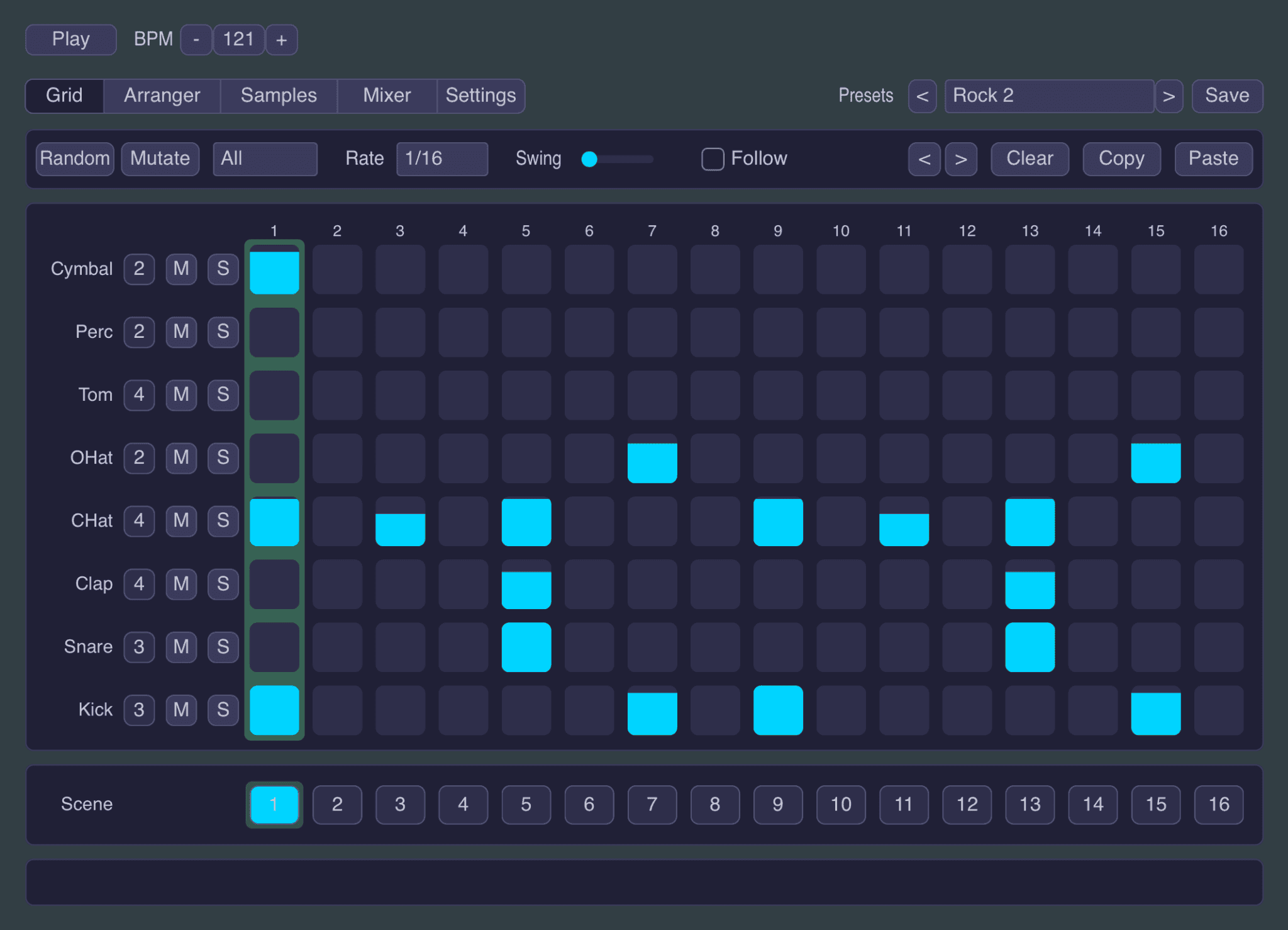

Little Drum Machine by Snorkel Audio is a free drum machine plugin designed for producers who want to build grooves quickly without opening a complicated workstation or browsing through hundreds of menus.
Released in July 2026 for macOS, Windows and iPad, the plugin combines an eight-lane step sequencer, 32 included drum samples, sample import, scene-based arrangement, polyrhythmic sequencing, a built-in mixer and flexible MIDI output.
Its streamlined interface makes it suitable for beatmakers, electronic music producers, composers and live performers who need a focused rhythm tool that can move from a blank pattern to a complete arrangement within minutes.
What Is Little Drum Machine?
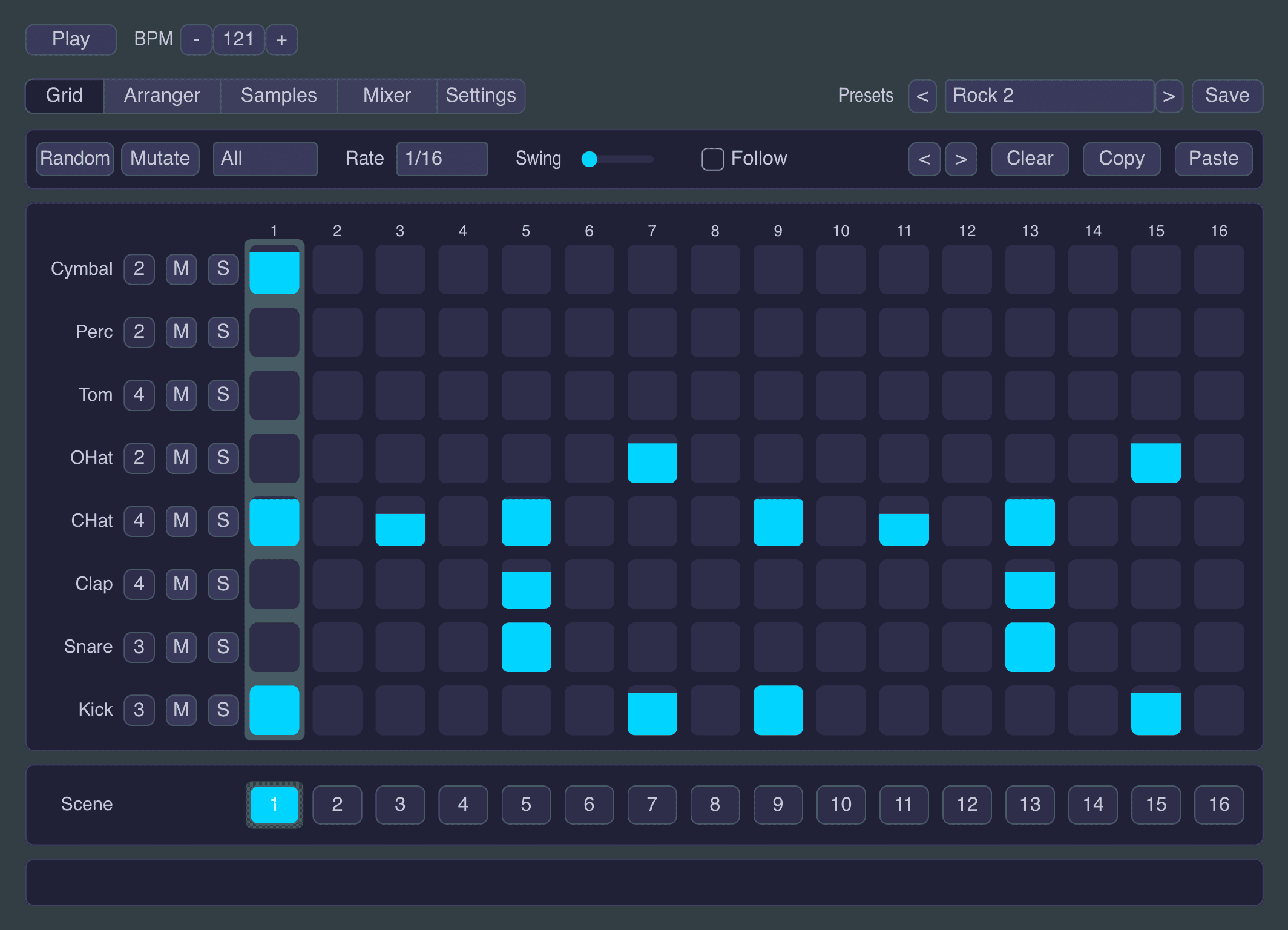
Little Drum Machine is a free sample-based drum machine and step sequencer developed by Snorkel Audio.
The plugin provides eight drum lanes arranged across a classic 16-step grid. Producers can activate steps, adjust individual velocities, introduce swing and create rhythmic variations without leaving the main interface.
It can generate sound using its included samples, import user samples or send MIDI to external drum instruments, software synthesizers and compatible hardware.
This makes Little Drum Machine useful both as a complete beatmaking plugin and as a dedicated sequencing tool.
Eight Drum Lanes and a 16-Step Sequencer
The main sequencing grid contains eight separate drum lanes and sixteen steps.
Each lane can represent a kick, snare, clap, hi-hat, percussion instrument, tom or any sample selected by the producer. The layout is deliberately familiar, making it easy for anyone who has used a classic hardware drum machine or DAW step sequencer to begin programming immediately.
Velocity can be edited directly inside the grid by dragging a step upward or downward. This provides quick control over accents, ghost notes and rhythmic dynamics.
Instead of every hit playing at the same level, producers can create grooves with natural movement and more convincing rhythmic emphasis.
32 Included Drum Sounds
Little Drum Machine includes 32 drum samples divided across its eight lanes.
Each drum category provides four available sound variations. These sounds can be selected for an entire lane or changed at individual steps, allowing different samples to appear within the same rhythmic pattern.
For example, a producer could use one closed hi-hat for most of the groove and replace selected steps with a brighter or more metallic variation.
The included library provides enough material to begin making beats immediately without downloading an additional sound pack.
Import Your Own Samples
Producers are not restricted to the factory drum sounds. Little Drum Machine can load user samples, making it possible to build custom kits from personal recordings, sample packs or previously designed one-shots.
This is especially useful for producers who already maintain organised folders of kicks, snares, percussion, Foley and electronic drum sounds.
Importing original material also gives each project a more distinctive identity than relying entirely on the same factory kit.
Per-Step Sample Variations
One of the most useful features is the ability to assign different sample variations within a single drum lane.
A conventional step sequencer often plays the same sound every time a lane is triggered. Little Drum Machine can alternate between four available sounds, creating subtle variation without requiring several separate tracks.
This can be used to:
- Alternate between several hi-hat samples
- Add occasional snare variations
- Introduce different percussion hits
- Create changing kick textures
- Build more realistic acoustic-style patterns
Small tonal differences between repeated hits can prevent a programmed beat from sounding excessively static.
Randomize and Mutate
Little Drum Machine includes two generative tools called Randomize and Mutate.
Randomize creates a new rhythmic starting point while attempting to preserve the basic behaviour of each drum category. Kicks remain positioned like kicks, while snares and other sounds are placed according to musically useful rhythmic roles.
Mutate works differently. Instead of replacing the entire pattern, it introduces smaller changes to the groove currently loaded.
This makes Mutate useful when a pattern already works but needs a variation for a second section, fill or transition.
Both tools can help producers escape an empty grid without handing complete control of the arrangement to random chance. The machine rolls the dice, but it does not throw them through the studio window.
Swing and Velocity Control
A dedicated swing control shifts selected steps away from rigid timing.
Straight 16th-note programming can work well for Techno, Electro and some forms of House, but other styles benefit from less mechanical spacing between hits.
Swing can add groove to:
- House patterns
- Hip-Hop drums
- UK Garage rhythms
- Lo-fi beats
- Funk-inspired percussion
- Broken beat arrangements
Combined with per-step velocity, swing gives producers two immediate methods for making programmed drums feel more musical.
Sixteen Scenes Per Preset
Every Little Drum Machine preset can contain up to sixteen scenes.
A scene stores a rhythmic variation, allowing producers to create separate patterns for intros, verses, drops, breakdowns, fills and outros.
Instead of loading another plugin instance for each musical section, multiple patterns can remain inside one preset.
A typical scene layout might include:
- Scene 1: Basic intro pattern
- Scene 2: Main groove
- Scene 3: Additional percussion
- Scene 4: Drum fill
- Scene 5: Breakdown rhythm
- Scene 6: Final drop variation
Built-In Arranger
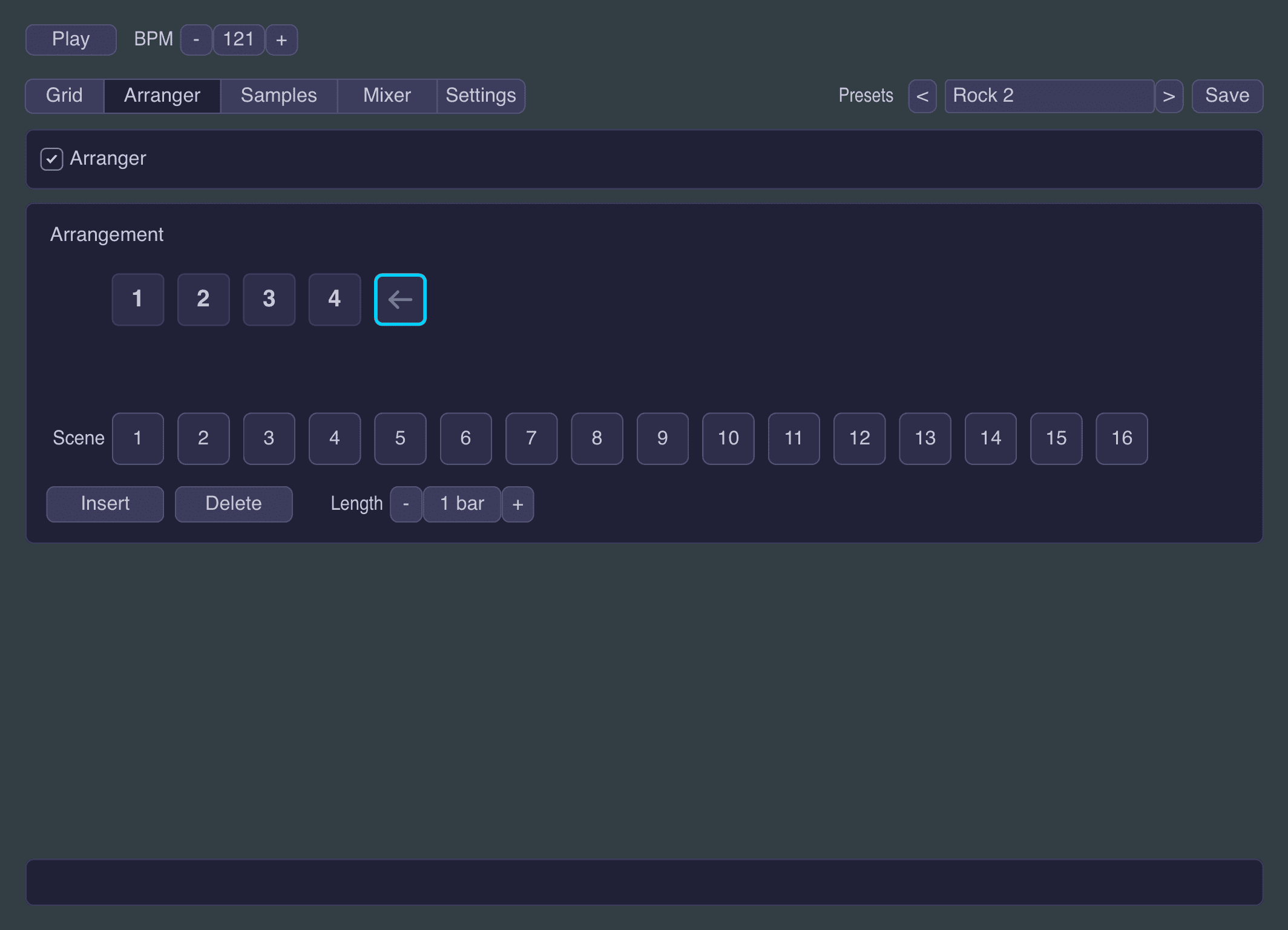
The Arranger can chain scenes together to create a complete drum structure.
This moves Little Drum Machine beyond the limitations of a simple repeating loop. Producers can determine which scene plays, how long it continues and which section follows next.
The arranger is useful for sketching complete tracks before transferring the final structure to the main DAW timeline.
Polyrhythms and Polymeters
Little Drum Machine allows each drum lane to use its own step count and loop length.
One lane might repeat every sixteen steps while another repeats after eleven or fifteen. As the loops move against each other, their relationship changes over time.
This technique can generate evolving rhythmic patterns without complex automation.
Polymetric sequencing is particularly effective for:
- Experimental Techno
- Minimal electronic music
- IDM
- Ambient percussion
- Generative composition
- Cinematic rhythm design
The feature can be disabled when a traditional sixteen-step workflow is preferred.
Built-In Drum Mixer
Each drum lane includes independent mixing controls.
Producers can adjust:
- Volume
- Panning
- Three-band EQ
- Mute
- Solo
The master section also contains an EQ and a simplified glue compressor.
This makes it possible to balance and shape the kit before sending the output into additional DAW processing.
The compressor is particularly useful for gently controlling peaks and making the separate drum elements feel more cohesive.
MIDI Output
Each drum lane can transmit its own MIDI channel and note.
This allows Little Drum Machine to sequence another plugin rather than using its internal sample engine.
It can therefore control:
- Third-party drum synthesizers
- DAW drum racks
- External samplers
- Software percussion instruments
- Compatible hardware drum machines
A producer could create a pattern inside Little Drum Machine, send its kick lane to one synthesizer, route percussion to another instrument and use the remaining lanes with the internal samples.
Twenty Genre Presets
The plugin includes twenty factory rhythm presets covering several musical styles.
These include patterns for:
- Techno
- House
- Hip-Hop
- Drum & Bass
- Jazz-inspired grooves
- Electronic beatmaking
Each preset is built as a four-bar phrase with velocity and swing already programmed.
The presets are intended as editable starting points rather than fixed demonstration sequences.
Using Little Drum Machine for House Music
House producers can begin with a four-on-the-floor kick pattern, add claps on the second and fourth beats and use offbeat hi-hats to establish the main groove.
Velocity adjustments can create more natural percussion, while swing can introduce additional movement.
Separate scenes can hold stripped-back intro drums, the complete main groove and several fill variations.
Using It for Hip-Hop and Lo-Fi Beats
For Hip-Hop, reduce the dependence on strict quantisation by adjusting velocity and swing.
Layer softer kicks with textured snares, then use per-step sample variations to prevent repeated hats from sounding identical.
User-imported vinyl percussion, acoustic hits or Foley recordings can help create more distinctive lo-fi kits.
Using It for Techno
Techno producers can use the polymetric system to generate percussion patterns that evolve gradually over long arrangements.
A sixteen-step kick can remain stable while hats, rims or metallic sounds repeat over shorter or longer cycles.
The built-in scene arranger can then introduce new combinations without manually rebuilding each pattern on the DAW timeline.
Using It for Drum & Bass
Drum & Bass production requires detailed velocity and variation to avoid mechanical break programming.
The eight lanes can separate kicks, snares, ghost snares, closed hats, open hats and additional percussion.
Mutate can generate alternative versions of a groove, while scene changes can provide fills before drops and transitions.
Mixing Tips
Leave Headroom
Avoid pushing every drum lane to maximum volume. Leave sufficient headroom for the master bus and later processing.
Use the Compressor Gently
The built-in glue compressor should control the kit rather than remove all dynamic movement. Excessive compression can flatten the kick and snare transients.
Check Low-Frequency Phase
When importing layered kick samples, check their phase relationship. Two powerful kicks can become weaker when their waveforms cancel each other.
Use EQ Before Adding More Samples
A drum sound that feels weak may need tonal adjustment rather than another layer. Use the per-lane EQ to remove unwanted frequencies and emphasise the useful part of each hit.
Plugin Compatibility
- Developer: Snorkel Audio
- Price: Free
- macOS formats: VST3 and Audio Unit
- Windows format: VST3
- iPad format: AUv3
- Sequencer: Eight lanes and sixteen steps
- Included sounds: 32 samples
- Scenes: 16 per preset
- Factory presets: 20
- Sample import: Supported
- MIDI output: Supported
Who Should Download Little Drum Machine?
Little Drum Machine is particularly useful for:
- Electronic music producers
- Beatmakers
- House and Techno producers
- Hip-Hop producers
- Drum & Bass producers
- Live performers
- iPad musicians
- Producers who use external drum plugins
- Beginners learning step sequencing
Is Little Drum Machine Really Free?
Yes. Snorkel Audio distributes Little Drum Machine as a genuinely free plugin for desktop and iPad.
There is no trial timer and no purchase is required to unlock its main functionality.
The developer has also announced that additional sample-shaping controls are planned for a future free update.
Final Verdict
Little Drum Machine succeeds because it focuses on the parts of drum programming that producers use most often.
The eight-lane grid is immediate, velocity and swing add groove, Randomize and Mutate provide useful starting points, and the scene arranger makes it possible to develop complete rhythmic structures inside the plugin.
Sample import and MIDI output considerably expand its usefulness. It can operate as a self-contained drum machine, a custom sample sequencer or the rhythmic brain controlling other instruments.
For producers looking for a free drum VST plugin in 2026, Little Drum Machine offers an impressive balance between speed, flexibility and clarity. It does not attempt to replace an entire DAW. It simply makes drums quickly, which is refreshingly close to what a drum machine is supposed to do.
Download Little Drum Machine from the official Snorkel Audio website:
https://snorkelaudio.com/little-drum-machine/