Free Spectral Processing Plugin
Control resonances, create frequency-selective sidechain ducking and capture custom spectral curves with a modern open-source processor.
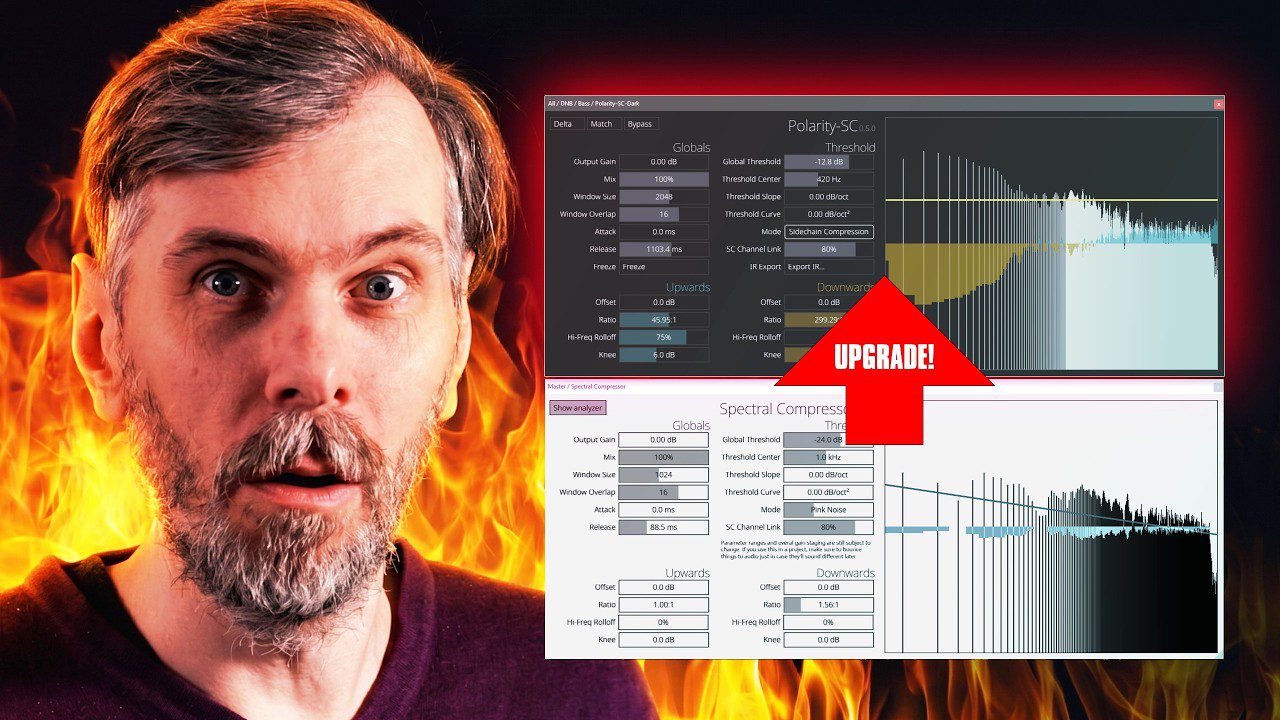
Polarity SC is a free spectral compressor and suppressor developed by Polarity. Released in April 2026, it processes audio across thousands of narrow frequency bins instead of dividing the signal into only a few conventional multiband sections.
The current version, Polarity SC 0.5.4, adds threshold curve presets, custom curve management and spectrum-based curve matching. It is available for Windows, macOS and Linux in VST3 and CLAP formats.
No account, e-mail address, subscription, telemetry service or external licence manager is required. The plugin remains open source under the GPL-3.0-or-later licence.
Polarity SC at a Glance
| Developer | Polarity |
| Plugin type | Spectral compressor and suppressor |
| Current version | 0.5.4 |
| Formats | VST3 and CLAP |
| Platforms | Windows, macOS and Linux |
| Price | Free and open source |
What Is Spectral Compression?
A conventional compressor turns the complete signal up or down according to its level. A multiband compressor improves precision by dividing the spectrum into several frequency ranges. Polarity SC goes considerably further by analyzing and processing many narrow FFT bins independently.
This allows the plugin to react only to the frequencies that become excessive. A harsh resonance can be reduced without lowering the complete instrument, while quieter spectral details can be lifted through upward compression.
The result can be more transparent than broad compression, although extreme settings can also produce highly processed, synthetic textures.
Frequency-Selective Sidechain Ducking
Polarity SC can receive an external sidechain signal and reduce only the spectral areas occupied by that source. For example, placing the plugin on a bass bus and feeding the drum bus into its sidechain can create space for the kick, snare and percussion without lowering the entire bass signal.
This approach can preserve more energy than conventional volume ducking. Frequencies that do not conflict with the sidechain remain relatively stable, helping the mix retain body while improving separation.
The same technique can be applied between vocals and instrumental buses, percussion and pads, or lead synthesizers and dense background layers.
Resonance Control and Threshold Curves
Downward spectral compression can control narrow peaks in pads, vocals, guitars, synthesizers and full mixes. Faster attack and release settings create tighter suppression, while slower values produce smoother tonal balancing.
Version 0.5.4 includes threshold curve presets for mastering, drums, basses, pads, leads and equal-loudness-style shaping. Producers can also draw custom curves directly across the spectrum, save them as presets and reload them in later sessions.
The Curve Matching function analyzes a measured spectrum and converts it into an editable threshold shape. This provides a faster starting point for matching tonal profiles or building frequency-dependent compression targets from real audio.
Best Uses
Spectral sidechain ducking, resonance suppression, harshness control, bass and kick separation, vocal masking reduction, pad smoothing, drum processing, mastering experiments and creative spectral sound design.
Delta, Freeze and IR Export
The Delta function outputs only the material removed by the processor. This makes it easier to hear whether useful transients, harmonics or vocal details are being suppressed accidentally.
Delta can also become a creative tool. With aggressive settings, the removed spectrum can produce thin rhythmic textures, unusual noise layers and spectral-gate effects suitable for experimental electronic music.
The Freeze function captures the current gain-reduction profile and holds it as a static curve. Polarity SC then behaves more like a detailed spectral equalizer than a continuously changing compressor.
A frozen curve can be exported as an impulse-response WAV file. The resulting IR can be loaded into a compatible convolution processor to reproduce the captured tonal shape in another project or system.
Production Tips
- Use Delta regularly to confirm that the plugin is removing problems rather than musical character.
- Begin with moderate ratios and slower timing before trying more aggressive suppression.
- Use sidechain mode when two instruments clash only in specific frequency areas.
- Activate Match when comparing processed and unprocessed signals to reduce loudness bias.
- Blend the effect with the Dry/Wet control when full spectral processing sounds too controlled.
Official Video Demonstration
The following video was published by Polarity and demonstrates spectral ducking, resonance suppression, Delta monitoring, Freeze and impulse-response export.
Compatibility and Installation
- Windows: 64-bit VST3 and CLAP builds
- macOS: Universal VST3 and CLAP builds
- Linux: x86_64 VST3 and CLAP builds
- Account required: No
- Licence manager: None
The plugin is supplied without a conventional installer. Download the correct package for your operating system and follow the official installation guide linked on the product page.
The macOS build is currently unsigned, so the operating system may block it during the first launch. Follow the developer’s official macOS instructions rather than changing security settings globally.
Licence
Polarity SC is distributed under the GPL-3.0-or-later open-source licence. The licence applies to the software and its source code, particularly when copying, modifying or redistributing the plugin itself.
The project does not contain a commercial soundbank or sample library. Users planning to redistribute modified builds should read the complete GPL terms provided by the developer.
Final Verdict
Polarity SC offers an unusually complete set of spectral tools for a free plugin. It can solve practical masking and resonance problems, but features such as Delta, Freeze, curve matching and IR export also make it useful for experimental production.
The interface remains focused despite the technical processing underneath, and the absence of accounts or licence managers makes installation relatively direct. Spectral compression still rewards careful listening, naturally. Thousands of frequency bands provide thousands of opportunities to improve a mix, plus a few thousand opportunities to completely destroy it.
Download Polarity SC from the official website: