
Retrospect: Free Time-Warping VST Plugin
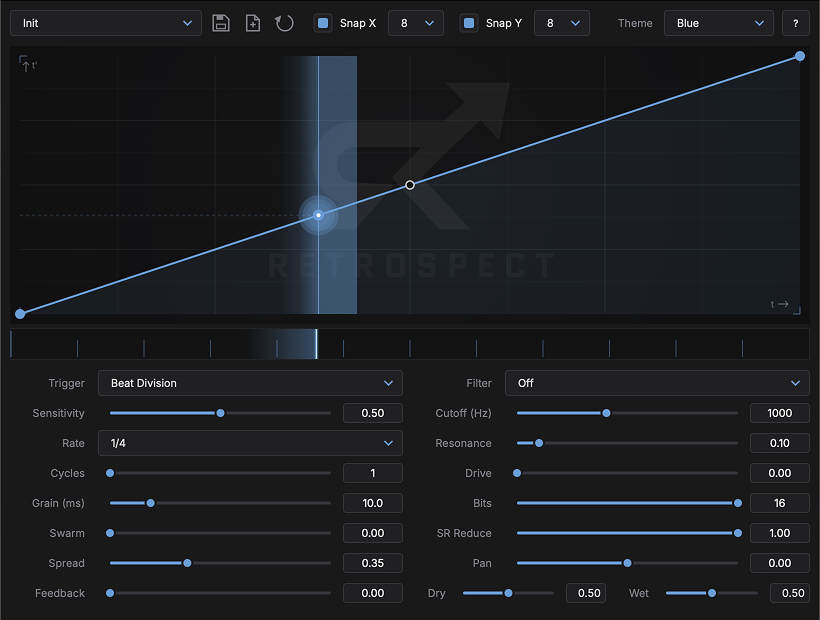
Retrospect by Conceptual Machines is a free creative audio effect built around a simple but unusual idea: instead of replaying buffered audio at a fixed speed, the plugin follows a curve that you draw.
That curve controls where the read head moves through time. A straight curve behaves like normal playback, while more adventurous shapes can freeze, stretch, skip, reverse or scramble the signal. The result is a plugin that works equally well for rhythmic edits, transitions, glitch effects and experimental sound design.
A Curve That Controls Time
The center of Retrospect is its editable warp curve. The slope of the curve becomes the instantaneous playback speed. Flat sections can hold the sound in place, gentle slopes create slower movement, steep sections rush through the buffer and downward motion produces reverse playback.
The editor lets you add anchor points, shape segments, switch between smooth and hard corners and create step-like holds for stutter effects. Instead of slicing audio manually, you can design the movement visually.
Tempo Sync or Transient Triggering
Retrospect can lock its cycle to the host tempo or restart from detected transients. This makes it practical on drum loops, percussion, synth sequences and other rhythmic material.
The Rate control defines the length of a warp cycle, while Cycles can repeat the curve from one to eight times inside the selected interval. Slow note values can therefore produce very fast stutter patterns without drawing a complicated automation lane.
Built-In FX for the Warped Signal
The wet path includes additional sound-shaping tools. Retrospect offers a resonant state-variable filter with low-pass, band-pass and high-pass modes, tanh drive and a lo-fi bitcrusher with bit-depth and sample-rate reduction.
This means the plugin can change both the timing and the texture of the incoming material. A short reverse gesture can become darker, dirtier or more aggressive without adding another plugin to the chain.
Granular Movement and Feedback
Retrospect also includes granular-style controls that can spread warped playback into larger textures. Grain size, swarm, spread and feedback open the door to less predictable processing, from subtle movement to shimmering clouds and regenerative effects.
On pads and sustained material, these settings can turn a simple source into an evolving atmosphere. On drums, they can create unusual fills and transitions that still remain synchronized to the track.
Curve-to-FX Modulation
One of the most interesting features is the ability to let the same curve influence effect parameters such as cutoff, drive, crush and pan. The movement of the effects can therefore follow the same rhythmic shape as the time warp itself.
This helps Retrospect feel animated rather than static and makes it useful for producers who enjoy designing effects that evolve through a bar or phrase.
Where Retrospect Works Best
- Drum fills and glitch edits
- Reverse transitions
- Loop variation
- Ambient and granular textures
- Cinematic sound design
- Creative vocal processing
- Tempo-synced experimental effects
A useful approach is to automate the wet mix and bring Retrospect in only for selected moments. Short bursts of time manipulation often create more impact than leaving a heavy effect active throughout the arrangement.
Retrospect at a Glance
Developer: Conceptual Machines
Type: Curve-driven time-warping effect
Main tools: Freeze, reverse, stutter, scrub and granular-style processing
Trigger modes: Host tempo or transient detection
Built-in FX: Filter, drive and bitcrusher
Formats: VST3, AU, CLAP and LV2 depending on platform
Platforms: macOS, Windows and Linux
Price: Free
Download Retrospect for Free
Get the current version directly from Conceptual Machines.
Final Thoughts
Retrospect stands out because it turns time manipulation into something visual and musical. The curve editor, tempo and transient triggering, built-in effects and granular controls provide enough depth for serious sound design while keeping the basic concept easy to understand. For producers looking for a free alternative to conventional glitch and buffer effects, it is a genuinely creative option.