AudioTeleporter is a remote audio-streaming plugin developed by ArnieWaves for producers, mixing engineers and musicians who need to share live DAW audio with someone outside the studio. Instead of exporting a mix, uploading a file and waiting for feedback, the plugin sends the audio passing through a track, bus or master channel to a private browser link.
AudioTeleporter includes a permanent free tier with no credit card required. The free plan supports one listener using an Opus stream at 64 kbps, making it suitable for quick feedback, arrangement checks and remote production sessions. Higher-quality and lossless options are available through the paid plans, so the free version should not be confused with the complete professional tier.
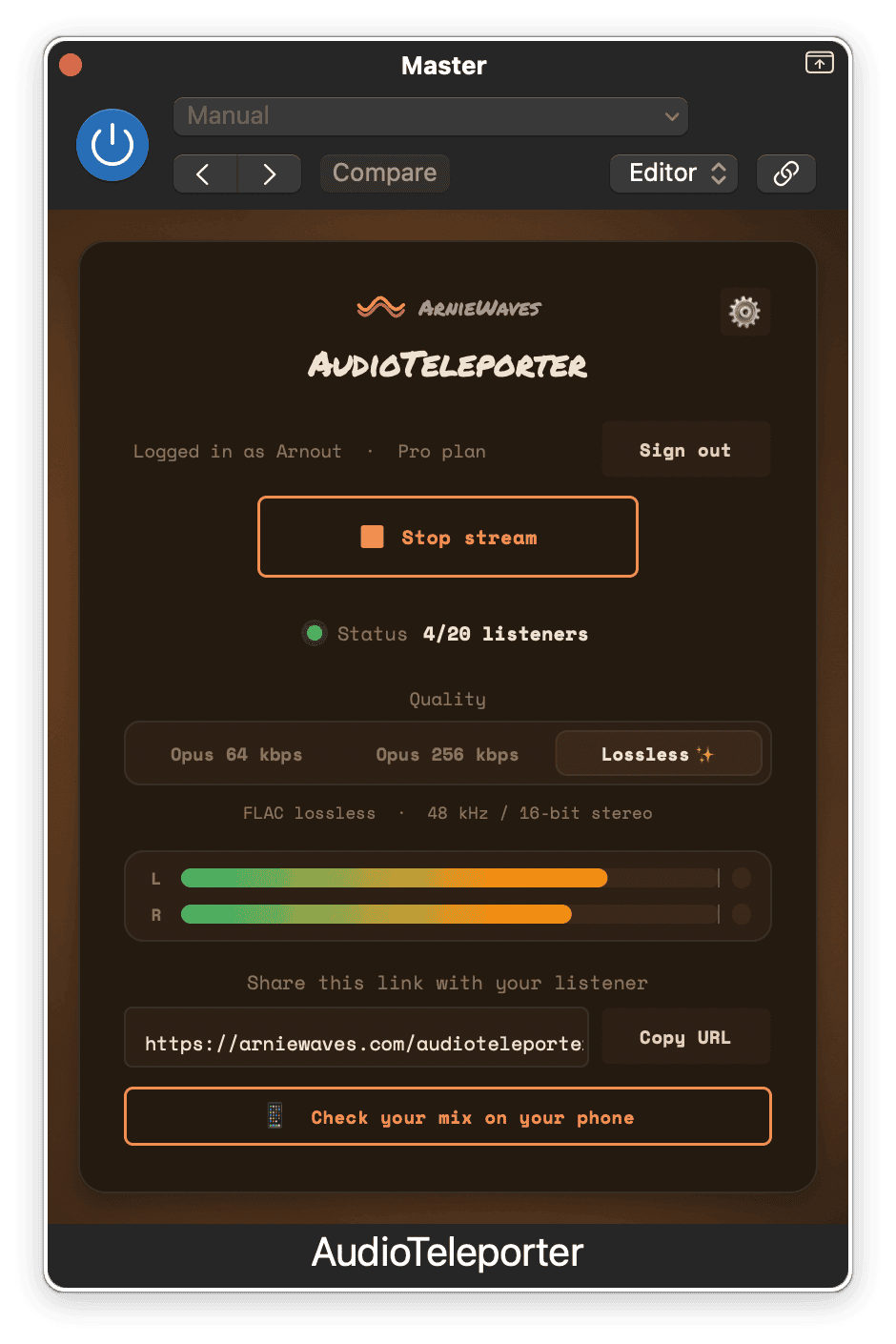
What Is AudioTeleporter?
AudioTeleporter is an audio utility rather than a conventional effect or virtual instrument. It does not add compression, reverb, saturation or synthesis. Its purpose is to move the audio from a DAW session to a remote listener in real time.
The plugin can be inserted as the final processor on the master bus, allowing the listener to hear the complete mix after all effects and master-fader adjustments. It can also be placed on an individual bus or stem when only one section of the production needs to be shared.
After the producer starts the stream, AudioTeleporter generates a listener link. That link can be sent through email, messaging applications or collaboration platforms. The recipient opens it in a web browser without installing software, creating an account or owning the same DAW and plugins.
What Is Included in the Free Tier?
- One simultaneous listener
- Opus audio streaming at 64 kbps
- Browser playback without a listener account
- Adjustable latency
- Private listener-link generation
- Support for desktop computers, phones and tablets
- No credit card or temporary trial period
The free tier is intended for basic remote listening and quick feedback. It uses compressed audio, so it is not the best choice for final mastering approval or detailed decisions involving subtle distortion, high-frequency balance or stereo imaging.
ArnieWaves reserves higher-quality Opus streaming and lossless FLAC transmission for the paid tiers. This distinction is important because AudioTeleporter is genuinely usable for free, but not every feature is available without a subscription.
How to Use AudioTeleporter
Install the appropriate plugin format, open the DAW and allow it to rescan the plugin folders. Place AudioTeleporter as the last insert on the master bus if the remote listener should hear the complete production.
Log in through the plugin, begin the stream and copy the generated listener link. The recipient can open that link on macOS, Windows, iPhone, iPad or Android using a standard web browser.
AudioTeleporter sends exactly what passes through the selected channel. Any processor placed after it will not be heard remotely, so its position in the signal chain matters. For a finished mix preview, it should normally remain after the limiter and other master processing.
Best Uses
The free plan is useful for sending an arrangement to a co-producer, checking a mix on a phone or letting an artist hear changes during a remote session. It can also replace repeated rough-mix exports when the project is still evolving quickly.
A producer can keep a separate communication service open for conversation while AudioTeleporter handles the music. This is necessary because the plugin sends audio in one direction and does not provide talkback, video chat or file transfer.
The service can also be used to test a production outside the control room. Open the listener link on a phone, move to another speaker system and hear the DAW output without creating another bounce.
Important Limitations
AudioTeleporter is designed for remote listening rather than live musical performance. Internet latency makes it unsuitable for musicians attempting to play together in real time.
The plugin carries a stereo stream at 48 kHz and does not support surround or Dolby Atmos delivery. It also does not record or store the session on either side. Any required archive must be created inside the DAW or with another recording tool.
The quality of the free Opus stream is appropriate for general feedback, but important mix and mastering approvals should use a lossless plan or a properly exported audio file.
Compatibility
Windows users receive the VST3 version. On macOS, AudioTeleporter is available in VST3, Audio Unit and AAX formats. It can therefore be used in compatible versions of Studio One, Ableton Live, FL Studio, Cubase, Reaper, Bitwig Studio, Logic Pro and Pro Tools on macOS.
The installer can be downloaded without creating an account. An ArnieWaves account is required when logging into the plugin and starting a streaming session. Listeners do not need an account or additional software.
Final Verdict
AudioTeleporter offers a practical free entry point into remote DAW monitoring. The one-listener and 64 kbps restrictions make the free plan better suited to feedback and production decisions than critical mastering, but it remains genuinely useful and does not expire.
Its simple browser-link workflow removes much of the usual technical friction from remote sessions. It will not stop a client from requesting “slightly more energy” without explaining what that means, but at least they can now make the request while hearing the current mix.
Download AudioTeleporter from the official website:
https://arniewaves.com/plugins/audioteleporter/