G-Bus Compressor: A Free SSL-Style Bus Compressor VST
Stereo-linked compression, sidechain filtering, transformer-style drive and 2x oversampling for drums, buses and full mixes.
Studio9 Plugins has released G-Bus Compressor, a free stereo bus compressor inspired by the classic SSL 4000 G-series compression workflow.
The plugin is designed to add cohesion, punch and density to drum buses, instrument groups and complete mixes while keeping the workflow simple.
It is available completely free, with no license manager, serial number or account registration required.
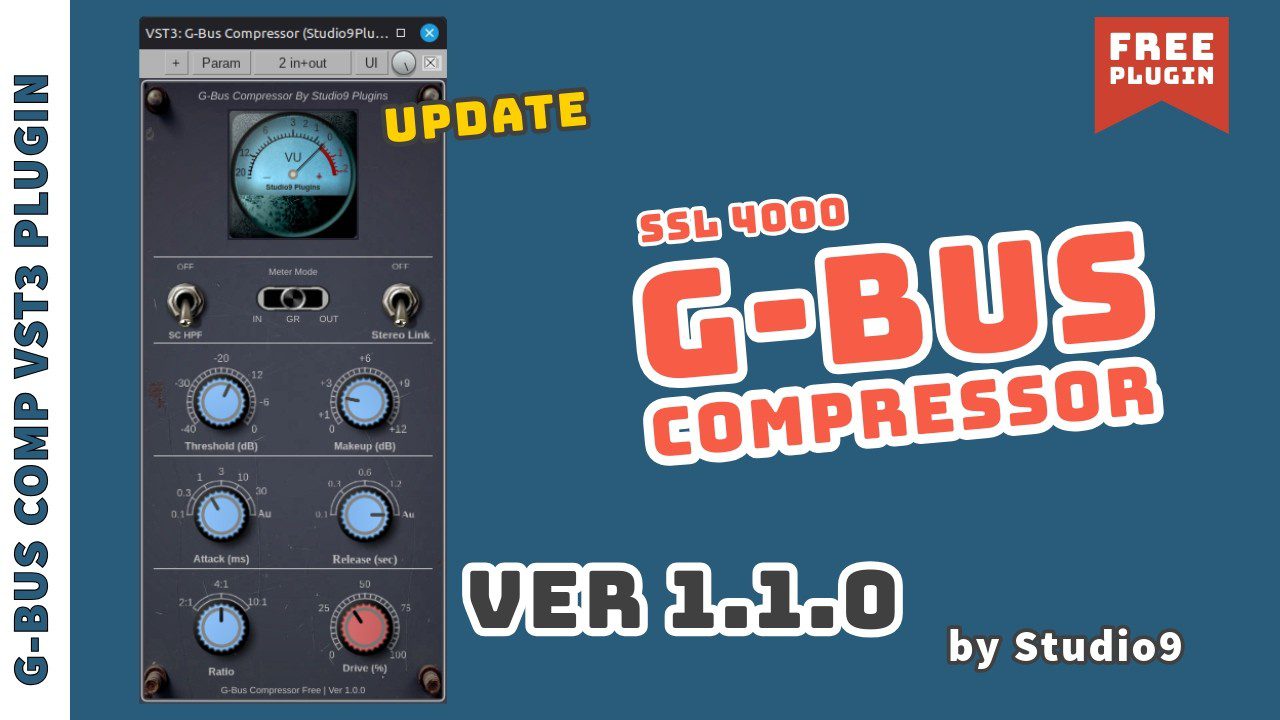
G-Bus Compressor at a Glance
- Free stereo bus compressor
- SSL 4000 G-style compression concept
- True stereo-linked RMS detection
- Feedback compressor topology
- Selectable attack and release settings
- Sidechain high-pass filter
- Soft-knee gain reduction
- Drive control for transformer-style saturation
- 2x oversampling
- Linear-phase filtering around the saturation stage
- Windows, macOS and Linux support
- No registration or license required
Designed to Glue a Mix Together
Bus compression is less about dramatically changing a sound and more about making several elements behave like one coherent performance.
G-Bus Compressor follows the familiar stereo bus compressor approach associated with large-format mixing consoles.
The detector uses a feedback topology, meaning the compressor reacts to the processed output rather than simply measuring the incoming signal.
This type of design is often associated with smooth, self-regulating compression that can work particularly well across drum groups and the stereo mix bus.
True Stereo-Linked RMS Detection
When a compressor is placed across a complete stereo mix, stable stereo behavior becomes especially important.
G-Bus Compressor uses stereo-linked RMS detection so that both channels respond together rather than allowing a strong transient on one side to create distracting stereo movement.
This makes the plugin particularly suitable for material where the stereo image needs to remain stable while dynamics are being controlled.
Good Uses for G-Bus Compressor
- Mix bus compression
- Drum bus glue
- Percussion groups
- Synth buses
- Backing vocal groups
- Guitar buses
- Electronic music mastering chains
- Parallel compression
Sidechain High-Pass Filtering
Low frequencies can easily dominate a compressor detector.
A strong kick or sub bass may trigger excessive gain reduction even when the rest of the mix does not need to be compressed.
The current version of G-Bus Compressor uses a 160 Hz sidechain high-pass filter, helping reduce the influence of deep low frequencies on the compression detector.
This can be especially useful for House, Techno, EDM and other bass-heavy productions.
Transformer-Style Drive
The plugin also includes a Drive control designed to introduce output-stage saturation inspired by the character of an SSL-style transformer stage.
Rather than functioning as an aggressive distortion effect, the control adds subtle harmonic density and additional coloration.
On drum buses, a small amount of drive can help increase perceived weight. On a full mix, it can provide additional density before the signal reaches the final limiter.
Watch G-Bus Compressor in Action
Studio9 Plugins demonstrates the updated G-Bus Compressor and its SSL-style compression workflow in this official video.
2x Oversampling for Cleaner Saturation
Nonlinear processing such as saturation can generate additional harmonics and potentially introduce aliasing.
G-Bus Compressor operates with 2x oversampling around its saturation stage to help reduce these unwanted artifacts.
The developer also uses linear-phase filtering around this section with the goal of maintaining phase coherence when the plugin is used on stereo buses and masters.
Using G-Bus Compressor on Drums
A drum bus is one of the most natural places to experiment with this style of compressor.
Try a slower attack to allow the initial transient of the kick and snare to pass through before the compressor begins working.
A faster release can then help the gain reduction recover between hits and contribute to a more energetic groove.
For House or Techno drums, starting with only a few decibels of gain reduction is usually more useful than immediately crushing the entire bus.
Mix Bus Starting Point
For gentle mix-bus compression, start conservatively:
- Use a relatively slow attack
- Choose a release that moves naturally with the song
- Aim for around 1 to 2 dB of gain reduction
- Use Drive subtly
- Level-match the processed and bypassed signals
The objective is usually cohesion, not making the gain-reduction meter perform its own drum solo.
Useful Before the Final Limiter
G-Bus Compressor can also fit naturally into a simple mastering chain.
Light compression can control larger dynamic movements before a clipper or limiter handles the fastest peaks.
A typical workflow might look like:
- Corrective EQ
- G-Bus Compressor for light glue
- Optional clipper
- Final limiter
- LUFS and True Peak metering
The compressor does not need to work hard. If the mix is already balanced, subtle gain reduction is generally enough.
Version 1.1.1 Improves Low-End Handling
The current version 1.1.1 updates the sidechain high-pass filter from 60 Hz to 160 Hz and includes additional code optimizations.
The update also adds compatibility with Apple Silicon Macs.
This makes the plugin significantly more practical for modern production environments than the initial release.
Compatibility
Developer: Studio9 Plugins
Current Version: 1.1.1
Windows: Windows 10 / 11, VST3
macOS: Apple Silicon compatible
Linux: Debian-based systems
Copy Protection: None
Registration: Not required
Price: Free
Free for Personal and Commercial Productions
Studio9 Plugins states that G-Bus Compressor can be used in both personal and commercial projects.
The plugin itself may not be redistributed or sold.
There is no activation process, account creation or license manager involved.
Official Free Download
G-Bus Compressor is available directly from Recording Studio9.
Version 1.1.1
Windows / macOS / Linux
No Registration
Price: Free
Is G-Bus Compressor Worth Downloading?
Yes, particularly if you need a straightforward bus compressor for drums, groups or stereo mix processing.
Its stereo-linked detector, sidechain filtering, transformer-style drive and oversampling provide more flexibility than a basic stock compressor while keeping the interface focused.
The lack of licensing, registration and payment also makes it extremely easy to try inside an existing session.
For producers looking for a free VST compressor with a classic bus-compression workflow, G-Bus Compressor is an interesting addition to the plugin folder.
Download G-Bus Compressor Free
Get the free stereo bus compressor directly from Studio9 Plugins.
Stereo-Linked RMS Compression
160 Hz Sidechain HPF
Transformer-Style Drive
2x Oversampling
No Registration
Price: Free