AudiartistAudiartist
  • Home
  • Freebie
    • Free FL Studio template
    • Free Kontakt sound
    • Free Preset
    • Free Sample Pack
    • Free Serum Preset
    • FREE VST
  • Music
    • Afro Music
    • Cinematic
    • Classical Music
    • Electro / House
    • Jazz
    • Latina Music
    • Lo-fi
    • New music release
    • Pop Music
    • Rock
    • Synthwave
  • Breaking News
  • Music Production
  • Music Promotion
  • Free Submission to Our Spotify Playlists
Font ResizerAa
AudiartistAudiartist
Font ResizerAa
  • Home
  • Freebie
  • Music
  • Breaking News
  • Music Production
  • Music Promotion
  • Free Submission to Our Spotify Playlists
Search
  • Home
  • Freebie
    • Free FL Studio template
    • Free Kontakt sound
    • Free Preset
    • Free Sample Pack
    • Free Serum Preset
    • FREE VST
  • Music
    • Afro Music
    • Cinematic
    • Classical Music
    • Electro / House
    • Jazz
    • Latina Music
    • Lo-fi
    • New music release
    • Pop Music
    • Rock
    • Synthwave
  • Breaking News
  • Music Production
  • Music Promotion
  • Free Submission to Our Spotify Playlists
Follow US
Audiartist > Music Production > Mastering EQ in Music Production
Music Production

Mastering EQ in Music Production

audiartist
Last updated: 1 avril 2025 16h07
audiartist
Share
5 Min Read
SHARE


Contents
  • Mastering EQ in Music Production: The Beginner’s Guide to Equalization
  • AUDIARTIST

Mastering EQ in Music Production: The Beginner’s Guide to Equalization

Introduction
If you want your mixes to sound clean, punchy, and professional, mastering EQ (equalization) is non-negotiable. EQ allows you to shape your sound by adjusting specific frequencies, helping each instrument find its space. For music producers just starting out, EQ might seem complex—but with the right approach, it’s one of the most powerful tools in your DAW. This guide will walk you through the what, why, and how of using EQ effectively in your mixes.

What Is EQ and Why Does It Matter?
EQ adjusts the volume of specific frequency bands in a sound. Think of it like a sonic sculptor—you’re not adding more instruments, you’re carving out space for the ones you have.

Why it’s essential:

  • Clean out unwanted noise or mud
  • Make each instrument stand out
  • Fix problem areas like harsh vocals or boomy bass
  • Enhance musicality and tone

Without proper EQ, your mix can sound flat, muddy, or harsh—no matter how good your original recordings are.

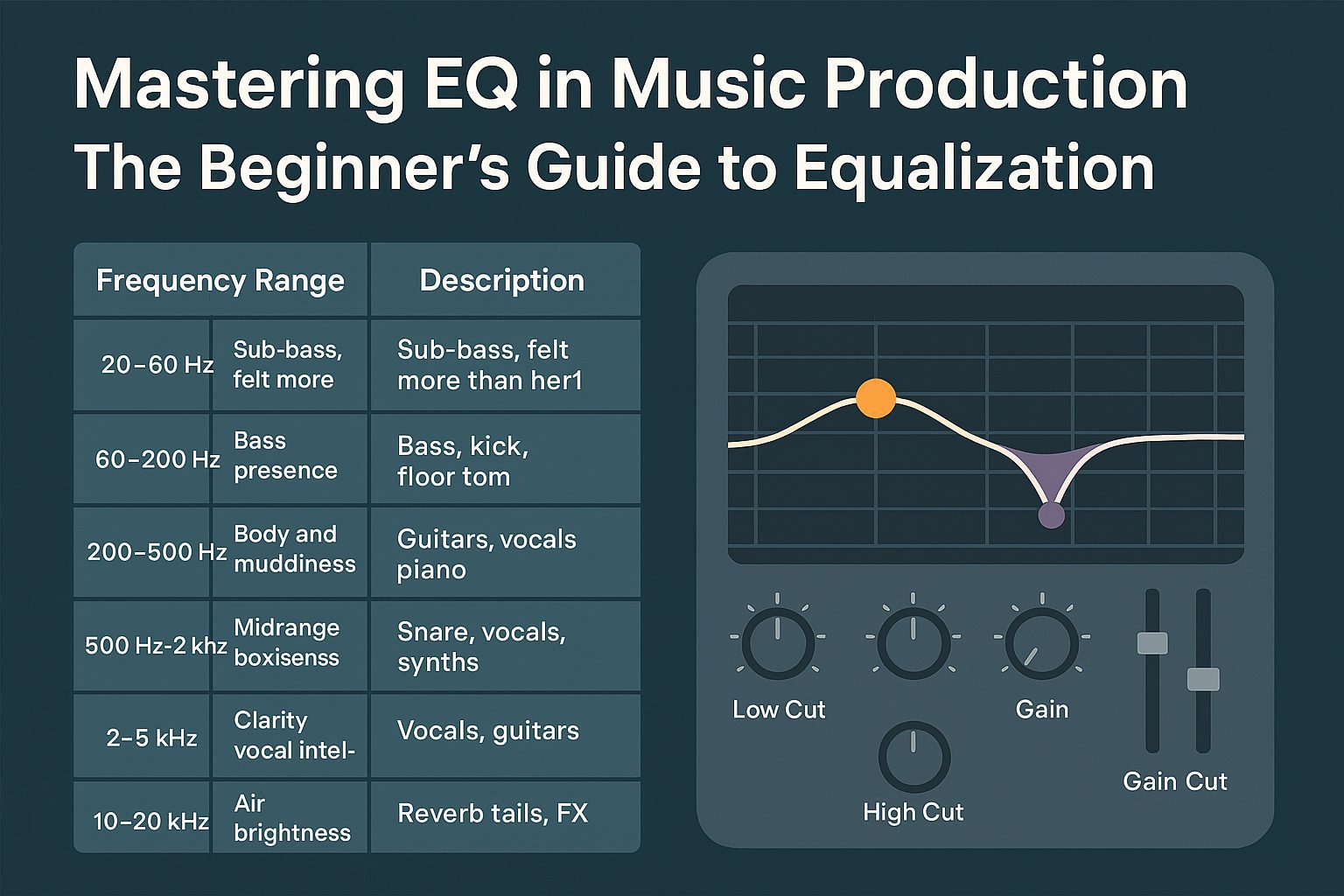
Understanding the Frequency Spectrum

Frequency RangeDescriptionCommon Instruments
20–60 HzSub-bass, felt more than heardSub synths, kick
60–200 HzBass presence, warmthBass, kick, floor tom
200–500 HzBody and muddinessGuitars, vocals, piano
500 Hz–2 kHzMidrange presence, boxinessSnare, vocals, synths
2–5 kHzClarity, vocal intelligibilityVocals, guitars
5–10 kHzAir, brightness, definitionHi-hats, cymbals
10–20 kHzSparkle, sizzleReverb tails, FX

Use this map to identify which parts of your track may be clashing—or lacking presence.

Core EQ Techniques for Beginners

1. Subtractive EQ First
Before boosting anything, start by cutting what you don’t need.
Example: Cut 300–400 Hz from guitars or synths to reduce mud and leave room for vocals.

2. High-Pass Filtering
Use HPF to remove unwanted low-end rumble from non-bass instruments.
Example: Apply a high-pass at 100 Hz on vocals or pads.

3. Surgical EQ for Problem Areas
Use a narrow Q to sweep the spectrum and isolate unpleasant resonances, then gently cut them.

4. Boost with Intention
If a sound feels dull or lost, add subtle boosts to enhance its character—only when needed.
Example: Boost around 5–6 kHz to add presence to a vocal.

5. Mix in Context
Never EQ a sound in solo! Always EQ with the full mix playing so you know what you’re affecting.

Types of EQs You’ll Encounter

  • Graphic EQ: Fixed bands, good for simple adjustments
  • Parametric EQ: Flexible control over frequency, gain, and Q — best for precision work
  • Dynamic EQ: Acts only when certain frequencies exceed a threshold — combines compression and EQ
  • Linear Phase EQ: Preserves phase relationships, ideal for mastering

For mixing, parametric EQs are the most useful.

Best EQ Plugins (Free & Paid)

Free EQ Plugins

  • TDR Nova – Dynamic EQ with powerful features
    https://www.tokyodawn.net/tdr-nova/
  • MEqualizer by MeldaProduction – 6-band EQ with analyzer
    https://www.meldaproduction.com/MEqualizer
  • ReaEQ (from ReaPlugs) – Lightweight, flexible parametric EQ
    https://www.reaper.fm/reaplugs/

Paid EQ Plugins

  • FabFilter Pro-Q 3 – Industry-favorite with dynamic bands and spectrum grabbing
    https://www.fabfilter.com/products/pro-q-3-equalizer-plug-in
  • Slate Infinity EQ – Sleek workflow and top-quality tone shaping
    https://slatedigital.com/infinity-eq/
  • Waves F6 Dynamic EQ – Great for surgical and dynamic work
    https://www.waves.com/plugins/f6-floating-band-dynamic-eq

EQ Workflow Example for Vocals

  1. High-pass filter at 80–100 Hz
  2. Cut 300–400 Hz to reduce boxiness
  3. Boost 2–4 kHz for clarity
  4. Add a gentle shelf at 10 kHz for air
  5. Use a dynamic EQ to tame harsh 5–7 kHz sibilance

Always compare before/after and trust your ears.

Conclusion
EQ is the foundation of a clear, balanced mix. By learning how to cut problem areas, highlight strengths, and work in context, you can transform a messy recording into a focused, professional sound. Practice regularly, use reference tracks, and remember: less is more. Your ears are the final judge.

Download a free EQ plugin today and start experimenting!


Loading

AUDIARTIST

Music news, production & promotion updates, the best VSTs, free presets.

We don’t spam! Check our privacy policy for more information.

Check your inbox or spam folder to confirm your subscription.

TAGGED:audio mixing toolsbeginner EQ techniquesEQ for beginnersfree EQ pluginshow to use EQ in music productionmixing with EQmusic EQ tipsparametric EQ guidesubtractive EQvocal EQ tutorial
Share This Article
Facebook Pinterest Tumblr Reddit Copy Link Print

Support us by buying us a coffee.

Subscribe to our newsletter.

AUDIARTIST

Music news, production & promotion updates, the best VSTs, free presets.

We don’t spam! Check our privacy policy for more information.

Check your inbox or spam folder to confirm your subscription.

News

Micro-Communities: The Most Powerful but Most Ignored Promotion Strategy of 2026
Music Promotion
Kyller: Marseille’s Northside Prospect Turning Urban Heat Into Melody
Music New music release Urban We love
Apostola lights up the season with “Christmas Smiles”
Music New music release Pop Music We love
 The Death of Traditional Music PR: What Actually Replaces Blogs in 2026
Music Promotion
Dynamic EQ Explained: The “Smart EQ” That Only Moves When Needed
Music Production
The Satellite Artist Effect: How Asymmetric Collaborations Create Unpredictable Career Trajectories
Music Promotion

Top Acticles

Top 7 Free Music Distributors in 2025 
Music Promotion
How Spotify Pays Artists in 2025: A Complete Breakdown
Music Promotion
NAM Universal
FREE VST Freebie
Spotify’s Free Tier Update
Music Promotion
You’ve Been On My Mind by #R!sK
Music New music release Pop Music Synthwave We love
Yuri Semenov’s Free VST Plugin Collection
FREE VST

You Might Also Like

Music Production

Heat Up 3: The Beatmaker’s Sonic Powerhouse

3 septembre 2025
Music Production

Understanding Audio Reverb

22 mai 2024
Music Production

RZA Exclusive Interview: The Vision Behind A Ballet Through Mud

12 mars 2025
Music Production

Creative Automations

30 mai 2025

Find Us on Socials

Artists

  • Nodachi
  • Snake Russell
  • Spycho Fox
  • Mister BoO
  • Sebastian McQueen

Freebie (Vst, Preset, Sample)

  • Freebie
  • Free FL Studio template
  • Free Kontakt sound
  • Free Preset
  • Free Sample Pack
  • Free Serum Preset
  • FREE VST

News

  • Micro-Communities: The Most Powerful but Most Ignored Promotion Strategy of 2026
  • Kyller: Marseille’s Northside Prospect Turning Urban Heat Into Melody
  • Apostola lights up the season with “Christmas Smiles”
  •  The Death of Traditional Music PR: What Actually Replaces Blogs in 2026
  • Dynamic EQ Explained: The “Smart EQ” That Only Moves When Needed
Welcome Back!

Sign in to your account

Username or Email Address
Password

Lost your password?