Proteus by GuitarML: A Free Neural Guitar Amp VST
Load, create and share neural captures of guitar amplifiers, preamps, overdrive pedals and complete recording rigs.
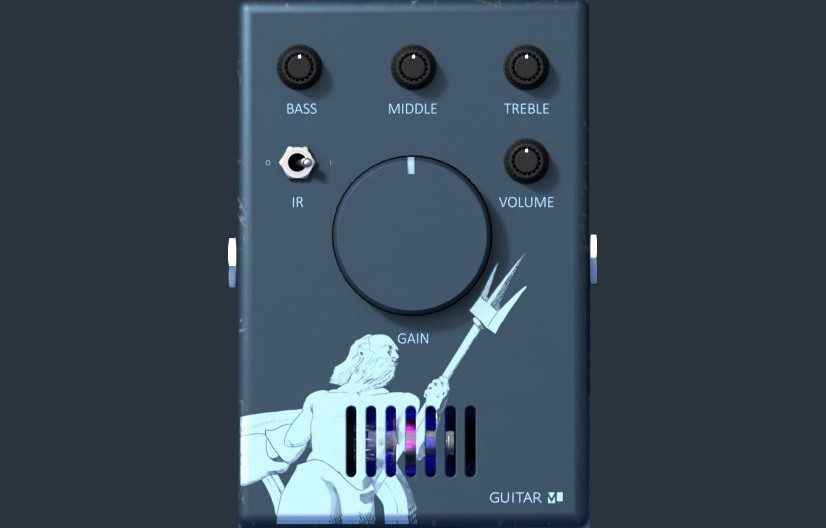
Proteus is a free and open-source guitar amp and pedal capture plugin developed by GuitarML. It uses machine learning to reproduce the dynamic response of amplifiers, preamps, distortion pedals, overdrives and boosts inside a compatible DAW.
The plugin can load ready-made models from the GuitarML ToneLibrary, but its most distinctive feature is the ability to create personal captures of real hardware or other audio plugins. Guitarists can model a single amplifier setting, capture the complete range of a gain or tone control, or record a complete signal chain containing pedals and an amplifier.
Proteus is not a restricted demo or a time-limited edition. The plugin and its source code are distributed freely under the GNU GPLv3 licence, with official installers available for Windows, macOS and Linux.
What Is Proteus?
Proteus is based on an LSTM neural network trained to reproduce nonlinear audio equipment. Instead of modelling every electronic component individually, the system learns the relationship between a clean input recording and the processed output produced by the original amplifier or pedal.
This approach captures characteristics such as distortion, compression, transient response and changes in harmonic content. The resulting model can then process a live guitar signal in real time.
Proteus is designed for non-time-based equipment. It is suitable for amplifiers, preamps, overdrive pedals, distortion pedals and boosts. Effects such as reverb, delay, chorus, flanger and phaser are not appropriate capture targets because their output changes over time in ways the current model architecture is not designed to reproduce.
Snapshot and Knob Captures
Proteus supports two main approaches to modelling guitar equipment.
Snapshot captures reproduce one fixed configuration. The amplifier or pedal is recorded with its controls left in a selected position, creating a model of that specific tone. Snapshot captures are faster to train and are generally the best starting point for new users.
Knob captures reproduce the behavior of a variable control such as gain, drive or tone. Several recordings are made at different control positions, allowing the finished model to respond across a wider range rather than reproducing only one setting.
Knob captures require more preparation and training, but they provide a more flexible plugin experience. A captured gain control can move from clean or lightly driven tones toward stronger saturation while retaining the character of the original equipment.
Creating Your Own Guitar Models
GuitarML provides a free Proteus Capture Utility containing a specially prepared input recording and a Google Colab training script.
The input file is played through the amplifier, pedal or plugin being captured. The processed result is recorded back into the DAW as a mono WAV file, then uploaded to the supplied Colab notebook.
The training process compares the original input with the recorded output and creates a JSON model that can be loaded into Proteus. According to the developer, a snapshot model can normally be trained in approximately ten minutes or less, while a knob capture requires several recordings and takes longer.
Accurate timing is essential. The processed recording must align closely with the original capture file. Latency, noise, clipping or an incorrect sample rate can reduce the accuracy of the trained model.
ToneLibrary and External Models
Producers who do not want to capture their own equipment can download compatible models from the GuitarML ToneLibrary.
The library contains community-created captures of amplifiers, preamps and pedals. After downloading a model, use the Load Model button inside Proteus and select the folder containing the JSON file.
Proteus models are based on a specific neural architecture and are not interchangeable with Neural Amp Modeler, ToneX or other capture ecosystems. Models created for GuitarML’s NeuralPi and SmartPedal plugins may also use different architectures and should not be assumed to work inside Proteus.
Keeping models organised by amplifier, pedal and musical style makes the browser easier to manage. Neural captures multiply rapidly, usually just after the producer promises to download only one more.
Three-Band EQ and Cabinet IR
Proteus version 1.2 includes Bass, Middle and Treble controls for adjusting the loaded model without adding a separate EQ plugin.
The EQ is useful for quick tonal corrections, particularly when a capture sounds too dark, bright or mid-focused inside a complete arrangement. More detailed resonance control can still be handled with a dedicated equalizer after Proteus.
A default cabinet impulse response is also included for convenience. This allows direct amplifier captures to produce a more complete guitar tone without immediately loading another plugin.
For final production, GuitarML recommends using a dedicated impulse-response loader when greater control over cabinets, microphones and room characteristics is required.
Models captured through a microphone already contain the sound of the speaker, cabinet, microphone and recording position. Adding another cabinet IR after this type of model will normally produce an excessively filtered result.
Best Uses
Home guitar recording: Record a clean DI signal and audition several amplifier or pedal captures after the performance.
Rock and metal production: Use direct high-gain amp models with a separate cabinet IR for tighter rhythm tones.
Clean and edge-of-breakup sounds: Capture boutique amplifiers, preamps and pedals that respond dynamically to picking strength.
Pedal preservation: Create digital versions of rare, modified or personal overdrive and distortion pedals.
Reamping: Change the amplifier tone after recording without asking the guitarist to perform the complete part again.
Plugin capture: Model a favourite software amp or distortion setting and load the result inside a lightweight open-source processor.
Recording and Mixing Tips
Record the clean guitar DI at a healthy level without clipping. Excessive input gain can change the way the neural model responds and may produce more distortion than expected.
Use a high-impedance instrument input on the audio interface. A guitar connected to an unsuitable line input may lose brightness and transient detail before reaching the plugin.
For direct amplifier captures, place a cabinet IR after Proteus. High-pass filtering around the lowest unnecessary frequencies and a gentle low-pass filter can help the guitar sit more naturally inside the mix.
Double-track rhythm guitars with separate performances rather than duplicating one recording. Pan the performances left and right, then use slightly different models, cabinets or settings when additional width is required.
Judge guitar tones with the bass and drums playing. A large solo tone may contain too much low end and gain once the complete arrangement arrives.
Compatibility
Proteus version 1.2 is available for Windows, macOS and Linux. Formats vary according to the operating system and include VST3, Audio Unit, AAX and LV2.
- Windows: 64-bit installers for current Windows systems
- macOS: macOS 10.11 or later
- Linux: Official Linux installer available
- Plugin formats: VST3, AU, AAX and LV2, depending on the platform
- Built-in processing: Three-band EQ and default cabinet IR
- Custom models: Snapshot and variable-control captures supported
- Licence: GNU GPLv3
- Price: Completely free and open source
Final Verdict
Proteus is a powerful free guitar plugin for musicians who want more than a fixed collection of amplifier models.
Its ability to load community captures, reproduce variable controls and create personal models gives it considerable flexibility for recording, reamping and preserving real equipment.
The integrated EQ and cabinet IR make the plugin easier to use immediately, while external impulse responses and downloadable models provide room for more advanced tone building.
The capture workflow requires more preparation than choosing a preset in a conventional amp simulator, but it also allows producers to reproduce equipment that may never appear inside a commercial guitar suite.
Proteus will not carry the amplifier, connect the cables or explain why the guitarist needs fourteen nearly identical overdrive pedals. It does, however, make capturing their tones considerably less expensive.
Download Proteus from the official GuitarML repository: