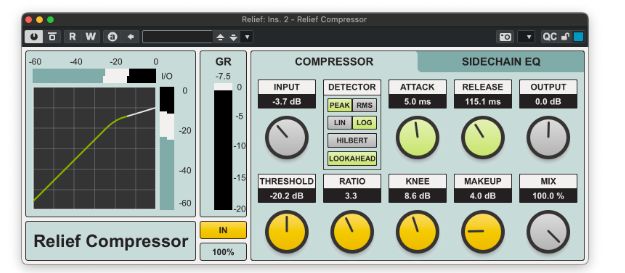
Relief Compressor is a free and open-source dynamics plugin developed by Kiriki-liszt for everyday mixing and master bus processing. It combines flexible detector modes, detailed sidechain filtering and smooth lookahead compression inside a clear interface.
Available in VST3 and AU formats for Windows and macOS, Relief Compressor remains a useful free mixing tool in 2026. It requires no subscription, license manager or paid upgrade to unlock its main features.
Main Features
- Free and open-source compressor
- 64-bit double-precision internal processing
- Peak and RMS detector modes
- Linear and logarithmic detection options
- Optional Hilbert detector
- Fixed 0.5 ms lookahead
- Two-band sidechain EQ
- Selectable pass and shelf filters
- Parallel compression Mix control
- VST3 and AU compatibility
Flexible Compression Detection
Relief Compressor provides several detector combinations that change how the plugin reacts to incoming audio.
Peak mode responds quickly to short transients and is suitable for drums, percussion, vocals and other signals requiring tighter peak control.
RMS mode follows the average energy of the signal more smoothly. It can work well on buses, sustained instruments and material that needs less aggressive movement.
The Linear option allows more of the fastest peaks to pass through, creating a more open and punchy result. Logarithmic detection applies the envelope directly to gain reduction, offering tighter control over transient timing.
An optional Hilbert detector provides a cleaner compression character with reduced upper harmonic content. It can sound more controlled than conventional detection, especially on complex material.
Sidechain EQ and Lookahead
The dedicated sidechain page includes a two-band EQ with selectable pass and shelf filtering. This allows producers to change which frequencies trigger the compressor without directly altering the sound of the processed track.
For example, reducing low-frequency sensitivity can prevent a kick drum or bass note from causing excessive gain reduction on a full mix or instrument bus.
Relief Compressor also uses a fixed 0.5 ms lookahead system with FIR smoothing. This helps the gain reduction react more cleanly to fast peaks while keeping the control layout simple.
Best Uses
Drums and Percussion
Peak detection can control sharp drum transients, while the Mix control makes parallel compression possible directly inside the plugin. Increase the ratio and gain reduction, then blend the compressed signal with the original drums.
Vocals
RMS detection can produce smoother level control on vocals. Use moderate attack and release settings, then adjust the sidechain EQ if plosives or low notes trigger too much compression.
Mix and Instrument Buses
The RMS and Linear combination can help glue grouped instruments while retaining some transient movement. Small amounts of gain reduction are usually enough on drum, guitar, keyboard or backing vocal buses.
Master Bus Processing
Relief Compressor can also handle restrained master bus compression. Use a low ratio, slower attack and limited gain reduction to support the mix without flattening its dynamics.
Production Tips
Compare at equal loudness: Use the output and makeup controls to match the processed signal with the bypassed level before judging the result.
Watch the gain reduction: More compression is not automatically better. On buses and masters, one or two decibels may already be enough.
Use the sidechain filter: Reduce low-frequency sensitivity when kick drums or bass notes dominate the detector.
Try parallel compression: Use the Mix control to restore transient detail after applying stronger settings.
Choose the detector by ear: The extra modes are useful, but the waveform will not become offended if you select the simplest option.
Compatibility
Relief Compressor is available in VST3 format for Windows 10 or later and macOS 10.13 or later. An AUv2 version is also provided for compatible macOS hosts, with native support for Intel and Apple Silicon systems.
Windows users can copy the VST3 folder into the standard system VST3 directory. macOS users can install the VST3 and Audio Unit files in their respective plugin folders. Additional security steps may be required if macOS blocks the manually installed plugin.
Final Verdict
Relief Compressor is a capable free dynamics processor for producers who want more control than a basic stock compressor provides. Its detector choices, sidechain EQ, lookahead system and parallel Mix control make it suitable for individual tracks, buses and restrained mastering work.
The interface remains practical despite the technical options, and the GPL open-source license makes the complete plugin genuinely free. It will not compress your deadline, unfortunately, but drums and vocals should be considerably more cooperative.
Download Relief Compressor from the official website:
https://github.com/Kiriki-liszt/Relief_Compressor/releases/latest