
Your master peaks below 0 dBFS, the limiter shows no overloads, and the exported WAV appears perfectly clean. Then you convert it to MP3, upload it to a streaming platform or play it through another device, and distortion suddenly appears.
The problem may not be your mix. It may be the difference between true peak vs sample peak.
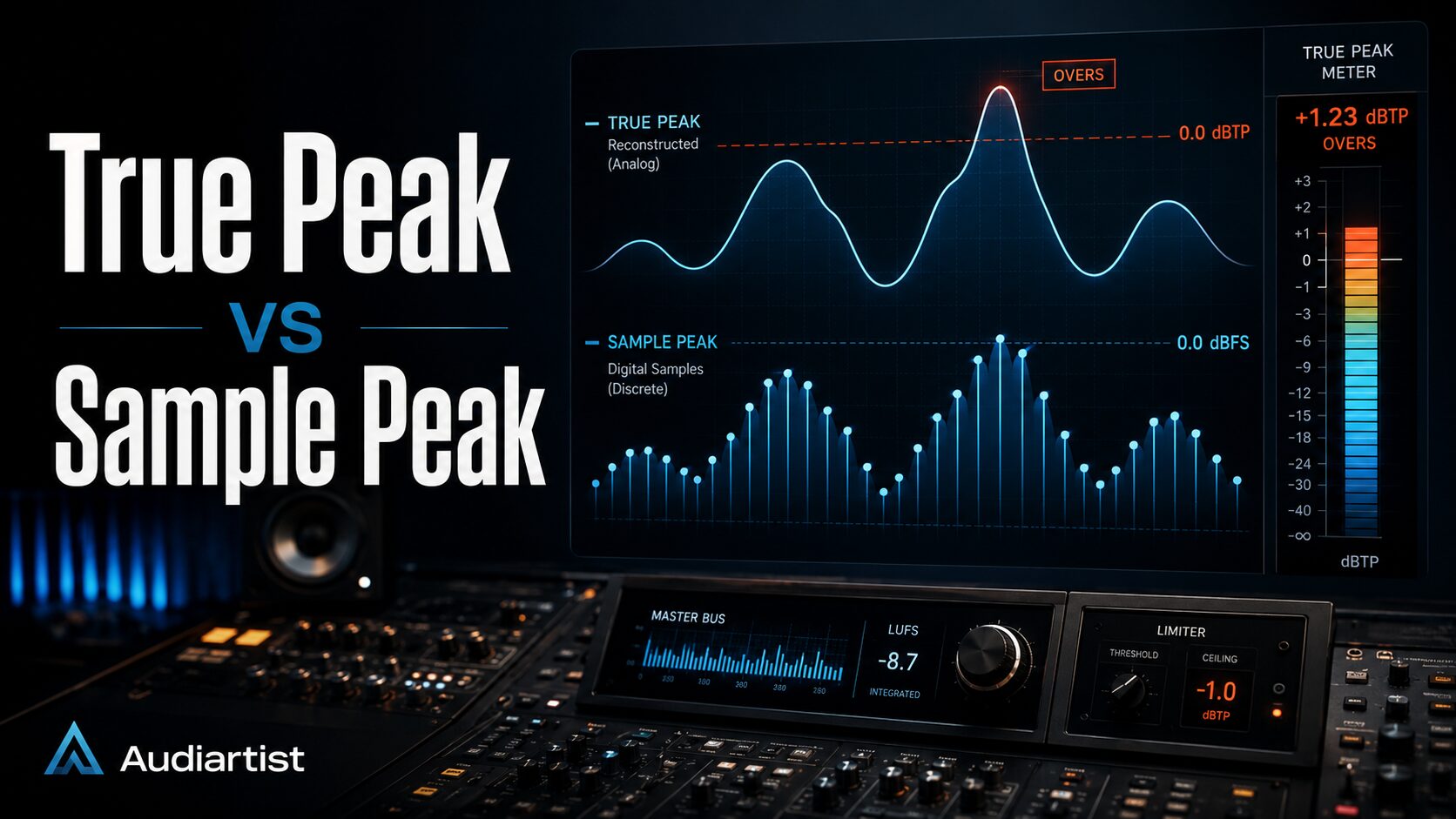
A conventional peak meter only measures the individual digital samples stored inside an audio file. A true peak meter estimates what happens between those samples when the waveform is reconstructed during playback.
Those hidden levels are known as inter-sample peaks. They can exceed the highest recorded sample and may cause clipping during digital-to-analog conversion, sample-rate conversion or lossy encoding.
This guide explains the difference between sample peak and true peak, why a master can clip after export, how to set a reliable limiter ceiling and which VST plugins can measure or control true peak levels accurately.
What Is Sample Peak?
Sample peak is the highest amplitude reached by an individual digital sample inside an audio file.
Digital audio represents a continuous sound waveform as a sequence of measurements taken at regular intervals. At a sample rate of 44.1 kHz, the system stores 44,100 samples per second for each channel. At 48 kHz, it stores 48,000 samples per second.
A standard digital peak meter examines those stored values and reports the highest sample level in decibels relative to full scale, written as dBFS.
In fixed-point digital audio:
- 0 dBFS represents the maximum available sample value.
- -1 dBFS is one decibel below that maximum.
- -6 dBFS provides six decibels of sample-level headroom.
If a sample reaches or exceeds the maximum value allowed by the format, it is clipped. The top of the waveform can no longer be represented correctly, creating distortion.
Sample peak metering is useful, but it only observes the samples themselves. It does not necessarily reveal the maximum level of the reconstructed waveform between those samples.
What Is True Peak?
True peak estimates the maximum level reached by the continuous waveform when the digital samples are reconstructed during playback.
The International Telecommunication Union defines true peak as the maximum positive or negative value of the waveform in the continuous-time domain. This value can be higher than the largest stored sample value.
True peak is measured in dBTP, which means decibels true peak.
A true peak meter does not simply search for the loudest sample. It reconstructs a more detailed approximation of the waveform by using oversampling and filtering. This allows it to detect peaks that may exist between the original sample points.
These peaks are often called:
- Inter-sample peaks.
- Intersample overs.
- Reconstruction peaks.
- True peak overs.
The terms are closely related, although true peak specifically refers to an estimated measurement of the reconstructed waveform.
True Peak vs Sample Peak: The Main Difference
| Measurement | Sample Peak | True Peak |
|---|---|---|
| Unit | dBFS | dBTP |
| Measures | Stored digital sample values | Estimated reconstructed waveform |
| Detects inter-sample peaks | No | Yes |
| Uses oversampling | Usually no | Yes |
| Best use | Tracking and basic digital level monitoring | Mastering, broadcast and final delivery |
| Main limitation | Can miss peaks between samples | Requires more processing and depends on implementation |
A sample peak meter may report a maximum level of -0.1 dBFS while a true peak meter reports +0.6 dBTP.
Both readings can be correct. The first describes the stored sample values. The second estimates the maximum amplitude of the reconstructed waveform.
How Can Audio Exceed 0 dBFS Between Samples?
Digital audio samples are not independent staircase-shaped blocks during playback. A digital-to-analog converter uses reconstruction filtering to rebuild a continuous waveform from the stored sample values.
When adjacent samples are close to full scale, the curve connecting them may rise above their individual amplitudes.
Imagine two mountain markers placed below a height limit. The smooth road drawn between them can still curve above that limit. The markers remain legal, but the reconstructed route does not.
This is why a waveform can contain no individual samples above 0 dBFS while its reconstructed true peak exceeds 0 dBTP.
The risk becomes greater when audio contains:
- Heavy limiting.
- Hard clipping.
- Dense high-frequency content.
- Sharp transients.
- Very loud sustained waveforms.
- Samples positioned close to 0 dBFS.
A heavily limited master may therefore appear safe on a conventional meter while producing overloads on a true peak meter.
Why Your Master Can Clip After Export
1. The Limiter Only Controls Sample Peaks
Some limiters set their output ceiling according to sample peak values rather than reconstructed true peak levels.
If the ceiling is set to -0.1 dBFS, the plugin may ensure that no stored sample exceeds that value. It does not automatically guarantee that the reconstructed waveform remains below 0 dBTP.
This is particularly important with older limiters, basic stock processors and plugins whose true peak mode is disabled.
2. Lossy Encoding Changes the Waveform
Formats such as MP3, AAC and Ogg Vorbis remove and reorganize audio information to reduce file size. After decoding, the waveform is not mathematically identical to the original uncompressed master.
The encoding process can create new peaks that were not present in the WAV file. A master that reaches -0.1 dBTP before conversion may exceed 0 dBTP after conversion.
This does not mean lossy encoding is defective. It means the master needs enough headroom to tolerate the changes introduced by compression and reconstruction.
3. Sample-Rate Conversion Creates Additional Peaks
Converting a project from one sample rate to another requires filtering and interpolation. These operations can alter peak levels.
For example, a 96 kHz master converted to 44.1 kHz may produce slightly different peaks because the waveform is being represented by a new set of sample positions.
This is one reason final peak verification should be performed after sample-rate conversion rather than only inside the original high-resolution session.
4. Analog Playback Systems Have Limited Headroom
Consumer converters, mobile devices, Bluetooth speakers and inexpensive playback systems do not all handle full-scale signals identically.
A technically aggressive master may play cleanly through one converter while producing distortion through another. Leaving true peak headroom improves compatibility across different playback systems.
5. Plugin Order Changes the Final Peak Level
Any processing placed after the final limiter can create new peaks.
This includes:
- EQ boosts.
- Saturation.
- Stereo widening.
- Dithering.
- Sample-rate conversion.
- Gain adjustments.
- Export normalization.
The final true peak limiter and meter should therefore be placed near the end of the delivery chain.
Why a Ceiling of -0.1 dBFS Is Not Always Safe
For many years, producers commonly set mastering limiters between -0.1 and -0.3 dBFS. This created a small amount of sample-level headroom while keeping the master extremely loud.
The problem is that a sample peak ceiling does not account for inter-sample peaks.
A master limited to -0.1 dBFS may still reach:
- +0.2 dBTP.
- +0.8 dBTP.
- Occasionally even higher levels on difficult material.
The exact difference depends on the waveform, sample rate, limiter design, oversampling quality and encoding process.
For modern digital distribution, setting the ceiling very close to 0 dBFS is often an unnecessary risk. The small increase in level rarely produces a meaningful improvement in perceived loudness, but it can reduce playback reliability.
What True Peak Ceiling Should You Use?
There is no single true peak ceiling that is perfect for every release, genre and delivery format.
However, the following values provide useful starting points.
| Delivery Situation | Practical Starting Point |
|---|---|
| General music streaming master | Around -1 dBTP |
| Very loud master intended for lossy streaming | Consider -2 dBTP |
| Dynamic lossless master | Approximately -1 dBTP or lower |
| Broadcast delivery | Follow the broadcaster specification |
| Film, television or advertising | Follow the exact delivery document |
| Club or DJ master | Evaluate the playback context and required format |
Spotify currently recommends keeping masters below -1 dBTP for lossy playback. It also advises keeping true peak below -2 dB when the master is louder than -14 LUFS integrated, because louder material may be more vulnerable to encoding distortion.
These figures should be treated as delivery guidance rather than a command to master every song at exactly -14 LUFS.
A techno track, jazz recording, acoustic ballad, hip-hop master and cinematic score should not all be forced into the same loudness and dynamics profile.
The artistic balance of the master remains more important than blindly matching a number.
Do Streaming Platforms Turn Down True Peaks?
Loudness normalization and true peak control are different processes.
A streaming platform may reduce the playback gain of a loud master to match its normalization target. This can lower the final playback level, but it does not repair distortion that was already created during mastering or encoding.
If a limiter damaged the transient response or a clipped master generated harsh distortion, normalization simply plays that damaged audio at a lower volume.
A loud master being turned down is still the same master. It does not regain the dynamics that were removed before upload.
True Peak Is Not the Same as LUFS
True peak and LUFS describe different properties of audio.
- True peak measures the highest estimated waveform peak.
- LUFS estimates perceived loudness over time.
- Loudness range describes variations in loudness across a programme.
- Crest factor compares peak level with average level.
A track can have a low true peak and still sound loud. It can also have a high true peak while sounding relatively quiet.
For example, a dynamic snare hit may create a high peak without significantly increasing integrated loudness. A dense distorted guitar may produce high average loudness with relatively limited peak movement.
Mastering decisions should therefore consider true peak, LUFS, dynamics and tonal balance together.
For a deeper explanation, read the Audiartist guide to LUFS, loudness and streaming VST plugins.
How Does a True Peak Meter Work?
A true peak meter estimates the reconstructed waveform by increasing the internal sample rate through oversampling.
The current ITU-R BS.1770 recommendation describes a true peak measurement process using oversampling and filtering. At a 48 kHz input sample rate, its reference method includes 4x oversampling, increasing the internal rate to 192 kHz.
The additional sample points create a more detailed approximation of the curve between the original samples.
The meter then searches this oversampled signal for its maximum positive or negative value and displays the result in dBTP.
Higher oversampling ratios can improve precision, although they also increase CPU usage. The accuracy of a meter depends on its filters, processing method and compliance with recognized measurement standards.
True Peak Limiting vs True Peak Metering
True peak metering and true peak limiting are related but not identical.
True Peak Metering
A true peak meter analyzes the audio and reports estimated inter-sample peaks. It does not necessarily change the sound.
True Peak Limiting
A true peak limiter attempts to prevent the reconstructed waveform from exceeding the selected output ceiling.
When true peak limiting is enabled, the limiter accounts for estimated inter-sample peaks while calculating gain reduction.
A limiter can include true peak metering without necessarily using true peak information to control its processing. Always check whether the plugin offers:
- True peak metering.
- True peak limiting.
- Both functions.
A Reliable True Peak Mastering Workflow
1. Finish the Mix Before Chasing Loudness
True peak limiting cannot repair an unstable mix. Control excessive kick, snare, bass and vocal peaks before the final mastering stage.
If one drum hit triggers 5 dB of limiter reduction, investigate the mix before forcing the limiter to work harder.
2. Place the Final Limiter Near the End of the Chain
A typical mastering chain might look like this:
Corrective EQ > Compression > Saturation > Stereo Processing > Clipper > True Peak Limiter > Dither > Metering
The exact order can change, but avoid placing level-creating processors after the final limiter unless you measure the result again.
3. Enable True Peak Limiting
Open the advanced limiter controls and enable the true peak option when available.
Do not assume that true peak limiting is active by default. Some plugins use sample peak operation unless the user manually activates ISP or True Peak mode.
4. Set an Appropriate Ceiling
Start around -1 dBTP for a general streaming master. For very loud masters intended for lossy delivery, test a more conservative ceiling such as -2 dBTP.
Use the ceiling as a safety control, not as a loudness target.
5. Use Adequate Oversampling
If the limiter provides oversampling settings, compare 4x, 8x and higher modes.
More oversampling can improve peak detection and reduce aliasing, but it may also change transients slightly and consume more processing power.
A sensible workflow is to use a moderate setting while working and a higher-quality mode for the final offline render.
6. Export the Final File
Render the master at the required sample rate and bit depth. Avoid unnecessary normalization during export unless the delivery specification explicitly requires it.
If reducing bit depth, apply dither only at the appropriate final stage.
7. Measure the Exported File Again
Do not rely only on the meter inside the live mastering session.
Import the final WAV into a new session or analyze it with a standalone loudness meter. Confirm:
- Maximum true peak.
- Integrated LUFS.
- Sample rate.
- Bit depth.
- Beginning and ending fades.
- No accidental normalization.
- No unexpected silence or truncation.
8. Test a Lossy Encode
Create an MP3 or AAC preview and measure it again. This reveals whether the encoding stage creates additional true peak overs.
Listen carefully to:
- Cymbals.
- Bright vocals.
- Distorted synths.
- Snare transients.
- Dense choruses.
- Heavy sub-bass sections.
If the encoded file exceeds 0 dBTP or sounds harsher than the WAV, lower the limiter ceiling and export again.
Best True Peak Meter and Limiter VST Plugins
Youlean Loudness Meter 2 – Free and Pro
Youlean Loudness Meter 2 is one of the most accessible tools for measuring LUFS, loudness range, dynamics and true peak levels.
The free version is sufficient for many independent producers who need reliable final-master verification. The plugin is available for common DAW formats, while additional workflow and export features are included in the Pro version.
Youlean is especially useful as the final plugin in a mastering chain because it provides independent verification after the limiter.
Read the complete Audiartist presentation of Youlean Loudness Meter 2.
TBProAudio dpMeter5 – Free
dpMeter5 is a free multi-channel meter that includes RMS, EBU R 128, loudness range, crest factor and true peak measurement.
Its true peak system is based on the ITU BS.1770 measurement method. It is a strong choice for producers who want detailed technical metering without purchasing a complete mastering suite.
dpMeter5 is particularly useful for checking the difference between sample peak, true peak, loudness and crest factor inside a single interface.
Discover more in the Audiartist guide to TBProAudio dpMeter5.
FabFilter Pro-L 2
FabFilter Pro-L 2 combines professional limiting with true peak metering, true peak limiting, loudness measurement and multiple oversampling options.
Its visual display makes it easy to observe peak reduction, output level and loudness changes in real time. Several limiting algorithms allow producers to choose between transparent control, punch preservation and more aggressive loudness.
For reliable delivery, enable true peak limiting, select an appropriate output ceiling and confirm the result with an independent meter after rendering.
iZotope Ozone Maximizer
iZotope Ozone includes the Maximizer module for final loudness and peak control.
Its true peak function examines more than the individual digital sample values, helping control peaks that may occur during waveform reconstruction.
Ozone is particularly practical for producers who prefer to manage EQ, dynamics, imaging, clipping, limiting and final metering inside one mastering environment.
NUGEN Audio VisLM
NUGEN Audio VisLM is a professional loudness and true peak meter designed for music, broadcast, post-production and game audio workflows.
Its true peak meter follows the ITU-R BS.1770 definition and can identify inter-sample peak violations. The history display is especially useful for locating problematic sections in long-form material.
VisLM may be more advanced than necessary for a simple home-studio master, but it is a strong option when compliance, logging and detailed delivery analysis are required.
NUGEN Audio ISL
NUGEN Audio ISL is a dedicated true peak limiter designed to prevent downstream distortion while controlling output levels transparently.
It is particularly relevant for broadcast, post-production and delivery workflows where the maximum true peak value must remain within a defined specification.
Should You Trust the Meter Built Into Your DAW?
DAW meters are excellent for tracking, mixing and general level control, but not every built-in meter provides true peak measurement.
A meter labeled Peak may only display sample peak. Look for labels such as:
- True Peak.
- dBTP.
- ISP.
- Inter-Sample Peak.
- BS.1770.
If the DAW documentation does not mention true peak measurement, verify the final master with a dedicated plugin.
Using two different meters can also reveal configuration errors. If one plugin reports -1 dBTP and another reports +0.4 dBTP, check the channel routing, oversampling, playback gain and meter reset settings.
Common True Peak Mistakes
Confusing dBFS With dBTP
A value of -1 dBFS describes the highest digital sample. A value of -1 dBTP describes the estimated reconstructed waveform.
They are not interchangeable measurements.
Setting the Ceiling Without Enabling True Peak Mode
Entering -1 dB into a sample peak limiter does not necessarily create a -1 dBTP master.
The limiter must use true peak detection or the result must be verified with an external true peak meter.
Measuring Before the Final Processor
A meter placed before the limiter, dither or export gain stage does not describe the final delivered signal.
Meter the last meaningful point in the chain and analyze the rendered file again.
Assuming Streaming Normalization Prevents Clipping
Normalization adjusts playback gain. It does not restore clipped transients or remove distortion created during mastering.
Using Maximum Oversampling Without Listening
Higher oversampling can improve accuracy, but it also changes processing behavior and increases CPU use. Compare settings at matched loudness rather than selecting the largest number because it looks impressively expensive.
Mastering Every Song to the Same Numbers
Technical safety matters, but mastering remains a musical process. A dynamic piano recording and an aggressive techno track do not require identical loudness, crest factor or limiting behavior.
Frequently Asked Questions
Can true peak be higher than 0 dBTP when sample peak stays below 0 dBFS?
Yes. The reconstructed waveform can rise above the individual stored samples, creating an inter-sample peak even when no sample exceeds 0 dBFS.
Does a WAV file contain inter-sample peaks?
The file contains digital samples. Inter-sample peaks describe the estimated waveform created between those samples during reconstruction. They are a property of the signal represented by the samples rather than additional hidden sample values stored in the file.
Is -1 dBTP always safe for streaming?
It is a widely used practical starting point, but it is not an absolute guarantee for every codec and playback chain. Very loud masters may benefit from a lower ceiling such as -2 dBTP.
Should I use -14 LUFS for every master?
No. LUFS normalization targets describe playback management, not a universal creative mastering target. Choose loudness according to the genre, arrangement, dynamics and intended release format.
Can clipping create true peak overs?
Yes. Hard clipping and aggressive limiting can create waveform shapes with strong high-frequency energy. These signals may produce significant inter-sample peaks during reconstruction or encoding.
Should the true peak meter go before or after the limiter?
Place an independent true peak meter after the final limiter so it measures the limiter output. The rendered file should also be analyzed separately after export.
Does increasing the sample rate eliminate inter-sample peaks?
A higher sample rate provides more sample points and can reduce the amount of oversampling required for accurate measurement, but it does not make peak management unnecessary.
Why does my exported file show a higher true peak than my DAW?
The difference may result from sample-rate conversion, lossy encoding, export normalization, plugin quality modes or measurement settings. Always compare the same file, sample rate and playback gain.
Final Verdict: True Peak or Sample Peak?
Sample peak remains useful for recording, mixing and basic digital level monitoring. It tells you whether individual samples are approaching the numerical limit of the audio format.
True peak is more appropriate for mastering and final delivery because it estimates the maximum level of the reconstructed waveform, including peaks that occur between the stored samples.
For a reliable digital master:
- Use a limiter with true peak control.
- Leave appropriate output headroom.
- Measure the signal after the limiter.
- Analyze the exported WAV again.
- Test a lossy version before release.
- Follow the exact specification when delivering for broadcast or post-production.
A master that stops at -0.1 dBFS is not automatically clean, modern or competitive. Sometimes it is simply standing one encoding process away from a small digital accident.
True peak measurement does not replace critical listening, but it helps ensure that the master reaching the audience behaves like the master you approved in the studio.