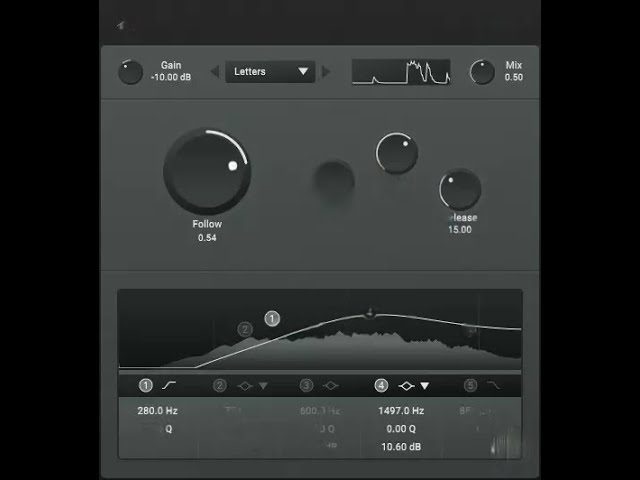

Tumult by Consint is a free and open-source noise texture plugin designed to add movement, age, atmosphere and controlled imperfection to clean digital recordings. The effect combines a library of 100 noise samples with dynamic playback modes, a five-band equalizer and support for importing custom sounds.
Available as a 64-bit VST3 plugin for Windows and Linux, Tumult remains particularly relevant in 2026 for lo-fi production, cinematic sound design, electronic music and any project that needs more texture than another standard saturation preset can provide.
What Is Tumult?
Tumult is an audio effect that layers noise and recorded textures over an incoming signal. Instead of generating only white, pink or brown noise, the plugin includes a varied collection of environmental, mechanical and vintage-inspired recordings.
The supplied library covers categories such as vinyl noise, static, machine sounds, electrical hum, environmental recordings and more unusual textures. Producers can select a sound, blend it with the original audio and shape its frequency balance without altering the tonal character of the dry signal.
Tumult can also load custom samples. This turns the plugin into a flexible texture layer rather than a fixed collection of factory noises. Field recordings, room tone, tape hiss, rain, mechanical movement and personal Foley recordings can all become part of the effect.
What Is Included?
- 100 included noise and texture samples
- Support for importing custom audio samples
- Raw, Duck and Follow playback modes
- Five-band equalizer for shaping the noise layer
- Independent Mix and Gain controls
- Preset management
- Free and open-source distribution
- 64-bit VST3 format for Windows and Linux
The included sounds are not intended to replace a conventional sample library. They provide background detail that can make a clean recording feel older, less static or more connected to a specific environment.
Three Different Processing Modes
Raw Mode
Raw mode plays the selected texture continuously. The incoming audio does not affect the noise level, making this mode suitable for constant tape hiss, room tone, vinyl crackle or atmospheric layers.
It works well when the texture should behave like part of the recording environment rather than an effect that reacts to the music.
Duck Mode
Duck mode reduces the noise when the source signal becomes active. This keeps vocals, drums or melodic elements clearer while allowing the texture to become more noticeable during quieter moments.
The result is useful for arrangements where continuous noise would otherwise mask transients or compete with important details.
Follow Mode
Follow mode plays the selected texture when the source signal crosses the chosen threshold. This allows the noise to follow the rhythm and dynamics of the original audio.
On drums, for example, Follow mode can create a textured layer that reacts to individual hits. On vocals or guitars, it can make the added noise feel connected to the performance rather than placed independently behind it.
Best Uses
Lo-Fi Beats and Vintage Texture
Tumult is an obvious choice for lo-fi Hip-Hop, Chillhop and downtempo music. Vinyl crackle, tape-style noise and mechanical textures can help overly clean samples feel more worn and cohesive.
Use the Mix control carefully. A subtle layer often creates more convincing age than a loud wall of crackle competing with the snare.
Drum and Percussion Processing
Follow mode can add texture to drum loops without requiring manual sample layering. Select a short noise, adjust the threshold and let the plugin react to the rhythm.
This technique can add grit to snares, movement to percussion or extra upper-frequency detail to a drum bus. The five-band EQ helps remove unnecessary low frequencies before they interfere with the kick and bass.
Cinematic Sound Design
Environmental and mechanical recordings can add realism to cinematic drones, transitions and atmospheric beds. A clean synthesizer pad can become more physical when combined with subtle room noise, machinery or electrical hum.
Importing custom samples expands this workflow further. Record a location, appliance, street or object, then use Tumult to blend that sound dynamically with a musical source.
Electronic Music and Experimental Production
Techno, Ambient, IDM and experimental electronic tracks often benefit from background movement that is not obviously melodic or rhythmic. Tumult can provide this detail without adding another conventional instrument.
Automating the Mix level, EQ bands or playback mode can transform a static noise layer into an arrangement element that develops across a breakdown or transition.
How to Use Tumult
After downloading the plugin, extract the archive and copy the complete Tumult VST3 folder into the standard VST3 directory for your operating system.
On Windows, the usual location is:
C:\Program Files\Common Files\VST3
The separate TumultSamples folder can be stored in a location of your choice. Open the plugin settings, select the option for changing the sample folder location and point Tumult toward that directory. Remove and reload the plugin so the new path is recognized correctly.
Once installed, load Tumult as an insert effect, select a noise sample and begin with the Mix control at a low value. Choose Raw, Duck or Follow depending on whether the texture should remain constant or react to the incoming signal.
Production Tips
Remove unnecessary bass: Most texture layers do not need deep low frequencies. Use the internal EQ to prevent hum and environmental noise from weakening the kick or bass.
Match the texture to the arrangement: Vinyl noise may suit a sampled beat, while machinery, static or electrical recordings can work better in Industrial Techno and cinematic production.
Use Duck mode on vocals: Let the texture rise between phrases while keeping the vocal intelligible during active sections.
Import personal recordings: Custom Foley and field recordings will make the effect more distinctive than relying exclusively on familiar vinyl crackle.
Automate the Mix control: Increase the texture during intros, transitions and breakdowns, then reduce it when the full arrangement returns.
Process in parallel: Place Tumult on an effect return when several tracks should share the same textured environment.
Compatibility
Tumult is available as a free 64-bit VST3 effect for Windows and Linux. The developer does not currently provide an official macOS version.
A compatible DAW or plugin host supporting VST3 is required. The Windows download can be used in modern hosts such as Ableton Live, FL Studio, Studio One, Cubase, Reaper and Bitwig Studio.
The plugin is open source and distributed under the GPL-3.0 license. It does not require a paid account, subscription, license manager or time-limited activation.
Official Tumult Video
Final Verdict
Tumult is a focused free VST plugin for producers who understand that noise can be part of the sound rather than something that always needs to be removed.
Its 100 included textures, custom sample import, dynamic playback modes and five-band EQ make it useful for lo-fi beats, electronic music, cinematic work, drum processing and experimental sound design.
The Windows and Linux limitation prevents it from becoming a universal recommendation, but supported users receive a complete and unrestricted creative effect. It is also refreshingly honest about its purpose: Tumult adds noise, while half the other plugins in the folder are charging money to remove it.
Download Tumult from the official website:
https://www.consint.net/posts/tumult/