
Ultimate MIDI Plugin UChord
Every producer knows the moment. The drums are hitting, the bass idea is almost there, the sound palette feels right, but the chord progression refuses to arrive. UChord by Ultimate MIDI Plugin steps directly into that creative gap. It is a MIDI chord progression generator built for producers who want harmonic ideas quickly, without losing control over musical direction.
Rather than acting like a magic button that throws random chords into a session, UChord gives you a structured way to build progressions, shape rhythm, adjust voicings, and export MIDI into your DAW. For beatmakers, house producers, lo-fi creators, pop writers, hip-hop producers, and electronic musicians, it can become a fast creative assistant when the session needs movement, harmony, and momentum.
What Is UChord by Ultimate MIDI Plugin?
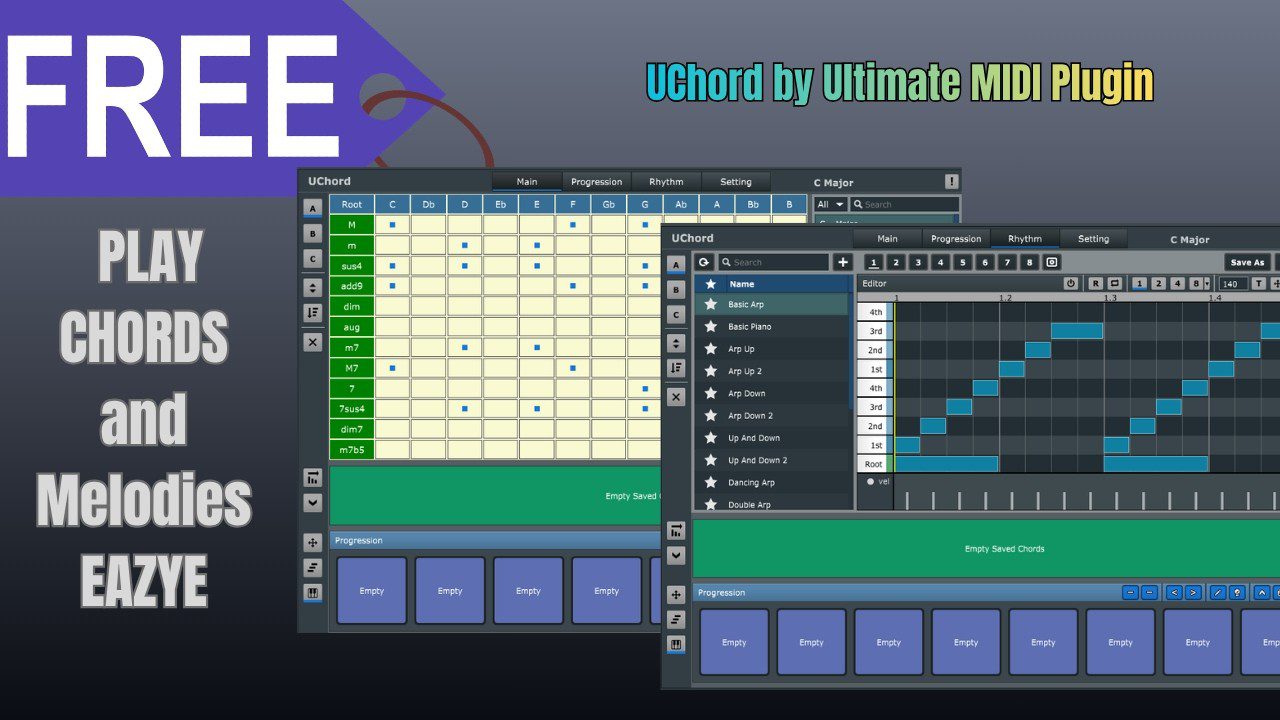
UChord, also known as Ultimate Chord Engine, is a Windows-only MIDI plugin designed to help musicians create chord progressions inside their DAW. It works as a chord generation tool based on a chord table and rhythm editor, allowing users to select chords, build progressions, shape patterns, and send the resulting MIDI to virtual instruments.
The plugin is available in VST and VST3 formats for Windows. This makes it useful for producers working in compatible Windows DAWs such as FL Studio, Ableton Live, Studio One, Cubase, Reaper, Cakewalk, and other hosts that support MIDI routing through VST or VST3 plugins.
A Creative Tool for Chords, Rhythm, and Harmonic Flow
The strength of UChord is not only that it generates chords. Its real interest comes from how it helps producers organize harmonic ideas. The chord table gives users a visual and practical way to choose roots and chord qualities, while the rhythm editor turns static progressions into playable musical patterns.
This is especially useful for producers who understand the feeling they want but do not always want to stop the session to solve every harmonic detail manually. UChord can help create a starting point, then let the producer refine, rearrange, export, and transform the result with their own instruments and production style.
More Than a Basic Chord Trigger
Many chord tools are designed for instant gratification, but they can quickly feel limited when the progression becomes too rigid or predictable. UChord adds more depth by including options for rhythm, arpeggiation, voicing, velocity, presets, and MIDI drag-and-drop. That gives producers more control over how the harmony behaves inside the track.
Instead of simply holding one key and hearing a block chord, you can create movement. A progression can become a rhythmic piano part, a synth stab pattern, a house chord groove, a lo-fi keys loop, or a melodic foundation for a full arrangement.
Sound and Character: The Sound Depends on Your Instrument
Because UChord is a MIDI plugin, it does not have a sound engine in the traditional sense. Its character comes from what it generates and how it drives your chosen instrument. Pair it with a warm electric piano and it can become a lo-fi or neo-soul idea machine. Route it into a soft pad and it can build cinematic emotion. Use it with a plucky synth, and it can produce rhythmic house, pop, or electronic hooks.
This makes UChord flexible in a practical way. It does not lock you into one sonic identity. Instead, it helps you create harmonic material that can be interpreted by any instrument in your session. The same progression can become a dreamy pad, a tight piano groove, a synthwave chord stack, or a trap melody layer, depending on the sound source you choose.
Workflow Advantages for Producers
UChord is built around speed without removing creative control. The chord table helps users explore harmonic options, the rhythm editor adds groove and movement, and the MIDI export function makes it easy to bring the result into the DAW for further editing.
That last point matters. A good MIDI generator should not trap the producer inside the plugin. UChord allows the generated progression to become editable MIDI, which means you can change notes, adjust timing, edit velocity, layer instruments, or completely reshape the idea after export.
Useful for Starting Tracks and Breaking Loops
One of the most practical uses for UChord is breaking the empty-session problem. Instead of scrolling through loops or forcing a progression from scratch, producers can use the plugin to build a musical foundation quickly. Once the chords are in place, drums, basslines, melodies, vocals, and arrangement ideas often become easier to develop.
It can also help when a loop feels stuck. Changing the voicing, rhythm, or chord order can open a new section, create a bridge, or give a chorus more emotional lift.
Best Uses in Music Production
House and Electronic Music
UChord can help build groovy chord stabs, rhythmic piano patterns, melodic synth progressions, and harmonic beds for house, deep house, Afro house, techno, and melodic electronic tracks.
Lo-Fi and Chill Beats
For lo-fi producers, UChord is useful for quickly creating warm, jazzy, or melancholic progressions. Route it into a soft piano, Rhodes-style instrument, tape-textured keys, or muted synth, then edit the MIDI for a more human feel.
Pop, Hip-Hop, and R&B Production
Songwriters and beatmakers can use UChord to sketch progressions for hooks, verses, toplines, and beat foundations. It is especially useful when the goal is to move fast from a harmonic idea to a complete production draft.
Why UChord Is Worth Trying
UChord is interesting because it focuses on one of the most important parts of music production: harmonic direction. A strong chord progression can change the emotional weight of a track, and this plugin gives producers a quick way to explore those possibilities without losing the ability to edit and personalize the result.
It is also a useful educational tool. By working with chord tables, scales, voicings, and rhythmic patterns, producers can gradually develop a stronger sense of harmony while still making music. That balance between instant results and musical learning gives UChord more value than a simple preset-based MIDI tool.
Who Is UChord Best Suited For?
UChord is best suited for Windows-based producers who want to create chord progressions faster while keeping control over the final MIDI. It is especially useful for beatmakers, house producers, lo-fi artists, electronic musicians, pop writers, and anyone who often starts tracks from harmony, keys, pads, or melodic loops.
It is also a strong choice for producers who are still building confidence with music theory. UChord can help generate ideas, show harmonic relationships, and make chord construction feel more visual and practical inside a production workflow.
Official Website and Download Link
UChord is available from the official Ultimate MIDI Plugin website. At the time of writing, the plugin is offered as a free download until June 15, 2026.
Official product page:
https://www.ultimatemidiplugin.com/product/UChord
Download page:
https://ultimatemidiplugin.gumroad.com/l/wriuxu
Conclusion: A Practical Chord Engine for Faster Musical Progress
Ultimate MIDI Plugin UChord is not a flashy synth, an effects processor, or another sound library. It is a focused MIDI tool designed to solve a very real creative problem: building chord progressions quickly, musically, and with enough control to make the result your own.
For Windows producers looking to speed up songwriting, create stronger harmonic foundations, or simply escape the blank project screen, UChord is well worth trying. Load it, build a progression, send it to your favorite instrument, and let the next idea unfold from there.
Product Description
Ultimate MIDI Plugin UChord is a Windows MIDI chord progression generator available in VST and VST3 formats. It uses a chord table, rhythm editor, arpeggiator, voicing tools, presets, velocity control, and MIDI drag-and-drop to help producers create and export chord progressions for use with any compatible virtual instrument.
Official website or download link:
https://www.ultimatemidiplugin.com/product/UChord