Wildcard by RIPPLES is a free glitch VST plugin designed for producers who want to create stutters, metallic resonances, sweeping modulation and digital destruction without building a complicated effects chain.
Released as part of the new RIPPLES plugin collection in July 2026, Wildcard combines four creative effects inside a compact, card-inspired interface. Each processor has one main fader, allowing producers to move from subtle rhythmic movement to heavily mangled audio in seconds.
The plugin is available completely free from the official RIPPLES website for Windows and macOS in VST3 and AU formats.
What Is Wildcard by RIPPLES?
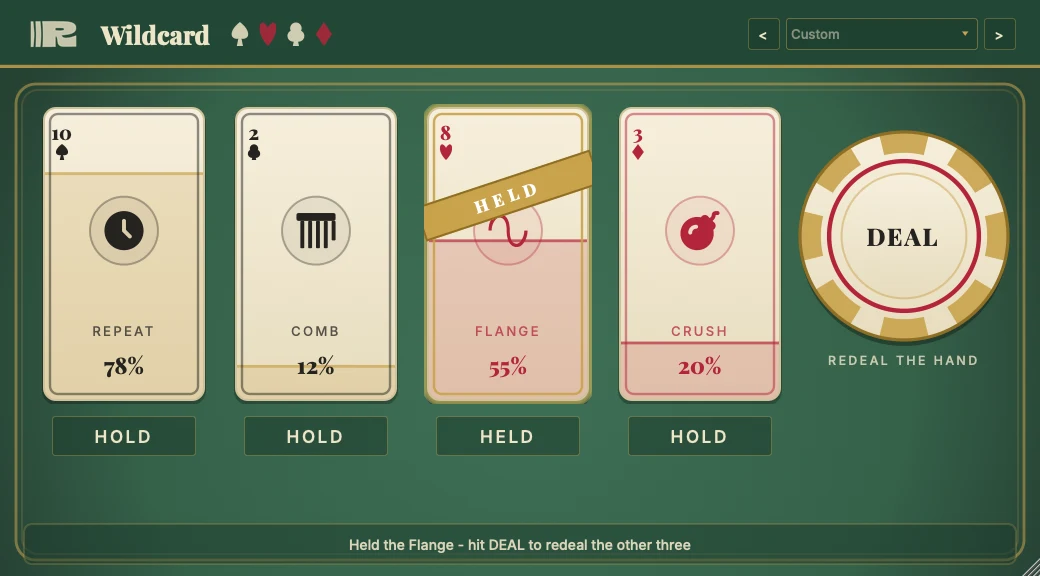
Wildcard is a free creative multi-effect built around four processors represented as playing cards:
- Beat Repeat
- Comb Filter
- Flanger
- Crusher
Rather than filling the interface with secondary pages and advanced menus, RIPPLES gives each effect a single vertical fader. Raising a card’s fader brings that processor into the signal path, while combining several cards produces more complex results.
This simple design makes Wildcard especially useful during fast production sessions. A drum loop can become a broken glitch pattern, a vocal phrase can turn into a digital transition, and a static synth can gain rhythmic movement without requiring several separate plugins.
Four Creative Effects in One Free Plugin
Beat Repeat
The Beat Repeat section captures and repeats short sections of the incoming signal. Its synchronized divisions range from 1/16 to 1/2 notes, making it suitable for rhythmic stutters, fills and chopped transition effects.
On drums, small amounts can create additional movement between hits. More extreme settings can transform an ordinary loop into a fractured IDM, glitch-hop or experimental techno pattern.
Comb Filter
Wildcard’s Comb Filter introduces resonant, metallic coloration by mixing the original signal with a slightly delayed version of itself.
This processor can add tonal ringing to percussion, generate robotic resonances from vocals or turn short sound effects into pitched, metallic textures. It is particularly effective for industrial music, cinematic sound design and experimental electronic production.
Flanger
The Flanger creates sweeping phase movement by combining the dry signal with a modulated delay.
Used gently, it can add animation and stereo interest to pads, guitars and background textures. At stronger settings, it produces more obvious jet-like sweeps and psychedelic movement.
Crusher
The Crusher section introduces digital degradation and reduced-resolution character.
It can roughen clean drum samples, add aggressive edges to bass sounds or push synthesizers toward retro game-console and broken-digital territory. Combined with Beat Repeat, it becomes particularly effective for corrupted fills and glitch transitions.
Built-In LFO for Automatic Movement
Wildcard also includes an integrated LFO that can animate the effects without requiring detailed DAW automation.
The modulation system offers tempo synchronization, rhythmic divisions and support for dotted and triplet timing. This makes it possible to create movement that remains connected to the project tempo while still sounding less predictable than a static effect setting.
For producers working quickly, this is an important feature. Instead of drawing several automation curves across a track, the LFO can generate continuous motion directly inside the plugin.
Why Wildcard Is Useful in Modern Music Production
Many glitch and multi-effect plugins offer extremely deep modulation systems. That depth can be valuable, but it can also interrupt the creative process when a producer only needs a fast transition, a rhythmic variation or an unusual texture.
Wildcard takes the opposite approach. It reduces each effect to one main performance control and encourages experimentation through combinations.
The result is not a conventional mixing processor. It is a creative tool for moments when a sound needs movement, surprise or controlled damage.
Best Uses for Wildcard
Creating Drum Fills
Place Wildcard on a drum bus and automate Beat Repeat during the final beat of a four-bar or eight-bar section. Add a small amount of Crusher or Comb Filter to make the fill stand apart from the original groove.
Transforming Vocal Fragments
Short vocal phrases can be processed with Beat Repeat and Flanger to create transition effects, background textures or chopped hooks. The Crusher can add a deliberately artificial digital edge.
Adding Motion to Synths
Pads, drones and sustained synthesizers often benefit from subtle movement. A low Flanger setting combined with LFO modulation can prevent these sounds from remaining completely static.
Designing Risers and Transitions
Automating several effect faders upward can gradually destabilize a sound before a drop or section change. The processed audio can also be rendered and reversed to create custom transition material.
Generating Experimental Textures
The Comb Filter and Crusher are useful for turning field recordings, Foley, percussion and ordinary samples into more abstract sound-design layers.
A Practical Wildcard Workflow
Begin with all four effect faders at their minimum position. Play the source material and increase one processor at a time to understand how it changes the signal.
Once a useful effect is found, introduce a second card at a lower level. Two carefully balanced effects will often produce a clearer result than pushing all four processors to maximum.
For rhythmic material, activate tempo-synchronized LFO movement and test different note divisions. Triplet or dotted values can create movement that contrasts with a straight drum pattern.
Finally, automate the global effect intensity or individual faders only during selected sections. Glitch processing usually feels more effective when it appears as a deliberate event rather than covering the entire arrangement.
Wildcard on Drums
Drum loops are among the best sources for testing Wildcard because their transients make every processor easy to hear.
Beat Repeat can produce rapid fills, while the Comb Filter adds metallic resonance to snares, claps and hi-hats. Crusher introduces additional grit, and Flanger can make cymbals or percussion sweep across a transition.
When processing a complete drum bus, subtle settings are often more useful than full destruction. For heavier results, duplicate the drum track and use Wildcard on the duplicate as a parallel effects layer.
Wildcard for Sound Design
Sound designers can use Wildcard as a fast resampling tool. Load a simple source, activate several effects, record the output and cut the most interesting moments into new one-shots.
A short click can become a metallic percussion hit. A spoken word can become a digital impact. A basic synthesizer note can become a noisy transition or cinematic texture.
This resampling approach turns Wildcard into more than an insert effect. It becomes a source of new material for sample libraries, film cues, game audio and experimental tracks.
Interface and Workflow
The visual concept is based on four playing cards placed on green felt. Each card represents one effect and includes a vertical fader.
The design makes the signal flow immediately understandable. There are no complicated routing pages or large modulation matrices to configure before the plugin becomes useful.
Wildcard also includes presets ranging from lighter rhythmic movement to more extreme processing. These presets provide practical starting points while still allowing the four effect levels to be adjusted manually.
System Compatibility
- Plugin formats: VST3 and AU
- Operating systems: Windows and macOS
- Plugin type: Insert audio effect
- Price: Free
- Best suited to: Glitch effects, transitions, rhythmic processing and experimental sound design
Windows users may see a Microsoft SmartScreen warning because the installer is relatively new. RIPPLES provides an official Windows installation guide explaining how to continue with the installation.
Who Should Download Wildcard?
Wildcard is particularly relevant for:
- Electronic music producers
- Beatmakers
- Sound designers
- Film and game composers
- Glitch, IDM and industrial producers
- Hip-hop and trap producers creating transitions
- Anyone looking for a fast creative multi-effect
It may be less suitable for engineers searching for surgical control over every parameter. Wildcard prioritizes immediacy and experimentation rather than detailed technical editing.
Is Wildcard Really Free?
Yes. Wildcard is presented by RIPPLES as a full free plugin rather than a time-limited demonstration. The official download is available directly from the developer’s website.
No paid purchase is required to access its four effect processors, LFO system or included presets.
Final Verdict
Wildcard does not attempt to replace a complete modular glitch environment. Its strength is speed.
The combination of Beat Repeat, Comb Filter, Flanger and Crusher gives producers four clearly different ways to reshape audio, while the one-fader-per-effect workflow keeps the creative process immediate.
It is especially useful for drum fills, vocal edits, transitions, sound-design experiments and automated movement. Producers who already own complex multi-effects may still appreciate Wildcard because it reaches interesting results without requiring a twenty-minute programming session.
Free, visually distinctive and genuinely practical, Wildcard is one of the most interesting creative VST plugins to emerge in 2026. Sometimes four cards are enough to ruin a perfectly clean sound, and in music production that can be a compliment.
Download Wildcard from the official RIPPLES website:
https://ripples-music.com/plugins/wildcard