Free Afro-Inspired Instrument
Afro Keyz Lite: Six Free Instruments for African-Inspired Beats
Create melodic Afrobeats, Afropop and Dancehall ideas with playable keys, plucks and organic-inspired tones inside a simple virtual instrument.
Afro Keyz Lite is a free virtual instrument developed by Afroplug for producers working across Afrobeats, Afropop, Dancehall, R&B, Reggaeton and other styles influenced by the African diaspora.
The free edition provides six instrument presets selected from the broader Afro Keyz sound collection. It is designed for producers who want to load a playable sound quickly, create a melody and continue arranging without building every patch from an empty synthesizer.
Afro Keyz Lite is available for Windows and macOS. The current official product page lists VST, VST3 and Audio Unit compatibility, allowing the instrument to work inside most major music production applications.
| Developer | Afroplug |
|---|---|
| Instrument type | Sample-based synthesizer and keyboard instrument |
| Free edition | Afro Keyz Lite |
| Included presets | 6 instrument presets |
| Main genres | Afrobeats, Afropop, Dancehall, R&B, Reggaeton and Lo-fi |
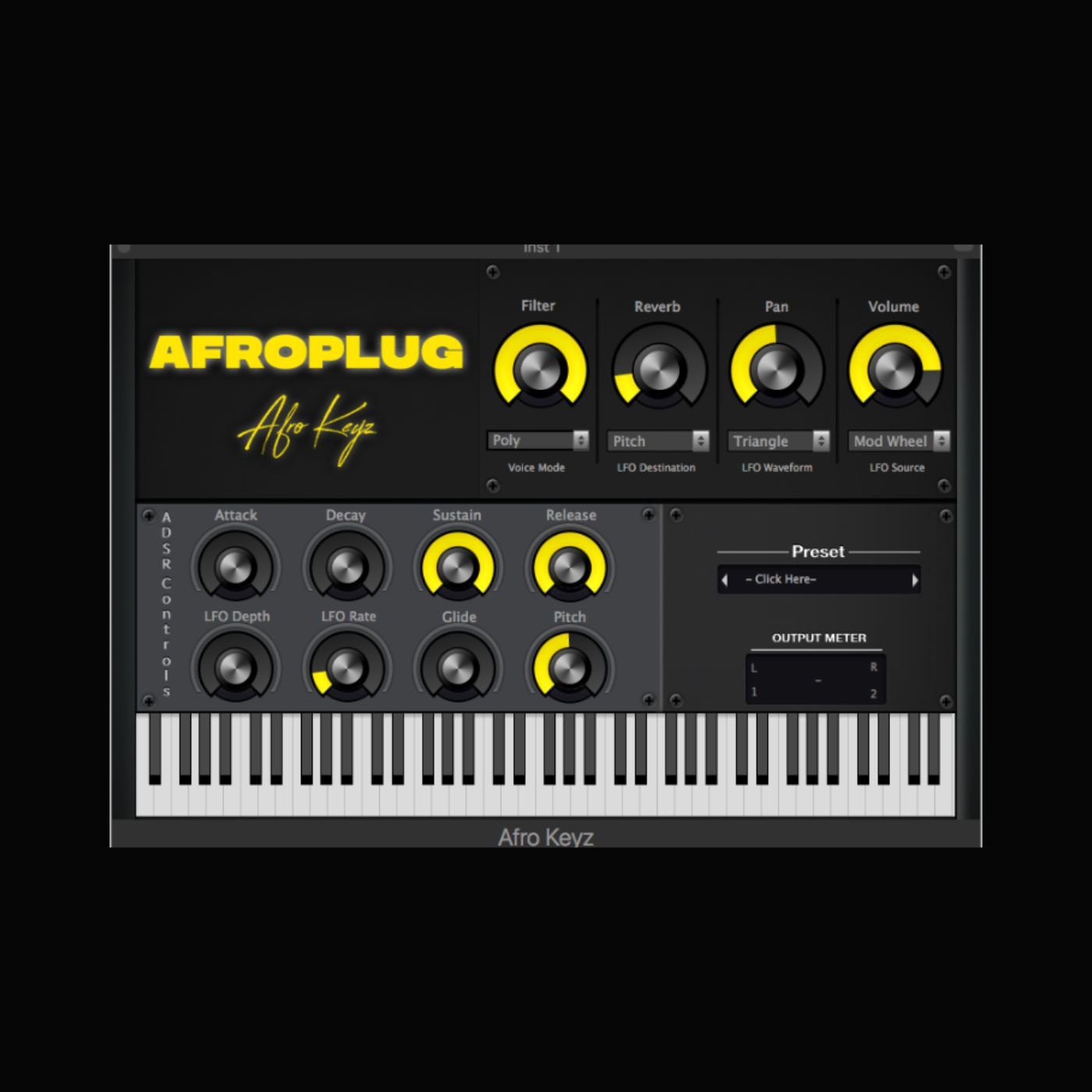
| Sound controls | ADSR, filter, LFO, glide, pitch and pan |
| Included effect | Reverb |
| Platforms | Windows and macOS |
| Plugin formats | VST, VST3 and AU |
| Price | Free |
A Fast Melodic Tool for Afrobeats
Modern Afrobeats productions often rely on short and memorable melodic phrases. A warm keyboard chord, a syncopated pluck or a bright mallet-style sound can establish the identity of the instrumental without occupying too much space around the vocal.
Afro Keyz Lite is designed around this direct workflow. Instead of presenting several pages of oscillators and modulation matrices, it provides ready-to-play sounds and a compact group of controls for shaping them.
This makes the plugin particularly useful during the songwriting stage. Producers can begin with a simple chord progression, add a short counter-melody and then build the percussion and bass around those ideas.
Six Playable Instrument Presets
The Lite edition includes six presets. Afroplug does not currently identify the exact six preset names on the official product page, so the selection may need to be auditioned after installation.
The broader Afro Keyz collection covers sounds such as keys, electronic pianos, marimbas, kalimbas, pads, plucks, basses and 808s. The free edition provides a limited introduction to that larger palette rather than all 40 sounds included with the paid version.
Six presets may appear modest compared with a large workstation, but a focused collection can speed up production. The objective is to find a usable melodic tone quickly rather than browse several hundred nearly identical patches while the original beat idea quietly leaves the room.
Keys and Plucks for Syncopated Melodies
Afrobeats melodies frequently use syncopation, leaving intentional spaces between notes so the percussion and vocal can breathe.
Short keys and plucks work particularly well for these patterns. A simple two-chord progression can become more interesting when the notes are placed around the kick and percussion rather than played continuously.
The glide control can connect selected notes smoothly, while the pitch control allows sounds to be moved into a register that fits the arrangement. Higher octaves can create bright hooks, while lower notes can support a warmer and more relaxed groove.
ADSR Envelope Controls
Afro Keyz Lite includes attack, decay, sustain and release controls for shaping the volume envelope.
Reducing the attack creates a more immediate sound that can reinforce rhythmic melodies. Increasing it softens the beginning of each note, which works well for pads and background layers.
A shorter release keeps notes separated and prevents melodic parts from becoming blurred. A longer release can produce smoother transitions, but producers should check that overlapping notes do not interfere with the bass or vocal.
Filter and LFO Movement
The filter provides a quick way to make a preset darker or brighter. Removing some high frequencies can help a keyboard sit behind a vocal, while opening the filter can make a hook more present during the chorus.
The LFO section includes rate and depth controls. It can introduce movement into pitch or another assigned parameter, depending on the selected configuration.
Subtle modulation can prevent sustained notes from sounding static. Stronger settings are better reserved for transitions, intros and more experimental melodic effects.
Built-In Reverb
The integrated reverb adds space without requiring an additional effect plugin.
A small amount of reverb can make keys and plucks feel more natural, while longer settings can transform a simple preset into an atmospheric background layer.
For vocal-driven Afrobeats, reverb should be controlled carefully. Excessive ambience can push the melody too far back or create unnecessary overlap with the singer’s own delay and reverb effects.
Best Uses
- Afrobeats and Afropop melodies
- Dancehall and Reggaeton instrumentals
- Syncopated keyboard chords
- Short melodic plucks and hooks
- Organic-inspired mallet textures
- Melodic R&B and Afro-fusion
- Quick songwriting and beat sketches
- Layering keys beneath vocals
Building an Afrobeats Arrangement
Start with a simple melodic phrase containing enough silence for the percussion. Afrobeats grooves often feel energetic because several small elements interact rather than because one instrument plays continuously.
Add the main kick, snare or rim pattern, then introduce shakers and hand percussion around the melody. The bass can follow the root notes while adding occasional rhythmic variations.
During the verse, reduce the melodic density or close the filter slightly. The chorus can use a brighter version of the sound, an additional octave or a counter-melody to increase energy without changing the entire production.
Compatibility and Installation
Afroplug lists Afro Keyz for Windows and macOS in 32-bit and 64-bit versions. The current store page also displays VST, VST3 and AU format labels.
Windows users can place VST3 files in the standard system VST3 folder or copy older VST files into the folder scanned by their DAW.
On macOS, VST3 files belong in the system VST3 directory, while AU component files belong in the Audio Units Components folder.
The official page states that the automatic macOS installer for Catalina and newer systems is included with the paid edition. Lite users may therefore need to install the supplied files manually.
Main Limitations
- Only six presets are included in the free edition
- The official page does not list the six free preset names
- The full collection of 40 instruments requires the paid version
- The current official page does not provide a detailed operating-system compatibility table
- The macOS installer for Catalina and newer is advertised for the paid edition
- No AAX version for Pro Tools is currently listed
- The instrument is intended for fast preset-based production rather than deep synthesis
Final Verdict
Afro Keyz Lite is a compact free instrument for producers who want melodic sounds suited to Afrobeats, Afropop, Dancehall and related styles.
Its six presets are limited compared with the paid edition, but the integrated envelope, filter, LFO, pitch, glide, pan and reverb controls provide enough flexibility for quick melodic ideas.
The plugin is especially useful for beginners and beatmakers who prefer ready-to-play sounds over complex synthesis. It can provide the first keyboard progression, pluck pattern or atmospheric layer around which a complete instrumental is built.
For producers seeking a free starting point for African-inspired melodies, Afro Keyz Lite remains a relevant and easy-to-use addition to the studio.