Amalgame by Inear Display is a free multi-effect VST plugin built for producers, sound designers, electronic musicians and home studio creators who want to transform ordinary audio into animated textures, glitch sequences, rhythmic movement and unpredictable sonic shapes. Now available through Inear Display’s pay-what-you-want model, the plugin gives users access to a deep experimental effect environment without the price of a premium multi-FX suite.
For artists working in electronic music, ambient, IDM, glitch, techno, cinematic sound design, industrial textures or experimental pop, Amalgame offers a powerful creative playground. It combines multiple effect slots, XY control, tempo-synced sequencers and randomization tools into one interface designed for movement, surprise and controlled chaos.
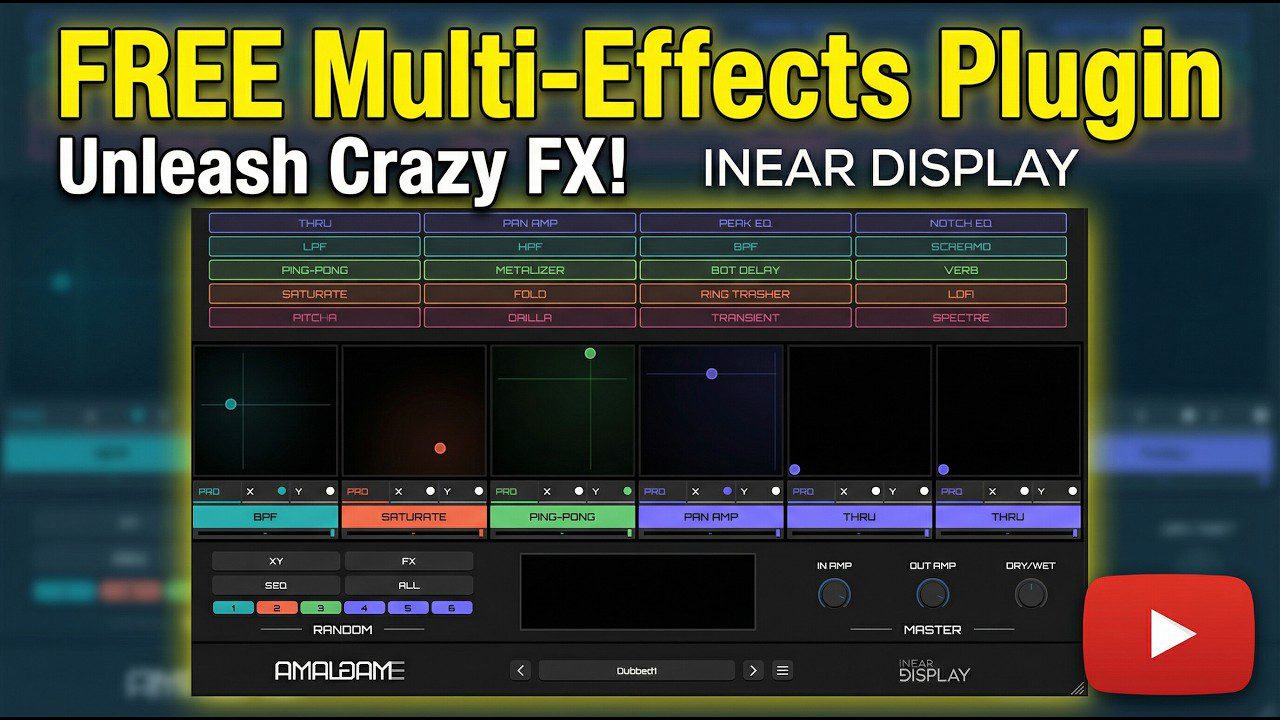
What Is Amalgame by Inear Display?
Amalgame is a multi-effect audio plugin from Inear Display. It is designed to create complex effect chains quickly, using a modular system where producers can combine several processors, control them through XY pads and animate parameters with built-in sequencers.
The plugin is not a traditional mixing tool. It is not built only for clean EQ correction, transparent compression or subtle mastering polish. Amalgame is a creative audio processor made for sound manipulation, rhythmic modulation, glitch processing, spectral movement, distortion, delays, filtering and evolving effect chains.
Amalgame is available as a VST3 and AU plugin for compatible Windows and macOS systems. It is part of Inear Display’s creative audio tools catalogue, now distributed through a pay-what-you-want model that allows producers to download it for free while still supporting future maintenance.
What This Free VST Plugin Does
Amalgame processes incoming audio through up to six effect slots. Each slot can host one of the plugin’s built-in effects, with two main parameters assigned to an XY pad. Those X and Y movements can be controlled manually or animated with tempo-synced step sequencers.
This makes the plugin especially useful for producers who want effects that move. A static pad can become a pulsing texture. A drum loop can turn into a glitch sequence. A vocal phrase can become a chopped, filtered and delayed rhythmic layer. A synth line can be reshaped into a constantly shifting sound design element.
Instead of loading several plugins one after another and automating every parameter manually, Amalgame brings multiple creative processors into one environment. It is designed for speed, experimentation and variation, three things that matter a lot when working with modern electronic production.
Main Features
- Free multi-effect VST plugin available through a pay-what-you-want model.
- 23 built-in effects covering filters, delays, modulation, distortion, spectral processing and glitch tools.
- Six effect slots for building custom effect chains.
- XY pad control for two parameters per effect slot.
- Tempo-synced sequencers for animating X and Y parameter movement.
- Randomization tools for generating fast creative variations.
- Individual dry/wet control per effect slot for precise blending.
- Global mix control for balancing processed and original signal.
- Input and output controls for managing gain through the chain.
- Preset browser for loading and saving creative setups.
- VST3 and AU formats for modern DAW compatibility.
- Windows and macOS support.
A Sound Design Playground With 23 Effects
The heart of Amalgame is its collection of 23 effects. The plugin includes practical processors such as filters, EQ-style modules, panning and delay tools, but it also moves into more experimental territory with distortion, ring modulation, spectral delay, glitch effects and audio mangling processors.
This range gives Amalgame its personality. It can behave like a rhythmic filter box, a glitch generator, a weird delay lab, a distortion unit, a modulation sequencer or a full sound design engine. The result depends on the source material, the chosen effects and how the XY pads are animated.
For producers, this flexibility is valuable because it allows one plugin to create many different types of movement. A soft ambient loop can become unstable and cinematic. A clean percussion loop can become fractured and nervous. A synth chord can be reshaped into a pulsing texture with delay, filtering and spectral color.
XY Pads and Sequencers for Moving Effects
Each effect slot in Amalgame includes an XY pad that controls two parameters. This gives the plugin a performance-oriented feel. Instead of only setting a knob value, the user can move between two dimensions of control and hear the effect evolve in real time.
The built-in sequencers take this further. By sequencing X and Y positions, producers can create rhythmic parameter movement locked to tempo. This is useful for glitch patterns, pulsing filters, evolving delays, animated distortion and sound design transitions.
This approach makes Amalgame feel more alive than a static effect chain. It can generate motion inside a loop, create ear-catching transitions or add subtle instability to a texture. In electronic music, that type of movement can be the difference between a flat loop and a sound that feels like it is breathing.
Sound, Workflow and Creative Use
Amalgame is most effective when used as a creative processor rather than a corrective tool. Place it on a drum loop, synth bus, vocal chop, pad, field recording or FX channel, then start building an effect chain. The plugin rewards experimentation, especially when randomization and sequenced XY movement are used together.
On drums, Amalgame can create stutters, filtered grooves, broken percussion edits and aggressive glitch beds. On synths, it can create pulsing modulation, widening movement, metallic textures and evolving delays. On vocals, it can turn phrases into chopped effects, strange echoes or abstract rhythmic layers.
The plugin is also useful for transitions. A simple riser, noise sweep or reversed cymbal can become more complex when processed through animated filtering, delay, distortion and spectral movement. For cinematic sound design, Amalgame can help turn small source sounds into larger, stranger audio events.
Why This Plugin Matters for Modern Producers
Modern production often depends on identity. Many producers have access to the same sample packs, presets, drum loops and synth sounds. Creative processing is one of the fastest ways to make a track feel more personal.
Amalgame gives producers a way to reshape familiar material into something less predictable. It can take a common loop and push it into a new direction. It can turn simple audio into motion. It can add controlled disorder to clean digital sounds. That matters in genres where texture, rhythm and sonic detail are as important as melody or harmony.
For independent producers and home studio users, the free availability of Amalgame is especially valuable. It offers a deep experimental workflow without forcing users to buy a large multi-effect bundle. That makes it a strong addition to a modern free plugin collection.
Who Should Use Amalgame?
Amalgame is ideal for electronic producers, experimental musicians, sound designers, ambient artists, glitch producers, techno creators, cinematic composers and home studio users who want a free audio plugin for advanced creative processing.
It is also useful for beatmakers who want to manipulate samples, producers who want more movement in loops and composers who need unusual textures for intros, breakdowns, transitions or atmospheric sections.
It is less suited to users looking for a simple EQ, compressor or clean mastering tool. Amalgame is not polite studio furniture. It is more like a laboratory with blinking lights, strange cables and one button that definitely should be pressed.
Best Use Cases for Producers
Glitch Processing
Use Amalgame on drum loops, percussion, vocal chops or synth patterns to create broken rhythms, stutters, sudden shifts and unpredictable movement.
Animated Filter Effects
Combine filters with sequenced XY movement to create pulsing sweeps, rhythmic tone changes and evolving movement inside static loops.
Experimental Delay Chains
Use delay-based effects with modulation and randomization to create strange echoes, moving tails and atmospheric repeats.
Sound Design Transitions
Process risers, impacts, noise layers and reversed sounds to build more detailed transitions for electronic, cinematic and trailer-style music.
Vocal Transformation
Place Amalgame on vocal phrases to create chopped, filtered, delayed or abstract vocal textures that can sit behind a lead or become a hook element.
Ambient and Cinematic Textures
Use slow-moving effect chains on pads, field recordings, piano notes or drones to create evolving atmospheric layers.
Sample Mangling
Beatmakers can use Amalgame to transform loops and samples into something more original before chopping, resampling or arranging them.
Compatibility and Download Details
Amalgame is available as a VST3 and AU plugin for compatible Windows and macOS systems. It can be downloaded from Inear Display’s official Gumroad page through a pay-what-you-want model.
- Official website: Inear Display Creative Audio Tools
- Download: Download Amalgame for free
Industry Impact: Experimental Tools Are Becoming More Accessible
The wider availability of Inear Display’s catalogue is important because experimental audio tools are often harder to access than standard mixing plugins. Free compressors, EQs and reverbs are everywhere. Free multi-effect processors with deep modulation, XY control and an original creative identity are much rarer.
Amalgame gives independent artists a serious sound design tool without adding cost to the production setup. That can matter for producers working on laptops, small studios, student projects, independent albums, video game audio, sound libraries or experimental releases.
It also reflects a broader movement in music technology: powerful creative tools are no longer limited to expensive studios. A producer can now build a distinctive sound palette with free and pay-what-you-want plugins, as long as they are willing to experiment.
What Happens Next
Amalgame has the potential to reach a new audience of producers discovering Inear Display’s tools through the free catalogue. Its long-term value will depend on how users explore it, share presets, build sound design workflows and integrate it into real productions.
The best way to understand the plugin is not to read a feature list, but to process audio through it. Load a drum loop, vocal phrase, synth pad or field recording, add a few effects, activate sequencers, hit randomize and start listening. The strongest results often come from the places where the plugin behaves slightly differently than expected.
Final Verdict
Amalgame by Inear Display is a powerful free multi-effect VST plugin for producers who want glitch processing, animated effects, experimental sound design and moving textures inside their DAW. With 23 effects, six slots, XY pads, sequencers and randomization tools, it offers much more than a basic multi-FX chain.
For ambient, glitch, techno, IDM, cinematic music, industrial sound design and experimental electronic production, Amalgame is a serious creative processor. It can be subtle, violent, strange, rhythmic, atmospheric or completely unhinged depending on how it is used.
If your home studio needs a free audio plugin that can transform simple sounds into complex movement, Amalgame deserves a place in your plugin folder. It is not the plugin you open when you want everything to behave. It is the plugin you open when the track needs a little electricity in the walls.