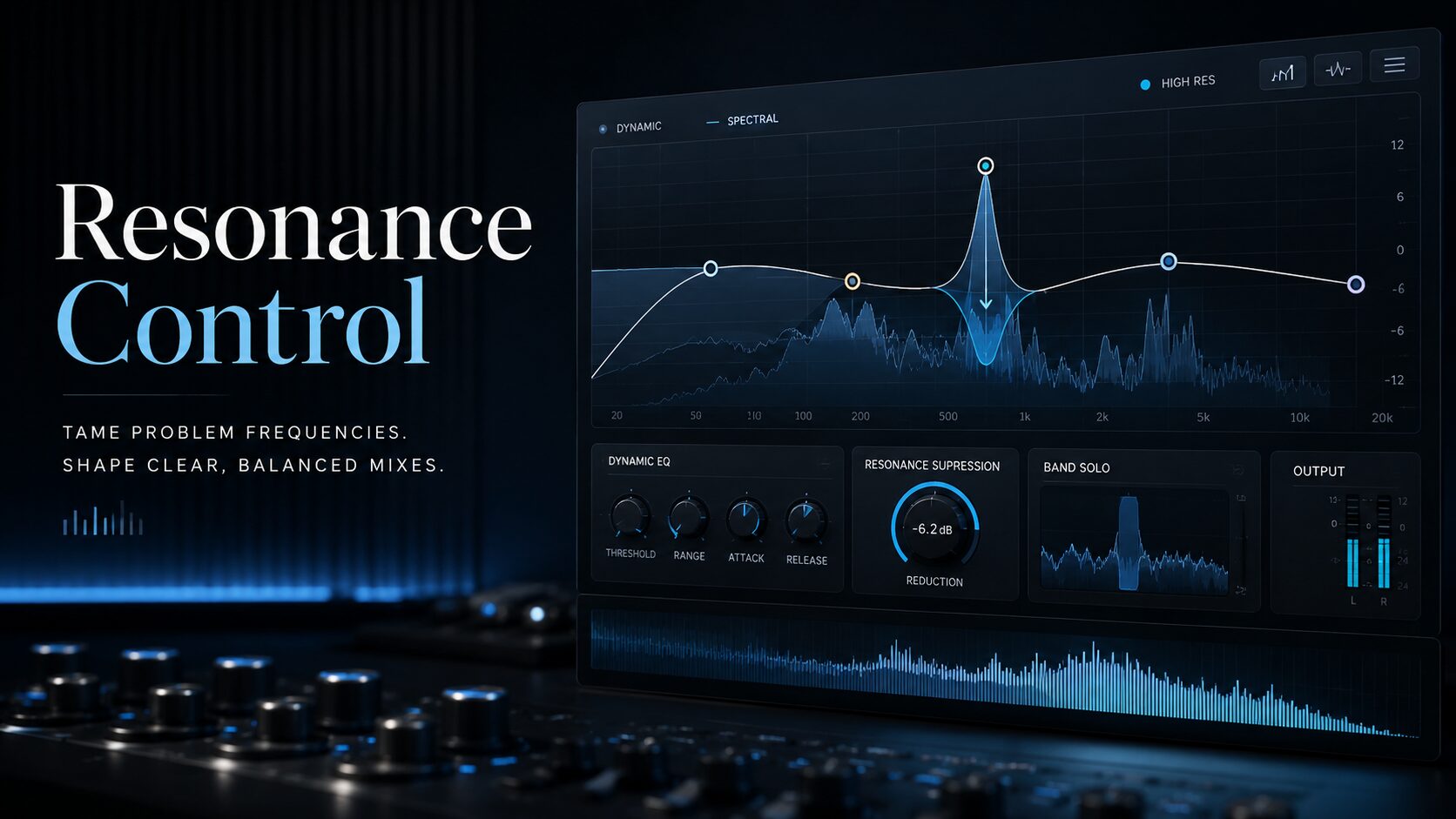

Harsh vocals, metallic synths, brittle cymbals and piercing guitar frequencies can make an otherwise solid production exhausting to hear. A static EQ may reduce the problem, but it also removes the same frequencies when they are not causing trouble. This is where the best resonance suppressor plugins become far more effective.
Modern resonance suppression plugins analyse audio continuously and reduce narrow frequency peaks only when they become excessive. The result can be smoother vocals, cleaner drum buses, more controlled synths and less aggressive masters without permanently darkening the source.
This guide compares the best free and paid resonance suppressor plugins available in 2026, including oeksound soothe3, TBProAudio DSEQ3, Baby Audio Smooth Operator Pro, Waves Curves Equator, Soundtheory Gullfoss, Mercurial Tones Dagon and TDR Nova.
Best Resonance Suppressor Plugins: Quick Comparison
| Plugin | Price Type | Best For | Processing Style |
|---|---|---|---|
| oeksound soothe3 | Premium | Professional mixing and mastering | Automatic dynamic resonance suppression |
| TBProAudio DSEQ3 | Paid | Maximum control and value | Highly detailed spectral dynamic EQ |
| Baby Audio Smooth Operator Pro | Paid | Fast and creative spectral shaping | Intelligent spectral balancing |
| Waves Curves Equator | Paid | Resonance control and frequency unmasking | Learn-based spectral suppression |
| Soundtheory Gullfoss | Premium | Mix bus and mastering balance | Perceptual intelligent equalisation |
| Mercurial Tones Dagon | Free | Automatic resonance control on a budget | Smart spectral and volume suppression |
| TDR Nova | Free | Manual dynamic resonance control | Four-band dynamic equalisation |
What Is a Resonance Suppressor Plugin?
A resonance is a frequency or narrow group of frequencies that becomes disproportionately loud compared with the rest of a sound. Resonances can originate from a singer’s voice, microphone placement, room acoustics, guitar cabinets, resonant filters, cymbals, distortion or overlapping instruments.
A traditional parametric EQ can remove a resonance with a narrow cut. The disadvantage is that the cut remains active throughout the performance. If a vocal only becomes harsh on a few notes, a static EQ may make every other note sound dull.
A resonance suppressor behaves more like a highly detailed dynamic EQ. It detects frequency peaks in real time and applies reduction only when those peaks become problematic. Advanced plugins can create hundreds or thousands of constantly changing filters across the spectrum.
This makes resonance suppression particularly effective for:
- controlling harsh vocal frequencies;
- reducing sibilance without using a conventional de-esser;
- softening brittle cymbals and hi-hats;
- removing nasal or boxy guitar resonances;
- controlling aggressive synth filters;
- cleaning distorted basses and leads;
- reducing low-mid buildup on buses;
- creating space between competing instruments;
- applying subtle corrective processing during mastering.
1. oeksound soothe3: Best Overall Resonance Suppressor
oeksound soothe3 is the most complete premium resonance suppressor in this comparison. Released as the successor to soothe2, it detects problematic resonances automatically and applies matching gain reduction only where and when it is needed.
The central Depth control determines how much processing is applied, while the frequency graph allows the user to increase or decrease the plugin’s sensitivity across different parts of the spectrum. This means soothe3 can target a sharp vocal presence range without unnecessarily processing the low end.
Soft mode is designed for transparent and adaptive resonance control. Hard mode reacts more aggressively and can create a stronger compressor-like effect. Attack, release, selectivity, sharpness and frequency weighting provide enough control for detailed professional work without making the initial setup unnecessarily complicated.
One of the most important additions in soothe3 is its improved low-latency workflow. The plugin can be used while recording, allowing a vocalist or musician to monitor a more controlled signal without waiting for the mixing stage. It also supports multichannel formats for advanced post-production and immersive audio workflows.
Where soothe3 Works Best
- harsh lead and backing vocals;
- acoustic guitar resonances;
- distorted electric guitars;
- bright drum overheads;
- aggressive synth leads;
- low-mid buildup on instrument buses;
- frequency masking through external sidechain processing;
- subtle mix bus and mastering correction.
Advantages
- highly transparent processing;
- fast automatic resonance detection;
- excellent control over processing behaviour;
- external sidechain support;
- zero-latency and low-latency operation;
- useful on individual tracks, buses and masters;
- professional multichannel support.
Limitations
- one of the most expensive plugins in the category;
- easy to overuse when the Depth control is pushed too far;
- requires an iLok account and License Manager;
- more processing power than a simple dynamic EQ.
Verdict: soothe3 is the strongest overall choice for professional producers, mixing engineers and mastering engineers who regularly need transparent resonance suppression. It is expensive, but its combination of speed, control and sound quality remains difficult to match.
Visit the official soothe3 page
2. TBProAudio DSEQ3: Best Value Paid Alternative
TBProAudio DSEQ3 is a dynamic spectral equalizer built for producers who want more detailed control over how resonances are detected and reduced.
DSEQ3 analyses the input signal or an external sidechain in the frequency domain. Its self-adjusting dynamic filters react independently to individual frequency areas, allowing it to reduce harshness, sibilance, ringing and frequency masking.
The Selectivity control determines how narrowly DSEQ3 focuses on individual peaks. Lower values produce broader and smoother processing, while higher values target narrow resonances more surgically. Attack and release controls determine how quickly the reduction begins and how naturally it returns to zero.
DSEQ3 also offers several quality modes, oversampling, stereo placement options, Mid/Side processing, custom threshold curves and gain-reduction limits. Its built-in loudness matching system helps prevent louder output from being mistaken for better processing.
Where DSEQ3 Works Best
- digital harshness on synths and samples;
- sharp vocal resonances and sibilance;
- cymbal and hi-hat control;
- distorted guitars;
- complex electronic sound design;
- mix bus smoothing;
- mastering correction;
- frequency unmasking with an external sidechain.
Advantages
- excellent price-to-performance ratio;
- deep control over detection and reduction;
- multiple quality and oversampling modes;
- external sidechain processing;
- loudness-matched comparisons;
- very effective when pushed harder than many competitors.
Limitations
- less immediate than soothe3;
- the number of controls can intimidate beginners;
- high-quality modes can increase CPU use and latency;
- requires careful adjustment on full mixes.
Verdict: DSEQ3 is one of the best paid soothe alternatives. It is particularly attractive for experienced producers who prefer detailed controls and want professional spectral processing without entering the highest price category.
3. Baby Audio Smooth Operator Pro: Best for Fast Spectral Shaping
Baby Audio Smooth Operator Pro combines automatic resonance suppression with broader tonal shaping. It is designed to remove muddy or fatiguing frequency energy while keeping the workflow visual and approachable.
The plugin uses a target curve that can be reshaped with frequency nodes. Pulling the curve downward increases suppression in a selected area, while raising it allows more energy to remain. The workflow feels closer to drawing the desired behaviour than configuring a conventional dynamic EQ.
Smooth Operator Pro expands the original plugin with more advanced global controls, per-node overrides, stereo imaging options, sidechain processing and improved control over spectral dynamics.
It can be used subtly to clean a vocal or more aggressively to reshape distorted guitars, room microphones, drum buses and full mixes. Its visual interface is easier to understand than some highly technical spectral processors, making it suitable for producers who want fast results without losing the ability to refine them.
Where Smooth Operator Pro Works Best
- muddy vocal recordings;
- harsh distorted guitars;
- boomy toms and room microphones;
- bright drum buses;
- overly dense synth layers;
- tonal reshaping of samples and loops;
- frequency masking between two sources.
Advantages
- fast and intuitive workflow;
- useful combination of correction and creative shaping;
- clear visual feedback;
- individual node control;
- sidechain and imaging tools;
- less expensive than the most premium alternatives.
Limitations
- not always as transparent as soothe3 at extreme settings;
- the target-curve workflow may encourage excessive processing;
- broader tonal changes can occur when the curve is not carefully shaped.
Verdict: Smooth Operator Pro is an excellent choice for modern producers who want resonance control, spectral balancing and creative tone shaping inside one accessible plugin.
Visit the Smooth Operator Pro product page
4. Waves Curves Equator: Best for Resonance Suppression and Unmasking
Waves Curves Equator is designed to correct resonances, tonal inconsistencies and frequency masking. Its Learn function analyses the source and creates a personalised suppression curve based on the audio.
Once the analysis is complete, the user can adjust the amount of suppression and reshape the suggested curve. A safeguard system helps prevent the processor from removing too much useful energy.
Curves Equator becomes especially interesting when its sidechain Learn function is used. The plugin can analyse a competing source and create an inverse curve on the processed track. For example, a vocal can trigger narrow reductions in an instrumental bus only at the frequencies where the two signals collide.
This is more precise than conventional full-band sidechain compression because only the conflicting frequency areas are reduced.
Where Curves Equator Works Best
- harsh or inconsistent vocals;
- frequency separation between vocals and instruments;
- kick and bass unmasking;
- removing drum bleed from recorded instruments;
- bright drum buses;
- resonant samples;
- full-mix tonal correction.
Advantages
- fast personalised Learn function;
- excellent sidechain unmasking tools;
- automatic makeup gain;
- adjustable frequency nodes and crossover areas;
- linear-phase processing;
- zero-latency live component included.
Limitations
- requires the Waves installation and licensing ecosystem;
- the Learn curve is a starting point, not an automatic final answer;
- strong settings can reduce the natural identity of a source.
Verdict: Curves Equator is one of the most versatile options for producers who need both resonance suppression and intelligent frequency unmasking. Its sidechain workflow is particularly useful in dense pop, hip-hop, house and electronic arrangements.
Visit the official Curves Equator page
5. Soundtheory Gullfoss: Best for Mix Bus and Mastering Balance
Soundtheory Gullfoss is not a conventional resonance suppressor. It is an intelligent equalizer based on a computational model of auditory perception. It continuously analyses the signal and adjusts frequency balance to improve clarity, separation and perceived detail.
The Tame control reduces dominant frequency areas, while Recover brings forward details that are being masked. Bias changes the relationship between those two processes. Brighten and Boost then adjust the overall high-frequency and low-frequency balance.
Gullfoss is less suitable for removing one obvious whistle or ringing frequency than soothe3 or DSEQ3. Its strength is broader perceptual rebalancing. On a mix bus, it can reduce cloudy frequency buildup and reveal details that feel hidden behind louder elements.
Because it constantly changes its processing in response to the music, small control movements can produce meaningful results. It should be adjusted by ear rather than pushed until the visual display becomes exciting.
Where Gullfoss Works Best
- full mixes that feel cloudy or congested;
- mastering and premaster correction;
- instrument buses with competing layers;
- recordings that lack clarity and separation;
- subtle tonal balancing before limiting.
Advantages
- excellent for broad spectral balance;
- simple main control set;
- can reveal masked detail without conventional EQ boosts;
- useful on mix buses and masters;
- available in studio, mastering and low-latency versions.
Limitations
- less surgical than dedicated resonance suppressors;
- can make different mixes feel overly similar when used heavily;
- requires restraint during mastering;
- not the best first choice for isolated ringing frequencies.
Verdict: Gullfoss is the best option in this list for producers and mastering engineers who want intelligent tonal balance rather than purely surgical resonance removal.
Visit the official Gullfoss page
6. Mercurial Tones Dagon: Best Free Automatic Resonance Suppressor
Dagon by Mercurial Tones is one of the most interesting free resonance suppressor plugins released in 2026. It combines dynamic resonance control with volume suppression and several processing modes.
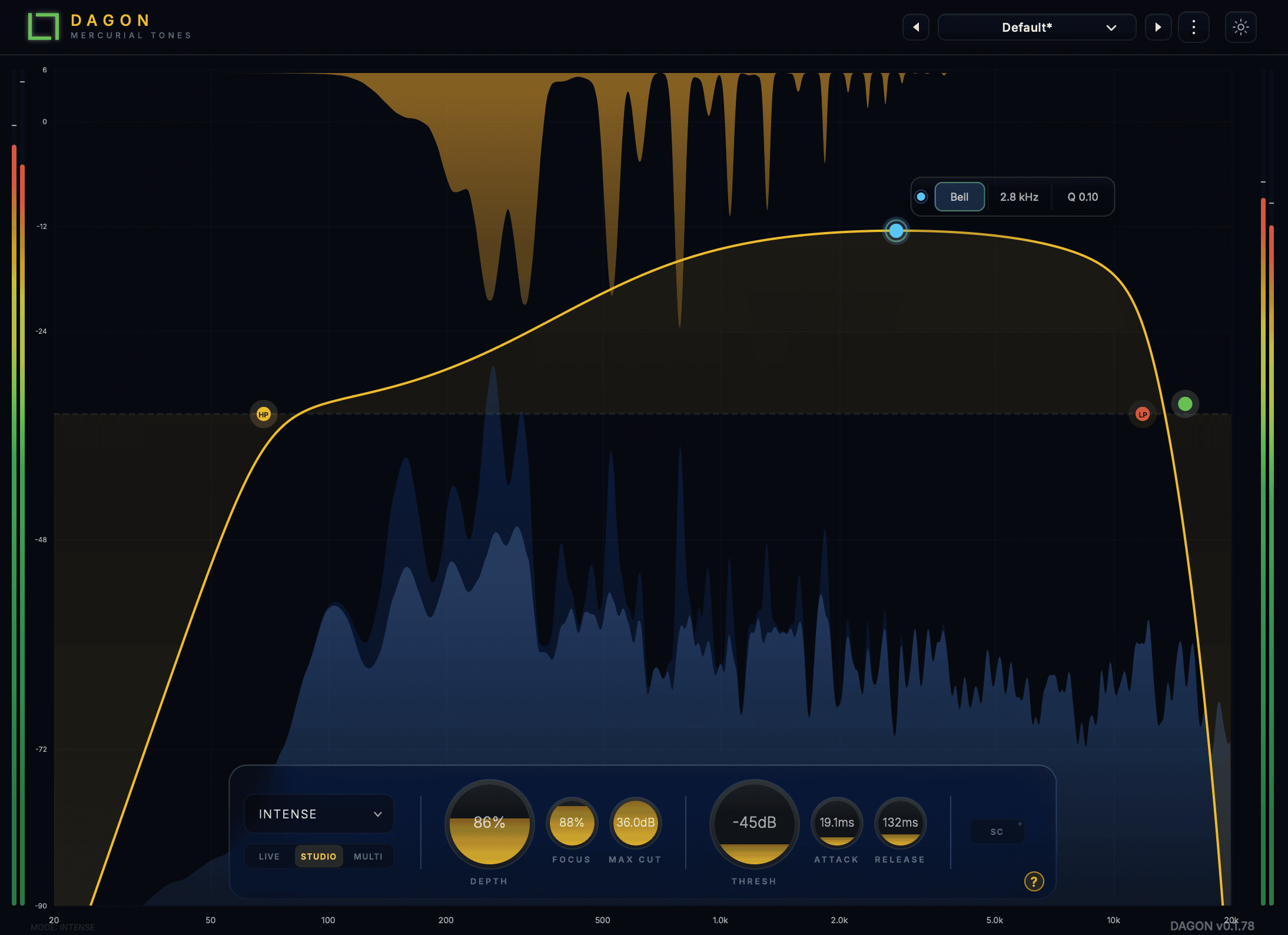
Smart mode analyses relative spectral prominence instead of reacting only to the absolute input level. This allows the processor to treat a harsh resonance consistently whether the track is quiet or loud.
The Focus control changes the selectivity of the suppression. Lower values create wider and smoother correction, while higher values target narrow whistles, metallic ringing and sharp resonant notes.
Dagon includes Resonance, Soft, Perceptual, Volume and Smart modes. This allows it to move from direct peak control to gentler perceptual cleanup or wider dynamic suppression.
The plugin also provides Live and Studio quality modes. Live mode offers a zero-latency path, while Studio mode prioritises processing quality for mixing and offline rendering.
Where Dagon Works Best
- harsh vocal notes;
- bright hi-hats and cymbals;
- resonant synth leads;
- metallic samples;
- distorted drum and instrument buses;
- processed loops with hidden frequency spikes;
- home studio mix cleanup.
Advantages
- completely free;
- automatic Smart processing mode;
- five different suppression behaviours;
- zero-latency Live mode;
- linear-phase Studio mode;
- available in VST3 and AU formats;
- modern and approachable interface.
Limitations
- installed and activated through Mercurial Tones Hub;
- less detailed control than soothe3 or DSEQ3;
- not available as AAX;
- requires an AVX2-compatible processor on Windows.
Verdict: Dagon is the best free option for producers who want automatic resonance suppression rather than manually configuring several dynamic EQ bands. It does not completely replace a premium processor, but it covers an impressive amount of ground for a free plugin.
Read the complete Audiartist review: Dagon Free VST Plugin for Smart Resonance Control.
7. TDR Nova: Best Free Manual Alternative
TDR Nova is a free parallel dynamic equalizer. It does not automatically create hundreds of filters like soothe3, but its dynamic bands can control specific resonances with excellent precision.
Nova offers four parametric EQ bands, high-pass and low-pass filters, wideband compression and independent dynamic processing for each band. A producer can identify a harsh frequency, activate the band dynamics and set a threshold so the cut only occurs when that frequency becomes excessive.
Its external sidechain input can also create space between competing instruments. Placing Nova on a bass track and feeding the kick into the sidechain allows the bass to be reduced only around the kick’s fundamental frequency.
The GR Delta function makes it possible to hear only the material being removed. This is extremely useful when adjusting the frequency, threshold, ratio, attack and release.
Where TDR Nova Works Best
- vocal sibilance;
- one or two identifiable resonances;
- harsh cymbals;
- kick and bass separation;
- low-mid buildup;
- dynamic tonal correction during mastering.
Advantages
- completely free;
- professional dynamic EQ workflow;
- external sidechain support;
- Delta monitoring;
- wideband and band-specific dynamics;
- available in VST, VST3, AU and AAX formats.
Limitations
- resonances must be found and configured manually;
- only four main parametric bands;
- slower than an automatic spectral suppressor;
- cannot independently follow hundreds of shifting peaks.
Verdict: TDR Nova is the best free choice when the problem frequencies are identifiable and the producer is comfortable setting dynamic EQ bands manually.
Read the Audiartist guide: TDR Nova Free VST Dynamic EQ for Mixing and Mastering.
Free vs Paid Resonance Suppressor Plugins
Free plugins can deliver excellent results, but the best choice depends on the complexity of the problem.
Choose a Free Plugin When:
- you are learning dynamic EQ and resonance control;
- you only need to treat occasional harsh frequencies;
- you prefer to identify problems manually;
- you do not need advanced sidechain unmasking;
- your production budget is limited.
Dagon is the better free choice for automatic processing. TDR Nova is the better free choice for manual control.
Choose a Paid Plugin When:
- you mix vocals or live instruments regularly;
- resonances move constantly across the spectrum;
- you need faster results across many tracks;
- you work on professional mixing or mastering projects;
- you need detailed Mid/Side, sidechain or multichannel processing;
- you want higher-quality processing at aggressive settings.
For the most transparent professional workflow, soothe3 is the leading option. For maximum value and detailed control, DSEQ3 is difficult to beat. For unmasking, Curves Equator has one of the strongest sidechain workflows.
How to Use a Resonance Suppressor Without Destroying the Mix
1. Start With a Small Processing Amount
Resonance suppression should normally make the source feel less uncomfortable rather than obviously processed. Begin with a low Depth, Amount or Threshold setting and increase it until the harshness moves slightly backward.
2. Use Delta Monitoring
Delta mode allows you to hear only what the plugin is removing. Ideally, the removed signal should contain whistles, ringing, harshness or unwanted buildup. If Delta mode contains the entire vocal, snare or synth character, the processing is probably too broad.
3. Restrict the Frequency Range
Do not process the entire spectrum when the problem only exists in the upper midrange. Limiting the working range can preserve low-end weight, air and transient clarity.
4. Level-Match Before and After
Automatic resonance suppression can change the perceived loudness of a signal. Match the processed and unprocessed levels before deciding which version sounds better.
5. Bypass the Plugin Regularly
After listening for several minutes, the processed version may begin to sound normal even when too much energy has been removed. Bypass the plugin regularly and compare it with the original source.
6. Avoid Placing Heavy Suppression Everywhere
Using aggressive spectral suppression on every channel can remove contrast and make the entire production sound flat. Apply it only where a genuine problem exists.
Suggested Starting Points
Vocals
- focus on the upper midrange and presence frequencies;
- use a moderate attack to preserve consonant definition;
- avoid suppressing the entire high-frequency range;
- listen for excessive removal of breath and vocal character.
Drum Bus
- target brittle cymbals and sharp snare overtones;
- use broader and gentler processing than on an individual track;
- preserve kick weight and snare attack;
- compare at equal loudness.
Synth Leads
- place the suppressor after distortion or saturation;
- use narrow selectivity for moving filter peaks;
- retain enough upper-mid energy for the lead to remain present;
- automate the processing amount if the filter changes dramatically.
Mix Bus and Mastering
- use very low processing amounts;
- prefer broad, transparent settings;
- limit maximum gain reduction;
- check the result on headphones, monitors and small speakers;
- do not use resonance suppression to repair a fundamentally unbalanced mix.
Which Resonance Suppressor Should You Choose?
Best overall: oeksound soothe3
Best paid value: TBProAudio DSEQ3
Best fast workflow: Baby Audio Smooth Operator Pro
Best for sidechain unmasking: Waves Curves Equator
Best for mix bus and mastering balance: Soundtheory Gullfoss
Best free automatic suppressor: Mercurial Tones Dagon
Best free manual alternative: TDR Nova
Frequently Asked Questions
What Is the Best Resonance Suppressor Plugin in 2026?
oeksound soothe3 is the strongest overall resonance suppressor for professional mixing and mastering. DSEQ3 offers better value for producers who want detailed control, while Dagon is one of the best free automatic alternatives.
Is There a Free Alternative to soothe3?
Dagon by Mercurial Tones is a free automatic resonance control plugin with several suppression modes. TDR Nova is another excellent free option, although its dynamic EQ bands must be configured manually.
Can TDR Nova Remove Resonances?
Yes. TDR Nova can dynamically reduce harsh frequencies, sibilance and resonant peaks. However, it does not automatically track large numbers of shifting resonances like soothe3, DSEQ3 or Dagon.
Should a Resonance Suppressor Be Used Before or After Compression?
Placing it before compression prevents resonances from triggering the compressor too strongly. Placing it after compression controls resonances that become more obvious once the signal has been compressed. Both positions are valid, and the correct choice depends on the source.
Can Resonance Suppressors Be Used for Mastering?
Yes, but only with subtle settings. Excessive resonance suppression on a master can remove punch, brightness, depth and musical contrast. Limit the frequency range and maximum reduction, then compare the result at equal loudness.
Can a Resonance Suppressor Replace EQ?
No. Static EQ remains better for permanent tonal decisions, such as removing unnecessary low frequencies or changing the overall character of a sound. Resonance suppressors are most effective when the problem changes over time.
Final Verdict
The best resonance suppressor plugins can save hours of manual EQ automation, but they are not automatic mix-fixing machines. Their real value lies in controlling frequencies that move, appear intermittently or become aggressive only at specific moments.
oeksound soothe3 remains the most complete premium choice. TBProAudio DSEQ3 provides exceptional control at a more accessible price level. Smooth Operator Pro offers a fast and creative workflow, while Curves Equator excels at spectral unmasking.
For mastering and broad tonal balance, Gullfoss offers a different but highly effective approach. Producers searching for free options should begin with Dagon for automatic suppression or TDR Nova for manual dynamic EQ control.
The most important rule is simple: stop increasing the processing when the harshness disappears. Removing another 6 dB simply because the graph looks busy is how a lively mix becomes a very polite pancake.