Free Online DAW
Audiotool Studio: A Free Browser DAW With Recording and VST3 Support
Record vocals, sequence MIDI, build modular effect chains and produce complete tracks without installing a traditional desktop workstation.
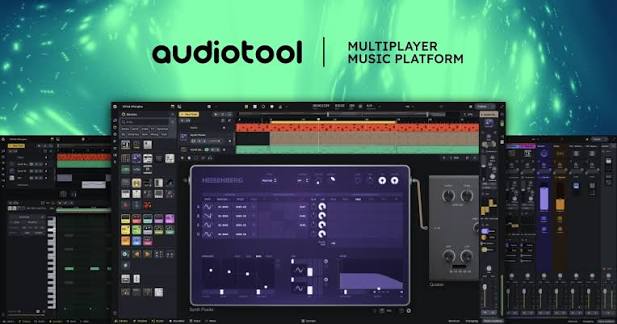
Audiotool Studio is a free browser-based digital audio workstation for recording, beatmaking, MIDI sequencing, sound design, mixing and online collaboration.
The platform runs directly inside a supported web browser, so producers do not need to install a conventional DAW before creating a project. Audiotool presents the service as completely free and without advertising.
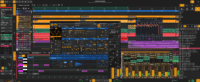
The redesigned Studio provides audio and MIDI tracks, virtual instruments, drum machines, automation, a full mixer, modular routing and a cloud sample library. External VST3 plugins can also be connected through the separate Audiotool VST Bridge application.
| Developer | Audiotool |
|---|---|
| Software type | Cloud-based audio and MIDI workstation |
| Installation | No DAW installation required |
| Supported browsers | Chrome, Edge, Chromium, Brave, Opera and Firefox |
| Audio recording | Microphone, line input and audio interface |
| MIDI | Recording, piano-roll editing, quantization and MIDI Learn |
| Included instruments | Synthesizers, drum machines, samplers and instrument players |
| External plugins | VST3 through Audiotool VST Bridge |
| Price | Free with no advertising |
Audio Recording Inside the Browser
Audiotool Studio can record vocals, guitars, keyboards and other external sources through a microphone, line input or compatible audio interface.
Tracks provide real-time monitoring and input-level meters. The integrated latency-correction system measures the delay introduced by the recording setup and automatically adjusts future recordings to improve timing.
After recording, the Audio Editor can trim regions, split performances, adjust clip gain and create fades. Warp markers can correct timing, while pitch controls and reverse playback provide additional editing and sound-design options.
Editing remains non-destructive, allowing producers to change regions without permanently modifying the original recording stored in the private cloud library.
MIDI Recording and Piano-Roll Editing
External MIDI keyboards and controllers can be connected through USB. Audiotool automatically routes the active MIDI input toward the selected instrument or drum track.
Recorded performances appear as MIDI regions on the timeline. The editor provides note-length adjustment, velocity editing, quantization, humanization and layered editing for several regions.
MIDI Learn allows hardware knobs, pads and faders to control compatible parameters. Producers can record parameter movements as automation while performing.
This workflow supports both live playing and precise note programming, making Audiotool suitable for electronic music, Hip-Hop, House, Synthwave, Pop and experimental production.
Built-In Synthesizers and Drum Machines
Audiotool includes several internal synthesizers covering virtual-analog, wavetable, FM and bass synthesis.
Pulverisateur provides a flexible virtual-analog architecture with three oscillators, dual filters and extensive modulation. Heisenberg uses four-operator phase modulation for digital keys, bells, basses and experimental textures.
Space focuses on spectral and wavetable sounds, while Bassline provides monophonic acid-style synthesis with accent and slide controls. ToneMatrix combines step sequencing and synthesis for rapid melodic patterns.
Rhythmic production is handled through instruments including Machiniste, Beatbox 8 and Beatbox 9. Producers can program patterns, load samples and create drums without purchasing a separate plugin.
Effects, Mixing and Modular Routing
Every mixer channel includes gain, filtering, compression, equalization, panning, volume and effect-send controls.
Built-in reverb and delay sends are immediately available, while the Stagebox creates custom effect chains for groups, send channels and the master output.
The included processors cover EQ, compression, multiband dynamics, reverb, delay, distortion, modulation, stereo processing, filtering and experimental resampling.
Splitter, Merger and BandSplitter modules allow parallel processing and multiband routing. Producers can divide a bass into separate frequency sections or blend several effect chains around the original signal.
External VST3 Plugin Support
Audiotool can connect to locally installed VST3 instruments and effects through VST Bridge.
The bridge is a small companion application that runs on the computer while Audiotool remains open in the browser. It transfers audio and plugin processing between the local machine and the online project.
Official bridge packages are documented for Windows, macOS and Linux. Once connected, compatible VST3 plugins can be sequenced and processed alongside Audiotool’s native devices.
This feature significantly expands the platform, although it removes part of the simplicity of a completely installation-free workflow. External plugins also depend on local computer performance and individual compatibility.
Samples and Audio Editing
The integrated library contains thousands of curated loops, one-shots and sound effects. Samples can be searched by category, type, tempo and descriptive tags.
Files can be dragged directly onto the timeline or loaded into compatible sampler devices. Producers can also upload their own audio, which is stored inside a private cloud sample library.
Loops can be stretched, pitched, reversed and rearranged. Drum hits can be loaded into Machiniste, while longer recordings can remain on conventional audio tracks.
Automation and Creative Control
Audiotool supports manually drawn automation and real-time parameter recording.
Volume, filters, effects, mixer controls and synthesizer parameters can change across an arrangement. Preset automation shapes and randomization tools provide faster ways to create movement.
The platform also includes groove and tuning controls. These tools can adjust rhythmic feel, swing and pitch systems across individual tracks or complete projects.
Best Uses
- Electronic music and beatmaking
- Recording vocals and solo instruments
- Hip-Hop, House, Techno and Synthwave
- Modular sound design and effect routing
- Online collaboration and remixing
- MIDI composition and automation
- Creating music on Windows, macOS or Linux
- Using VST3 plugins inside a browser DAW
Compatibility and Requirements
Audiotool recommends Google Chrome or a Chromium-based browser such as Edge, Brave or Opera. Firefox is also supported, although the developer notes that some audio-input devices may not be fully available.
Safari is not currently supported. A stable Internet connection and a free Audiotool account are required for cloud projects, collaboration and sample storage.
The VST Bridge is optional and only necessary when using external VST3 plugins. Native instruments, effects, recording and MIDI production remain available directly through the browser.
Main Limitations
- A permanent Internet connection is required
- An Audiotool account is required to save projects
- Safari is not officially supported
- Firefox has limitations with some recording inputs
- The redesigned Studio is still evolving and functions may change
- External VST3 plugins require the separate VST Bridge
- Performance depends on the browser, connection and computer
- It cannot provide the same offline security as a conventional desktop DAW
Final Verdict
Audiotool Studio is one of the most complete genuinely free browser DAWs available for producers who want recording, MIDI, synthesis, mixing and modular routing without purchasing software.
Its native instruments and effects are deep enough for complete electronic productions, while VST Bridge extends the platform to locally installed VST3 plugins.
The dependence on an Internet connection remains its main disadvantage. The evolving Studio interface may also receive further changes as Audiotool continues developing the new platform.
For producers who want a free online studio that goes beyond basic loop arrangement, Audiotool provides a serious creative environment. Opening forty browser tabs during the session is still optional and probably not recommended.