Some plugins polish your sound. COGG by Plasmatic does something far less polite, and that is exactly the point. This free VST plugin is built to industrialize audio, adding metallic grit, harmonic distortion, pitch layering and synthetic metal-plate resonance to anything you feed into it.
COGG is a free sound design plugin for producers who want aggressive texture, cinematic tension, distorted movement and raw industrial character inside a DAW. It is not designed to be invisible. It is designed to make drums hit like machinery, synths corrode into metal, vocals turn more feral and clean sounds lose their innocence in a very productive way.
What Is COGG?
COGG is a free audio plugin developed by Plasmatic. It is described as an effects plugin that turns sounds into something industrial, using a chain of metallic processing that includes granular pitch layering, harmonic distortion and convolution reverb built from synthetic metal plate impulse responses.
In practical terms, COGG takes ordinary audio and pushes it toward mechanical, gritty, resonant and distorted territory. It can be used subtly for texture, or pushed harder for full destruction. That makes it useful for industrial music, cinematic sound design, experimental electronic music, techno, trap, bass music, horror scoring and any production where clean audio needs to become more dangerous.
As a free VST plugin, COGG feels unusually focused. It is not trying to be a general multi-effect suite. It has a clear identity: metal, impact, corrosion, pitch weight and controlled sonic damage.
Why This Free VST Plugin Matters for Producers Now
Modern production can sound too clean. Sample packs are polished, synth presets are glossy, drum loops are tight and mixes are often engineered to be smooth from the first idea. That can be useful, but it can also make music feel predictable.
COGG matters because it gives producers a fast way to add disorder, weight and tension. A pristine synth pad can become a dark cinematic layer. A drum loop can take on a crushed, mechanical edge. A vocal can become more aggressive. A simple one-shot can turn into a metallic transition effect.
For home studio producers, this kind of free audio plugin is valuable because it offers a specific creative color without requiring a large paid sound design suite. It is the kind of producer tool that can make a track feel less safe, which is sometimes exactly what the arrangement needs.
Main Features
- Free industrial destruction effect: designed to metallize and distort incoming audio.
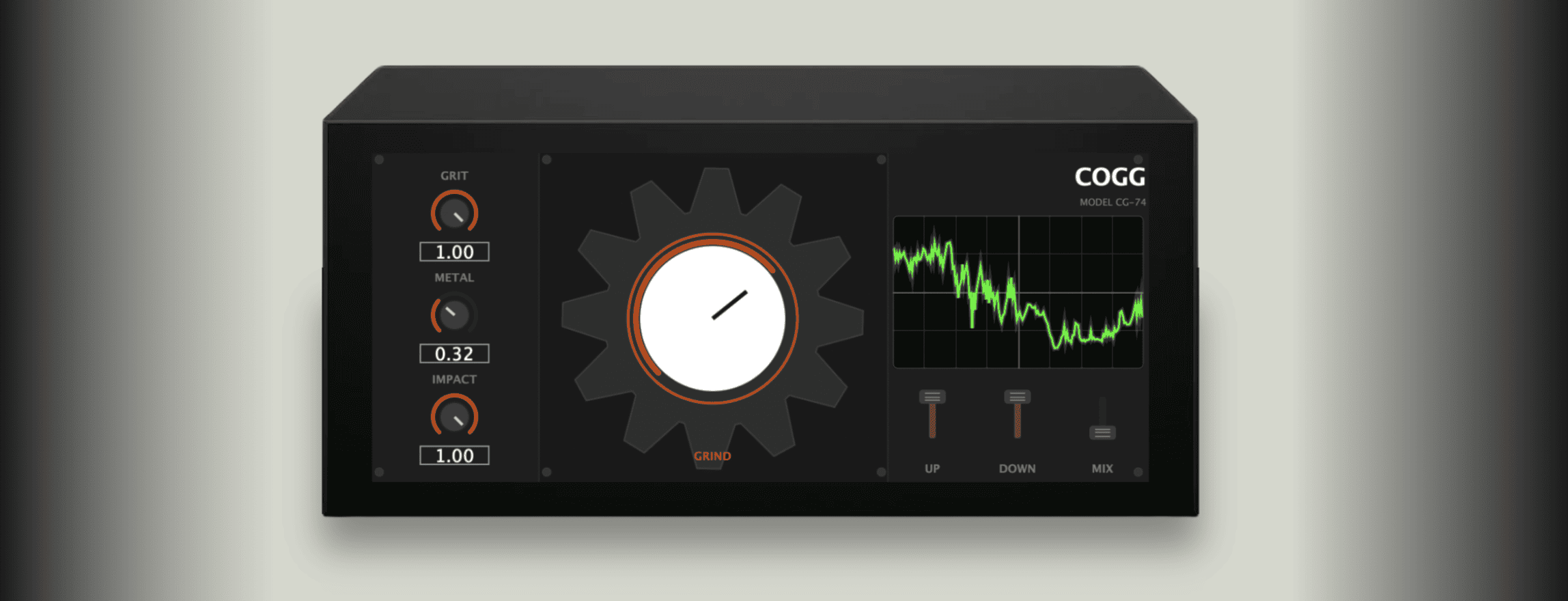
- Grind macro: central control for increasing the overall intensity of the effect.
- Impact control: adds a sharper metallic attack at the front of sounds.
- Metal control: uses convolution reverb with synthetic metal plate impulse responses.
- Grit control: adds harmonic excitement and industrial texture.
- Up and Down controls: layer pitch-shifted voices above and below the original signal.
- Mix control: blends the processed effect with the dry sound.
- 8 free presets: includes settings for subtle texture, heavy impact, metallic shimmer and full destruction.
- Animated interface: features a rotating gear-style visual and live CRT-style oscilloscope display.
- No account required: the plugin can be downloaded without creating an account.
- Windows and macOS support: available as Windows VST3, macOS VST3 and macOS AU.
Sound, Workflow and Creative Use
COGG is not a gentle enhancer. Its sound is metallic, gritty and intentionally unstable. It can add subtle industrial seasoning, but its real personality appears when the processing becomes obvious. This is a plugin for producers who want texture with teeth.
On drum loops, COGG can add machine-like crush, sharper attacks and metallic resonance. Used lightly, it can give percussion more attitude. Used heavily, it can turn a loop into a distorted industrial rhythm section, useful for techno, dark electronic music, cinematic trailers and experimental beats.
On synths, the plugin can be especially effective. Pads can become ominous and rusted. Leads can gain edge and dissonance. Bass sounds can take on a heavier, more mechanical character when pushed through Grind, Grit and pitch layering.
On vocals, COGG moves into more extreme territory. It can create aggressive, distorted vocal effects for industrial, metal-inspired electronic music, sound design and cinematic voice processing. This is not the tool for transparent vocal polish. This is the tool for making a vocal sound like it escaped from a factory basement with unfinished business.
The Most Important Controls Explained
Grind
Grind is the central macro control in COGG. It increases the overall intensity of the processing and acts as the quickest way to move from subtle corrosion to more obvious destruction.
This makes Grind the best starting point when auditioning the plugin. On a drum loop, turn it up until the groove starts to feel more mechanical. On a synth, increase it until the texture gains weight. On vocals, use it carefully, unless the goal is full industrial damage.
Impact
Impact shapes the front of the sound by adding a sharper metallic attack. This can make drums, percussion, bass hits and stabs feel more aggressive. It is especially useful when a sound needs more transient bite or a harder mechanical edge.
For cinematic sound design, Impact can help create hits, impacts, metallic strikes and tension elements from relatively simple sources. Even a basic synth note or percussion sound can become more dramatic when the attack is pushed into metallic territory.
Metal
Metal controls the convolution reverb section based on synthetic metal plate impulse responses. This gives the processed signal a resonant, metallic space rather than a clean room or hall style ambience.
This is one of the controls that gives COGG its identity. The sound does not simply become distorted. It starts to feel like it is living inside a resonant metal structure. That makes it useful for dark ambience, horror textures, industrial transitions and sound design layers.
Grit
Grit adds harmonic excitement and extra industrial texture. It helps push the signal into rougher, more distorted territory without relying only on the main Grind control.
This is useful when a sound needs more presence, edge or abrasion. On synths and basses, Grit can make the tone more aggressive. On drums, it can add rawness. On vocals, it can create a more extreme distorted character when combined with Mix and Grind.
Up and Down
Up and Down layer pitch-shifted voices above and below the incoming signal. These controls are important because they add dissonance, weight and width to the processing.
The upper layer can bring harshness, shimmer or tension, while the lower layer can add weight and darker movement. Used together, they can create unstable, cinematic textures that feel much bigger than the original sound.
Mix
Mix controls how much of the processed signal is blended with the dry sound. This is essential because COGG can become intense very quickly. A lower Mix setting can add metallic character while keeping the source recognizable. A higher Mix setting pushes the sound into full transformation.
For mixing, subtle Mix settings are useful on drums, basses and synths. For sound design, higher settings are where the fun begins, and possibly where the neighbors begin asking questions.
Who Should Use COGG?
COGG is best suited to producers, sound designers and composers who want a free industrial sound design plugin with a strong personality. It is especially useful for industrial music, dark techno, cinematic scoring, horror trailers, experimental electronic music, bass music, trap sound design and aggressive vocal effects.
Beatmakers can use it to destroy drum loops, create transition hits and add metallic character to one-shots. Mixing engineers may use it more sparingly as a special effect on parallel buses or automation moments. Sound designers can push it harder to create impacts, drones, textures and mechanical layers.
It is also useful for home studio producers who want a fast way to make clean sounds feel darker, heavier and less predictable. Not every track needs polished beauty. Some tracks need a little rust.
Best Use Cases for Producers and Sound Designers
- Industrial drums: add metallic crush, sharper attack and mechanical texture to drum loops.
- Cinematic impacts: transform simple hits into darker, heavier sound design elements.
- Dark synth textures: turn pads, leads and drones into corroded atmospheric layers.
- Vocal destruction: create aggressive distorted vocals for industrial, metal-inspired or experimental tracks.
- Trailer sound design: build tension, impact, movement and unstable metallic ambience.
- Techno and bass music: add grit, dirt and machine-like energy to rhythm sections.
- Experimental music: push ordinary sounds into strange, resonant and damaged territory.
- Creative resampling: print processed audio and edit the best moments into transitions, fills or textures.
Compatibility and Download Details
COGG is available as a free download from Plasmatic on itch.io. The official download page currently provides separate builds for Windows VST3, macOS VST3 and macOS AU. The plugin is made for Windows and macOS users working inside compatible DAWs.
The developer also provides installation instructions on the download page. Windows users can place the VST3 file in the standard VST3 folder, while macOS users can install the VST3 or AU version in the relevant system plugin folders. If the plugin does not appear immediately, a DAW plugin rescan may be required.
Official website: Visit the COGG page on Plasmatic
Download link: Download COGG for free
Why This Type of Free Plugin Matters
Free plugins often succeed when they do one job with a clear identity. COGG is a strong example of that idea. It is not a generic distortion plugin with a new skin. It has a specific concept: metallic processing, industrial texture, pitch layering and resonant destruction.
That matters because producers already have plenty of clean tools. Most DAWs include EQ, compression, delay, reverb and basic distortion. What many sessions need is a source of character, something that can turn a familiar sound into something strange enough to catch the ear.
A free VST plugin like COGG gives independent producers access to a more experimental sonic palette without cost. For home studio creators, that can be important. Sound design should not be limited to expensive cinematic libraries or large commercial effect suites.
What Happens Next?
COGG already feels like the kind of plugin that could develop a strong niche audience. Industrial sound design tools do not need to please everyone. They need to be useful to the people who want edge, damage and atmosphere, and COGG understands that brief clearly.
The addition of presets makes the plugin easier to approach, especially for producers who want quick starting points rather than building every metallic texture from scratch. From subtle rust to full meltdown, the preset system helps users explore different levels of destruction quickly.
Its future will likely depend on how producers use it outside the obvious industrial context. The real value may appear when COGG is placed on unexpected sources: acoustic samples, soft vocals, clean guitars, orchestral hits, lo-fi loops or field recordings.
Final Verdict
COGG by Plasmatic is a distinctive free sound design plugin for producers who want metallic distortion, industrial texture and creative destruction inside their DAW. It is not subtle by nature, but it can be controlled with the Mix control and shaped through Grind, Impact, Metal, Grit and pitch layering.
For industrial music, cinematic sound design, dark electronic production, experimental beats and aggressive vocal processing, COGG is easy to recommend. It gives producers a fast way to make clean sounds feel heavier, stranger and more dangerous.
As a free audio plugin, COGG has a clear identity and enough personality to stand out. It may not be the tool you place on every channel, thankfully for everyone’s nervous system, but when a track needs corrosion, metal and controlled chaos, it does the job with conviction.