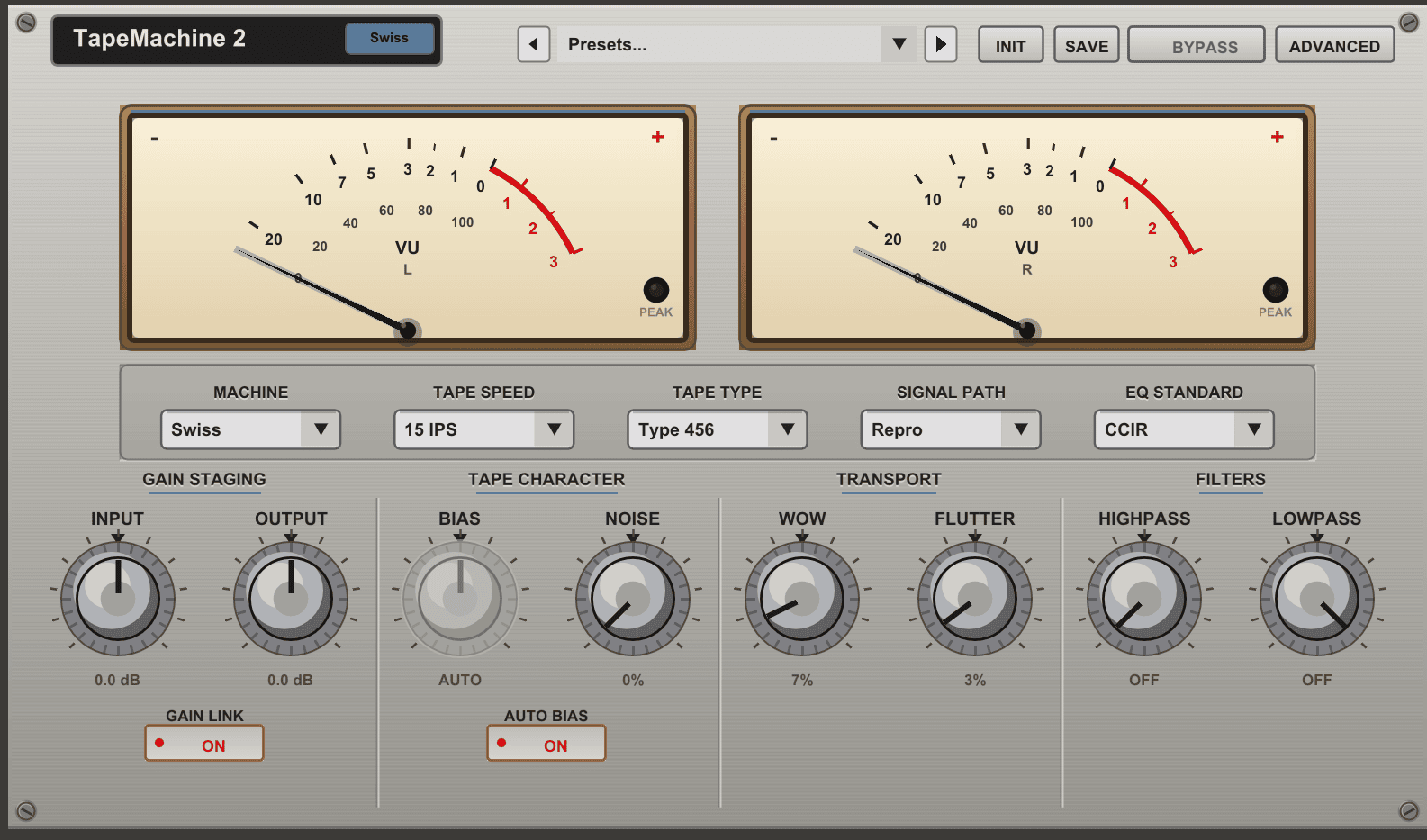
Dusk Audio has released TapeMachine 2, a free open-source tape saturation plugin designed to reproduce the colour, compression, frequency response and mechanical movement associated with professional reel-to-reel recorders.
Released in July 2026, the plugin provides two distinct tape-machine models, four tape formulations, multiple recording speeds, adjustable bias, wow and flutter, advanced reproduce equalisation and 20 factory presets. It can add subtle cohesion to a mix bus or push individual tracks toward heavier vintage and lo-fi character.
What Is TapeMachine 2?
TapeMachine 2 is the second generation of Dusk Audio’s analogue tape-processing system.
Rather than presenting one generic saturation curve, the plugin offers two machine models with different frequency responses, harmonic behaviour and signal-path options.
The effect can be inserted on vocals, drums, basses, guitars, synthesizers, instrument groups or a complete mix. It processes existing audio and is not a virtual instrument.
Two Different Tape Machines
The interface provides Swiss and American machine models.
Swiss Machine
The Swiss model is inspired by a precise transformerless studio recorder. It offers a tighter low end, extended high frequencies and a cleaner response that can work well for tracking, drums, vocals and mix-bus processing.
It is the more controlled option when producers want tape colour without heavily softening the original signal.
American Machine
The American model is inspired by a classic mastering recorder with a warmer tonal balance, transformer character and a more pronounced low-frequency head bump.
It also provides additional controls for head width, crosstalk, transformer colour and transport movement.
This model can be particularly useful for mastering-style saturation, bass-heavy material and productions that need a broader vintage identity.
Four Tape Formulations
TapeMachine 2 includes four tape types, each designed to react differently when driven.
- 456: Warm and punchy saturation for Rock, Pop, drums and mix buses
- GP9: Cleaner response with more headroom for mastering and transparent processing
- 900: Controlled European-style colour and musical warmth
- 250: Earlier saturation and stronger vintage character for lo-fi processing
Changing the tape formulation affects how quickly the signal begins to compress and generate harmonics.
A clean recording may benefit from the additional colour of 456 or 250, while a dense mix may require the greater headroom of GP9.
Four Tape Speeds
The plugin models four recording speeds:
- 30 IPS
- 15 IPS
- 7.5 IPS
- 3.75 IPS on the American machine
Higher speeds generally provide tighter low frequencies and a more extended top end. Slower speeds increase the low-frequency bump and reduce high-frequency detail, producing a warmer and more obviously vintage sound.
The 30 IPS setting is useful for cleaner bus processing, while 7.5 or 3.75 IPS can create stronger colour on drums, keys, guitars and sampled material.
Repro, Sync, Input and Thru Modes
TapeMachine 2 recreates several signal paths found on real recording machines.
- Repro: Applies the complete tape and playback processing chain
- Sync: Uses a record-head-style response with additional high-frequency roll-off
- Input: Processes the signal through the electronics without the complete tape response
- Thru: Provides a clean comparison path
Input mode can be useful when a producer wants transformer and electronic colour without the complete head response or transport modulation.
NAB and CCIR Equalisation
The plugin includes NAB and CCIR equalisation standards.
NAB provides a warmer American-style response with stronger high-frequency pre-emphasis, while CCIR offers a more balanced European-style presentation.
The difference can be subtle at conservative settings but becomes more noticeable when combined with slower tape speeds and stronger input drive.
Bias and Automatic Calibration
Bias influences the relationship between saturation, distortion and high-frequency response.
TapeMachine 2 allows manual adjustment or automatic bias calibration. Auto Bias provides a quick starting point, while manual control can be used to create cleaner or more deliberately coloured results.
Changing bias should be judged in the context of the complete mix. A setting that sounds exciting on a solo track may remove too much clarity once every instrument is playing.
Automatic Gain Compensation
Driving the input harder produces more saturation, but additional level can make comparisons misleading.
The Auto Compensation function adjusts the output while the input drive changes, helping producers compare tone rather than volume.
This is particularly valuable on mix buses and mastering chains, where a louder processed signal can easily appear better even when it has lost punch or detail.
Wow and Flutter
TapeMachine 2 provides separate controls for wow and flutter.
Wow creates slower pitch movement that can add gentle instability to sustained notes, pads, vocals and keys. Flutter introduces faster modulation with a subtler chorus-like character.
Low settings can make a source feel less static. Stronger values are more suitable for lo-fi effects, ambient textures, nostalgic keyboards and deliberately damaged recordings.
The stereo processing remains coherent, helping the effect create movement without turning the centre of the mix into an unpredictable phase experiment.
Advanced Reproduce EQ
A four-band Repro EQ provides additional control over the playback tone.
- Low-frequency shelf for weight and body
- Low-mid peak for warmth
- High-mid peak for presence
- High-frequency shelf for air and brightness
This section can compensate for changes introduced by slower tape speeds or create a more stylised tone after saturation.
It is better suited to broad musical adjustments than narrow corrective equalisation.
Using TapeMachine 2 on Drums
Tape saturation can soften sharp transients while increasing harmonic density.
On a drum bus, start with the Swiss machine at 15 or 30 IPS for controlled cohesion. Increase the input until the drums begin to feel more connected, then use Auto Compensation to compare the processed and bypassed signals at a similar level.
For heavier Hip-Hop, House or Techno drums, the American machine with 456 tape can produce more low-frequency weight and stronger saturation.
Using the Plugin on Bass
Bass sounds can benefit from the additional harmonics produced by tape processing.
These harmonics help the instrument remain audible on smaller playback systems without simply increasing the deepest sub frequencies.
Use moderate input drive and monitor the head bump carefully. Slower tape speeds can add useful weight, but they can also create excessive energy around the kick and bass relationship.
Vocals, Guitars and Synthesizers
On vocals, TapeMachine 2 can soften transients and add density before or after compression. The Swiss machine is a useful starting point when the original recording already contains warmth.
Guitars and electric keyboards can tolerate stronger wow, flutter and slower-speed processing, especially in Indie, Lo-Fi, Dream Pop and retro electronic productions.
Digital synthesizers can also gain additional movement and harmonic complexity. Subtle saturation often works better than extreme drive when the patch already contains several oscillators and effects.
Mix Bus and Mastering Use
The American machine is designed partly around mastering-style tape behaviour, but mix-bus processing should remain conservative.
Use higher tape speeds, cleaner formulations and small amounts of input drive when the objective is cohesion rather than obvious distortion.
The Auto Compensation function is essential for accurate comparison. Check the result for low-frequency build-up, softened transients and reduced stereo clarity before committing the processing.
Twenty Factory Presets
TapeMachine 2 includes 20 factory presets divided across mastering, colour, mixing and lo-fi applications.
The collection includes starting points for drum buses, bass, vocals, Rock mixes, Hip-Hop, mastering and deliberately aged tape effects.
Presets provide useful examples of how the machine, tape type, speed, bias and transport controls interact, but input gain should always be adjusted to match the source level.
Formats and Compatibility
- Current version: 1.0.0
- Windows: VST3
- macOS: VST3 and Audio Unit
- Linux: VST3 and LV2
- Architecture: 64-bit DAW required
- Sample rates: 44.1 to 192 kHz
- Interface: Resizable
- License: GPL-3.0 open source
TapeMachine 2 does not currently provide an AAX version for Pro Tools.
Free and Open Source
The plugin is completely free and distributed under the GPL-3.0 open-source licence.
No trial period, subscription or paid upgrade is required to use the current version. Installers and source code are available through the official Dusk Audio website and GitHub repository.
Visit the official TapeMachine 2 product page
Download TapeMachine 2 from the official GitHub release
Important Limitations
TapeMachine 2 is a creative tape processor rather than a transparent mastering utility.
Heavy drive, slow tape speeds and strong wow or flutter settings can reduce transient clarity and stereo focus. These behaviours are part of the effect, but they may not suit every track.
The plugin also models tape-machine behaviour rather than the complete workflow of recording, editing and mixing on physical tape.
Final Verdict
TapeMachine 2 is a detailed free tape emulation plugin for producers who want more control than a simple saturation knob.
Its two machine models, four tape formulations, multiple speeds, signal-path options, adjustable bias, advanced Repro EQ and transport modulation cover both practical mixing and stronger creative processing.
For drums, basses, vocals, guitars, synthesizers and mix buses, it provides a flexible way to introduce analogue-style density, movement and frequency colour without purchasing another premium tape plugin.