
COGG by Plasmatic: Free Industrial Multi-Effect VST
Turn drums, synths, vocals and samples into metallic, distorted and industrial textures with one free creative effects plugin.
COGG is a free creative effects plugin developed by Plasmatic for producers who want to transform clean sounds into metallic, distorted and industrial textures.
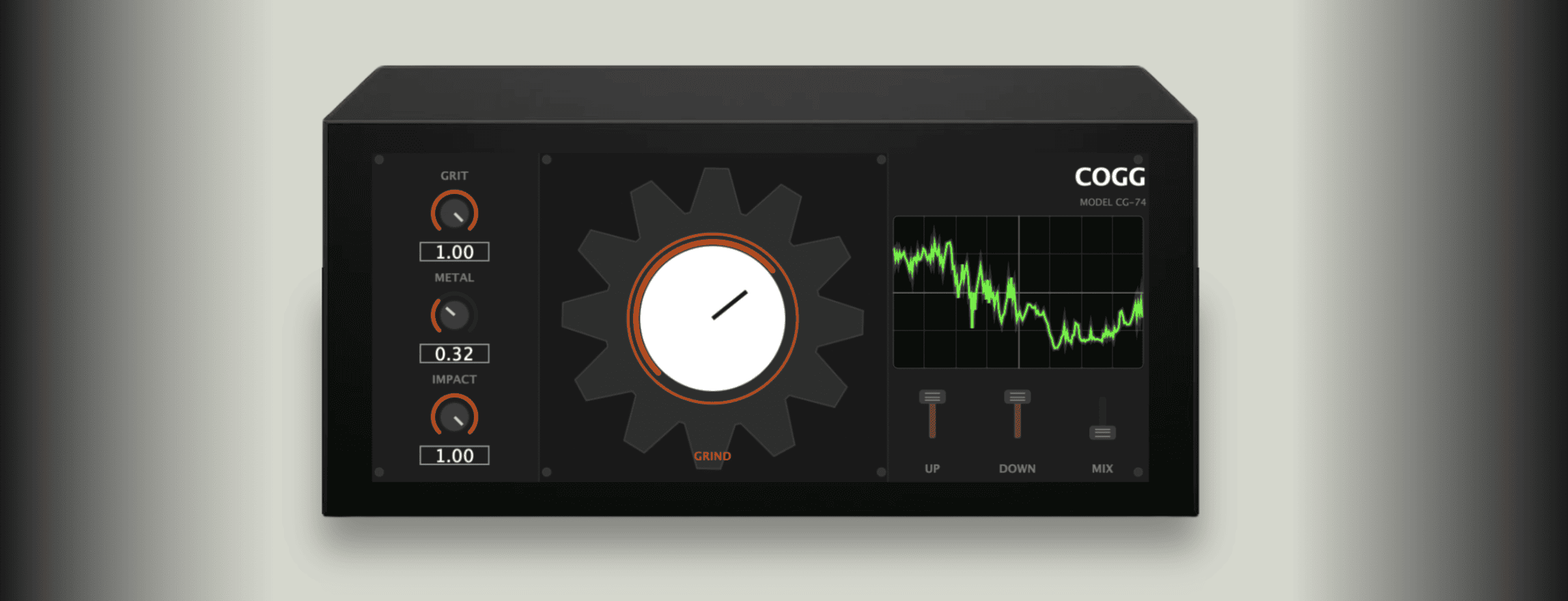
Instead of providing another conventional distortion algorithm, COGG combines several processes inside one compact interface: granular pitch layering, harmonic excitation and convolution reverb based on synthetic metal plate impulse responses.
The result can range from subtle mechanical coloration to heavily transformed drums, basses, synthesizers, vocals and experimental sound-design material.
Completely free: COGG can be downloaded directly from the developer’s official itch.io page. No account, subscription or activation system is required.
What Is COGG?
COGG is an audio effect designed around one central idea: making ordinary sounds more mechanical, metallic and aggressive.
The plugin can be inserted on almost any audio source. Plasmatic specifically demonstrates it on synth pads, basses, leads, drum loops and vocals.
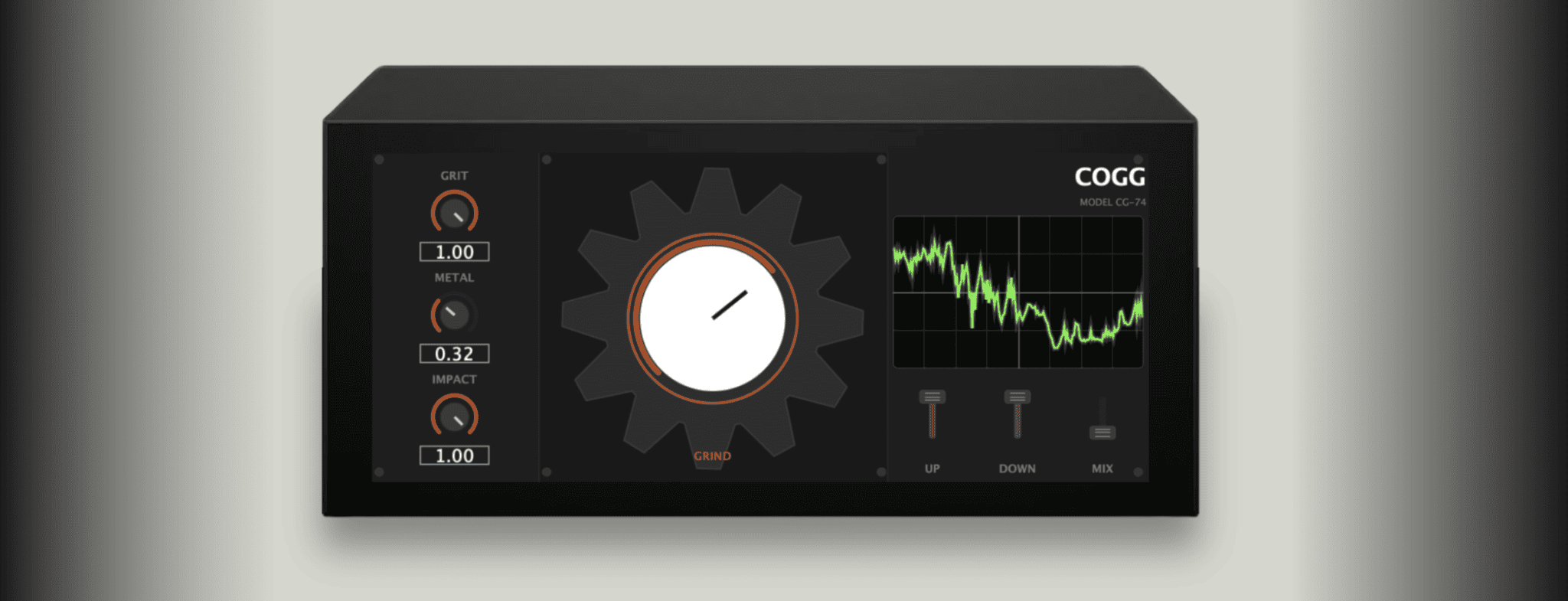
Several processing stages work together to create the final texture, but the large central Grind control makes it possible to control the overall intensity without adjusting every parameter manually.
Main advantage: COGG combines several destructive sound-design techniques in one plugin, making it faster to create industrial textures than building a long chain of pitch shifters, distortion and convolution effects.
Main Features
- Granular pitch layering
- Harmonic distortion and excitation
- Synthetic metal plate convolution reverb
- Central Grind macro control
- Metallic transient shaping
- Pitch layers above and below the original signal
- Dry and wet Mix control
- Output Gain control
- 12 factory presets
- Animated rotating gear interface
- Real-time CRT-style oscilloscope
- Free Windows and macOS downloads
The Grind Control
The large central Grind knob acts as the main intensity control.
Increasing Grind pushes the signal further into COGG’s processing chain, producing progressively stronger distortion, metallic coloration and transformation.
This is useful when working quickly. Instead of adjusting several effects independently, producers can use Grind to find the general amount of destruction first and fine-tune the individual controls afterwards.
Starting point: Begin with a relatively low Grind value and increase it while the complete arrangement is playing. COGG is capable of moving from texture to total reconstruction fairly quickly.
Impact: Metallic Attack Shaping
The Impact control changes the character of the beginning of each sound.
Higher settings create a sharper and more distorted metallic attack before the processing settles into the sustained part of the signal.
This can be particularly effective on drums, percussion, plucks and short synthesizer notes where the transient plays an important role.
Drum idea: Increase Impact on a snare or percussion loop, then reduce Mix until the original transient and the metallic processed layer work together.
Metal: Synthetic Plate Convolution
The Metal parameter controls a convolution reverb generated from synthetic metal plate impulse responses.
This is one of the main elements responsible for COGG’s industrial character. Instead of a conventional room or hall ambience, the processed sound appears to resonate through metallic material.
Short sounds can become ringing mechanical hits, while sustained instruments can develop resonant industrial tails.
Sound-design tip: Render a heavily processed metallic tail to audio, reverse it and place it before the original sound to create custom transitions and impacts.
Grit: Harmonic Distortion
Grit introduces additional harmonic content to the signal.
The developer describes the processing as folding odd harmonics into the source, producing rougher and more industrial coloration.
On basses and synths, moderate Grit can add presence and density. Stronger values work better when the objective is obvious distortion rather than transparent enhancement.
Because harmonic processing can increase perceived loudness, the output Gain control is useful for making more accurate before-and-after comparisons.
Up and Down Pitch Layers
The Up and Down controls add pitch-shifted voices above and below the original source.
These layers can make a simple sound considerably larger or more unusual. A drum hit can gain tonal resonances, while a synth or vocal can develop a more complex mechanical texture.
Up: Introduces a higher-pitched processed layer.
Down: Adds a lower-pitched layer for additional weight and darker coloration.
Using both controls simultaneously can create dense layered effects. In a busy mix, however, one pitch direction may provide enough character without occupying unnecessary frequency space.
Output Gain
The recent update adds a dedicated Gain control for adjusting the level leaving the plugin.
This may appear like a simple addition, but it is particularly useful with destructive effects. Distortion, convolution and pitch layering can all increase perceived or actual output level.
Reducing Gain allows the processed and bypassed signals to be compared at a more similar loudness.
Mixing reminder: Louder usually sounds more impressive during a quick comparison. Match the levels before deciding that maximum destruction has also produced maximum improvement.
12 Factory Presets
COGG now includes 12 factory presets designed to demonstrate different levels and styles of metallic processing.
The presets provide useful starting points for producers who want immediate results before learning every control.
They can also be modified freely, making them more useful as starting configurations rather than fixed final sounds.
Using COGG on Drums
Drums are one of the most obvious applications for COGG.
Place the plugin on a percussion loop and use Impact to strengthen the metallic attack. Add Metal for resonant tails and increase Grit when the loop needs additional aggression.
Parallel processing often works particularly well. Keep part of the original drum signal intact with the Mix control while blending the more destructive version underneath.
Creative workflow: Process a full drum loop aggressively, render it to audio, cut individual metallic hits from the result and use them as additional percussion in the arrangement.
Using COGG on Synthesizers
Synth pads, leads and basses can become considerably more complex through COGG.
A smooth pad can develop metallic resonance and pitch movement. A simple bass can gain additional harmonics, while leads can be pushed toward more aggressive Industrial, Hyperpop or experimental electronic textures.
Automating Grind or Mix during a transition can move gradually from the original synth into the processed version.
Using It on Vocals
Vocals can produce some of the most extreme results.
Small amounts of processing can add texture to backing vocals, spoken phrases and vocal effects. Stronger settings can produce distorted or scream-like industrial vocal treatments.
For a lead vocal, parallel processing is usually safer than completely replacing the original signal.
Vocal idea: Duplicate or send the vocal to another channel, apply heavy COGG processing and automate that layer only during selected words, transitions or ad-libs.
Useful Genres
Industrial: Create metallic percussion, distorted textures and aggressive sound-design layers.
Hard Techno: Transform kicks, percussion and FX into harsher mechanical material.
Hyperpop: Push vocals, synths and drum fills into more exaggerated digital textures.
Experimental EDM: Process ordinary samples into unusual transition and drop elements.
Noise and Industrial Rock: Add aggressive resonances to guitars, vocals and recorded material.
Cinematic sound design: Create machinery, metallic impacts, tension effects and processed atmospheric elements.
Official COGG Update Demo
The official developer video below demonstrates the updated COGG workflow and its metallic processing.
Resizable Creativity Without a Huge Plugin Chain
The main attraction of COGG is not precision mixing. It is speed and character.
A similar effect could be created manually with pitch shifters, granular processing, distortion, convolution reverb and additional routing. COGG places those ideas inside a simpler interface designed specifically for destructive experimentation.
This makes it useful when the production needs a new sound quickly rather than another hour of technical routing.
Compatibility
- Windows: VST3
- macOS: VST3 and Audio Unit
- Plugin type: Creative multi-effect
- Factory presets: 12
- Account required: No
- Subscription: No
- Linux: No official build currently listed
- Source code: Available through the developer’s GitHub repository
The developer also notes that some older macOS systems may require additional steps to remove Apple quarantine restrictions before the plugin is recognised by the DAW.
How to Download COGG
- Open the official COGG itch.io page.
- Select Download.
- Choose the Windows VST3, macOS VST3 or macOS Audio Unit version.
- Extract the downloaded archive.
- Move the plugin file to the appropriate system plugin folder.
- Open the DAW and rescan the plugin directory if necessary.
- Load COGG as an audio effect.
Final Verdict
COGG is a distinctive free effect for producers who already have enough transparent EQs, compressors and reverbs and want something deliberately less polite.
Its combination of metallic convolution, harmonic distortion, pitch layering and transient shaping can turn basic material into percussion, transitions, industrial textures and aggressive sound-design elements.
The plugin is especially interesting on drums and synthesizers, but vocals, guitars and field recordings can produce equally unusual results.
COGG is not intended to solve technical mix problems. Its job is to create new ones in a musically useful way, which is considerably more entertaining.
Download COGG for Free
Get the Windows or macOS edition directly from Plasmatic’s official download page.
![[ODESA] - OFFICIAL FREE SAMPLE PACK VOL.1](https://www.audiartist.com/wp-content/uploads/2026/08/uhmup1lv86cuaa18kcaom931ko1s-200x200.jpg)