
KrystalComp: A Free Precision Compressor VST
RMS and Peak detection, sidechain EQ, parallel compression, automatic loudness matching and detailed visual metering in a completely free dynamics processor.
KrystalComp is a free digital compressor developed by Krystal Dynamics for mixing, mastering and detailed dynamics control.
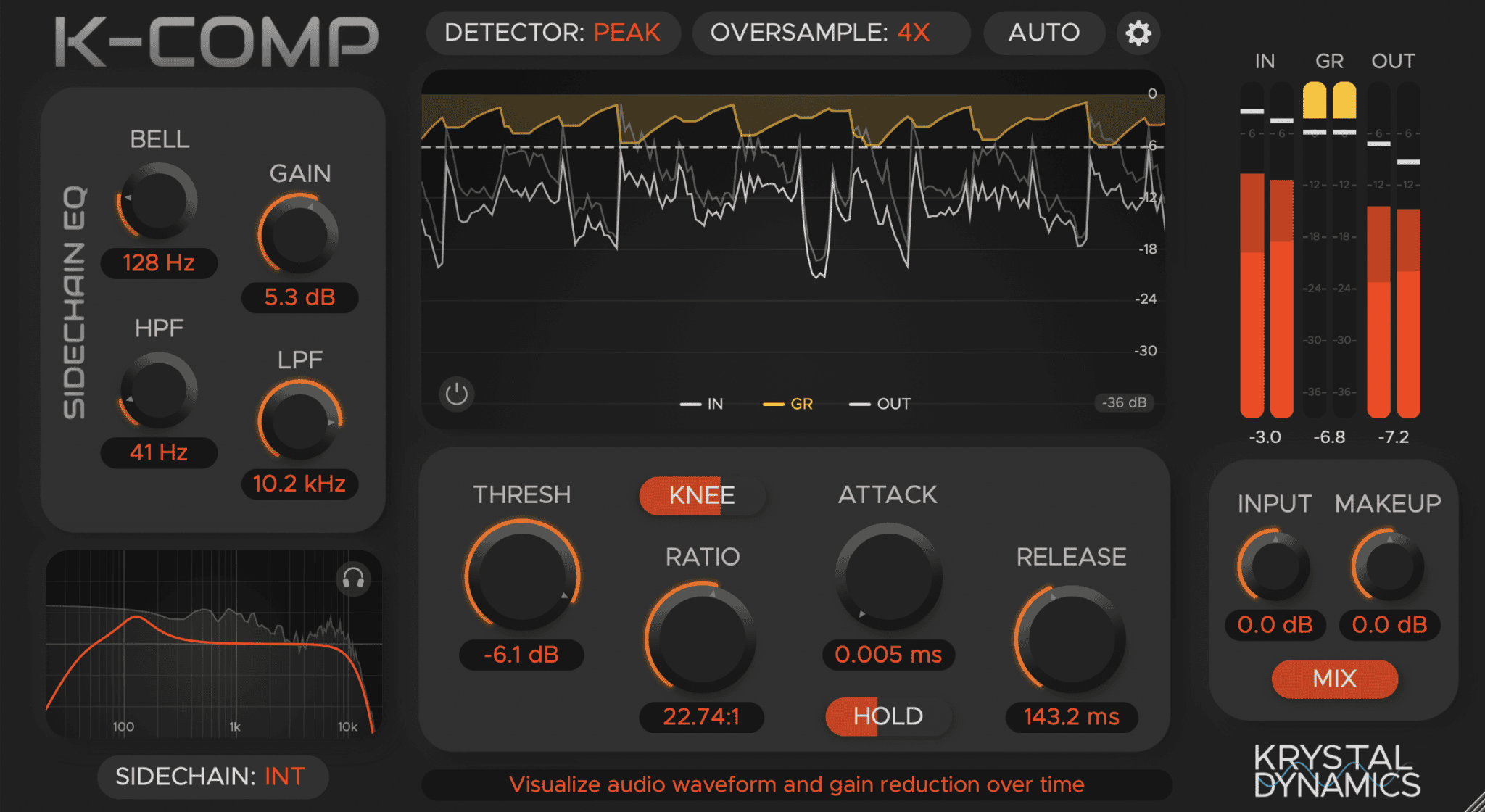
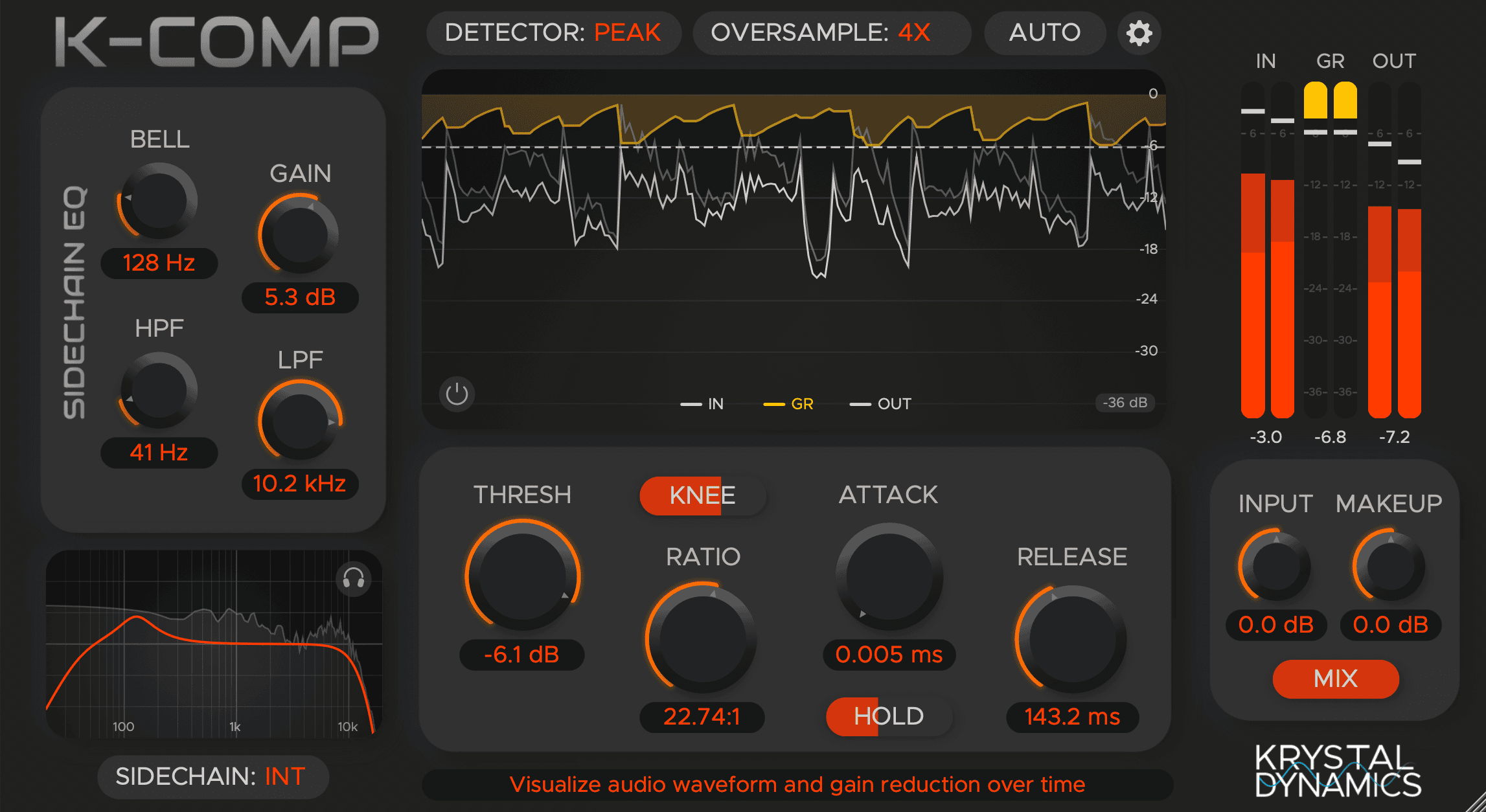
The plugin combines traditional compressor controls with several features normally associated with more advanced commercial processors, including RMS and Peak detection, variable knee, a Hold parameter, internal and external sidechaining and a dedicated sidechain EQ.
KrystalComp also provides automatic loudness matching, real-time waveform visualisation, parallel compression and up to 4x oversampling.
Completely free: Krystal Dynamics provides KrystalComp without payment for both personal and commercial music production. Windows users receive VST3, while macOS users can install VST3 or Audio Unit versions.
What Is KrystalComp?
KrystalComp is a modern digital compressor designed to provide precise control over the dynamic range of vocals, drums, basses, instruments, buses and complete mixes.
Its interface follows a familiar compressor workflow, with Threshold, Ratio, Attack and Release controls at the centre of the processing.
Krystal Dynamics expands this conventional design with additional tools for shaping how the compressor detects and reacts to the incoming signal.
Main advantage: KrystalComp provides detailed dynamics control without locking important functions such as external sidechain, parallel compression or advanced detection behind a paid edition.
Main Features
- Threshold, Ratio, Attack and Release controls
- Variable compression knee
- Dedicated Hold parameter
- RMS detection mode
- Peak detection mode
- Input and makeup gain
- Automatic loudness matching
- Parallel compression Mix control
- Internal sidechain
- External sidechain input
- Sidechain high-pass filter
- Sidechain low-pass filter
- Sidechain bell EQ
- Sidechain monitoring
- Real-time waveform display
- Input, output and gain-reduction meters
- Oversampling up to 4x
- Zero reported processing latency
RMS and Peak Detection
KrystalComp provides separate RMS and Peak detection modes.
Peak mode reacts more directly to short transient events. It can therefore be useful for drums, percussion and other sounds where sudden peaks need to be controlled.
RMS mode responds more closely to the average signal level. This generally produces smoother compression and can work particularly well on vocals, bass, instrument buses and complete mixes.
Starting point: Try Peak detection when controlling aggressive transients and RMS when the goal is smoother overall level control. The correct mode still depends on the source rather than the label on the channel.
Variable Knee Control
The Knee parameter controls how gradually the compressor moves from uncompressed to compressed behaviour around the threshold.
A harder knee produces a more immediate transition and can create a firmer dynamic response.
A softer knee introduces compression more progressively, often creating smoother results on vocals, bass, pads and mix buses.
This additional control is useful because two compressors using the same threshold and ratio can still feel very different depending on the shape of their knee.
The Hold Parameter
KrystalComp also includes a Hold control, added during the plugin’s 1.1 update.
Hold determines how long the compressor maintains its gain-reduction behaviour before the release stage takes over.
This can help stabilise compression on signals with rapidly changing dynamics and prevent the gain reduction from recovering too quickly between nearby peaks.
Drum tip: A small Hold value can keep the compressor engaged between closely spaced drum transients without requiring an excessively long Release setting.
Built-In Sidechain EQ
One of KrystalComp’s strongest features is its integrated sidechain equalizer.
The detector can be filtered with high-pass, low-pass and bell filters before the signal controls the compressor.
This does not necessarily change the audible signal itself. Instead, it changes which frequencies make the compressor react most strongly.
High-pass filter: Prevent excessive low frequencies from triggering unnecessary gain reduction.
Low-pass filter: Reduce the detector’s sensitivity to high-frequency content.
Bell filter: Increase or decrease the compressor’s sensitivity around a specific frequency range.
Better Mix-Bus Compression
The high-pass sidechain filter is particularly useful when KrystalComp is placed on a drum bus or master bus.
Without filtering, a strong kick or sub-bass note may trigger several decibels of compression across the entire mix.
Filtering some low-frequency information from the detector can allow the compressor to react more evenly to the complete arrangement while leaving the audible bass signal untouched.
Mix-bus starting point: Use a low ratio, slower Attack, moderate Release and only a small amount of gain reduction. Mix-bus compression is usually more useful when it sounds like cohesion rather than an administrative punishment.
External Sidechain Compression
KrystalComp supports external sidechain signals when the host DAW provides the required routing.
This allows another track to control the compressor.
A common electronic-music example is placing KrystalComp on the bass and sending the kick into its external sidechain input. Every kick hit then reduces the bass level temporarily.
Kick and bass: Create space in the low end whenever the kick plays.
Vocals and instruments: Reduce guitars, keys or pads slightly when the lead vocal enters.
Reverb ducking: Place the compressor after a reverb and use the dry vocal as the external trigger.
Creative pumping: Use rhythmic percussion or a ghost trigger to create deliberate movement.
Parallel Compression
The Mix control blends the compressed and original signals inside the plugin.
This makes parallel compression possible without creating another bus or duplicating the track.
For drums, try stronger compression than would normally be appropriate and reduce the Mix control until the original transients return.
The compressed signal contributes density and sustain, while the dry signal preserves part of the original attack.
Important: Parallel compression can increase perceived loudness rapidly. Compare the result at a similar output level before deciding that 100% compressed is mysteriously better than 50%.
Automatic Loudness Matching
KrystalComp includes an automatic loudness-matching system designed to make before-and-after comparisons more reliable.
Compression often changes output level. If the processed version is louder, it may immediately appear more impressive even when the dynamics or tone have not actually improved.
Automatic matching helps compensate for this difference so that the effect can be judged more fairly.
Critical listening tip: Use loudness matching when adjusting Attack, Release and Ratio. The goal is to hear how the envelope changes, not simply which version arrives at the speakers louder.
Real-Time Waveform Display
The interface includes a real-time waveform display showing signal behaviour and gain reduction over time.
This visualisation can make Attack, Hold and Release settings easier to understand, particularly for producers learning compression.
Fast transients reveal whether the compressor is reacting immediately, while sustained signals make the release behaviour easier to observe.
The plugin also includes comprehensive input, output and gain-reduction meters for monitoring signal levels directly from the interface.
Up to 4x Oversampling
Krystal Dynamics added oversampling options up to 4x in version 1.1.1.
Oversampling increases the internal processing sample rate and can improve the behaviour of some nonlinear or rapidly changing processing stages.
Higher settings also require additional CPU resources. Producers working on large sessions may therefore prefer lower settings while mixing and activate stronger oversampling before the final render.
Using KrystalComp on Vocals
For vocals, RMS mode can provide a smooth starting point.
Use a moderate ratio and lower the threshold until the louder phrases trigger a few decibels of compression. Adjust Attack to preserve enough initial articulation and use Release to determine how quickly the voice returns to its uncompressed level.
A softer knee can help the compression enter more gradually.
Vocal tip: Compression should make the performance easier to place in the mix without removing every natural difference between quiet and loud words.
Using KrystalComp on Drums
Peak detection is a useful starting point for controlling sharp drum transients.
A fast Attack can reduce the initial peak aggressively, while a slower Attack allows more of the original transient through before compression begins.
The Release control influences groove. Very fast recovery can produce obvious pumping, while slower settings can create smoother bus compression.
The sidechain EQ can also prevent the kick from dominating the detector when processing a complete drum bus.
Using KrystalComp for Mastering
KrystalComp can be used during mastering when subtle dynamic control is required.
Start with a low ratio and relatively slow Attack. The compressor should normally produce only modest gain reduction unless the track requires a deliberate dynamic effect.
Use the sidechain high-pass filter when the kick and sub-bass cause the complete master to pump excessively.
Mastering reminder: KrystalComp is a compressor, not a final limiter. Peak limiting, true-peak control and loudness measurement should still be handled by dedicated mastering tools when required.
Compatibility
- Current version: 1.1.2
- Windows: Windows 10 or later
- Windows format: VST3
- macOS: macOS 10.13 or later
- macOS formats: VST3 and Audio Unit
- Architecture: 64-bit
- Reported latency: Zero
- Oversampling: Up to 4x
- Commercial use: Permitted
- Linux: No official version listed
How to Download KrystalComp
- Open the official KrystalComp product page.
- Select the Windows or macOS download.
- Extract the downloaded archive.
- Run the supplied installer.
- Alternatively, install the VST3 or AU files manually.
- Restart the DAW and rescan the plugin folders if necessary.
- Load KrystalComp as an audio effect.
Final Verdict
KrystalComp is a surprisingly complete free compressor for producers who want more control than a basic stock dynamics processor provides.
RMS and Peak detection make it adaptable to different sources, while the variable knee, Hold parameter and detailed Attack and Release controls provide precise envelope shaping.
The integrated sidechain EQ is particularly useful on bass-heavy buses and mastering chains, and external sidechaining makes the plugin suitable for electronic production workflows.
Automatic loudness matching, parallel compression, waveform visualisation and 4x oversampling add further value without complicating the central workflow.
For vocals, drums, basses, buses and subtle mastering compression, KrystalComp offers a serious feature set without turning the download page into the traditional search for the hidden checkout button.
Download KrystalComp for Free
Get the latest Windows or macOS version directly from the official Krystal Dynamics website.
![[ODESA] - OFFICIAL FREE SAMPLE PACK VOL.1](https://www.audiartist.com/wp-content/uploads/2026/08/uhmup1lv86cuaa18kcaom931ko1s-200x200.jpg)