Free Spatial Mixing Plugin
Distance: A Free Psychoacoustic Depth Plugin for Better Mix Placement
Push vocals, instruments and sound effects farther into the mix without relying on an obvious reverb tail.
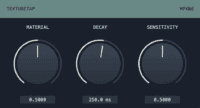
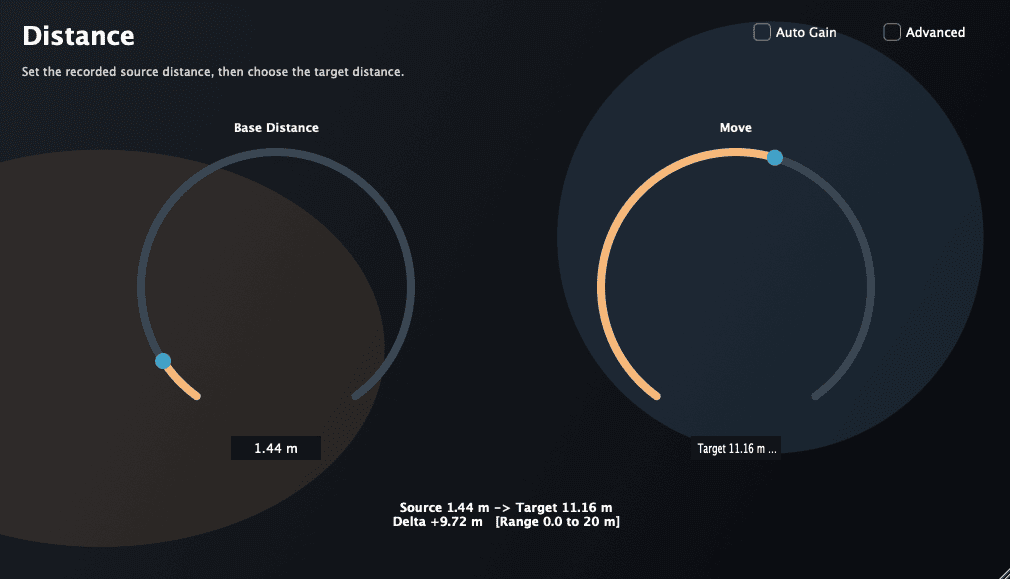
Distance is a free psychoacoustic mixing plugin developed by recording engineer Hiroshi Kojima. It is designed to change the apparent front-to-back position of an audio source, helping producers create depth without reaching immediately for another reverb.
Traditional depth processing often combines volume reduction, high-frequency filtering and room ambience. These techniques remain useful, but they can also make a source sound dull, washed out or disconnected from the rest of the arrangement.
Distance takes a more focused approach. Its purpose is to make close recordings feel farther away while preserving a natural and mix-friendly presentation. It can be used on vocals, dialogue, instruments, Foley, effects and other sounds that feel too close to the listener.
| Developer | Hiroshi Kojima |
|---|---|
| Plugin type | Psychoacoustic depth and distance processor |
| Current version | 1.0.1 |
| Platforms | Windows and macOS |
| Windows format | VST3 |
| macOS formats | VST3, Audio Unit and AAX |
| macOS requirement | macOS 11 or later |
| Account required | No account is listed for the direct download |
| Price | Free |
Creating Depth Without Obvious Reverb
Reverb is one of the most common methods for moving a source backward in a mix. Increasing the wet level and reducing the amount of direct signal can make a recording feel farther away.
The problem is that reverb also introduces a noticeable acoustic environment. A vocal may sound more distant, but it may also become blurry, lose intelligibility or appear to occupy a completely different room from the other instruments.
Distance is designed for situations where the producer wants depth without a long or obvious reverb tail. It can help reposition a source before ambience is added, giving the reverb less work to do.
Useful for Vocal Placement
A lead vocal is normally one of the closest elements in a mix. Backing vocals, harmonies and ad-libs often need to sit slightly farther behind it while remaining clear.
Distance can help create that separation. Instead of lowering every backing vocal excessively or covering it with reverb, the plugin can be used to adjust its perceived depth.
This approach may be especially useful for layered Pop, R&B and electronic productions where several voices occupy similar frequencies. The lead can remain present at the front while the supporting parts feel more distant.
The effect should be adjusted while listening to the complete arrangement. A depth change that appears subtle in solo may become much clearer once the vocal is placed beside drums, basses and melodic instruments.
Front-to-Back Separation for Instruments
Mixing is not limited to left and right positioning. A convincing arrangement also needs a sense of depth.
Pianos, guitars, pads, percussion and orchestral layers can all compete for the same apparent position. When every instrument sounds extremely close, the mix may feel flat even when the stereo image is wide.
Distance can be used to push selected layers backward and create more contrast. A percussion loop can feel less dominant, a pad can move behind the main chords, or a secondary guitar can sit farther from the listener.
This can reduce the need for extreme EQ or large volume changes. The instrument remains part of the arrangement, but its spatial role becomes easier to understand.
Dialogue, Foley and Sound Design
The plugin is also relevant for post-production and sound design. Dialogue, Foley and environmental effects often need to match the apparent distance of an on-screen event.
A voice recorded close to a microphone may need to sound as though it comes from the other side of a room. A footstep, impact or mechanical effect may need to move away without being covered by a large artificial reverb.
Distance provides a simple starting point for this kind of placement. It can then be combined with delay, room ambience or automation when a more detailed environment is required.
A Subtle Mixing Utility
Distance is described by its developer as a practical utility rather than a dramatic special effect. Its changes may therefore be more convincing when used gently.
The goal is not necessarily to make every source sound as though it has moved into the next building. Small depth adjustments can be enough to create space around a vocal, lead instrument or important transient.
As with stereo width, compression and saturation, it is easy to lose perspective after repeated adjustments. Bypass the plugin regularly and compare the result at a matched listening level.
If every instrument is pushed backward, nothing remains at the front. The mix then becomes spacious in the same way an empty restaurant is spacious.
Best Uses
- Moving backing vocals behind a lead vocal
- Creating front-to-back instrument separation
- Reducing the apparent closeness of dry recordings
- Placing percussion and secondary musical layers
- Dialogue and Foley positioning
- Film, television and game-audio mixing
- Building depth before adding reverb
- Creating subtle movement through automation
Combining Distance With Other Effects
Distance does not need to replace reverb or EQ. It can be used before those processors as part of a complete spatial chain.
Start by adjusting the apparent distance of the dry source. Add a short room reverb afterward if the sound needs to share a believable environment with the rest of the mix.
A longer creative reverb can still be used on a send, while EQ may help remove unnecessary low frequencies or soften an overly bright layer.
Automation can also change the perceived depth between song sections. A vocal or synth can feel closer during an intimate verse and move backward during a larger chorus or transition.
Compatibility and Installation
The official macOS installer includes AAX, Audio Unit and VST3 versions for macOS 11 or later.
Windows users receive a separate VST3 package. Windows AAX support is not currently included and is listed by the developer as a possible future addition.
Installation is performed by running the macOS package or placing the Windows VST3 file in the standard plugin directory. The DAW may need to rescan its plugin folders before Distance appears.
Main Limitations
- No Linux version is currently listed
- Windows users receive VST3 only
- Windows AAX support is not currently available
- The plugin focuses on subtle depth placement rather than dramatic spatial effects
- The perceived result may vary considerably between different source sounds
- The developer notes that future algorithm improvements are still planned
- Version 1.0.1 addresses a possible loading problem that has not been confirmed in every environment
Final Verdict
Distance is an interesting free mixing tool for producers who want greater control over front-to-back placement.
Its concept is particularly useful when conventional reverb makes a source too washed out or when EQ alone creates a result that feels unnaturally dark.
The plugin is best used for subtle placement rather than obvious sound design. Vocals, instruments, dialogue and effects can all benefit when they feel too close or occupy the same apparent depth as every other element.
For Windows and macOS producers looking for a free alternative way to create depth, Distance is a focused utility worth testing inside a real mix.