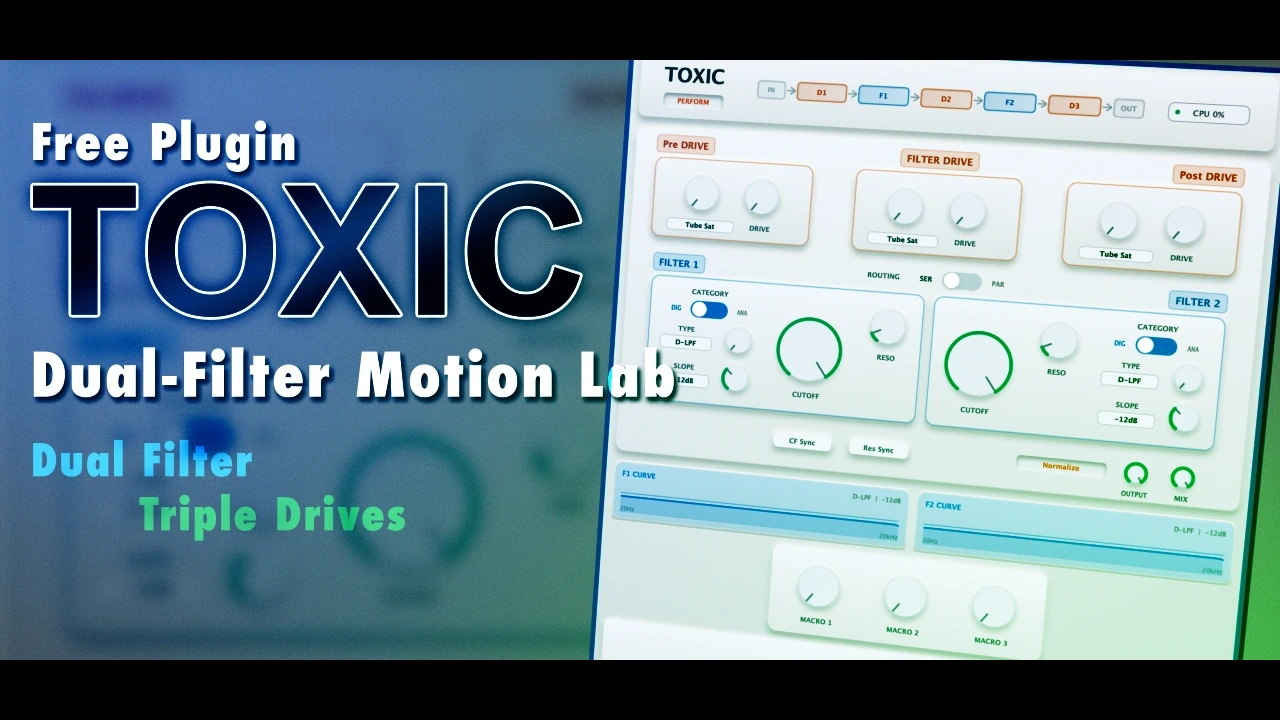
Toxic by SoundRave is a free VST plugin built for producers who want more movement, distortion and tonal control than a conventional filter effect usually provides. Created for the KVR Developer Challenge 2026, it combines two independent filter stages, three drive sections, flexible modulation and performance-focused macro controls inside one compact audio effect.
This is not a synthesizer or virtual instrument. Toxic processes an existing audio signal inside a compatible DAW, making it suitable for synths, basses, drums, loops, guitars, vocals and experimental sound design.
Its strongest feature is the way filtering, nonlinear processing and modulation interact. Producers can use it for restrained tone shaping, rhythmic filter movement, formant effects, aggressive transitions or heavily degraded digital textures without building a long chain of separate plugins.
What Is Toxic by SoundRave?
Toxic is a free dual-filter audio effect developed by SoundRave. It was released as an entry in the KVR Developer Challenge 2026 and is available for Windows and macOS.
The plugin is organized around two filter engines that can operate in serial or parallel. Around those filters, SoundRave has placed three separate drive stages, two LFOs, an envelope follower and three assignable macro controls.
This structure makes Toxic closer to a compact filter workstation than a basic auto-filter. It can reshape the frequency balance of a signal, add harmonic density, react to incoming dynamics and generate synchronized movement from within the same interface.
The filter architecture takes inspiration from the flexible dual-filter topology associated with classic hardware virtual-analog synthesizers. SoundRave clearly states that Toxic is not a clone or an official emulation of any specific instrument.
Why This Free VST Plugin Matters
Many free filter plugins focus on a single low-pass or high-pass circuit with a small modulation section. Toxic takes a broader approach by treating filtering as a complete creative process.
Its two filters can be combined in different ways, while the drive stages let users change how the signal behaves before, between and after the filtering process. This creates a wider range of results than simply automating one cutoff control.
For electronic music production, that flexibility can be particularly useful. A static pad can become rhythmically animated, a bass can acquire vocal-like movement, and a drum loop can be transformed into a distorted transition or metallic texture.
The plugin is also relevant for independent producers working in smaller home studio setups. It places several common sound design tools inside one free audio plugin, reducing the need to combine multiple filter, distortion and modulation effects.
Dual Filters With Serial and Parallel Routing
Toxic contains Filter 1 and Filter 2, each with its own cutoff, resonance, category and filter-type controls.
In serial mode, the output of Filter 1 is sent into Filter 2. This configuration can produce deeper filtering, more focused resonant sweeps and stronger interactions between the two stages.
Serial routing is particularly effective when one filter removes unwanted frequencies before the second filter adds a more obvious tonal character. It can also produce dense, vocal-like movements when resonance and drive are pushed.
In parallel mode, both filters process the signal separately before their outputs are combined. This can create more open textures, divided frequency treatments and less concentrated tonal movement.
Parallel filtering may be useful when one filter is used to retain lower frequencies while the other emphasizes a brighter or more animated band.
Analog and Digital Filter Families
Each filter can be switched independently between analog-oriented and digital-oriented algorithm families.
The analog section includes state-variable filters, OTA-style models, all-pass processing, ladder-inspired low-pass responses and an acid-style resonant filter. These models are intended for rounder movement, thicker midrange coloration and more organic behavior when driven.
The digital family includes precise low-pass, high-pass, band-pass, notch and peak filters, alongside all-pass, comb, buzz, formant and fixed-point DSP-inspired models.
Available filter types include:
- Low-pass filters
- High-pass filters
- Band-pass filters
- Notch filters
- Peak filters
- All-pass filters
- Comb filtering
- Acid-style resonant filtering
- Buzz filter models
- Formant and vowel filtering
- Fixed-point digital filter models
The two filters do not have to use the same category. A producer can place an analog-style model in the first stage and a sharper digital filter in the second, combining body and precision within one processing chain.
Three Independent Drive Stages
Toxic includes three drive positions: PreDrive, FilterDrive and PostDrive.
PreDrive
PreDrive processes the incoming audio before it reaches the first filter. Increasing this stage changes the harmonic content entering the filter and can make cutoff or resonance movements feel more pronounced.
FilterDrive
FilterDrive is positioned between Filter 1 and Filter 2 when the plugin operates in serial mode. It can exaggerate harmonics and resonance generated by the first filter before the signal enters the second stage.
This middle drive stage is not used in parallel routing because the two filters are then processing the signal on separate paths.
PostDrive
PostDrive applies the final nonlinear processing after the filter structure. It can be used to add density, smooth the processed signal or push the result into more obvious distortion.
Each stage offers several different processing characters, including:
- Tube-style saturation
- Silicon diode-style clipping
- Germanium-style clipping
- Multiple wavefolding models
- Tape-style saturation
- Crunch distortion
- Soft clipping
- Hard clipping
- Bit crushing
- Sample-rate decimation
Because the three stages can use different drive types, Toxic can move from gentle saturation to aggressive digital destruction without loading another distortion VST.
LFO Modulation and Host Synchronization
Toxic provides two LFOs for periodic modulation. They can operate freely or synchronize to the host tempo, which makes the plugin suitable for rhythmic effects in house, techno, EDM, hip-hop and other beat-driven production styles.
The available motion shapes include conventional sine, triangle, saw, square and pulse waves, as well as sample-and-hold, Perlin, stepped, damped, chirp, bounce and ring-style shapes.
The LFOs can modulate parameters such as cutoff, resonance, drive amount, output, wet and dry mix, formant movement, envelope settings and macro controls. One LFO can also influence the other, allowing more complex movement than a standard single-cycle auto-filter.
For subtle processing, a slow LFO can add gentle variation to a sustained pad or background texture. Faster synchronized settings can turn a static synth, drum loop or bass part into a rhythmic element.
Envelope Follower
The envelope follower creates modulation from the level and movement of the incoming audio signal.
Its controls include attack, hold, decay, release, threshold, scale, amount and inversion. These settings determine how quickly the modulation reacts, how long it remains active and how strongly it affects the assigned parameter.
This section can be used for auto-wah effects, transient-sensitive filtering, dynamic resonance or drive that becomes stronger as the input level increases.
On drums and percussion, the envelope follower can open a filter in response to each hit. On bass or guitar, it can produce expressive filtering that follows the player’s dynamics. On sustained sources, slower settings can create smoother reactive motion.
Three Macro Controls for Performance
Toxic includes three macro controls that can each influence several parameters at once. Modulation amounts can be assigned in positive or negative directions.
One macro could raise the cutoff while reducing resonance, increasing PostDrive and adjusting the wet and dry mix. This turns several detailed changes into one automation lane or MIDI-controlled gesture.
The macros are useful during arrangement, live performance and sound design sessions where several parameters need to move together in a predictable way.
Toxic also supports MIDI Learn for assigning plugin parameters to external controllers.
Expert and Perform Interfaces
The plugin offers two interface modes.
Expert mode exposes the detailed filter, drive, LFO, envelope and macro sections. This is the main workspace for designing patches and building complex modulation assignments.
Perform mode presents larger controls for the most important filter, drive and macro parameters. It is intended for quicker adjustments, automation recording and live control.
Visual modulation arcs around the controls display assignment amounts and current movement. This helps users understand how LFOs, macros and the envelope follower are affecting the selected parameters.
Sound and Processing Character
Toxic does not have one fixed sonic identity. Its character depends on the selected routing, filter algorithms, modulation sources and drive types.
At restrained settings, it can behave as an animated tone-shaping tool. Clean digital filters can remove or emphasize precise frequency areas, while gentle modulation prevents sustained parts from feeling static.
Analog-oriented filters and moderate saturation can add thicker movement to basses, pads and synthesizer parts. Formant processing can introduce vowel-like resonance, while comb and all-pass models create metallic or phase-based textures.
At more extreme settings, the wavefolding, bit-crushing and decimation options turn the plugin into a free creative effect for glitch, industrial music and experimental sound design.
Resonance and modulation can generate sharp peaks, so users should monitor output level carefully. The Normalize control can help reduce large volume jumps, although it should not replace proper gain staging.
Best Uses for Toxic
Toxic can be used across a wide range of music production and sound design tasks:
- Tempo-synchronized filter movement on synthesizers
- Animated pads and atmospheric textures
- Rhythmic bass processing
- Auto-wah effects for guitar, bass or keyboards
- Formant and vowel-style effects
- Filter transitions for electronic music arrangements
- Distorted drum loops and percussion
- Metallic comb-filter effects
- Glitch and lo-fi processing
- Macro-controlled automation
- Reactive filtering driven by incoming dynamics
- Experimental vocal processing
Who Should Use This Free Filter VST?
Toxic is primarily aimed at electronic music producers, sound designers, beatmakers and musicians who enjoy creating movement through modulation.
House and techno producers can use its synchronized LFOs for rhythmic filtering. EDM producers may find it useful for risers, breakdowns and automated transitions. Hip-hop and trap beatmakers can transform samples or melodic loops, while cinematic composers can create unstable drones and evolving textures.
Mixing engineers may also use Toxic for more controlled jobs, particularly when a static element needs subtle motion or when an effect return requires reactive filtering.
Because the plugin includes a large number of modulation and distortion options, it is more appropriate for creative processing than transparent corrective equalization.
Plugin Formats and Operating System Compatibility
Toxic is available in the following officially confirmed formats:
- Windows 10 and Windows 11: VST3
- macOS: VST3 and Audio Unit
Windows users need a DAW or plugin host capable of loading VST3 audio effects. macOS users need a compatible VST3 or Audio Unit host.
The developer does not claim universal compatibility with every DAW. Users should therefore confirm that their music production software supports one of the available plugin formats.
No Linux, AAX, CLAP, LV2 or standalone version is listed on the official product page.
Installation and Registration
SoundRave provides separate downloadable packages for Windows and macOS from the official Toxic product page.
No user account, newsletter subscription or license manager is indicated as a requirement. The KVR product listing also identifies the plugin as having no copy protection.
After downloading the appropriate package, install or copy the plugin according to the instructions included by the developer, then rescan the plugin list inside the DAW if Toxic does not appear automatically.
The plugin should only be downloaded from the official SoundRave website or the official KVR Developer Challenge page. Unofficial mirrors and modified installers should be avoided.
Important Limitations
Toxic is an audio effect, not a synthesizer, sampler or virtual instrument. It requires an existing audio signal and cannot generate playable notes by itself.
It also should not be treated as a replacement for a transparent mixing EQ. Although it contains many filter shapes, its modulation and nonlinear processing are designed mainly for creative tone shaping and sound design.
The large number of filter, drive and modulation combinations may require some experimentation. Producers looking for a minimal one-knob filter may find Toxic more complex than necessary.
High resonance, strong drive and extreme modulation can create sharp peaks or substantial level changes. Careful output monitoring is recommended, particularly when processing headphones, tweeters or sensitive master buses.
The developer confirms that Toxic is free, but the official page does not provide a detailed open-source or redistribution license. It should therefore be described simply as a free plugin rather than an open-source or copyright-free product.
Availability and Official Download
Toxic is currently available free of charge from SoundRave. The verified release at the time of publication is version 1.0.2.
The update improved real-time interface rendering, added an OpenGL-backed rendering path with a compatibility fallback and addressed visual issues affecting LFO, envelope, filter and assignment displays.
Official product page: Download Toxic from SoundRave
Windows VST3 download: Download Toxic for Windows
macOS AU and VST3 download: Download Toxic for macOS
Official manual: Read the Toxic user manual
Why Free Creative Effects Still Matter
Free music production software is most valuable when it offers a workflow that is not already duplicated by dozens of basic plugins. Toxic succeeds here because it combines filtering, saturation, modulation and performance control in a coherent design.
For independent producers, tools like this lower the cost of exploring advanced sound design. They also give smaller developers an opportunity to experiment with ideas that might be considered too specialized for mainstream commercial releases.
The KVR Developer Challenge continues to play an important role in this area by encouraging developers to release genuinely free audio tools for the wider music production community.
Future Development
SoundRave has already released maintenance updates addressing interface performance and visual feedback. However, no specific long-term development roadmap or additional plugin formats should be assumed until they are officially announced.
Users interested in future versions should check the official product page and changelog rather than relying on third-party download listings.
Final Verdict
Toxic by SoundRave is an unusually deep free VST3 plugin for producers who see a filter as more than a simple cutoff control.
Its serial and parallel dual-filter architecture, three drive stages, two LFOs, envelope follower and assignable macros make it capable of both practical movement and extreme sound design.
It may be more elaborate than necessary for basic filtering, and its resonant or distorted settings require sensible level management. Those limitations are reasonable considering the scope of the plugin.
For electronic music producers, composers, beatmakers and sound designers looking for a free creative filter effect, Toxic is a strong and distinctive addition to a modern plugin collection.