FamiStudio: A Free Chiptune DAW for NES Music Production
Compose authentic 8-bit music with a modern piano roll, pattern sequencer, DPCM sampling and real NES/Famicom sound-chip emulation.
FamiStudio is a free and open-source music production environment created specifically for Nintendo Entertainment System and Famicom-style music.
Rather than reproducing the hexadecimal tracker workflow associated with classic chiptune software, FamiStudio uses a much more familiar interface based around a graphical sequencer and piano roll.
This makes it an interesting option for electronic producers, game composers and chiptune musicians who want authentic retro sound-chip limitations without giving up a modern editing workflow.
A Modern Workflow for NES Music
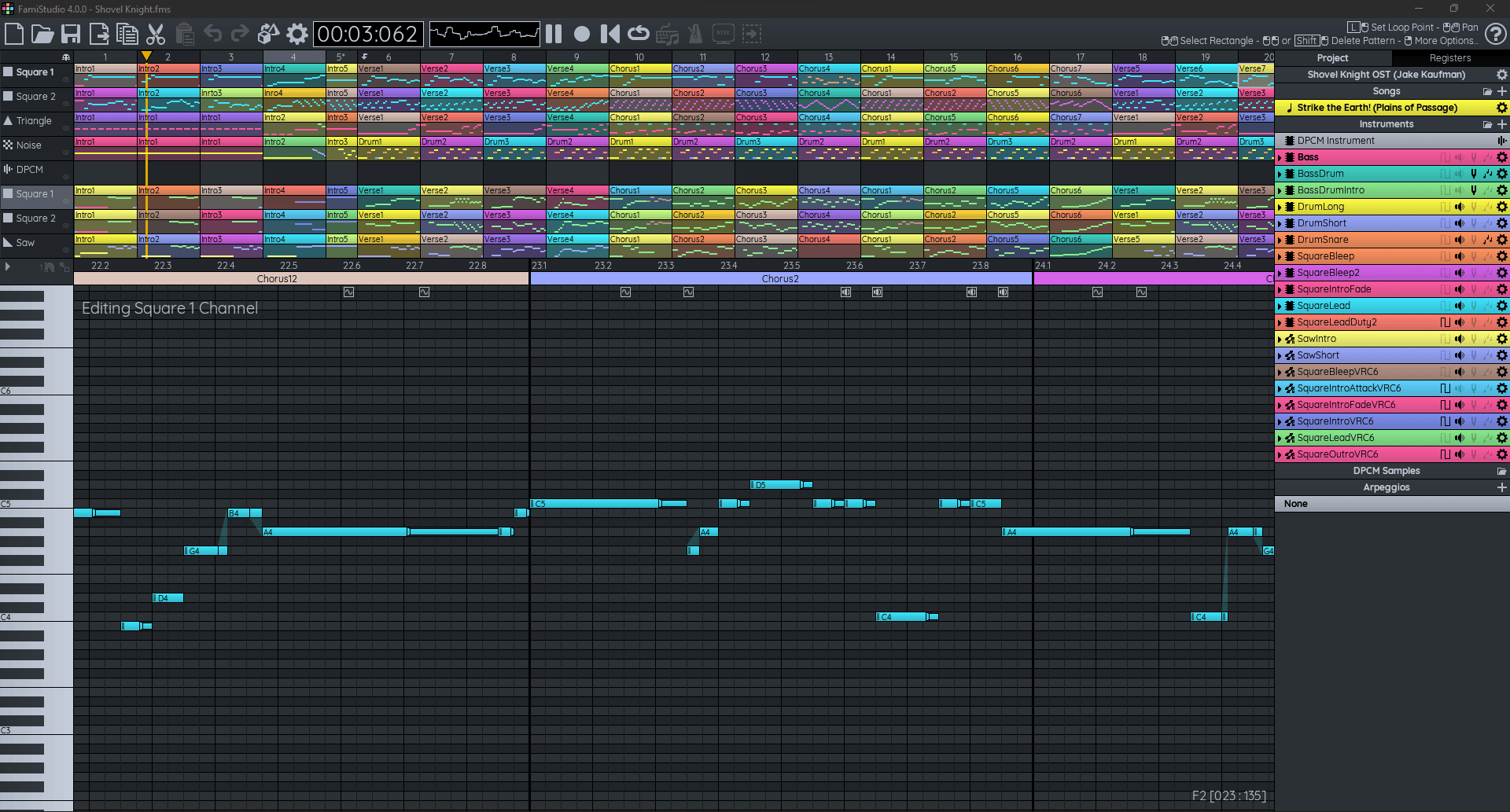
A FamiStudio project is organized around songs, instruments, patterns, DPCM samples and arpeggios.
The main interface combines four essential areas:
- Toolbar and transport controls
- Project Explorer
- Pattern sequencer
- Piano Roll
The sequencer provides a high-level view of the arrangement, while the Piano Roll handles individual notes, instrument envelopes and effects.
This approach should feel considerably more familiar to producers coming from conventional DAWs than the traditional tracker interface normally associated with NES music.
Learn FamiStudio From Scratch
The official FamiStudio desktop tutorial demonstrates how to build a complete basic song using the sequencer, instruments and Piano Roll.
A Proper Piano Roll Instead of Hexadecimal Editing
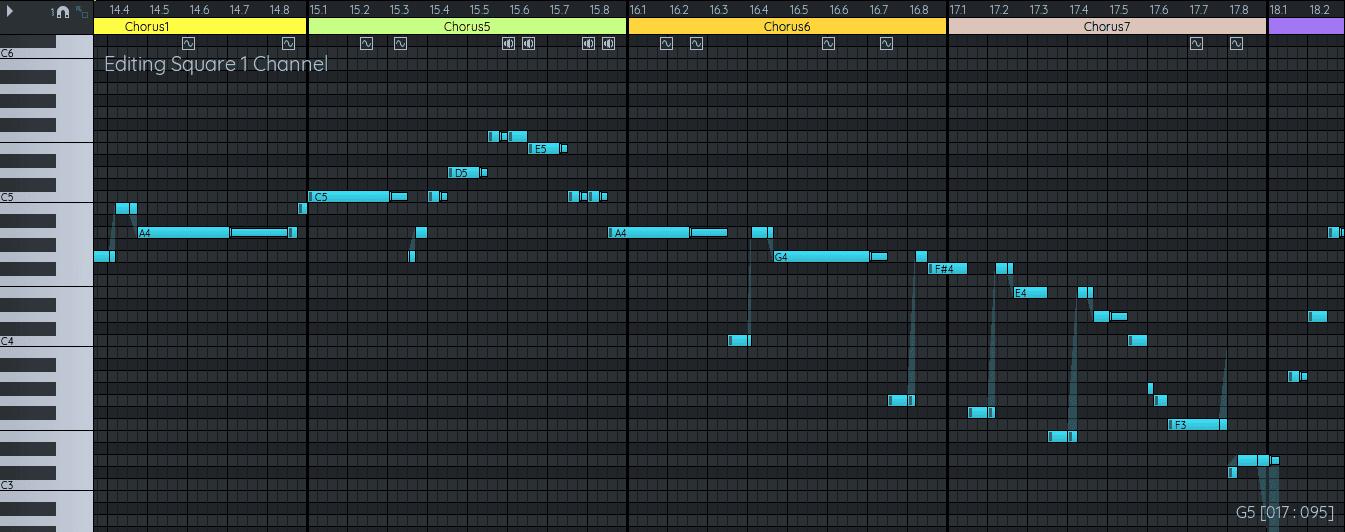
FamiStudio’s Piano Roll is one of the features that makes the software particularly approachable.
Notes can be added, moved, resized and selected visually. The same editor can also display instrument envelopes and special NES effects.
MIDI keyboards can be used for note input, while computer-keyboard input is also available on desktop systems.
Authentic NES Sound Architecture
A standard NES project is built around the console’s five original sound channels.
- Two pulse / square channels
- Triangle channel
- Noise channel
- DPCM sample channel
Working within these restrictions is a major part of the chiptune aesthetic. Instead of stacking dozens of virtual instruments, producers learn to create arrangements using a very small number of carefully programmed voices.
That limitation can actually become a useful creative exercise even if your final music is not intended for an actual NES game.
Expansion Audio for Much Bigger Sounds
FamiStudio also emulates several classic Famicom expansion chips that add extra synthesis capabilities beyond the basic NES audio hardware.
Supported systems include:
- Konami VRC6
- Konami VRC7
- Famicom Disk System
- Nintendo MMC5
- Namco 163
- Sunsoft 5B
- EPSM
These expansions introduce additional square waves, wavetable synthesis and even FM synthesis, depending on the selected hardware.
For producers, this means FamiStudio can cover much more territory than the familiar basic 8-bit pulse-wave sound.
Import and Edit DPCM Samples
FamiStudio includes dedicated tools for the NES DPCM sample channel.
WAV and DMC files can be imported and processed before being mapped across notes.
The integrated sample editor can display both source and processed waveforms, trim material, adjust volume and prepare sounds for the severe memory and quality limitations of real NES hardware.
This is particularly useful for creating retro drums, vocal fragments, percussion and short effects.
MIDI Import and Export
Desktop versions of FamiStudio can import standard MIDI files.
Notes, tempo information and time-signature changes can be transferred into a project, although polyphonic MIDI arrangements need to be simplified to respect the much stricter limitations of NES sound hardware.
FamiStudio projects created in its native tempo mode can also be exported back to MIDI.
This creates an interesting bridge between a conventional DAW and the chiptune environment.
Export WAV, MP3 and OGG Audio
You do not need to release music as an NES cartridge to make practical use of FamiStudio.
Finished songs can be exported as regular audio files, including:
- WAV
- MP3
- OGG Vorbis on desktop
Stereo output is supported, along with individual channel exports for producers who want to continue mixing or processing the song in another DAW.
For maximum fidelity to the internal emulation, the developer recommends 44.1 kHz audio export.
Create Ready-Made Chiptune Videos
One of FamiStudio’s most unusual features is integrated video export.
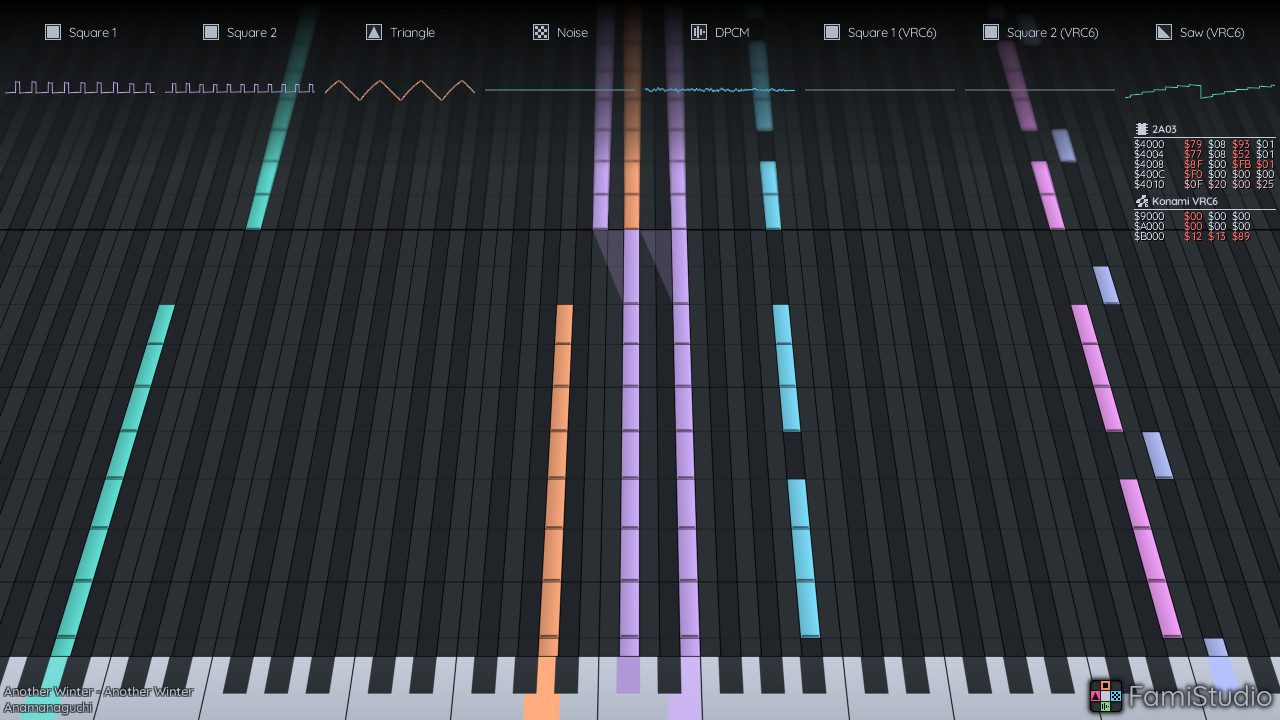
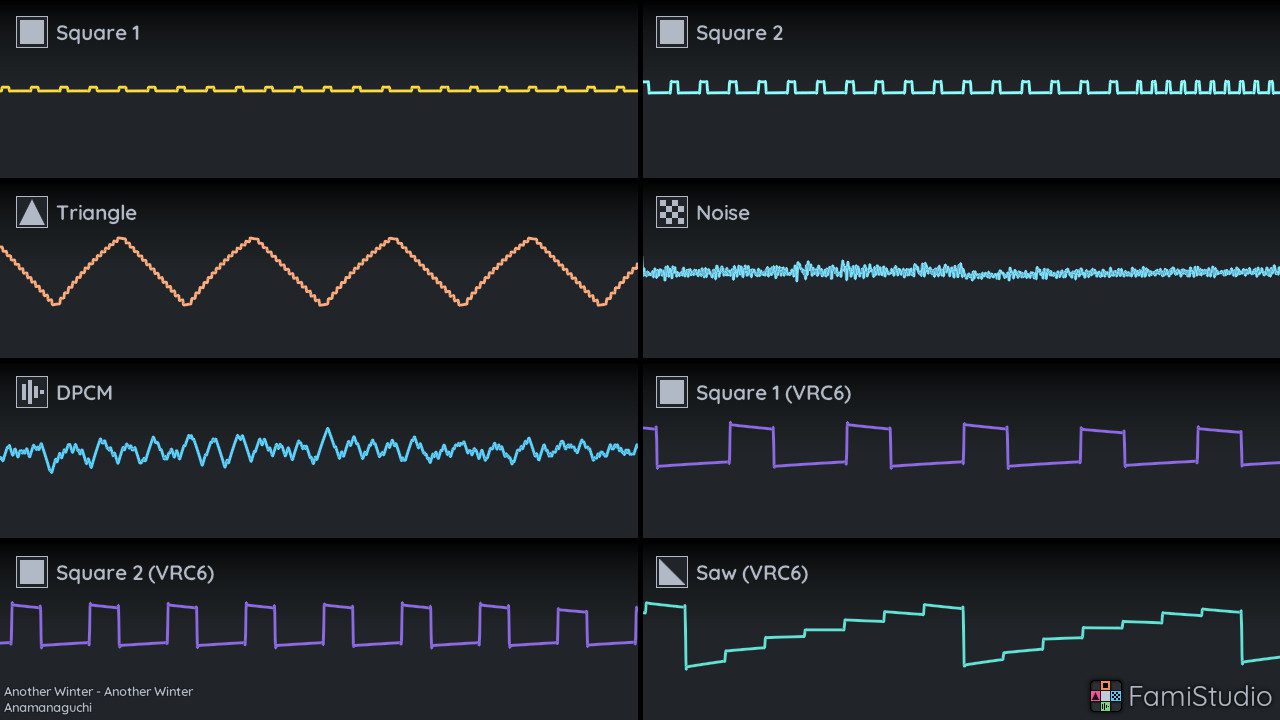
With FFmpeg configured, the software can generate animated videos using several visualization modes:
- Oscilloscope grid
- Separate-channel Piano Rolls
- Unified Piano Roll
The Piano Roll can even use a 3D perspective effect, while register information can be displayed alongside the music.
This is particularly convenient for producers who publish chiptune performances and compositions on YouTube or social media.
Export Music for Real NES Hardware
For game developers and dedicated chiptune musicians, FamiStudio goes much further than standard audio rendering.
Projects can also be exported to formats including:
- NSF / NSFe
- NES ROM
- Famicom Disk System images
- VGM
- FamiTracker text
- FamiStudio sound-engine data
Compatible ROM exports can be played in emulators or transferred to suitable cartridges and devices for playback on real Nintendo hardware.
FamiStudio on Mobile
The official mobile tutorial demonstrates how the same production workflow has been adapted to phones and tablets.
Free and Open Source
FamiStudio is completely free and its source code is publicly available under the MIT license.
There is no premium edition required to unlock the desktop music editor.
The project is actively maintained by its community, with version 4.5.3 released in August 2026 following the major 4.5 update earlier in the year.
Not a Conventional Recording DAW
FamiStudio is highly specialized and should not be mistaken for an alternative to Studio One, Ableton Live, Cubase or Logic Pro for normal multitrack recording and mixing.
Its purpose is NES/Famicom music production.
There is no conventional environment for loading large numbers of audio tracks and third-party mixing plugins. The restrictions of the original hardware are deliberately part of the creative workflow.
If you want authentic chiptune production, however, those limitations are precisely what make FamiStudio interesting.
FamiStudio at a Glance
Developer: FamiStudio / open-source contributors
Current version: 4.5.3
Type: NES/Famicom chiptune music editor / DAW-style sequencer
Workflow: Pattern sequencer + Piano Roll
Standard NES channels: 5
DPCM samples: WAV / DMC import and editing
MIDI: Import, export and MIDI input
Audio export: WAV / MP3 / OGG
Video export: Piano Roll / Oscilloscope
NES export: NSF / NSFe / ROM / FDS
Expansion audio: VRC6, VRC7, FDS, MMC5, N163, S5B and EPSM
Desktop: Windows / macOS / Linux
Mobile: Android / iOS
License: MIT Open Source
Price: Free
Download FamiStudio for Free
FamiStudio can be downloaded directly from the official website for Windows, macOS and Linux, with mobile editions also available.
Final Thoughts
FamiStudio is not trying to compete with a traditional full-scale recording DAW. Its strength comes from doing one thing exceptionally well: making authentic NES and Famicom music accessible through a modern graphical workflow. The Piano Roll, expansion-chip support, DPCM editor, MIDI tools and impressive audio, video and hardware export options make it useful for chiptune artists, game composers and producers who simply want to experiment with genuine 8-bit limitations. For anyone interested in retro game music, this free open-source tool is much deeper than its simple interface first suggests.