Gorgon by Inear Display is a free distortion VST plugin built for producers, sound designers and experimental electronic musicians who want to push audio far beyond polite saturation. Now available through Inear Display’s pay-what-you-want catalogue, Gorgon brings together aggressive distortion, FM ring modulation, comb filtering, sample-rate reduction, envelope-followed modulation and a morphable low-pass/high-pass filter in one brutal creative processor.
This is not a plugin designed to gently warm up a vocal or add a tiny bit of analog flavor to a master bus. Gorgon is made for destruction, pressure, movement and extreme texture. It is the kind of free audio plugin that turns drum loops into broken machines, synths into circuit-bent chaos, basslines into unstable weapons and simple sounds into dark experimental material.
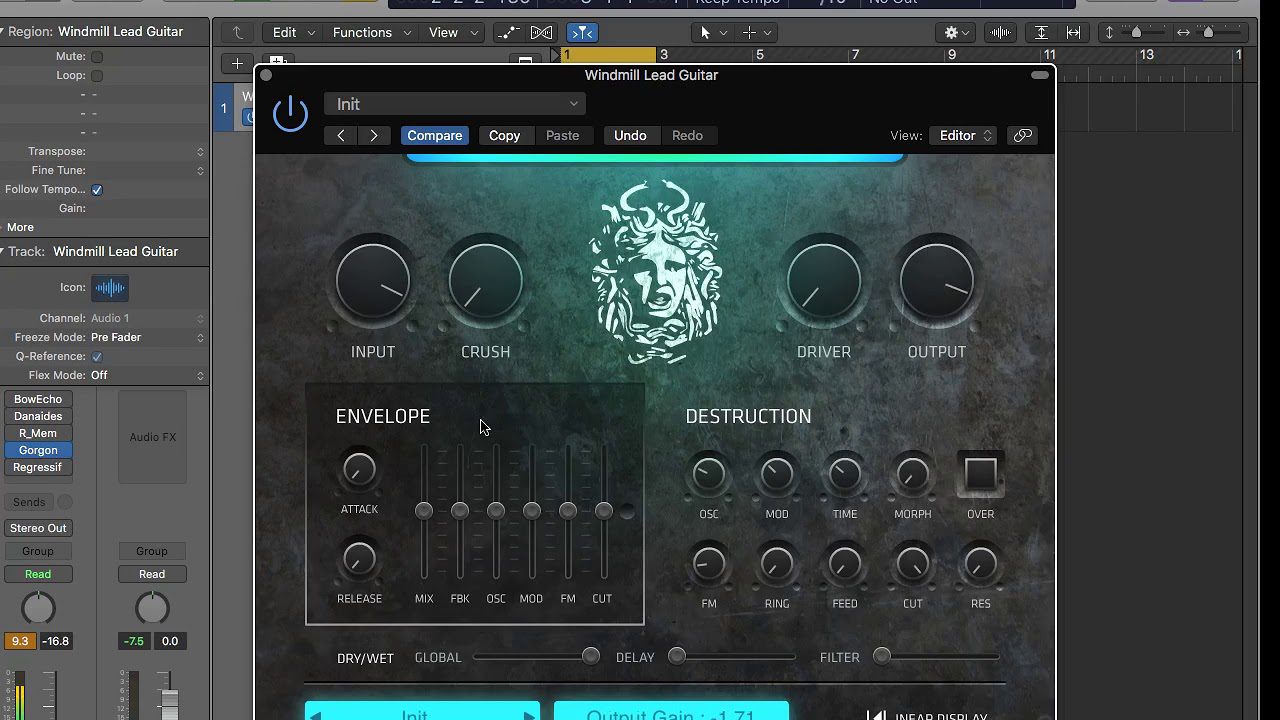
What Is Gorgon by Inear Display?
Gorgon is an aggressive distortion effect plugin from Inear Display. The plugin was designed to create intense, circuit-bending-style audio transformations, with a sound engine focused on distortion, modulation, filtering and digital destruction.
Unlike traditional distortion tools that focus mainly on drive, tone and output level, Gorgon combines several destructive processors into a single signal path. It can distort, modulate, filter, reduce sample rate, add comb-filtered resonance and react dynamically to the incoming signal through its envelope follower.
The current version, Gorgon v2.0, is available as a 64-bit VST3 and AU plugin for compatible Windows and macOS systems. It is part of the Inear Display catalogue, now distributed through a pay-what-you-want model, which means producers can download it for free while still having the option to support the developer.
Why This Free Distortion VST Plugin Matters
The free distortion VST plugin category is full of simple saturators, guitar-style pedals and classic overdrive tools. Gorgon is different because it is not trying to imitate a familiar hardware box. It is built for experimental destruction and sound design.
That makes it useful for modern producers who want more than warmth. In industrial techno, glitch music, dark electronic production, cinematic sound design, bass music, experimental hip-hop and IDM, distortion often becomes part of the arrangement itself. It shapes rhythm, movement, tension and identity.
Gorgon fits that world perfectly. It can be used as a dramatic insert effect, a resampling tool, a transition generator or a complete audio mangling processor. It is especially powerful on drums, synths, bass, loops, vocals and field recordings.
Main Features
- Free distortion VST plugin available through Inear Display’s pay-what-you-want model.
- Ultraviolent distortion engine designed for aggressive sound transformation.
- FM ring modulation for metallic, unstable and experimental tones.
- Comb filtering for resonant movement and sharper sound design effects.
- Sample-rate reduction for digital crunch, aliasing-style character and degraded textures.
- Morphable low-pass/high-pass filter inside the signal path.
- Envelope follower modulation for dynamic movement based on the incoming audio.
- Built-in EQ for refining the distorted output.
- Output mixer for balancing the processed sound.
- Optional mono mode for focused processing.
- Parameter randomizer for instant destructive sound design ideas.
- Resizable interface for modern production setups.
- Preset browser with cross-platform compatibility.
- VST3 and AU support for compatible DAWs.
- Windows and macOS compatibility.
A Distortion Plugin Built for Audio Destruction
Gorgon is most effective when used as a creative processor rather than a conventional mixing tool. Its purpose is not to clean up a sound. Its purpose is to push it into a different world.
On drum loops, Gorgon can create crushed transients, broken grooves, metallic percussion, digital artifacts and industrial textures. On synths, it can turn clean tones into unstable distorted signals full of movement. On bass, it can add dangerous midrange grit and extra harmonic weight. On vocals, it can create corrupted phrases, robotic layers and harsh background effects.
The plugin rewards experimentation. A small change in distortion, filtering or modulation can completely change the final result. That makes Gorgon especially useful for producers who like to resample audio, print effect passes and chop the best accidents into new material.
FM Ring Modulation, Comb Filtering and Digital Damage
Gorgon’s identity comes from the way its processors interact. FM ring modulation can create metallic sidebands, unstable movement and harsh harmonic content. Comb filtering can add resonant peaks, hollow tones and aggressive frequency movement. Sample-rate reduction can introduce digital grain, crunchy degradation and broken texture.
Used separately, these processes are already strong. Combined with distortion and filtering, they become much more extreme. A simple percussion hit can become a cybernetic impact. A synth stab can become a violent rhythmic texture. A vocal chop can become a distorted signal fragment that feels closer to sound design than traditional vocal processing.
This makes Gorgon a serious tool for producers who want sound sources to feel less predictable. It is not about making everything beautiful. It is about making audio feel dangerous, animated and strange.
Envelope Follower Modulation for Dynamic Movement
One of Gorgon’s most important creative features is its envelope follower. Instead of applying static processing, the plugin can react to the level and movement of the incoming audio. This allows parameters to move dynamically with the source signal.
For drums, that means the distortion and modulation can respond to transient energy. For bass, it can make the effect breathe with the groove. For vocals, it can follow the shape of the performance. For field recordings or textures, it can create unstable motion that feels organic rather than fully programmed.
This is where Gorgon becomes more than a distortion effect. It becomes a movement processor. The sound can bend, open, collapse, bite and shift depending on what enters the plugin.
Sound and Creative Use
Gorgon is at home in aggressive electronic music, but it can be useful anywhere a sound needs a violent transformation. Industrial techno producers can use it to create machine-like drum layers. Glitch producers can use it to fracture loops and samples. Cinematic sound designers can use it to build dark tension, impacts and corrupted textures.
It also works well as a parallel effect. Place Gorgon on a duplicate track or send bus, push the processing hard, then blend it under the clean signal. This can add intensity without completely destroying the original source.
For bass music, Gorgon can add midrange bite and dirty movement to bass layers. For experimental hip-hop, it can damage samples in a way that feels personal and less predictable. For dark ambient, it can turn field recordings into noisy drones and hostile atmospheres.
Who Should Use Gorgon?
Gorgon is ideal for sound designers, industrial techno producers, glitch musicians, experimental electronic artists, cinematic composers, bass music producers and home studio users who want a free audio plugin with a strong destructive identity.
It is also useful for beatmakers who want to resample distorted loops, producers who need unique transition material and artists who want to escape clean digital perfection.
It is less suited to users looking for subtle warmth or transparent analog-style saturation. Gorgon is not here to behave nicely. It is here to bite the audio and leave fingerprints.
Best Use Cases for Producers
Industrial Drum Processing
Use Gorgon on kick loops, snares, percussion buses and drum breaks to create harsh transients, metallic movement and destructive rhythmic energy.
Glitch and IDM Textures
Push the modulation, comb filtering and sample-rate reduction to generate broken digital artifacts, unstable loops and unpredictable rhythmic fragments.
Synth Destruction
Place Gorgon on synth leads, basses, stabs or pads to add distorted movement, aggressive tone and circuit-bending-style instability.
Bass Harmonic Enhancement
Use Gorgon in parallel on basslines to add midrange grit and presence while keeping the original low-end foundation intact.
Vocal Mangling
Process vocal chops, shouts, ad-libs or spoken phrases to create distorted robotic textures, harsh background layers and corrupted hooks.
Cinematic Impacts and Tension
Run impacts, field recordings, drones and risers through Gorgon to create darker, noisier and more intense sound design material.
Resampling Experiments
Print Gorgon’s output to audio, chop the most interesting moments and use them as fills, one-shots, transitions or new texture layers.
Compatibility and Download Details
Gorgon is available as a 64-bit VST3 and AU plugin for compatible Windows and macOS systems. It can be downloaded from Inear Display’s official Gumroad page through a pay-what-you-want model.
- Official website: Inear Display Creative Audio Tools
- Download: Download Gorgon for free
Industry Impact: Free Experimental Distortion Keeps Getting Stronger
The return of Inear Display’s plugins through a pay-what-you-want model is important for producers because it makes serious experimental tools more accessible. Many free plugins are useful, but few have such a clear creative identity.
Gorgon gives independent musicians access to a distortion processor that does not feel generic. It has a specific attitude, a strong sound design purpose and a workflow built around aggressive transformation. That matters in a production world where many tracks are built from the same drum packs, synth presets and loop libraries.
Creative distortion can help producers make familiar material feel new again. With tools like Gorgon, a simple loop can become a signature texture, and a basic synth line can become a dangerous centerpiece.
What Happens Next
Gorgon now has a strong opportunity to reach producers who may have missed its earlier commercial release. Its future value will likely come from sound designers, electronic artists and beatmakers sharing creative workflows, presets, resampling chains and distorted audio examples.
The best way to test it is simple: load it on a drum loop, synth line, vocal chop or field recording, then push the distortion, filter, modulation and randomizer. Gorgon rewards fearless experimentation, and in this case, the wrong setting might be exactly the right sound.
Final Verdict
Gorgon by Inear Display is a powerful free distortion VST plugin for producers who want brutal audio transformation, aggressive digital texture, FM ring modulation, comb filtering, sample-rate destruction and dynamic movement inside the DAW.
It is not a safe utility plugin, and it does not want to be. Its strength is character. Gorgon can turn ordinary sounds into distorted machines, broken rhythms, dark atmospheres and experimental audio fragments with a strong identity.
For industrial techno, glitch, cinematic sound design, bass music, experimental electronic production and sample mangling, Gorgon is absolutely worth downloading. If your home studio needs a free audio plugin that can make clean sounds nervous, violent and alive, this one belongs in your distortion folder.