Grand Piano by Audiolatry: A Free Yamaha C5 Piano VST
A sampled acoustic grand piano with 16 velocity layers, key-release sounds and built-in effects for Windows and macOS.
Grand Piano by Audiolatry is a free virtual instrument based on samples of a Yamaha C5 6’7″ grand piano. It provides a straightforward acoustic piano sound for songwriting, cinematic composition, beatmaking and general music production.
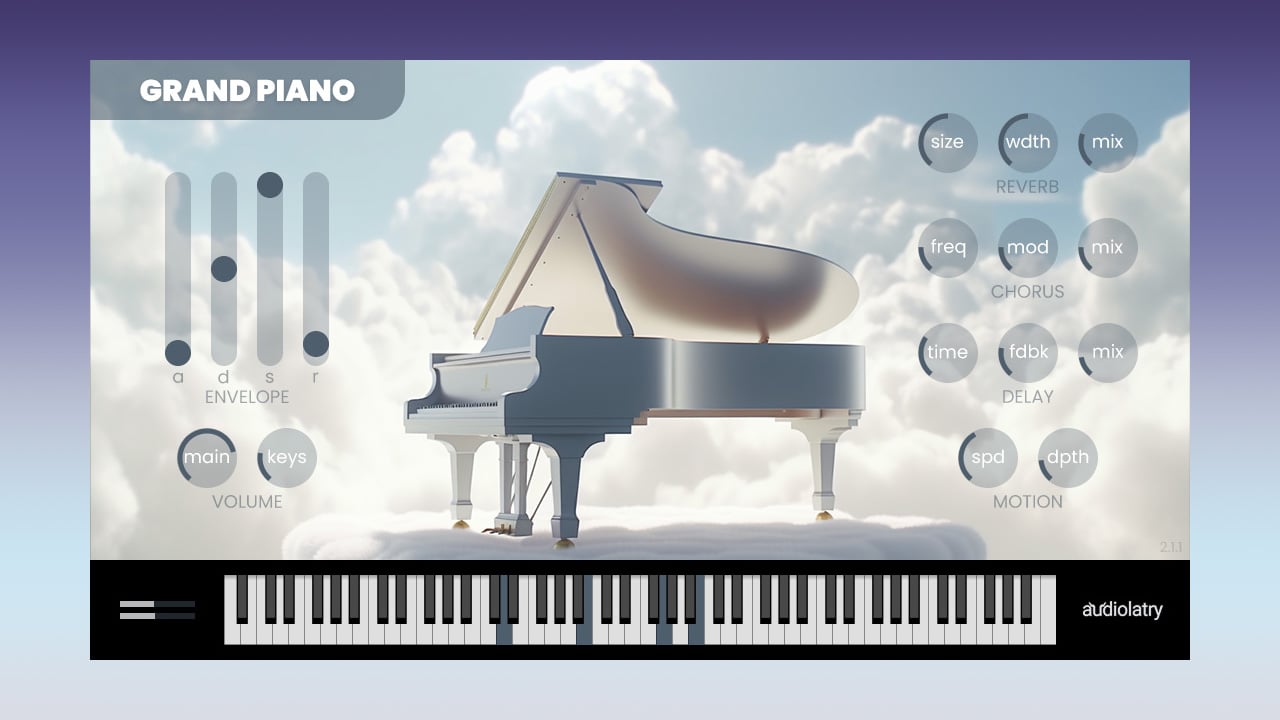
The plugin combines detailed sampling with a simple interface. It includes 16 velocity layers per sampled note, separate key-release noises, an ADSR envelope and four integrated effect modules.
Free download: Grand Piano is distributed through Audiolatry using a pay-what-you-want system. Enter 0 in the price field to download the plugin for free.
What Is Grand Piano?
Grand Piano is a sample-based virtual instrument, sometimes described as a ROMpler. Instead of generating its sound through synthesis or physical modelling, it plays recordings of a real acoustic piano across the keyboard.
The source instrument is a Yamaha C5 grand piano. The original samples were recorded by Alexander Holm using two AKG C414 condenser microphones positioned above the strings.
The recordings were captured at 48 kHz and 24-bit resolution. The piano sound and the noises produced when releasing the keys were sampled separately, allowing users to adjust their balance inside the plugin.
Key feature: Grand Piano includes 16 velocity layers per sampled note. This provides smoother transitions between soft playing and stronger performances than a basic single-layer piano instrument.
Main Features
- Sampled Yamaha C5 6’7″ grand piano
- 16 velocity layers per sampled note
- 48 kHz and 24-bit sample quality
- Separate key-release samples
- Independent piano and release-volume controls
- ADSR amplitude envelope
- Built-in reverb module
- Built-in chorus module
- Built-in delay module
- Motion and tremolo effect
- Global output-volume control
- Approximately 1.19 GB of installed content
Sixteen Velocity Layers
The velocity layers are one of the plugin’s most useful features. When a MIDI note is played softly, Grand Piano triggers a quieter sample. Stronger velocities activate samples recorded with more force.
This creates a more progressive response across the dynamic range. It is especially useful for melodic performances, emotional chord progressions and piano parts that remain exposed in the arrangement.
Producers working with programmed MIDI should avoid assigning the same velocity to every note. Small differences between notes can make chords and melodies feel considerably more natural.
Performance tip
Use lower velocities for background chords and stronger values for melodic accents. The 16 available layers give MIDI programming more room to breathe, which is unusually polite behaviour for a free plugin.
Sound-Shaping Controls
Grand Piano provides an ADSR envelope for adjusting the attack, decay, sustain and release of the instrument.
A fast attack preserves the immediate character of the piano. Increasing the attack creates a softer entrance that can work well for ambient layers and cinematic textures.
The release control determines how long notes continue after the MIDI key is released. Short settings produce tighter piano parts, while longer values can create smoother and more atmospheric performances.
The separate key-release volume control adjusts the mechanical detail heard when notes end. Increasing it creates a more noticeable and intimate effect, while lowering it produces a cleaner result.
Built-In Effects
The plugin includes four effect modules for processing the sound without loading additional effects inside the DAW.
Reverb: Adds space and depth to the piano, from subtle room ambience to larger cinematic environments.
Chorus: Introduces modulation and stereo width, helping the instrument blend with pads and synthesizers.
Delay: Creates rhythmic echoes and wider melodic textures.
Motion: Functions as a tremolo-style effect with speed and depth controls for animated or experimental sounds.
Grand Piano Video Demo
Watch the demonstration below to hear the sampled Yamaha C5 and explore the plugin’s main sound-shaping controls.
Songwriting: Quickly load an acoustic piano for developing chords, melodies and complete song arrangements.
Cinematic music: Combine softer velocities, longer releases and reverb for emotional or reflective piano passages.
Lo-fi production: Process the instrument with filtering, saturation, tape effects or vinyl noise for a warmer character.
Pop and electronic music: Layer the piano with synthesizers, pads and plucks to strengthen chord progressions.
Game and media composition: Create melodic themes, background music and atmospheric layers without purchasing a separate piano library.
Production Tips
Begin by shaping the MIDI performance before adding effects. The velocity layers can provide much of the required expression without heavy processing.
For an intimate piano sound, use moderate velocities, reduce the reverb and increase the key-release level slightly.
For cinematic textures, extend the release time and combine the built-in reverb with a slower attack. Chorus and delay can then be added carefully to increase width and movement.
When the piano is used inside a dense arrangement, a high-pass filter can remove unnecessary low-frequency energy. A small EQ reduction in the low-mid range may also help create space for vocals, guitars and synthesizers.
Mixing reminder: Avoid using the same processing for every project. A solo piano needs detail and space, while a piano layered inside a full arrangement may require considerably less low end, sustain and stereo width.
Compatibility
Grand Piano is available for 64-bit Windows and macOS systems. The available plugin formats depend on the operating system.
- Windows: VST and VST3, 64-bit
- Windows requirement: Windows 8.1 or later
- macOS: VST, VST3 and Audio Units
- Memory: At least 2 GB of RAM
- Disk space: Approximately 1.19 GB
- AAX: Not supported
- Linux: No official version listed
Windows users can load the VST3 version in compatible hosts such as Ableton Live, FL Studio, Cubase and Studio One. Mac users can choose between VST3 and Audio Units according to their DAW.
Is Grand Piano Really Free?
Grand Piano is available through Audiolatry’s official website using a pay-what-you-want checkout.
Enter 0 in the price field to obtain the instrument without payment. Users can also enter another amount if they want to support the developer.
Download process: Open the official product page, enter 0 in the price field, complete the checkout and download the version corresponding to your operating system.
Final Verdict
Audiolatry Grand Piano is a practical free instrument for producers who need an acoustic piano without purchasing a large commercial library or installing a separate sampler.
Its 16 velocity layers and key-release samples provide more detail than many lightweight freeware pianos. The ADSR envelope and four built-in effects also make it flexible enough for traditional piano parts, atmospheric textures and cinematic sound design.
It does not include the microphone positions, pedal controls and extensive customisation found in premium libraries. However, its manageable size, expressive sampling and simple workflow make it a useful addition to a producer’s collection.
Grand Piano will not transform every MIDI performance into a concert recital, but it gives those notes a respectable piano and considerably fewer excuses.
Download Grand Piano for Free
Get the Windows or macOS version directly from the official Audiolatry website.