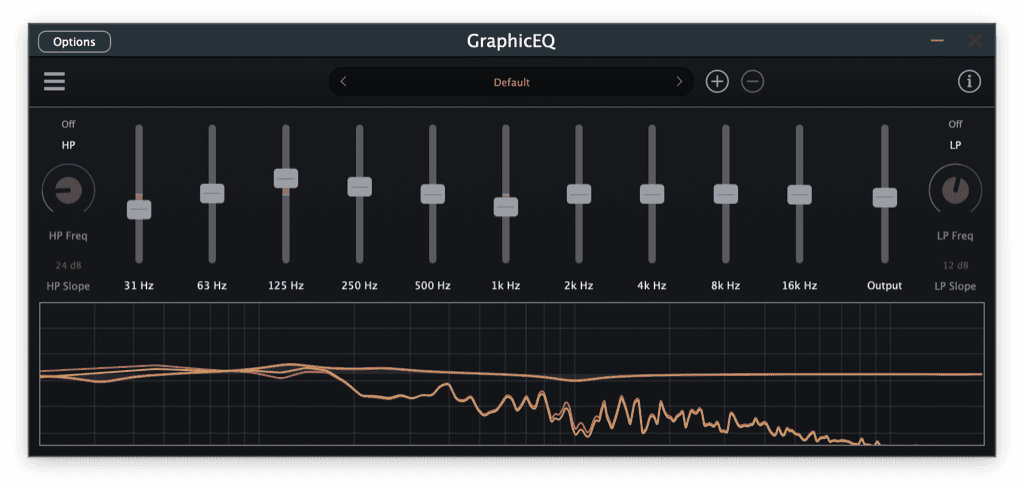
GraphicEQ by SocaLabs is a free graphic equalizer plugin designed for producers who want to make fast and musical tonal adjustments without building a complicated parametric EQ chain. The plugin combines ten fixed frequency bands, dedicated high-pass and low-pass filter sections, an output control and an integrated spectrum display.
SocaLabs provides GraphicEQ as a direct free download for Windows, macOS and Linux. The plugin remains actively maintained in 2026, with recent updates listed on its official product page.
What Does GraphicEQ Include?
GraphicEQ uses ten fixed bands positioned across the main areas of the audible frequency spectrum:
- 31 Hz
- 63 Hz
- 125 Hz
- 250 Hz
- 500 Hz
- 1 kHz
- 2 kHz
- 4 kHz
- 8 kHz
- 16 kHz
This layout provides quick access to sub frequencies, bass weight, low-mid body, presence, brightness and upper-frequency air. The high-pass and low-pass sections can also help remove unnecessary extremes before or after shaping the main bands.
An integrated frequency display provides useful visual feedback while the output control makes it easier to compensate for level changes. This matters because a louder signal often appears better, even when the EQ decision itself is not actually helping the mix.
Why Use a Graphic EQ?
A parametric equalizer remains the better choice for surgical corrections, narrow resonances and precisely selected frequencies. GraphicEQ takes a different approach. Its fixed bands encourage broader decisions and faster tonal balancing.
That can be especially useful when working on drum buses, synth groups, guitars, backing vocals, samples or complete instrument sections. Instead of spending several minutes adjusting frequency, bandwidth and filter shape, producers can move a familiar band and immediately hear the result.
This workflow also makes GraphicEQ accessible to beginners. Each slider represents a clearly defined part of the spectrum, making it easier to understand how low, mid and high frequencies affect a sound.
Practical Uses in Music Production
On a drum bus, the 63 Hz and 125 Hz bands can help control the balance between low-end impact and body. The 2 kHz and 4 kHz areas can influence attack and presence, while the highest bands can adjust cymbal brightness.
For synthesizers and pads, the 250 Hz and 500 Hz controls are useful areas to investigate when several layers are creating too much low-mid density. The upper bands can then help a sound remain audible without simply increasing its overall volume.
GraphicEQ can also work well on guitars, sampled instruments and vocal groups. Broad changes often sound more natural than multiple narrow boosts, particularly when the goal is overall character rather than technical repair.
Production Tips
Begin with small adjustments. Moving several bands aggressively can quickly change the identity of a sound, even when the interface makes those changes look harmless.
Regularly compare the processed signal with the bypassed version and use the output control to keep both at a similar volume. This makes it easier to judge tonal balance instead of being impressed by additional loudness.
GraphicEQ can also be placed before a compressor to change how the compressor reacts, or after compression to refine the final tone. Before compression, boosted frequencies may trigger more gain reduction. After compression, the EQ behaves more like a finishing stage.
Compatibility and Installation
The official SocaLabs page currently provides the following 64-bit formats:
- Windows: VST3 and CLAP
- macOS: VST3, AU and CLAP
- Linux: VST3, LV2 and CLAP
Download the installer for your operating system from the official page, complete the installation and rescan the plugin folders inside your DAW if GraphicEQ does not appear immediately.
Final Verdict
GraphicEQ is a practical free EQ for producers who value speed, clear controls and broad tonal shaping. It does not attempt to replace a detailed dynamic or surgical equalizer. Instead, it offers a straightforward way to balance frequency areas without interrupting the creative process.
It will not mix the track on your behalf, sadly, but it may prevent you from opening a 47-node parametric EQ to solve a two-decibel problem.
Download GraphicEQ from the official SocaLabs website:
https://socalabs.com/effects/graphiceq/