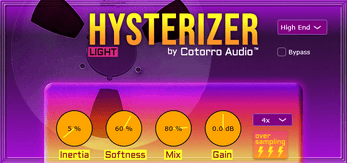
Hysterizer Light by Cotorro Audio is a free VST plugin designed to soften aggressive transients and add a more controlled sense of movement to audio.
The plugin uses a digital implementation of hysteresis, a lagging and softening behavior associated with magnetic recording processes. It can be used on drums, bass, vocals and other transient-heavy material.
Hysterizer Light is available as a free VST3 plugin for Windows.
What Is Hysterizer Light?
Hysterizer Light is a transient-shaping and character effect built around digital hysteresis processing.
Instead of using conventional attack and sustain controls, the plugin changes how quickly a signal reacts to movement. This can soften sharp attacks and make transient-heavy material feel heavier or more controlled.
The Inertia Control
Inertia is the central control in Hysterizer Light.
Higher settings make transients work harder to pass through the processing, while smaller movements can become more resistant and softened.
Lower settings create a faster response with greater sensitivity to small signal changes.
The developer recommends starting with the Clean preset and adjusting Inertia before using the Mix control to blend the effect.
Parallel Processing With the Mix Control
The Mix control allows the processed signal to be blended with the original audio.
This is useful when full-strength processing removes too much attack. A lower mix setting can retain the original punch while adding the smoother character of the hysteresis effect underneath.
2x and 4x Oversampling
Hysterizer Light includes 2x and 4x oversampling options.
The commercial Hysterizer Elite version extends the available oversampling to 8x, but the free Light edition remains fully usable without purchasing the paid version.
Best Uses for Hysterizer Light
- Smoothing sharp kick and snare transients
- Adjusting the snap of acoustic and electronic drums
- Softening picked bass attacks
- Reducing aggressive vocal plosives
- Preparing signals before compression or limiting
- Adding subtle movement to drum buses
- Creative transient processing
Using Hysterizer Before a Compressor
One interesting application is placing Hysterizer Light before a compressor or limiter.
By softening difficult peaks before they reach the dynamics processor, the following compressor may react more smoothly to the signal.
This can be useful on drums, bass and other material with sharp transient spikes.
Eight Factory Presets
The plugin includes eight presets designed to provide starting points for different processing intensities.
The Clean preset is recommended by the developer as a useful starting point for learning how the Inertia control affects the signal.
Compatibility and Plugin Format
- Operating system: Windows
- Plugin format: VST3
A compatible Windows DAW or audio host supporting VST3 effects is required.
No macOS, Linux, Audio Unit, AAX or CLAP version is officially listed for Hysterizer Light.
Installation and Registration
Hysterizer Light is distributed as a name-your-own-price download with a genuine free option.
After downloading and extracting the archive, the VST3 file can be copied to the standard Windows VST3 plugin folder.
No serial number or license manager is indicated for the free version.
Important Limitations
Hysterizer Light is a specialized character processor rather than a conventional full-featured transient shaper.
It does not provide the familiar independent attack and sustain controls found in many transient-design plugins.
The free version is also Windows-only and limited to 2x and 4x oversampling. Producers who need 8x oversampling can look at the commercial Hysterizer Elite edition.
Official Download
Official product page: Visit Hysterizer Light by Cotorro Audio
Official free download: Download Hysterizer Light for free
Final Verdict
Hysterizer Light is an unusual free VST3 plugin for producers who want to shape transients from a different angle.
Its hysteresis-based processing can soften sharp attacks, add weight and help difficult peaks behave more smoothly before compression or limiting.
It is a focused Windows-only tool, but that simplicity is part of its appeal. Sometimes a transient does not need another compressor. It just needs to calm down slightly.