Jeesonic EQ Pro is a free dynamic EQ VST plugin designed for producers, mixing engineers, mastering engineers and home studio users who want precise frequency control without paying for a premium surgical equalizer. Built as a transparent 24-band dynamic EQ, it combines modern curve editing, per-band dynamics, Mid/Side and Left/Right routing, selectable phase modes, real-time analysis and level-preserving Auto Gain inside a clean, focused interface.
This is not a vintage EQ emulation built to add analog colour, saturation or console-style flavour. EQ Pro is designed for accuracy. It is made for users who want to see what they are doing, hear exactly what the curve represents and make detailed corrective or tonal decisions without unnecessary decoration. For modern mixing, mastering and problem-solving, that makes it a serious free audio plugin.
What Is Jeesonic EQ Pro?
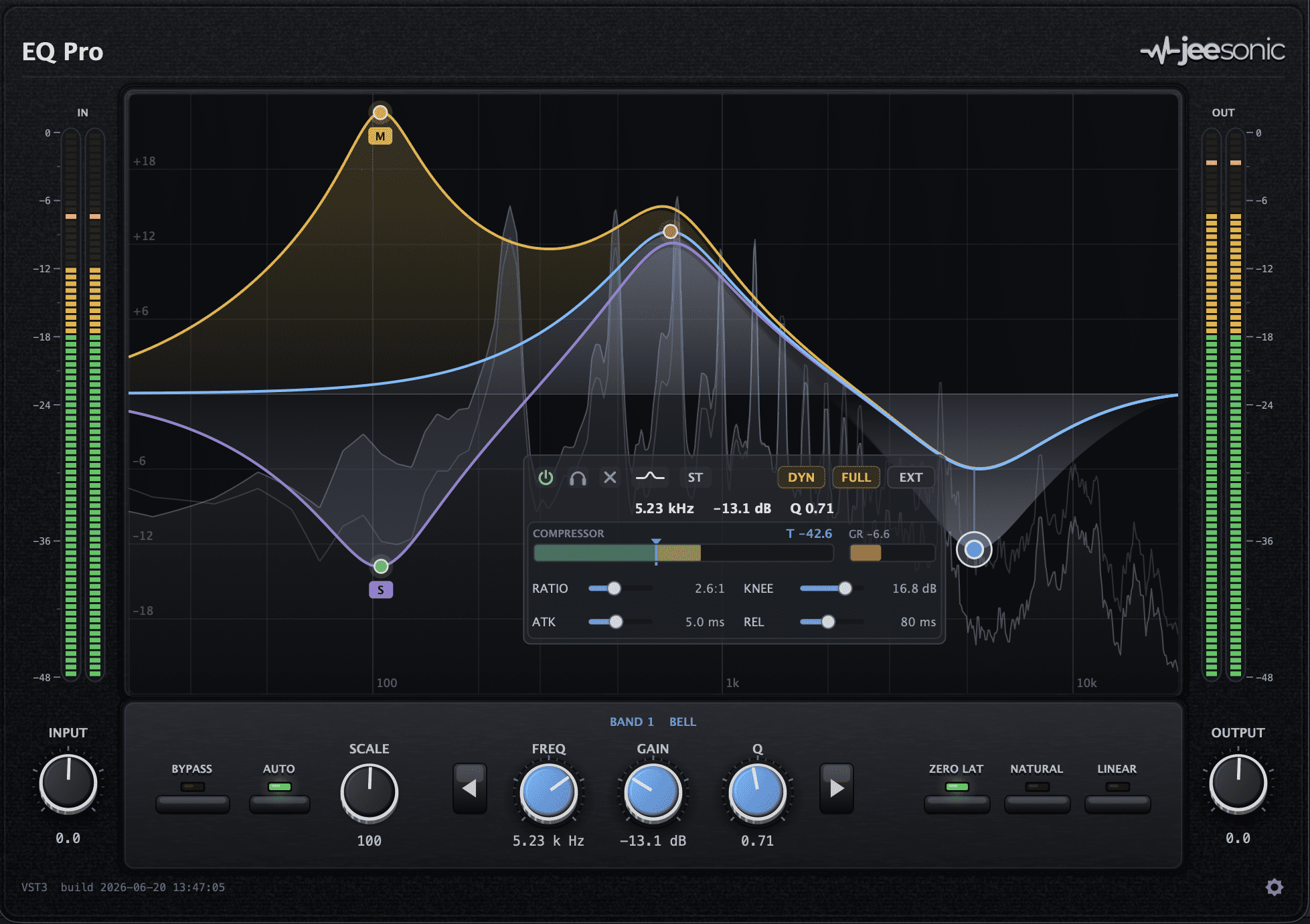
Jeesonic EQ Pro is a free dynamic equalizer for macOS and Windows. It offers up to 24 freely typed EQ bands, each placed directly on an interactive curve with a built-in spectrum analyzer. The plugin is available as VST3 and AU on macOS, and as VST3 on Windows.
The plugin is built around a clear promise: what you draw is what you hear. The displayed EQ curve and the actual audio processing use the same filter maths, so the visual curve is meant to represent the real processing result rather than a rough approximation.
Each bell or shelf band can also become dynamic, meaning the EQ move can react to the signal level inside that specific frequency area. This makes EQ Pro useful not only as a standard parametric EQ, but also as a de-esser, resonance controller, harshness reducer, low-end tamer and dynamic tonal shaper.
Why This Free Dynamic EQ VST Plugin Matters
The free dynamic EQ VST plugin category is becoming more competitive, but EQ Pro stands out because of how much control it offers at no cost. Up to 24 bands, per-band dynamics, stereo routing, selectable phase modes, oversampling, analyzer options and Auto Gain are features usually associated with more advanced commercial EQs.
For independent producers, this matters. Dynamic EQ is one of the most useful tools in modern mixing because it sits between equalization and compression. A normal EQ cut always removes the same amount of frequency content. A dynamic EQ cut only reacts when the problem becomes loud enough to need control.
That is important for vocals, drums, guitars, bass, synths and full mixes. A vocal may only become harsh on certain words. A snare may only ring on certain hits. A bass may only overload the low-mids on certain notes. EQ Pro gives producers a way to target those moments without flattening the entire performance.
Main Features
- Free dynamic EQ plugin for macOS and Windows.
- Up to 24 freely typed EQ bands on an interactive curve.
- Dynamic processing per band for bells and shelves.
- Full compressor controls per dynamic band, including threshold, ratio, knee, attack and release.
- Filter types: Bell, Low Shelf, High Shelf, Low Cut, High Cut, Notch and Tilt.
- Cut slopes from 6 to 96 dB per octave.
- Per-band routing for Stereo, Mid, Side, Left and Right processing.
- Selectable phase modes: Zero Latency, Natural and Linear.
- Real-time analyzer with pre and post modes.
- Oversampling options at Off, 2x and 4x.
- Gain Scale for scaling the entire EQ curve from 0 to 200 percent.
- Deterministic Auto Gain designed to preserve perceived level while EQ changes the tone.
- Input and output trim with stereo metering.
- True bypass for fast A/B comparisons.
- macOS VST3 and AU support.
- Windows VST3 support.
A Transparent EQ Built for Precision
Jeesonic EQ Pro is clearly designed for producers who want transparency. It does not try to imitate tubes, transformers, consoles or classic hardware curves. Its goal is to change the frequency balance cleanly and accurately.
This makes it useful for surgical tasks. Producers can remove narrow resonances, tame harsh frequencies, clean muddy low-mids, adjust vocal presence, shape drums, balance synths or make final tonal corrections before mastering. The 24-band limit gives enough room for complex work without forcing the user into multiple EQ instances.
The visual workflow is also important. New bands can be created directly on the curve, then moved by dragging. The interface is designed around the relationship between frequency, gain and Q, making it fast to shape a sound while watching the analyzer and response curve.
Dynamic EQ on Every Band
The most powerful part of EQ Pro is its dynamic band system. Any bell or shelf can become dynamic, allowing the EQ move to react only when the selected frequency range crosses a threshold.
This makes the plugin extremely useful for common mix problems. A dynamic bell around a harsh vocal frequency can reduce sharp moments only when they appear. A dynamic low-mid cut on a guitar can control muddiness without making the part permanently thin. A dynamic high shelf can add brightness only when the signal needs lift, depending on how it is set.
Each dynamic band can reveal full compressor controls, including threshold, ratio, knee, attack and release. That makes the system much deeper than a simple automatic dynamic EQ switch. Producers can decide how hard the band reacts, how smoothly it engages and how quickly it recovers.
Mid/Side and Left/Right Control
EQ Pro also includes per-band stereo routing. Each band can work in Stereo, Mid, Side, Left or Right mode. This opens up a lot of useful mixing and mastering options.
For example, a producer can cut low-end mud from the Side channel while keeping the center bass strong. They can brighten the Side signal for more perceived width. They can reduce harshness on only one side of a stereo recording. They can control vocal presence in the Mid without changing wide background elements.
This type of routing is especially useful in mastering and bus processing, where small stereo decisions can make a mix feel more balanced, wider or more controlled.
Phase Modes for Tracking, Mixing and Mastering
Jeesonic EQ Pro includes three phase modes: Zero Latency, Natural and Linear. Zero Latency is useful when tracking or mixing in situations where latency needs to stay low. Natural Phase gives another option for general mixing. Linear Phase is useful when phase shift is a concern, especially in mastering or parallel-style processing.
There is an important workflow point: dynamic EQ is available in Zero Latency and Natural Phase modes, while Linear Phase is intended for static EQ work. That makes sense because dynamic processing and linear-phase behavior often involve different technical trade-offs.
For producers, the practical takeaway is simple. Use Zero Latency or Natural for most dynamic mix work. Use Linear when phase behavior matters more than dynamic movement.
Auto Gain for More Honest Decisions
One of EQ Pro’s most interesting features is its Auto Gain system. EQ changes can easily fool the ear because louder often feels better. If a boost makes a track louder, it can sound more impressive even if the tonal decision is not actually right.
EQ Pro’s Auto Gain is designed to keep level comparisons more honest. It follows the EQ response and dynamic band movement to help preserve output level while the tonal balance changes. This helps producers judge the EQ decision itself rather than being tricked by volume differences.
This is especially useful on mix bus and mastering work, where small changes can feel bigger than they really are. Honest A/B comparison is one of the least glamorous parts of mixing, but it saves more tracks than another shiny preset ever will.
Sound and Creative Use
EQ Pro is not a character plugin. It is not meant to thicken, saturate or colour the signal. Its sound is clean, transparent and technical. That is exactly why it is useful.
On vocals, it can work as a de-esser, resonance controller and tonal shaper. On drums, it can tame ring, control cymbal harshness and shape kick or snare body. On bass, it can reduce boomy notes dynamically while keeping the low-end foundation intact. On guitars and synths, it can remove harsh resonances without dulling the whole sound.
On the mix bus or master bus, EQ Pro can make broad tonal adjustments, Mid/Side refinements and careful corrective moves. The Tilt filter is useful for quick global balance changes, making a track feel slightly warmer or brighter with one band.
Why Dynamic EQ Matters in Modern Mixing
Dynamic EQ has become essential because modern mixes are dense. Vocals, drums, bass, synths, guitars, effects and samples often compete in the same frequency areas. Static EQ can solve some problems, but it can also remove energy when the problem is not present.
A dynamic EQ can be more musical. It listens for the problem and acts only when needed. This makes it useful for keeping a vocal present without harshness, keeping bass powerful without boom, keeping drums exciting without painful cymbals and keeping a mix clean without making it lifeless.
For home studio users, this can be a major upgrade. Many producers struggle with harshness, mud and masking. A good free dynamic EQ gives them a serious tool for solving those problems without buying an expensive plugin suite.
Who Should Use Jeesonic EQ Pro?
Jeesonic EQ Pro is ideal for producers, beatmakers, mixing engineers, mastering engineers, vocal producers and home studio users who need a free audio plugin for precise frequency control.
It is especially useful for anyone mixing vocals, drums, bass, guitars, synths, full beats or stereo buses. It is also a strong option for producers who want a modern surgical EQ with analyzer feedback and dynamic control, but who do not want to pay for a premium commercial equalizer.
It is less suited to users looking for vintage tone, analog warmth or instant coloration. EQ Pro is a scalpel, not a lava lamp. It is built to solve problems clearly.
Best Use Cases for Producers
Vocal Harshness and Sibilance
Use a dynamic bell or high-frequency band to reduce harsh consonants, sharp upper mids or sibilance only when they become too loud.
Low-Mid Mud Control
Apply dynamic cuts around muddy frequencies on vocals, guitars, keys or buses to clean the mix without making tracks permanently thin.
Bass Note Control
Use dynamic bands to tame boomy bass notes while preserving the overall low-end weight of the performance.
Drum Ring Removal
Use narrow dynamic bands to control resonant snare, tom or cymbal frequencies that only appear on certain hits.
Mid/Side Mastering Adjustments
Use Mid and Side routing to refine stereo balance, clean low-end width or add subtle side brightness during mastering.
Transparent Mix Bus EQ
Use broad shelves, Tilt EQ or small dynamic moves for careful mix bus shaping without adding analog-style coloration.
External Sidechain Frequency Control
Use external sidechain processing to make one sound react to another in a specific frequency range, useful for kick and bass, vocal and music bed, or lead instrument masking.
Compatibility and Download Details
Jeesonic EQ Pro is available for macOS and Windows. The macOS version includes VST3 and AU formats for Apple Silicon and Intel Macs. The Windows version is available as a VST3 plugin.
- Official website: Jeesonic EQ Pro official page
- Download for macOS: Download Jeesonic EQ Pro for macOS
- Download for Windows: Download Jeesonic EQ Pro for Windows
- User manual: Read the Jeesonic EQ Pro manual
Industry Impact: A Serious Free EQ for Modern Producers
Jeesonic EQ Pro shows how advanced free plugins continue to raise expectations. A few years ago, a free EQ was often simple, useful and limited. EQ Pro arrives with features that many producers associate with professional paid tools: dynamic bands, stereo routing, phase modes, oversampling, Auto Gain and a real-time analyzer.
For independent musicians, this is important. Mixing quality is often limited not only by skill, but also by access to reliable tools. A free dynamic EQ with this level of control gives producers a real opportunity to improve their mixes without increasing their budget.
It also reinforces a wider trend in music software: freeware is no longer just a beginner category. Some free plugins are now serious enough to sit next to paid processors in professional sessions.
What Happens Next
Jeesonic EQ Pro is a new release, and its long-term value will depend on stability, user feedback, updates and how well it performs across different DAWs and operating systems. The feature set is already strong, but real adoption will come from producers using it in everyday mixing and mastering sessions.
The best way to test it is simple: load it on a vocal, drum bus, bass track or full mix, create a few bands, activate dynamic processing where needed and compare with Auto Gain enabled. If the tone improves without the level tricking your ears, EQ Pro is doing exactly what a good modern EQ should do.
Final Verdict
Jeesonic EQ Pro is a powerful free dynamic EQ VST plugin for producers who need surgical control, transparent tone shaping and modern mixing features without paying for a premium equalizer.
With up to 24 bands, dynamic EQ per band, full compressor controls, Mid/Side and Left/Right routing, selectable phase modes, oversampling, analyzer tools and deterministic Auto Gain, it offers an impressive amount of control for a free audio plugin.
For vocals, drums, bass, synths, mix bus correction and mastering work, Jeesonic EQ Pro is absolutely worth downloading. It is clean, technical and surprisingly complete, the kind of free plugin that makes the rest of the EQ folder suddenly feel a little nervous.