Interstice by Inear Display is a free dual-band delay VST plugin designed for producers, sound designers, electronic musicians and cinematic composers who want to move beyond ordinary echoes. Now available through Inear Display’s pay-what-you-want catalogue, Interstice gives home studio creators a distinctive delay engine for spectral movement, resonant echoes, drifting textures and experimental sound design.
This is not a standard delay plugin built only for clean repeats or simple slapback effects. Interstice splits the input signal into low and high frequency bands, processes each side through its own delay path, then adds pitch shifting, diffusion, damping and drift modulation to create strange, evolving results. For ambient music, IDM, glitch, film scoring, dark electronic production and experimental textures, it offers a very different kind of echo.
What Is Interstice by Inear Display?
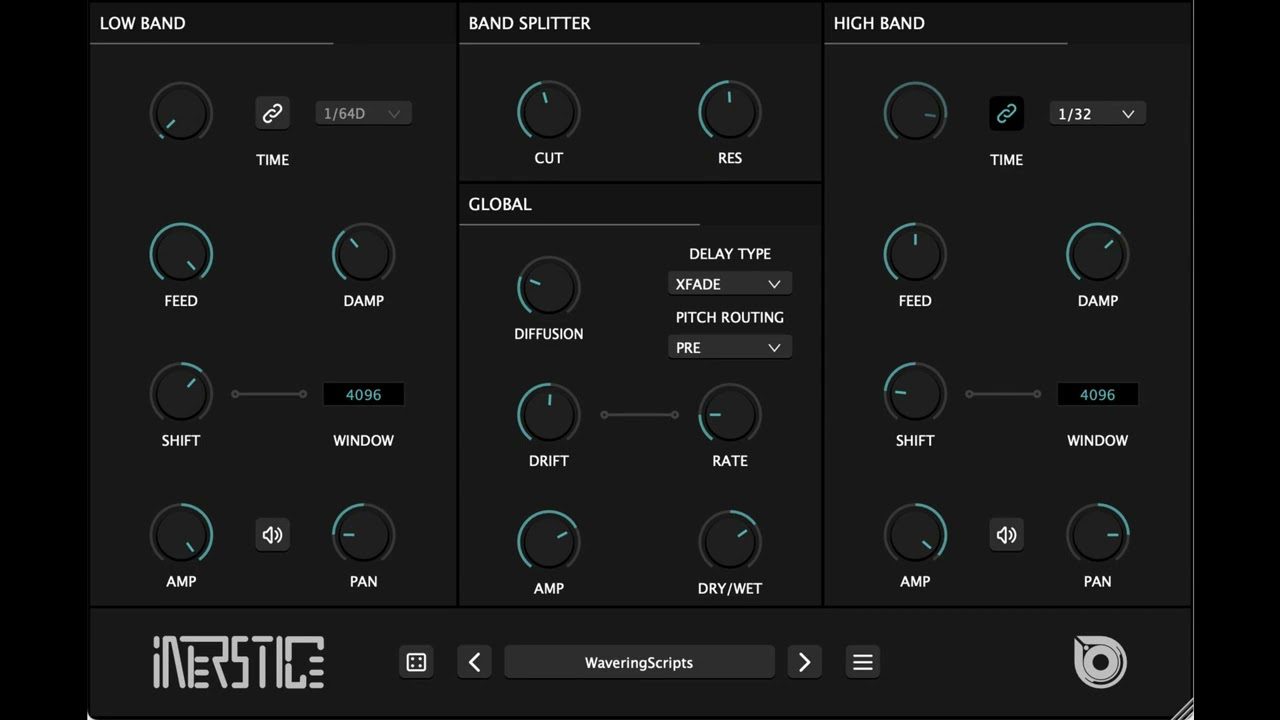
Interstice is an experimental dual-band delay effect plugin from Inear Display. It is built around a frequency-splitting workflow, where incoming audio is divided into low and high bands using a resonant filter. Each band then passes through its own delay circuit, giving producers more control over how echoes behave across the frequency spectrum.
Instead of treating the whole signal as one block, Interstice allows low frequencies and high frequencies to react differently. This makes it useful for creating complex echoes, ghost-like resonances, warped rhythmic repeats, metallic textures and atmospheric sound beds that would be difficult to create with a basic stereo delay.
Interstice is available as a 64-bit VST3 and AU plugin for compatible Windows and macOS systems. It is part of Inear Display’s creative audio tools catalogue, now distributed through a pay-what-you-want model, which means it can be downloaded for free while still giving users the option to support the developer.
Why This Free Dual-Band Delay VST Plugin Matters
The free dual-band delay VST plugin category is not crowded. Most free delay plugins focus on classic tape delay, analog echo, clean digital repeats or simple tempo-synced movement. Interstice takes a more experimental route by treating delay as a tool for resonance, frequency separation and textural transformation.
For modern producers, this matters because delay is no longer just a spatial effect. It can become part of the arrangement, part of the rhythm and part of the sound design identity of a track. A delay can make a vocal feel distant, a synth feel alive, a drum loop feel unstable or a cinematic transition feel deeper.
Interstice is especially useful when a track needs movement that feels less predictable than a standard ping-pong delay. It can create echoes that shimmer, wobble, resonate, drift and break apart, making it a strong creative tool for producers who want their effects to have personality.
Main Features
- Free dual-band delay VST plugin available through Inear Display’s pay-what-you-want model.
- Frequency splitter that divides the input signal into low and high bands.
- Resonant filter crossover for shaping the split between frequency ranges.
- Separate delay paths for low and high bands.
- Complex feedback circuit using diffusion and damping for evolving echoes.
- Pitch shifting per band for creating overtones, harmonic movement and unusual delay colors.
- Pre-delay or post-delay pitch processing for different tonal results.
- Repitch and crossfade delay algorithms for different timing and pitch behaviors.
- Manual and host-synced delay timing for free movement or tempo-locked effects.
- Drift modulator for organic wobble and unstable movement.
- Individual amplitude and pan controls for each band.
- Mute options for isolating low or high band processing.
- Parameter randomizer for fast experimental results.
- Resizable interface with multiple color schemes.
- VST3 and AU support for compatible DAWs on Windows and macOS.
A Delay Plugin Built Around Frequency Separation
The defining idea behind Interstice is frequency separation. By splitting audio into low and high bands before delay processing, the plugin gives producers a way to design echoes with more detail. A low band can remain heavy and slow, while the high band can shimmer, scatter or move rhythmically. A high band can be muted while the low band creates deep resonant movement. A low band can be kept controlled while the upper frequencies become more experimental.
This is useful because different frequency ranges behave differently in a mix. Low-frequency delays can quickly create mud if they are not controlled. High-frequency delays can become harsh if they are too bright or too dense. Interstice gives producers a more surgical and creative way to explore those areas without using multiple delay plugins and complex routing.
The resonant crossover filter adds another layer of character. It is not simply a clean technical split. It can add harmonic energy around the split point, which helps the delay feel more alive and more unusual.
Pitch Shifting and Feedback for Strange Echoes
One of the strongest creative aspects of Interstice is its pitch-shifting system. Each band can include pitch processing before or after the delay stage, creating overtones, warped repeats and shifting harmonic textures.
When pitch shifting happens before the delay, the changed pitch enters the delay circuit and repeats from there. When it happens after the delay, the repeat behavior and pitch behavior interact differently. This gives producers several ways to create unstable echoes, rising or falling delay colors, metallic repeats and atmospheric movements.
The feedback path also plays a major role. With diffusion and damping inside the circuit, Interstice can move from recognizable echoes into smeared resonances and evolving clouds. This makes it useful not only for delay effects, but also for texture generation.
Drift Modulation for Organic Movement
The drift modulator gives Interstice a more unstable and organic feel. Instead of repeating with mechanical precision, the plugin can introduce movement that makes the effect wobble, shift and breathe.
This is especially useful in ambient, cinematic and experimental music, where perfect digital timing can sometimes feel too clean. Drift creates imperfection. It can make echoes feel haunted, tape-like, unstable or alive, depending on the settings and source material.
On a simple piano phrase, drift can create a strange emotional halo. On a synth pad, it can add movement without adding another instrument. On a vocal fragment, it can create ghost-like repeats that sit behind the lead. On percussion, it can create rhythmic instability and glitch-adjacent motion.
Sound and Creative Use
Interstice is at its best when used as a creative delay rather than a conventional mixing utility. It can handle simple echo duties, but its real identity appears when the band split, pitch shifting, feedback and drift are pushed into more experimental territory.
On vocals, it can create distant echoes, spectral trails and shifting background textures. On synths, it can turn short phrases into evolving rhythmic patterns. On drums, it can create unusual delay grooves and frequency-dependent repeats. On guitars and pianos, it can create cinematic atmospheres, unstable halos and resonant sound beds.
It is also a strong resampling tool. Producers can process a simple sound through Interstice, record the output, then cut the most interesting moments into transitions, impacts, fills or new texture layers.
Why Experimental Delay Still Matters
Delay is one of the most common effects in music production, but experimental delay remains one of the most powerful ways to create sonic identity. A standard delay can add space. A more unusual delay can change the way a sound behaves inside the arrangement.
Interstice matters because it gives producers access to delay processing that feels less predictable. It can create movement, atmosphere and harmonic detail at the same time. That makes it useful for producers who want to make common sounds feel less common.
In a production world where many artists use the same presets, drum packs and sample libraries, creative processing is one of the fastest ways to build a more personal sound. Interstice can help turn familiar material into something more distinctive.
Who Should Use Interstice?
Interstice is ideal for ambient producers, cinematic composers, experimental electronic artists, glitch musicians, IDM producers, sound designers and home studio users who want a free audio plugin for unusual delay processing.
It is also useful for beatmakers who want to transform loops, producers who need atmospheric transitions and musicians who want delay effects that do more than repeat the input signal politely.
It is less suited to users looking for a basic, transparent delay for everyday mix tasks. Interstice can be subtle, but it is clearly built for stranger work. This is not the delay you load when everything needs to behave. This is the delay you load when the echo should start telling ghost stories.
Best Use Cases for Producers
Ambient Echo Textures
Use Interstice on pads, piano, guitars or field recordings to create long, drifting echoes and atmospheric layers.
Cinematic Resonances
Push the feedback and diffusion controls to build strange resonant tails for film scoring, transitions, intros and tension beds.
Vocal Delay Effects
Apply Interstice to vocal phrases, ad-libs or spoken fragments to create shifting echoes, ghostly trails and background motion.
Glitch and IDM Processing
Use pitch shifting, band muting and delay timing to create broken rhythmic repeats and unstable texture patterns.
Synth Movement
Place Interstice on synth stabs, arpeggios, pads or leads to create evolving delay patterns that add energy without adding new MIDI parts.
Drum Loop Transformation
Process percussion loops through the dual-band delay engine to create unusual rhythmic echoes and frequency-dependent movement.
Resampling and Sound Design
Print the output of Interstice to audio, then chop, reverse, stretch or layer the results into new sound design elements.
Compatibility and Download Details
Interstice is available as a 64-bit VST3 and AU plugin for compatible Windows and macOS systems. It can be downloaded from Inear Display’s official Gumroad page through a pay-what-you-want model.
- Official website: Inear Display Creative Audio Tools
- Download: Download Interstice for free
Industry Impact: Free Delay Plugins Are Getting More Creative
The availability of Interstice as a free or pay-what-you-want plugin is important because advanced delay processors are often locked behind premium sound design bundles. Simple delays are easy to find, but dual-band experimental delay tools with pitch shifting, diffusion, damping and drift modulation are much rarer in the free plugin world.
For independent producers, this matters. It means atmospheric, cinematic and experimental delay design is available without extra cost. It also gives home studio creators another way to build signature textures from simple source material.
Interstice also shows the value of focused plugin design. It does not try to be a giant multi-effect environment. It takes one idea, dual-band delay transformation, and explores it deeply enough to feel genuinely useful.
What Happens Next
Interstice has the potential to reach a wider audience now that the Inear Display catalogue is available through a free-friendly pay-what-you-want model. Its future value will likely come from producers sharing sound design workflows, ambient examples, cinematic presets and resampling chains built around the plugin.
The best way to test it is simple: load it on a piano, vocal chop, synth pad, guitar phrase or percussion loop, then explore the band split, pitch shifting, drift and feedback controls. If the sound starts moving somewhere unexpected, Interstice is doing exactly what it was built to do.
Final Verdict
Interstice by Inear Display is a powerful free dual-band delay VST plugin for producers who want otherworldly echoes, resonant textures, drifting movement and experimental delay design inside the DAW. Its frequency-splitting workflow, pitch shifting, diffusion, damping and drift modulation make it far more interesting than a standard echo effect.
For ambient music, cinematic scoring, glitch, IDM, dark electronic production and creative resampling, Interstice is absolutely worth downloading. It can be subtle, but its real strength appears when the delay begins to blur, bend and sing in strange directions.
If your home studio needs a free audio plugin that can turn ordinary echoes into moving soundscapes, Interstice deserves a place in your delay folder. It is not just an echo machine. It is a small portal for frequencies that clearly had other plans.