Free Clipper Plugin
Leikkaus: A Free Dynamic Clipper for Punchier and Louder Mixes
Control fast peaks, add density and prepare drums, basses and complete mixes for louder limiting with a free open-source plugin.
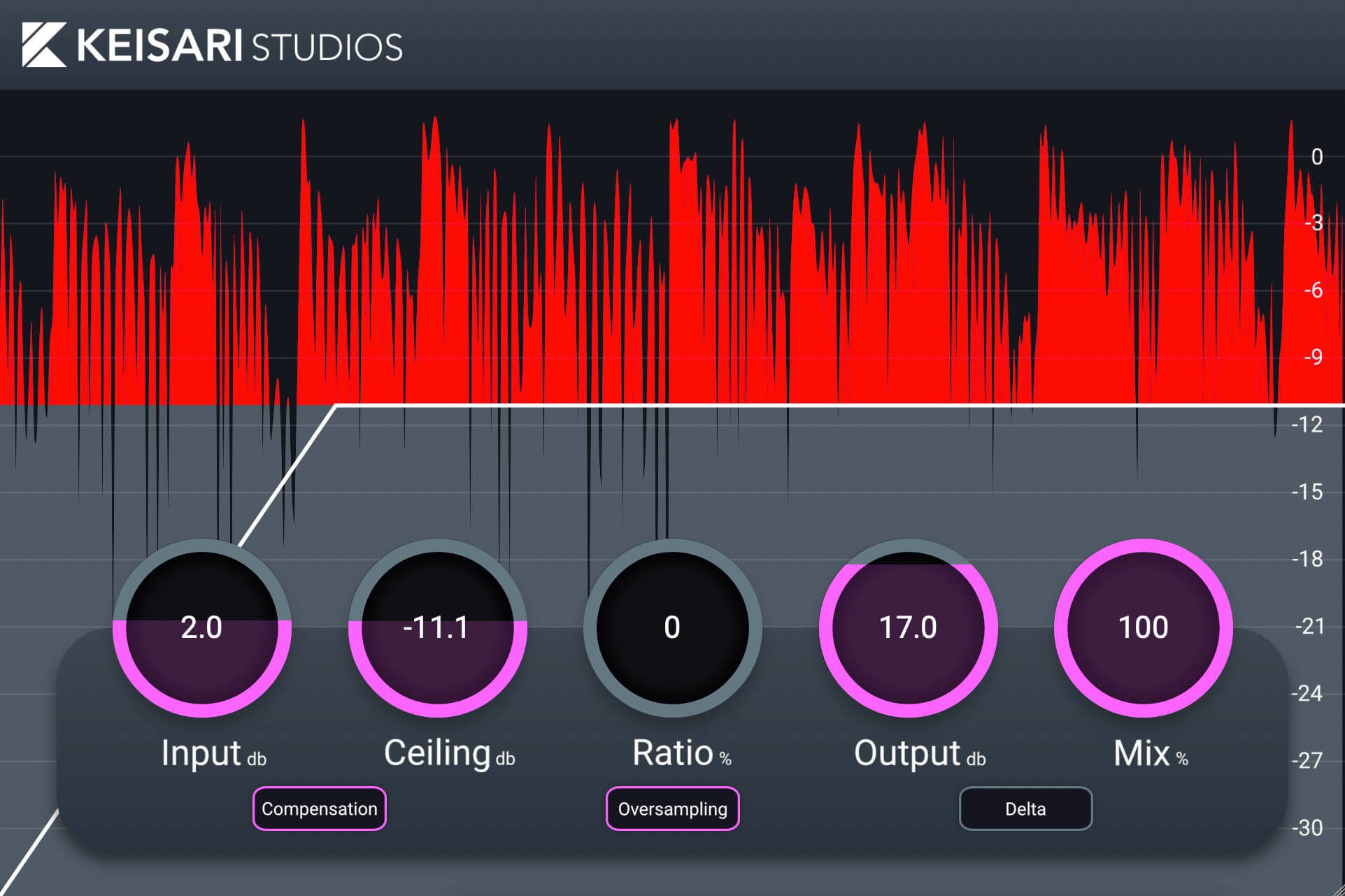
Leikkaus is a free dynamic clipper plugin developed by Keisari Studios. Released in March 2024, it provides producers with a focused tool for controlling fast peaks, adding clipping character and increasing perceived loudness before the final limiter.
The plugin is completely free and open source. It is available in VST3 format for Windows, while macOS users receive VST3 and Audio Unit versions compatible with Intel and Apple Silicon processors.
Leikkaus is intended for producers who want more control than a basic fixed clipper but do not need an oversized mastering suite. Its resizable interface and focused workflow make it suitable for individual tracks, drum groups, instrument buses and complete mixes.
| Developer | Keisari Studios |
|---|---|
| Plugin type | Dynamic clipper effect |
| Release date | March 2024 |
| Current version | 1.0.1 |
| Platforms | Windows and macOS |
| Windows format | VST3 |
| macOS formats | VST3 and Audio Unit |
| Processor support | Intel and Apple Silicon on macOS |
| Price | Free and open source |
What Is Dynamic Clipping?
A clipper controls peaks by limiting the maximum amplitude of the waveform. When a transient moves beyond the clipping threshold, its highest section is reshaped instead of continuing to increase freely.
This process differs from conventional compression. A compressor gradually reduces gain according to its threshold, ratio, attack and release settings. A clipper reacts directly to the waveform and can control extremely short peaks that may pass through a slower compressor.
The result can create more headroom for the final limiter. A few milliseconds of excessive peak energy may add very little to the musical impact of a kick or snare, yet force the limiter to work much harder.
Removing those peaks carefully can increase perceived loudness while preserving more punch than heavy broadband limiting.
Useful for Drums and Percussion
Drums are among the most common sources processed with a clipper. Kicks, snares, claps and percussion often contain fast transients that create large peaks without contributing the same amount of perceived volume.
Leikkaus can be placed on an individual drum channel to reduce these peaks before compression, saturation or limiting. It can also be used on the complete drum bus to increase density and create a more unified rhythmic section.
Start with a conservative amount of clipping and compare the result at a matched output level. The goal is usually to control the highest transient moments without making the drum sound flat, brittle or noticeably distorted.
House, Techno, EDM, Hip-Hop and modern Pop productions can all benefit from controlled clipping when the drums need to remain loud and energetic inside a dense mix.
Controlling Kicks and Bass Sounds
Kicks and basses can create significant peaks in the low-frequency range. These peaks may not always sound loud, but they consume headroom and can cause the master limiter to react aggressively.
A clipper can help stabilize the strongest hits before the kick and bass reach the master bus. This is particularly useful for electronic music, where the low end must remain powerful without dominating the complete mix.
Clipping low-frequency material should be handled carefully because excessive processing can introduce additional harmonics. These harmonics may improve translation on smaller speakers, but they can also change the original tone.
Use spectrum analysis and level-matched comparisons rather than judging the result only by increased loudness.
Bus and Master Processing
Leikkaus can also be placed before the final limiter on a drum bus, instrument bus or master channel.
In this position, the clipper can remove a small number of isolated peaks before they reach the limiter. This allows the limiter to concentrate on overall loudness control rather than reacting heavily to every snare or kick transient.
Master-bus clipping should generally remain subtle. Reducing one or two decibels of the strongest peaks may be enough to improve loudness and limiter behavior without introducing obvious distortion.
A clipper is not a replacement for balanced mixing. If the kick, snare or bass continually creates excessive peaks, correcting those elements individually will usually produce a cleaner result than forcing the master clipper to solve everything.
Creative Clipping and Saturation
Clipping does not need to remain completely transparent. More aggressive settings can add harmonic density and create intentional distortion.
This can work well on drum loops, 808s, synth basses, percussion, distorted vocals and parallel processing channels. A clipped duplicate can be blended beneath the original signal to add presence without completely replacing the clean version.
Creative clipping is especially effective when a sound feels too polite or lacks midrange energy. The generated harmonics can help it remain audible through smaller speakers and crowded arrangements.
The difference between controlled character and accidental damage is usually only a few decibels, so the bypass button remains an important member of the production team.
Best Uses
- Controlling kick and snare peaks
- Increasing drum-bus density
- Preparing a mix for final limiting
- Adding harmonics to basses and 808s
- Creating aggressive electronic drums
- Parallel distortion and saturation
- Reducing transient-heavy peaks
- Increasing perceived loudness carefully
How to Use Leikkaus
Insert Leikkaus after corrective processing but before the final limiter. On individual drums, it can be placed before or after compression depending on the desired result.
Lower the clipping level gradually until the loudest peaks begin to change. Listen for unwanted harshness, loss of punch or excessive distortion.
Compare the processed and unprocessed signals at similar loudness. Without gain matching, the louder version will often appear more impressive even when the sound quality has become worse.
For mastering, begin with only a small amount of peak reduction. Several stages of light processing often sound cleaner than asking one plugin to remove every peak at once.
Resizable Interface
Keisari Studios designed Leikkaus with a scalable interface that supports high-resolution displays up to 4K.
This is useful for producers working on modern laptops, large studio monitors or compact screens where fixed plugin interfaces can become uncomfortable.
The visual design remains focused on the clipping process rather than adding unnecessary browsers, animated backgrounds or unrelated mastering modules.
Compatibility and Installation
The Windows version requires a 64-bit VST3 host and supports Windows Vista, Windows 7, Windows 8, Windows 10 and Windows 11.
On macOS, Leikkaus requires macOS 10.9 or newer and is available in VST3 and Audio Unit formats. The universal build supports both Intel processors and Apple Silicon.
The plugin is supplied through the official Keisari Studios Patreon page. Download the correct archive, extract the files and place them in the appropriate system plugin directory.
No commercial license manager or subscription is listed. The source code is also published by the developer for users interested in studying or modifying the project.
Main Limitations
- No official Linux version is listed
- No AAX version for Pro Tools is currently provided
- The plugin is a dedicated clipper rather than a complete mastering suite
- Excessive clipping can create audible distortion and harshness
- Low-frequency clipping may significantly change the tone of bass sounds
- The download is hosted through Patreon rather than a conventional installer manager
Final Verdict
Leikkaus is a focused free clipper for producers who want better control over fast peaks and perceived loudness.
Its main strength is simplicity. Instead of combining dozens of mastering modules, it concentrates on one important task: shaping transient peaks before they reach the next processor.
The plugin can be useful on drums, basses, instrument buses and complete mixes. Used carefully, it can reduce limiter workload and preserve more punch. Used aggressively, it can add distortion and harmonic character.
For Windows and macOS producers looking for a free open-source clipping tool released within the last few years, Leikkaus is a practical addition to the mixing folder.