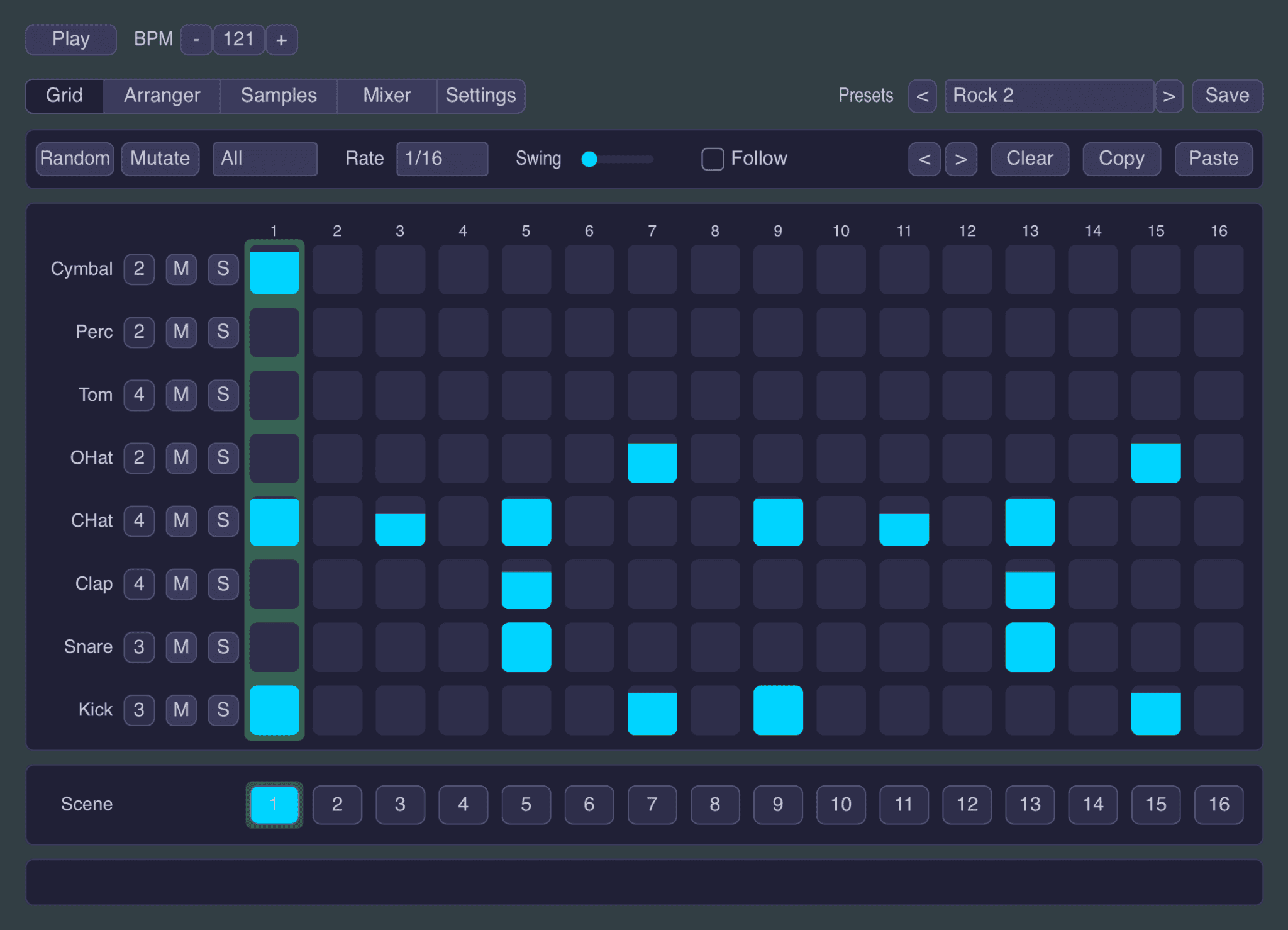

Little Drum Machine is a free drum instrument developed by Snorkel Audio for producers who want to build beats quickly without opening an oversized workstation. It combines a compact step sequencer, sample playback, preset grooves, pattern scenes and a practical mixer inside one clear interface.
The plugin includes 32 drum sounds and 20 genre-based presets, while also allowing producers to import their own samples. It is completely free and available for Windows, macOS and iPad.
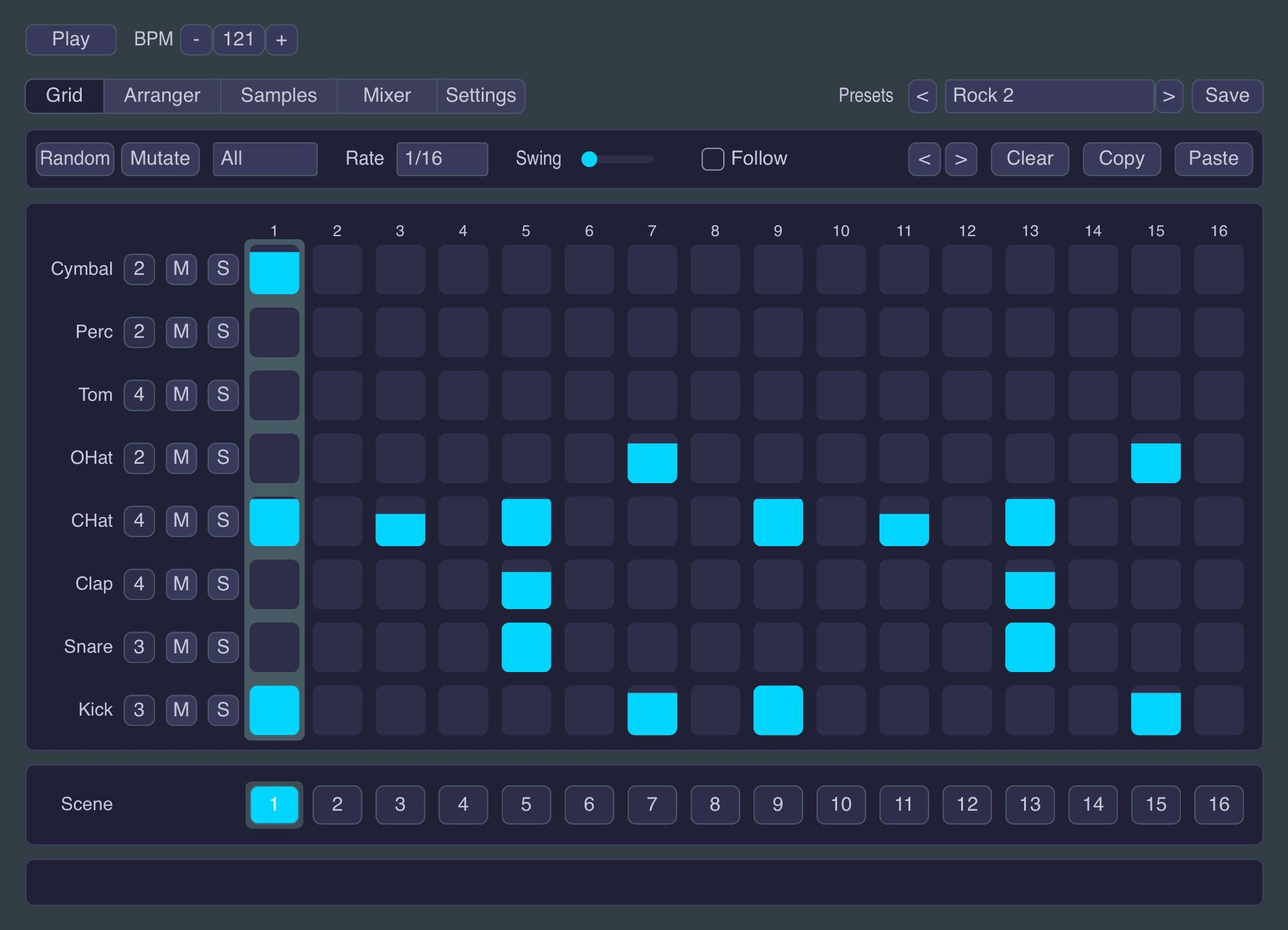
What Is Included?
Little Drum Machine focuses on the tools needed to move from an empty project to a usable rhythm without unnecessary menus.
- 32 included drum samples
- Eight drum lanes
- Four sound variations for each drum
- 16-step pattern sequencer
- 20 genre-based presets
- Velocity editing directly inside the grid
- Swing control
- Randomize and Mutate functions
- Sample import
- 16 pattern scenes per preset
- Built-in song arranger
- Polyrhythm and polymeter options
- Per-drum mixer and three-band EQ
- Master EQ and glue compressor
- Configurable MIDI output
The eight drum lanes cover kick, snare, clap, closed hi-hat, open hi-hat, tom, percussion and cymbal sounds. Each lane can access four sample slots, providing enough variation for accents, alternate hits and less repetitive patterns.
Fast Drum Sequencing
The main grid uses a familiar 16-step layout. Notes can be entered directly, while dragging vertically changes their velocity. This makes it possible to add accents and softer ghost notes without opening a separate MIDI editor.
The Randomize function creates a new groove while respecting the role of each drum. Kicks remain rhythmically useful, snares are placed in sensible positions and percussion fills the remaining space. Mutate makes smaller changes to the current pattern, which is useful when a groove works but needs a fresh variation.
These functions are designed to accelerate beat creation rather than generate a complete track automatically. The producer is still required to make decisions, an old-fashioned concept that somehow survived into 2026.
Scenes, Arranger and Polyrhythms
Each preset can store up to 16 scenes. These can be used for main grooves, fills, breakdowns, transitions and alternative chorus patterns.
The built-in arranger chains scenes together to create a longer drum performance. This allows producers to develop a complete rhythmic structure inside the plugin instead of repeating one four-bar loop across the entire song.
Little Drum Machine also supports independent step counts and loop lengths for each lane. A hi-hat can run over a different number of steps than the kick, creating evolving polyrhythms and polymeters.
This feature is particularly useful for Techno, Minimal, Ambient, IDM and experimental electronic music, where small timing differences can keep a repetitive groove moving.
Best Uses
House and Techno
The sequencer, swing control and pattern scenes make Little Drum Machine suitable for House, Techno and related club styles. Start with a basic four-on-the-floor kick, then add velocity changes to the hi-hats and percussion.
Use Mutate to generate fills or alternative patterns while preserving the central groove.
Hip-Hop and Modern Beats
Imported samples can be used to build personal Hip-Hop, Trap and R&B drum kits. Velocity editing helps create more natural hi-hat movement, while scene variations can separate verses, hooks and transitions.
The included presets are starting points rather than finished beats. Replace the original samples, change the swing and remove unnecessary steps to give the rhythm its own identity.
Drum & Bass
The plugin includes presets for faster electronic genres and can support Drum & Bass production. Different scenes can hold the main break, a simplified verse rhythm and more active fills.
For greater control, import individual kick, snare and breakbeat slices rather than relying on one complete drum loop.
External Drum Synths
Each lane can send MIDI using its own note and channel settings. Little Drum Machine can therefore sequence another drum plugin, software synthesizer, iPad application or compatible hardware instrument.
This turns the plugin into a simple rhythmic control centre even when its internal sounds are not being used.
Production Tips
Use velocity deliberately: Reduce the velocity of secondary hi-hats and percussion instead of programming every hit at maximum level.
Create several scenes early: Build a main groove, fill and simplified variation before arranging the full track.
Import personal samples: Replacing the factory sounds is the quickest way to adapt the plugin to a specific production style.
Use Mutate conservatively: Small variations usually sound more musical than completely randomizing a groove that already works.
Control the low end: Use the per-drum EQ to remove unnecessary bass frequencies from percussion, claps and cymbals.
Try different lane lengths: A shorter or longer hi-hat sequence can add movement without changing the main kick pattern.
Compatibility
Little Drum Machine is available as a VST3 plugin for Windows. macOS users can install it in VST3 or Audio Unit format.
The iPad version runs as an AUv3 instrument in compatible hosts such as Logic Pro, AUM, Cubasis and Drambo.
The desktop version can be used in compatible DAWs including Studio One, Ableton Live, FL Studio, Cubase, Reaper and Bitwig Studio. Logic Pro users should install the Audio Unit version.
Final Verdict
Little Drum Machine is a focused free VST for producers who value speed, clear sequencing and flexible sample use. Its 20 presets, pattern scenes, arranger, polyrhythms and MIDI output provide considerably more depth than its compact interface initially suggests.
It is not designed to replace an advanced drum workstation with thousands of sounds. Instead, it helps producers create, vary and arrange a groove before inspiration wanders into another browser tab.
Download Little Drum Machine from the official website:
https://snorkelaudio.com/little-drum-machine/