Vocal tuning has become part of the modern studio language. From polished pop hooks to melodic rap, lo-fi toplines, Afro house vocals, hyperpop textures and clean podcast-style vocal production, pitch correction is no longer only a repair tool. It is a creative instrument. PitchCure – Vocal Pitch Corrector Free VST by Saint Mike DSP enters that space with a clear promise: to correct pitch while keeping the voice alive.
What Is PitchCure?
PitchCure is a free vocal pitch correction plugin designed for singers, rappers, producers, beatmakers and mixing engineers who need fast, musical tuning inside a DAW. Available from the official Saint Mike DSP PitchCure page, the plugin focuses on transparent correction, expressive vocal movement and a workflow that does not force the user into slow manual editing.
Instead of drawing every correction by hand, PitchCure is built around direct musical controls. The user can detect a key, choose a vocal range, shape the correction speed, preserve human expression, adjust transitions between notes and add tonal color. That makes it attractive for home studio creators who want professional-sounding vocal control without turning the session into an engineering marathon.
A Vocal Tuner Made for Speed and Feel
The strength of PitchCure lies in its balance between correction and emotion. Many pitch correction plugins can lock a vocal into tune, but the result may feel stiff if the performance is pushed too hard. PitchCure is designed to keep words clear, breaths natural and vibrato intact while still tightening notes that drift away from the intended scale.
For producers working with independent artists, this matters. Not every session has the luxury of endless vocal takes, and not every performance needs surgical editing. Sometimes the goal is simple: keep the character, fix the obvious pitch issues and help the vocal sit confidently in the track. PitchCure fits that practical reality.
Core Controls and Workflow
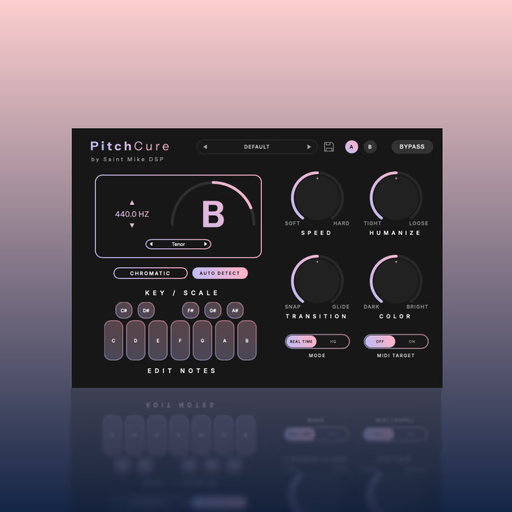
PitchCure includes several controls that make the tuning process feel immediate. The Speed control sets how strongly and quickly the plugin corrects incoming notes. Lower settings can create smoother, more discreet tuning, while faster settings can move toward a tighter, more modern vocal sound.
The Humanize control is especially important for natural vocal production. It helps preserve vibrato and emotional movement, which is useful when working with singers whose expression should remain present. Transition controls the glide between notes, allowing the vocal to move more naturally or snap more sharply depending on the style of the track.
PitchCure also includes Auto Key and Custom Scales, giving producers different ways to guide the correction. Auto Key helps speed up the setup process, while custom note editing gives more control when the song needs a specific melodic framework. MIDI Target mode adds another creative layer, allowing the vocal to follow notes played from a keyboard or MIDI controller.
Sound Character: Clean, Controlled and Musical
PitchCure is presented as a transparent vocal tuner, and its creative value comes from that balance. It is not only about forcing a voice into tune. It is about giving a vocal more focus while keeping enough movement to avoid a lifeless result. For pop, R&B, melodic rap, Afro house, trap, EDM and singer-songwriter productions, that kind of control can make the difference between a demo vocal and a finished vocal.
The Color knob adds a simple tonal shaping option with a tilt EQ approach. This can bring extra warmth or brightness before the vocal reaches the rest of the chain. In a real mix, that can be useful before compression, saturation, delay or reverb, especially when a vocal needs a quick tonal move without opening another plugin.
Who Is PitchCure For?
PitchCure is a strong choice for home studio users who record vocals regularly and need a free pitch correction plugin that feels approachable. Beatmakers can use it to polish hooks from featured vocalists. Producers can place it early in a vocal chain to stabilize a performance before mixing. Songwriters can use it during demo sessions to keep creative momentum. Mixing engineers can use it for fast corrective work when a vocal needs musical support without heavy manual editing.
It may also appeal to sound designers and electronic producers who want controlled vocal movement, MIDI-driven pitch behavior or more stylized tuning effects. While its natural tuning side is central, the faster correction settings and MIDI Target mode open the door to more creative vocal processing.
Practical Music Production Use Cases
On a lead vocal, PitchCure can help tighten pitch while preserving the singer’s identity. On backing vocals, it can make stacks feel cleaner and more consistent. On rap vocals with melodic phrasing, it can bring hooks closer to the instrumental key. On dance music vocals, it can help the topline lock into the harmonic movement of the track. On demos, it can quickly turn a rough idea into something more presentable.
The Real Time mode is useful for tracking, especially when artists want to hear tuning while recording. HQ mode is better suited for mixdown when sound quality takes priority. This kind of flexible workflow makes PitchCure practical in both writing sessions and final production sessions.
Compatibility and Download
PitchCure supports macOS 11.0 or higher, including Intel and Apple Silicon systems, with VST3, AU and AAX formats on macOS. On Windows, it supports Windows 10 and 11 in 64-bit, with VST3 and AAX formats. That makes it compatible with major DAWs such as Logic Pro, Ableton Live, FL Studio, Cubase, Reaper and Pro Tools.
The plugin is available from the same official PitchCure download page, where Saint Mike DSP provides the product details, audio examples and access to the free download.
Why This Free VST Is Worth Trying
The free vocal tuning category is competitive, but PitchCure stands out because it gives users a strong set of musical controls without overwhelming the workflow. Speed, Humanize, Transition, Auto Key, Custom Scales, MIDI Target and Color form a practical toolset for modern vocal production. It is simple enough for beginners, yet flexible enough for producers who want more than a one-knob correction effect.
For a free VST, the value is obvious. PitchCure gives vocal producers a fast way to improve pitch, shape performance and experiment with creative tuning inside a clean production workflow. It will not replace every advanced manual editor for every situation, but it can become a reliable first move in many vocal chains.
Final Verdict
PitchCure – Vocal Pitch Corrector Free VST is a smart addition to any modern producer’s toolkit. It offers the essential qualities artists need from vocal tuning today: speed, clarity, musical control and respect for the original performance. For singers, rappers, beatmakers, home studio users and mixing engineers looking for a free pitch correction plugin with real production value, PitchCure is absolutely worth downloading and testing in a vocal chain.