Free Dynamic Delay Plugin
DynamicEchoFree: A Free Delay That Follows Your Performance
A responsive delay effect that uses gain reduction to control feedback, wet level and the movement of each echo.
DynamicEchoFree by SaschArt Audio Plugins is a free dynamic delay released in March 2026. Instead of producing echoes that remain identical throughout a performance, the plugin analyzes the input dynamics and changes the behavior of the delay in real time.
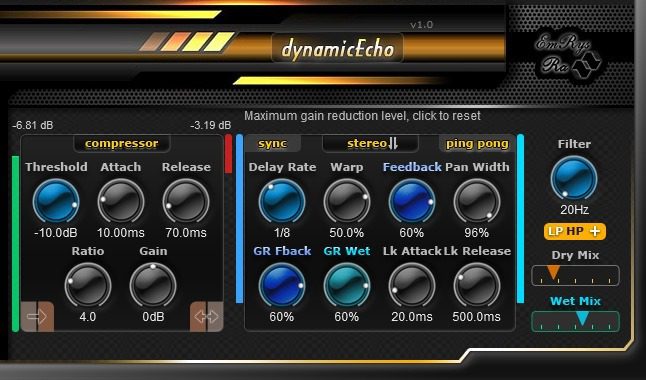
Its compressor section can operate as a conventional dynamics processor or simply as a gain-reduction detector. That detection signal can then control the delay feedback and wet level, creating echoes that expand, contract or move out of the way according to the intensity of the source.
The plugin is available for Windows and macOS. A free SaschArt account is required to access the download.
DynamicEchoFree at a Glance
| Developer | SaschArt Audio Plugins |
| Plugin type | Dynamic delay and compressor |
| Release version | 1.0 |
| Plugin formats | VST2, VST3 and Audio Unit |
| Platforms | Windows and macOS |
| Price | Free with account registration |
A Delay Controlled by Gain Reduction
Most delay plugins repeat the input signal according to fixed feedback and mix settings. DynamicEchoFree introduces a different workflow by using the gain reduction generated inside its compressor section as a modulation source.
When the input becomes louder, the plugin can increase or decrease the feedback and wet level. This makes it possible to preserve the initial attack of a vocal, guitar or synthesizer while allowing the echoes to develop during quieter moments.
The relationship can also be reversed. A positive link increases the selected delay parameter as gain reduction rises, while a negative link moves it toward zero. This gives producers control over whether the delay becomes more active or more restrained during louder passages.
Compressor and Sidechain Detection
The compressor section includes Threshold, Ratio, Attack and Release controls. It can process the incoming signal directly or analyze an external sidechain input.
External sidechain detection allows another track to control the delay. A lead vocal could reduce the echoes applied to an instrumental layer, or a drum track could animate the feedback of a synthesizer effect.
The gain-reduction detector remains active even when the Ratio control is set to 1:1. Producers can therefore use the dynamics analysis to animate the delay without necessarily applying conventional compression to the source.
Stereo, Ping-Pong and Warp Modes
DynamicEchoFree can process the incoming signal in stereo or average it to mono before it enters the delay engine.
The Stereo warp mode creates a wider and more layered echo, while Ping-Pong alternates the repetitions between the left and right channels. The Pan Width control determines how broadly the processed signal is distributed across the stereo field.
Delay time can be synchronized with the host tempo, making the plugin suitable for rhythmic vocal throws, guitar echoes, synth patterns and electronic percussion.
Best Uses
Lead vocals, backing vocals, guitars, synthesizers, electric pianos, percussion, ambient textures, melodic house, dub-inspired effects and cinematic transitions.
Independent Link Timing
The GR Link section includes separate Attack and Release controls. These settings determine how quickly the linked delay parameters respond after gain reduction has been detected.
This additional timing stage is useful because the delay does not have to follow the compressor instantly. A slower response can create smoother movement, while faster values produce more obvious rhythmic reactions.
The compressor timing and link timing operate together, giving producers two levels of control over how the effect follows the performance.
Filtering and Mix Controls
A filter section shapes the tone of the delayed signal. Low-pass and high-pass options can remove excessive brightness or low-frequency buildup, while boosted filter modes introduce a more pronounced tonal character.
Separate Dry and Wet controls make it possible to use DynamicEchoFree as an insert effect or create a fully processed signal for parallel routing.
The plugin also displays the input level, gain reduction, current feedback value and processed wet level. These visual meters help show how the dynamics are modifying the echo engine in real time.
Official Video Demonstration
The following official example demonstrates how DynamicEchoFree reacts to changes in the incoming signal and how its gain-reduction links affect the delay.
Compatibility and Installation
- Windows: 32-bit and 64-bit VST2 or VST3 host
- macOS: VST2, VST3 and Audio Unit
- Account required: Free SaschArt account
- Donation: Optional
Download the correct archive for your operating system, extract the files and follow the installation instructions linked from the official product page. Restart the DAW and perform a plugin rescan when necessary.
The plugin may appear under the manufacturer name EmRysRa inside some DAWs rather than SaschArt.
Licence
SaschArt retains the copyright to the plugin. Its terms prohibit selling, renting or reverse engineering the software without a separate agreement with the developer.
The complete licence is supplied through the registered user account. DynamicEchoFree is an audio effect and does not include a musical sample library intended for redistribution.
Final Verdict
DynamicEchoFree offers a genuinely different approach to delay processing. Its ability to link gain reduction to feedback and wet level produces echoes that follow the energy of a performance rather than remaining static.
The interface contains more controls than a basic one-knob delay, but the signal flow remains logical. It can provide cleaner vocal echoes, animated synth effects, spacious guitars and more responsive transitions.
A delay that listens before repeating itself is already displaying better communication skills than several musicians encountered during studio sessions.
Download DynamicEchoFree from the official SaschArt website: