Vocals can make a track feel expensive, intimate and alive. They can also betray a mix in half a second when a sharp “s” sound jumps out like it has its own publishing deal. S1 De-Esser by Parish Audio is a free VST plugin designed to control that exact problem: harsh sibilance, sharp consonants and high-frequency vocal peaks that become distracting once compression, EQ and limiting enter the chain.
This free de-esser VST plugin is built for producers, vocal editors, mixing engineers, podcasters and home studio users who need a focused tool for smoothing vocals without reaching immediately for a heavy processor. It is available as a free VST3 plugin for macOS and Windows, and its control set is clearly aimed at practical vocal work inside a DAW.
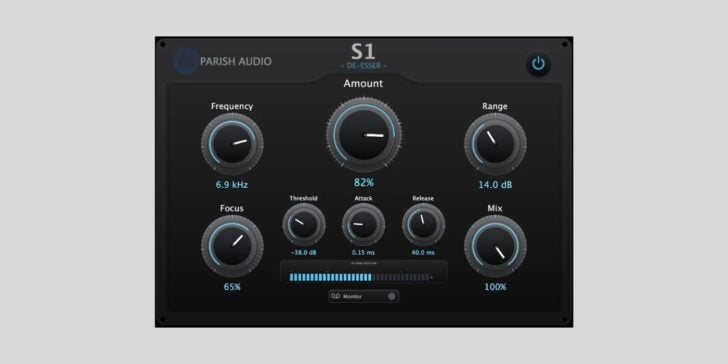
What Is S1 De-Esser?
S1 De-Esser is a free audio plugin from Parish Audio designed to reduce sibilance in vocal recordings. Sibilance usually appears around sharp “s,” “sh,” “ch,” “t” and similar consonant sounds, especially when a vocal has been recorded close to the microphone, brightened with EQ or pushed through compression.
A de-esser works by reacting to those harsh high-frequency moments and reducing them only when they become too prominent. In a good vocal mix, the goal is not to remove articulation. A singer still needs clarity, diction and air. The goal is to tame the consonants that feel too aggressive, while leaving the tone and energy of the performance intact.
That is where S1 De-Esser becomes useful. It gives producers dedicated controls for amount, frequency, focus, threshold, attack, release, range and mix, plus monitoring tools to check what the plugin is actually reducing. For a free VST plugin, that is a sensible and complete approach to a task that every vocal mix eventually has to face.
Why This Free VST Plugin Matters for Producers Now
Modern vocal production often pushes brightness hard. Pop, rap, EDM, house, indie, podcasting and YouTube vocals are commonly mixed to sound present and upfront. That usually means compression, saturation, EQ boosts and limiting. The problem is that all those tools can exaggerate sibilance.
Once a vocal becomes too sharp, it can make the whole mix feel amateur, even if the arrangement, production and mastering are solid. Bad sibilance is one of those tiny details that listeners may not name, but they feel it immediately. It makes headphones unpleasant, makes hooks tiring and can turn a polished vocal into something brittle.
S1 De-Esser matters because it gives home studio producers a free producer tool for a professional vocal problem. Not every artist has access to high-end vocal chains or paid mixing suites. A focused free de-esser VST plugin can help independent creators clean up vocals, voiceovers and spoken content without overcomplicating the session.
Main Features
- Free VST3 plugin: available for macOS and Windows.
- Dedicated sibilance control: designed to reduce harsh vocal consonants.
- Amount control: adjusts how strongly the plugin responds to detected sibilance.
- Frequency control: targets the area where unwanted sibilance is most present.
- Focus control: adjusts how broad or precise the processing is around the selected frequency.
- Threshold control: determines when de-essing begins.
- Attack and Release: shape how quickly the plugin reacts and recovers.
- Range control: limits the maximum amount of reduction to help avoid dull or lispy vocals.
- Mix control: blends the processed signal with the original vocal.
- Monitor function: lets users hear the material being reduced.
- Visual display: shows how much processing is happening during playback.
Sound, Workflow and Creative Use
The best de-essers are often the ones you forget are working. S1 De-Esser appears to follow that philosophy. Its role is not to create a dramatic effect, but to make a vocal sit more comfortably in the mix. That makes it more of a correction and refinement tool than a creative color box.
On a lead vocal, S1 De-Esser can be used after compression to catch sibilance that has become more obvious. It can also work before compression if the raw vocal is already too sharp and needs to be controlled before hitting the rest of the chain. Both approaches can be useful, depending on the recording.
For backing vocals, the plugin can help stacked harmonies feel smoother and less piercing. Sibilance becomes especially obvious when multiple vocal layers hit the same consonants at the same time. A small amount of de-essing on each layer can make the full vocal arrangement sound cleaner.
For rap vocals, S1 De-Esser can be helpful because fast diction and close-mic delivery often create strong consonants. Used carefully, it can reduce harsh peaks without softening the aggression or presence of the performance.
For podcasts, voiceovers and spoken-word content, it can make speech more comfortable to hear on headphones. That matters more than many people think. A voice can be clear and still unpleasant if the sibilance is not controlled.
The Most Important Controls Explained
Amount
Amount controls how strongly S1 De-Esser responds to detected sibilance. This is the main intensity control. A lower setting can gently smooth a vocal, while a higher setting can produce stronger reduction for problem recordings.
The key is restraint. Too much de-essing can make a vocal sound dull, unnatural or slightly lispy. A good starting point is to increase Amount until the harshness becomes less distracting, then back off slightly so the vocal still feels open.
Frequency
Frequency targets the area where the sibilance lives. This is one of the most important controls because not every voice creates harshness in the same range. A bright female vocal, a close rap vocal and a spoken podcast voice can all need different target areas.
The correct frequency is not always the brightest part of the vocal. It is the point where the consonants feel painful, sharp or disconnected from the rest of the performance. Sweeping this control while monitoring the reduction can help identify the right zone.
Focus
Focus adjusts how narrow or broad the de-essing behavior is around the selected frequency. A more focused setting can target a specific sibilant range with more precision. A broader setting can smooth a wider area, which may work better when harshness is less specific.
This is useful because de-essing is a balance between control and tone. If the processing is too broad, the vocal can lose brightness. If it is too narrow, some harsh consonants may escape. Focus helps refine that balance.
Threshold
Threshold determines when S1 De-Esser starts reducing sibilance. If the threshold is too high, the plugin may not react enough. If it is too low, it may process too many parts of the vocal and affect the overall tone.
In practice, this control should be adjusted while listening to the vocal in the full mix, not only in solo. A vocal that sounds slightly sharp in solo may sit perfectly with drums and synths. A vocal that sounds fine in solo may become painful once the master bus adds level. Context is the adult in the room, sadly.
Attack and Release
Attack controls how quickly the de-esser reacts when sibilance crosses the threshold. Release controls how quickly it stops reducing after the sibilant moment has passed. These controls shape the feel of the processing.
A fast response can catch sharp consonants more immediately. A slower or poorly matched response can either miss the harsh peak or make the reduction feel obvious. The goal is transparent movement: the plugin should control the problem without making the vocal pump or dip unnaturally.
Range
Range limits the maximum amount of reduction. This is one of the most useful controls on a de-esser because it acts like a safety boundary. Even if one consonant triggers strong processing, Range can stop the plugin from pulling the vocal down too far.
This helps preserve the natural character of the performance. Instead of allowing extreme reduction every time the vocal gets sharp, Range keeps the correction within a musical limit.
Mix
Mix blends the processed signal with the original. This can be useful when full-strength de-essing feels too heavy but the vocal still needs control. By blending some of the original back in, producers can keep clarity while reducing the harshest peaks.
This kind of parallel-style control is especially useful on vocals that need to stay bright and modern. You can smooth the sharpness without completely sanding down the top end.
Monitor
The Monitor function lets users hear what S1 De-Esser is removing. This is a practical feature because it helps prevent one of the classic mistakes in vocal mixing: removing too much useful tone while trying to fix sibilance.
If the monitor signal contains mostly sharp consonants, the plugin is probably targeting the right area. If it contains too much body, breath, tone or musical detail, the settings may need adjustment.
Who Should Use S1 De-Esser?
S1 De-Esser is for anyone working with vocals, speech or bright recorded material inside a DAW. It is especially relevant for independent artists, producers and engineers building vocal chains in a home studio.
Singers can use it to polish demo vocals. Rap producers can use it to control aggressive consonants after compression. Mixing engineers can use it as a quick utility when a vocal needs smoothing. Podcasters and content creators can use it to make spoken audio easier to listen to for long periods.
It is also useful for beginners because the layout is focused and understandable. De-essing can feel technical at first, but S1 De-Esser keeps the workflow direct: target the frequency, set the threshold, control the amount, refine the response and check what is being removed.
Best Use Cases for Producers and Engineers
- Lead vocal mixing: smooth sharp “s” and “sh” sounds after compression.
- Rap vocals: control aggressive consonants without killing presence.
- Pop vocal chains: keep bright vocals polished and comfortable.
- Backing vocals: reduce stacked sibilance in harmonies and doubles.
- Podcast editing: make spoken voice recordings less fatiguing.
- Voiceover work: control harsh speech peaks for cleaner narration.
- Home studio production: fix common vocal problems with a free audio plugin.
- Mix bus caution: use carefully on groups only when multiple vocal layers share the same harshness.
Compatibility and Download Details
S1 De-Esser is available from Parish Audio as a free VST3 plugin for macOS and Windows. The official product page should always be checked before installation, since plugin availability, system requirements and download conditions can change over time.
Because the plugin is listed as VST3, it should be used inside a compatible DAW that supports the VST3 format. Windows and macOS users may need to rescan their plugin folders after installation if the plugin does not appear immediately.
Official website: Visit the S1 De-Esser page on Parish Audio
Download link: Download S1 De-Esser from Parish Audio
Why This Type of Free Plugin Matters
Free plugins play an important role in modern music production because they give independent creators access to practical studio tools without raising the cost of entry. A de-esser is not glamorous, but it is essential. It is one of those processors that quietly separates a rough mix from something that feels controlled and listenable.
That is why a free vocal tool like S1 De-Esser is worth attention. It addresses a real production issue rather than offering a novelty effect. Every producer who records vocals eventually has to deal with sibilance. Every mixing engineer has opened a session where the vocal sounds good until one consonant takes a small knife to the eardrum.
A focused free de-esser VST plugin helps solve that problem at the source. It supports better vocal production, cleaner mixes and more professional-sounding home studio results.
What Happens Next?
S1 De-Esser arrives in a crowded vocal plugin landscape, but it has a clear advantage: it is free, focused and easy to understand. That combination gives it a strong chance of becoming a useful utility for producers who want a dedicated de-essing option without buying a full vocal suite.
The next step will depend on how users respond to its sound and workflow in real sessions. If it controls harsh consonants transparently while preserving vocal brightness, it could become a regular insert for independent producers, podcast editors and bedroom mix engineers.
Free vocal plugins often succeed when they do one job well. S1 De-Esser is built around one of the most common jobs in vocal production, and that gives it a practical reason to stay installed.
Final Verdict
S1 De-Esser by Parish Audio is a useful free VST plugin for producers who need cleaner vocals, smoother speech and more controlled high-frequency consonants. Its control set covers the essentials of de-essing without making the process feel unnecessarily complicated.
The strongest points are its focused workflow, VST3 availability for macOS and Windows, dedicated vocal controls and monitoring function. It is not a flashy creative effect, and it should not be. A good de-esser is there to fix a problem without becoming the star of the session.
For home studio producers, vocal mixers, beatmakers, podcasters and independent artists, S1 De-Esser is easy to recommend. If your vocals sound sharp after compression or your spoken audio feels tiring on headphones, this free de-esser VST plugin deserves a place in your DAW.