TO-Sampler: Free Creative Sampler VST3 for Windows
TO-Sampler by TubeOhm is a free Windows sampler built for producers who want to capture or import short sounds, turn them into playable instruments and shape them without opening a large sampling workstation.
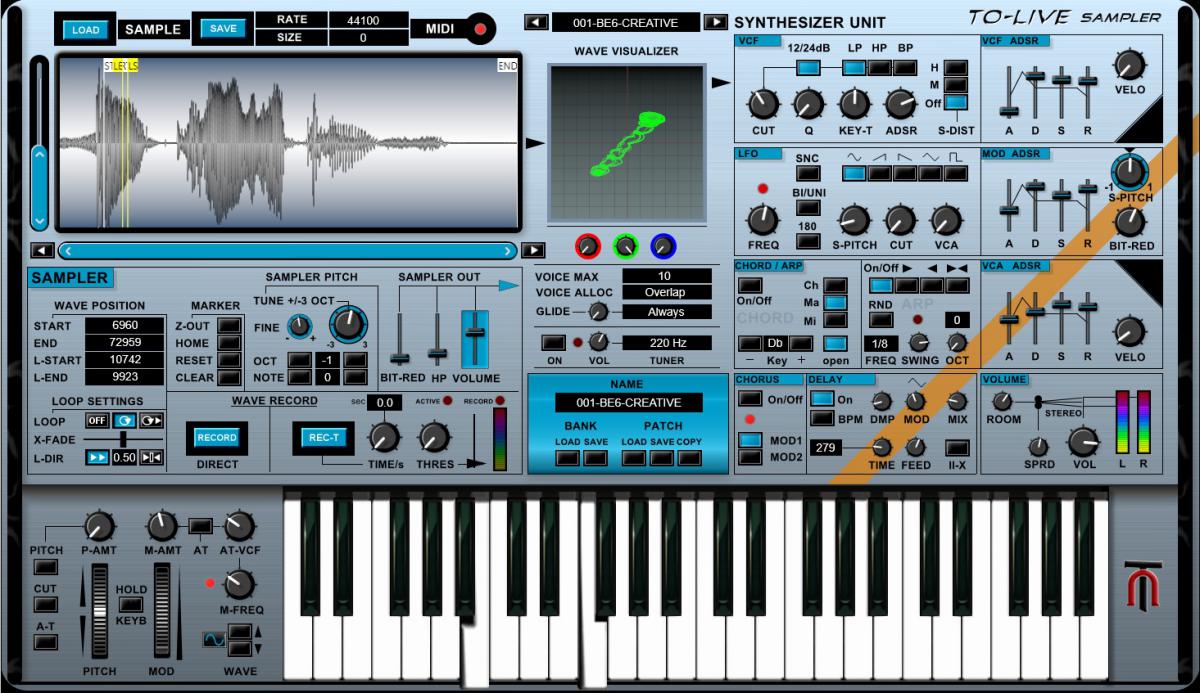
Available as a 64-bit VST3 plugin and standalone application, it combines direct recording, WAV import, loop editing, synth-style modulation, built-in effects and performance tools such as an arpeggiator and chord generator.
Windows only: TO-Sampler currently runs as a VST3 and standalone instrument on Windows 10/11 64-bit. It is completely free to download.
What Is TO-Sampler?
TO-Sampler is designed around a simple idea: get a sound into the instrument quickly, define how it plays, then shape it like a compact synthesizer.
You can record audio directly or import WAV files, view the waveform, set Start, End, Loop Start and Loop End points, and use crossfade looping to create smoother sustained sounds. Samples can be up to 5 MB, keeping the workflow focused on one-shots, short textures and compact custom instruments.
At a Glance
- Record audio directly
- Import WAV files
- Waveform display
- Start, End, Loop Start and Loop End editing
- Crossfade loop
- Multimode filter
- VCF and VCA ADSR envelopes
- Additional modulation envelope
- LFO for pitch, filter and amplitude
- Bit reduction down to 2-bit
- Soft distortion
- Stereo chorus
- Delay and room reverb
- Stereo spread
- Arpeggiator
- Chord generator
- Up to 128 stored sounds
- Windows VST3 and standalone
Record or Import Your Own Sounds
The fastest way to understand TO-Sampler is to treat it as a sketchpad for custom instruments. Load a short WAV, adjust the playback region, define a loop and start playing it chromatically from MIDI.
Crossfade looping is especially useful for pads, drones and sustained tones because it helps reduce clicks where the loop restarts. This makes even very short samples more usable as instruments.
Synth-Style Sound Shaping
Once the sample is loaded, TO-Sampler adds a familiar synthesis path. A multimode filter handles low-pass, high-pass and band-pass duties, while separate envelopes control the filter and amplifier.
An additional modulation envelope and an LFO can move pitch, filter cutoff and amplitude. That means a plain sample can become a much more animated patch without needing extra modulation plugins in the DAW.
Lo-Fi Processing Built In
TO-Sampler includes several effects that suit creative resampling particularly well. Bit reduction can go all the way down to 2-bit resolution, while soft distortion adds harmonic grit.
Stereo chorus and spread can widen narrow source material, with delay and room reverb available for space and depth. Used lightly, these tools can turn a basic one-shot into a finished lo-fi instrument inside a single plugin.
Creative workflow: load a short melodic sample, create a tight loop, reduce the bit depth, soften the top end with the filter, then add chorus and room reverb. A tiny WAV can quickly become a worn pad or retro digital key.
Arpeggiator and Chord Generator
The built-in arpeggiator and chord generator make TO-Sampler more than a basic sample player. A single sampled note can become the basis for rhythmic phrases or quick chord progressions without adding another MIDI effect.
This is particularly useful for lo-fi, synthwave, ambient and experimental electronic music, where a small source sound is often pushed far beyond its original role.
Best Uses
TO-Sampler is best suited to compact custom instruments, lo-fi keys, vocal fragments, texture design, one-shot manipulation, retro digital sounds, ambient pads and experimental resampling.
It is not intended to replace a huge multisampled workstation such as Kontakt. Its strength is speed: capture a sound, loop it, modulate it, process it and move on.
Compatibility
- Developer: TubeOhm
- Version: 1.0
- Format: VST3
- OS: Windows 10/11 64-bit
- Standalone: Included
- Maximum sample size: 5 MB
- Type: Sampler / virtual instrument
- Price: Free
How to Download TO-Sampler
- Open the official TubeOhm TO-Sampler page.
- Download the free Windows package.
- Copy the VST3 file into your system VST3 folder.
- Rescan plugins in your DAW.
- Load a WAV file or start recording your own source.
TubeOhm notes that the sampler is supplied without an automatic installer, so setup is manual.
Final Verdict
TO-Sampler is refreshingly focused. It does not try to become another giant sampling platform. Instead, it gives Windows producers a fast way to capture a sound, loop it, filter it, modulate it and push it into lo-fi or experimental territory.
The 5 MB sample limit reinforces that approach rather than weakening it. This is a sampler for quick ideas and personal sounds, not massive libraries.
For producers looking for a free instrument that sits somewhere between a sampler, compact synth and lo-fi sound-design tool, TO-Sampler is well worth trying.
Download TO-Sampler for Free