Volume Dealer by M Media Audio is a free VST plugin designed for producers, mixing engineers, mastering beginners, and home studio users who want a faster way to reach loudness targets without turning the final stage of a mix into a spreadsheet session. Built as a true peak mastering limiter with integrated LUFS metering, it brings together gain control, loudness measurement, brickwall limiting, and final export preparation inside one focused free audio plugin.
For independent music producers working on streaming releases, YouTube uploads, podcasts, beat packs, EDM tracks, hip-hop instrumentals, rock demos, or full home studio masters, Volume Dealer targets a very real problem: how to make a track loud enough, controlled enough, and consistent enough without losing the musical energy of the mix.
What Is Volume Dealer?
Volume Dealer is a free mastering limiter and loudness targeting tool from M Media Audio. It is available as a VST3 plugin for Windows, macOS, and Linux, with AU support for macOS users. Its main purpose is simple: measure the loudness of your track, let you choose a target LUFS value, then apply the corrective gain needed to reach that target before the limiter stage.
Instead of using one plugin for loudness metering, another plugin for gain staging, and another limiter for final peak control, Volume Dealer brings those steps into one compact workflow. This makes it especially useful for producers who want to prepare demos, singles, playlist-ready masters, or reference exports quickly inside a modern DAW.
What This Free VST Plugin Does
Volume Dealer works as a final-stage music producer tool. You place it at the end of your master bus, play the track, watch the integrated LUFS measurement, choose your target, then use the Set Level function to apply the required gain correction. The limiter then helps control peaks and protect the final output from clipping.
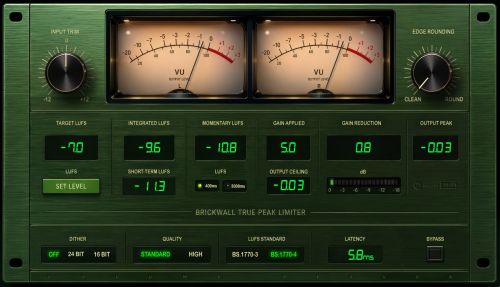
The plugin is built around BS.1770 LUFS metering, a true peak lookahead brickwall limiter, adjustable Edge Rounding, input trim, gain reduction monitoring, output peak readouts, and noise-shaped dither options. That combination makes it more than a simple loudness meter. It is a practical free music production plugin for finishing tracks with more confidence.
Main Features
- Free true peak limiter for mastering, mix bus control, and final export preparation.
- Integrated LUFS measurement for loudness targeting during playback.
- Set Level workflow that applies corrective gain after measuring the track.
- BS.1770-3 and BS.1770-4 LUFS standards for reliable loudness metering.
- Momentary and short-term LUFS displays for checking loudness movement over time.
- Brickwall true peak limiting with lookahead behavior for final peak control.
- Edge Rounding to adjust the limiter response from harder peak control to a smoother transition.
- High Quality mode with oversampled true peak detection for final exports.
- Input Trim for pre-limiter gain adjustment.
- Analog-style VU meters for visual level feedback.
- Gain Applied, Gain Reduction, Output Peak, and Latency readouts for clear monitoring.
- Noise-shaped dither options for 24-bit or 16-bit export workflows.
- VST3 and AU support depending on operating system compatibility.
Sound, Workflow, and Creative Use
The strength of Volume Dealer is not only its limiting engine, but the way it shortens the path between measuring loudness and making a usable mastering decision. In many home studio workflows, reaching a target loudness involves playing the track, checking a meter, adjusting gain, replaying the loudest section, checking again, then repeating the process until the numbers behave. Volume Dealer reduces that loop by turning loudness correction into a direct action.
For electronic music, house, afro house, EDM, trap, pop, synthwave, and beat-driven productions, this can be very useful. Loudness consistency matters when moving from one track to another in a playlist, a DJ set, a streaming release, or a beat catalog. A track that is too quiet can feel weak next to commercial references. A track that is pushed too hard can lose punch, depth, and groove. Volume Dealer gives producers a clearer way to find the middle ground.
The Edge Rounding control is also important. Hard brickwall limiting can be effective, but it can become aggressive on dense arrangements with heavy drums, wide synth layers, distorted bass, or loud vocals. A softer edge can help the limiter react more musically, especially when the goal is not maximum loudness at all costs, but a controlled and polished final output.
Who Should Use Volume Dealer?
Volume Dealer is aimed at producers who want practical loudness control without buying a full mastering suite. It is especially useful for independent artists, beatmakers, content creators, playlist curators preparing audio previews, podcasters, mixing engineers working from a home studio, and producers who need quick test masters before sending a track to a professional mastering engineer.
It is also a smart choice for anyone learning mastering. Because it shows loudness, peak control, gain correction, and limiter behavior in one interface, it helps users understand the relationship between loudness, headroom, dynamics, and final output level. In that sense, Volume Dealer is both a free mastering limiter VST and a learning tool.
Best Use Cases for Producers and Engineers
Streaming Release Preparation
Use Volume Dealer when preparing a single, EP, album demo, or playlist-ready version of a track. The LUFS targeting workflow can help you create more consistent masters across multiple songs.
Home Studio Mastering
For producers mixing and mastering their own music, Volume Dealer can sit at the end of the master chain after EQ, compression, saturation, stereo imaging, or other mastering processors. It acts as the final loudness and peak-control stage.
Beatmaking and Instrumental Exports
Beatmakers often need clean, loud, and consistent exports for clients, beat stores, social media previews, and YouTube uploads. Volume Dealer can help make instrumental exports feel more polished without complicating the workflow.
Mix Reference Checks
Even before final mastering, the plugin can be used to create quick loudness-matched references. This helps producers compare mixes more fairly against commercial tracks or previous versions of their own work.
Podcast and Spoken Word Audio
Because Volume Dealer includes LUFS metering and loudness targeting, it can also be useful for spoken word content, interviews, podcast episodes, and voice-based media where consistent perceived loudness is important.
Official Website and Download
Volume Dealer is available from the official M Media Audio website. Producers looking for a free true peak limiter, a free LUFS limiter, or a free mastering limiter VST can download it directly from the plugin page.
- Official website: M Media Audio Volume Dealer
- Download: Download Volume Dealer for free
Final Verdict
Volume Dealer by M Media Audio is one of those free tools that answers a very specific studio problem with a focused solution. It does not try to be a giant mastering environment, a vintage color box, or a magic button for instant commercial loudness. Instead, it gives producers a practical way to measure LUFS, target a desired level, control true peaks, and prepare a cleaner final export from inside the DAW.
For a free VST plugin, the feature set is impressive. The combination of LUFS metering, one-click level correction, true peak limiting, oversampling, dither, and clear visual feedback makes Volume Dealer a serious addition to any home studio setup. It is particularly useful for independent producers who release music regularly and need a reliable free audio plugin to speed up the final loudness stage.
If your mastering chain needs a free true peak limiter that keeps the workflow direct, readable, and focused on real-world output levels, Volume Dealer deserves a place in your plugin folder.