VxBx by Maciel Audio: Free Vocal Mixing Suite VST3, AU & AAX
VxBx by Maciel Audio, also known as Vocal Box, is a free all-in-one vocal mixing suite built to turn raw recordings into bigger, cleaner and more mix-ready vocals without rebuilding the same processing chain for every session.
The plugin finished second in the KVR Developer Challenge 2026 and is available for Windows and macOS in VST3, Audio Unit and AAX formats.
What Is VxBx Vocal Box?
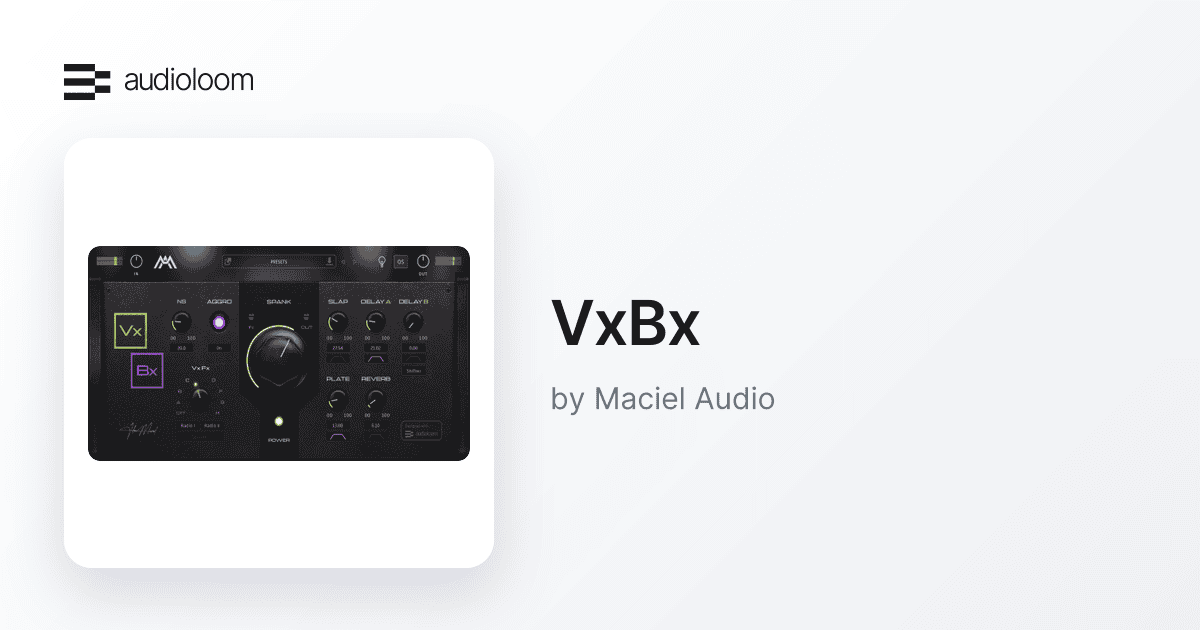
VxBx combines the processing stages producers commonly stack on a vocal track into one streamlined interface. Instead of loading separate tools for cleanup, dynamics, saturation, delay and reverb, the plugin provides a focused chain designed around vocal production.
Maciel Audio positions VxBx as a shortcut to more upfront vocals, particularly for modern rock and metal, but the workflow also makes sense for pop, electronic music, rap and any production where a vocal needs fast cleanup and character.
Main Features
- Noise suppression before the rest of the processing chain
- Spank processor for compression, saturation and forward vocal energy
- Aggro circuit for extra harmonic bite and grit
- Slapback delay for additional depth
- Two additional delay sections for rhythmic movement
- Plate and room-style reverb options
- Radio-style and creative vocal effects
- Dedicated filtering for the built-in spatial effects
- VST3, AU and AAX formats
- 64-bit Windows and macOS support
Clean the Recording Before Heavy Processing
One of the more useful ideas in VxBx is that cleanup happens before the more aggressive processing stages. Its noise suppressor is designed to reduce room noise, computer hum and other unwanted background information before compression and saturation make those problems more obvious.
This can be particularly practical for vocals captured in bedrooms, project studios and other untreated spaces. It does not replace good recording technique, but it can make the starting point easier to manage.
Spank and Aggro: Push Vocals Forward
The central Spank control is designed to combine several processing decisions behind one macro-style control. Maciel Audio describes it as a blend of aggressive compression, analog-inspired saturation and tonal shaping intended to make vocals feel more stable and present in a dense mix.
The separate Aggro stage adds more harmonic character. It is especially relevant for rock, metal, shouted vocals and other performances that need extra edge without building another saturation chain.
Built-In Delay, Reverb and Creative Effects
VxBx also handles the spatial side of a vocal chain. Slap provides a tight mono slapback, Delay A supplies an eighth-note repeat, and Delay B offers a wider quarter-note delay with an optional shifter for additional movement and stereo width.
For ambience, producers can choose between plate and room-style reverbs. The effects include their own high-pass and low-pass filtering, helping keep low-frequency buildup and unnecessary brightness away from the dry vocal.
Radio-style effects and the Spooky modulation option add faster ways to create filtered intros, background textures and transition moments without opening another effects rack.
One Important Thing to Know About CPU Use
VxBx earned second place in KVR’s 2026 challenge, but several KVR users have reported unusually high CPU or memory usage in their systems. That does not mean every setup will behave the same way, but it is worth testing the plugin in a real project before building a large session around multiple instances.
If performance is heavy on your computer, freezing or bouncing processed vocal tracks can be a practical workaround while the developer continues updating the plugin.
At a Glance
Developer: Maciel Audio
Plugin: VxBx / Vocal Box
Price: Free
Type: Vocal mixing suite / channel strip / multi-FX
Formats: VST3, Audio Unit, AAX
Platforms: Windows and macOS
Architecture: 64-bit
Best for: Vocal cleanup, compression, saturation, delays, reverbs and creative vocal effects
KVR Developer Challenge 2026: 2nd place
Compatibility and System Requirements
Maciel Audio lists VxBx for Windows 10 and macOS 10.15 or later, with native Intel and Apple Silicon support on Mac. The plugin is 64-bit only.
Supported formats include VST3, AU and AAX, covering major hosts such as Ableton Live, FL Studio, Cubase, Logic Pro, Pro Tools, Studio One, Reaper, Bitwig and GarageBand.
Watch VxBx in Action
Final Thoughts
VxBx is an ambitious free vocal processor because it tries to replace a substantial part of a traditional vocal chain rather than solve only one problem. The combination of cleanup, forward dynamics, saturation and built-in effects makes it especially attractive for producers who want to move quickly from a raw recording to a convincing starting mix.
The reported CPU load is the main caveat, so performance should be checked on your own system. At a price of zero, however, VxBx is easy to test, and its second-place finish in the KVR Developer Challenge 2026 makes it one of the more notable free vocal plugins released this year.
Download VxBx for Free
VxBx is currently listed at $0 on its official Audioloom product page.