Free Console EQ Plugin
4K-EQ: Free British Console EQ With Analog Character
A flexible four-band equalizer with two console-inspired modes, analog saturation, Mid/Side processing and real-time spectrum analysis.
4K-EQ by Dusk Audio is a free console-style equalizer designed to bring the musical response of classic British mixing desks into a modern DAW.
Released in 2026, the plugin combines a four-band parametric EQ, high-pass and low-pass filters, analog-style saturation, oversampling, Mid/Side processing and a real-time FFT spectrum analyzer.
Unlike many free editions, 4K-EQ does not hide advanced functions behind a paid upgrade. The complete plugin can be downloaded without creating an account, activating a licence or installing a separate software manager.
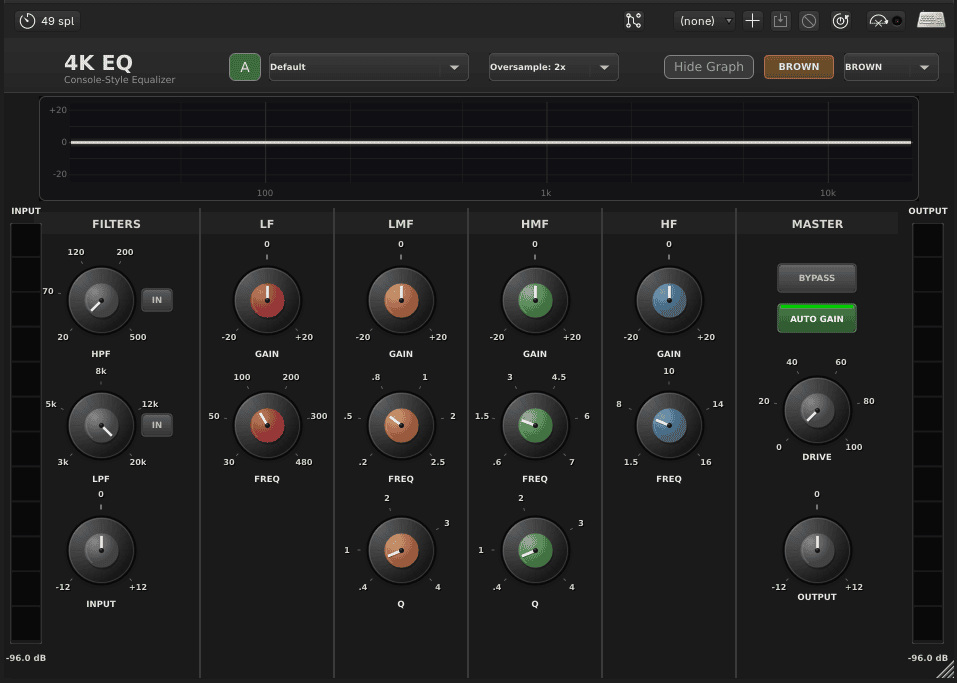
4K-EQ at a Glance
| Developer | Dusk Audio |
| Plugin type | Four-band parametric console EQ |
| Processing modes | Brown and Black console characters |
| Plugin formats | VST3, AU, LV2 and CLAP, depending on the platform |
| Platforms | Windows, macOS and Linux |
| Price | Completely free and open source |
Two British Console Characters
4K-EQ includes two processing modes designed to reproduce different generations of classic British console equalization.
Brown mode offers broader and more musical curves. Its shelving bands use a fixed Q response, while the saturation model emphasizes warmer second-order harmonics and transformer-style coloration.
Black mode provides a tighter and more controlled response. Its proportional Q behavior becomes narrower as gain is increased, making it useful for more focused tonal correction.
Black mode also allows the low and high frequency bands to switch between bell and shelving operation. This makes the plugin suitable for both broad tonal shaping and more precise adjustments.
Four Fully Adjustable EQ Bands
The plugin includes low, low-mid, high-mid and high frequency bands. Each section offers up to 20 dB of boost or attenuation.
The low band covers frequencies from 30 to 480 Hz, while the low-mid section ranges from 200 Hz to 2.5 kHz. The high-mid band reaches from 600 Hz to 7 kHz, and the high band covers frequencies between 1.5 and 16 kHz.
This range allows 4K-EQ to handle most common mixing tasks, from controlling excessive sub frequencies to adding presence, clarity or high-frequency air.
The low-mid and high-mid sections include adjustable Q controls, allowing broader musical changes or narrower corrective moves.
Best Uses
Vocals, drums, bass, guitars, piano, synthesizers, drum buses, mix buses, mastering chains and general channel equalization.
High-Pass and Low-Pass Filters
4K-EQ includes separate filters for removing unwanted frequencies outside the main four-band section.
The high-pass filter covers 16 to 350 Hz with an 18 dB-per-octave slope. It can remove rumble, microphone handling noise or excessive low-frequency energy from vocals, guitars, percussion and other sources.
The low-pass filter ranges from 3 to 22 kHz with a 12 dB-per-octave slope. It can soften harsh high frequencies, darken bright samples or create more focused vintage-style tones.
Both filters are integrated into the same interface, reducing the need to load a separate utility plugin before or after the equalizer.
Analog Saturation Modeling
The Drive control introduces modeled analog coloration inspired by transformers and console operational amplifiers.
At its default position, the plugin remains relatively clean. Increasing Drive adds harmonics and soft clipping, helping drums, basses, guitars and complete buses feel denser or more cohesive.
The harmonic response changes between Brown and Black modes. Brown emphasizes warmer transformer-style coloration, while Black produces a cleaner response with a stronger third-harmonic component.
Saturation is also influenced by the amount of EQ boost applied. Stronger boosts can create additional harmonic color, reproducing the interaction between equalization and analog circuitry.
Mid/Side Processing
The Mid/Side mode allows the center and sides of a stereo signal to be processed differently.
This can be useful for controlling low frequencies in the center of a mix while adding brightness or width to the sides. It can also help shape stereo keyboards, pads, backing vocals and complete mixes.
Mid/Side processing should be used carefully, especially on the master bus. Large differences between the center and sides can create phase problems or make the mix translate poorly in mono.
Spectrum Analyzer and Auto Gain
A real-time FFT display shows the frequency content of the incoming audio. This visual feedback can help identify excessive low-end energy, harsh resonances or areas that lack presence.
The analyzer should support listening decisions rather than replace them. A balanced spectrum is not automatically a balanced mix, particularly when instruments, arrangements and reference levels differ.
An automatic gain compensation option helps reduce the apparent loudness difference created by EQ boosts and saturation. This makes before-and-after comparisons more reliable.
Oversampling and Performance
4K-EQ includes 2x and 4x oversampling modes. Oversampling can reduce aliasing generated by the saturation stages, especially when stronger Drive settings are used.
Higher oversampling values require more processing power and introduce additional latency. The lower setting may therefore be more practical during recording or large mixing sessions.
For final rendering or mastering, 4x oversampling can provide cleaner nonlinear processing when the available CPU resources allow it.
Fifteen Factory Presets
The plugin includes 15 starting points for common sources and mixing situations.
Available presets cover vocal presence, kick punch, snare attack, bass warmth, acoustic guitar, piano, drum bus processing, mix bus coloration and mastering enhancement.
The presets are intended as starting points rather than automatic solutions. Frequency balance depends on the source material, recording method, arrangement and the other instruments already present in the mix.
Compatibility and Installation
- Windows: Windows 10 or later, VST3 and CLAP
- macOS: macOS 10.13 or later, VST3, AU and CLAP
- Linux: Compatible distributions with VST3, LV2 and CLAP support
- Architecture: 64-bit DAW required
- Sample rates: 44.1 to 192 kHz
- Account required: No
- Activation required: No
Download the correct archive for the operating system, extract the plugin and place it inside the standard plugin folder used by the DAW.
After installation, restart the DAW or perform a complete plugin rescan. The plugin should appear under the Dusk Audio manufacturer name.
Open-Source Licence
4K-EQ is distributed as open-source software under the GPL licence. The source code can be inspected, modified and contributed to through the official Dusk Audio repository.
The plugin is an independent console-inspired design. It is not officially affiliated with or endorsed by the manufacturer of the original hardware that inspired its processing modes.
Final Verdict
4K-EQ is a strong free choice for producers who want a console-style equalizer without sacrificing modern workflow features.
Its two tonal modes, four adjustable bands, analog saturation, filters, Mid/Side operation, spectrum display and oversampling make it suitable for individual tracks, buses and mastering applications.
The plugin can remain clean when required or add noticeable console-style character when the Drive control and EQ boosts are pushed harder.
It will not automatically repair a crowded arrangement, but at least it gives every frequency a professional opportunity to explain why it is still there.
Download 4K-EQ from the official Dusk Audio website: