Free DAW
OpenMPT: A Free Tracker DAW for Fast Pattern-Based Production
OpenMPT combines classic tracker sequencing with modern sample editing, MIDI recording, plugin support and flexible export tools in a lightweight Windows application.
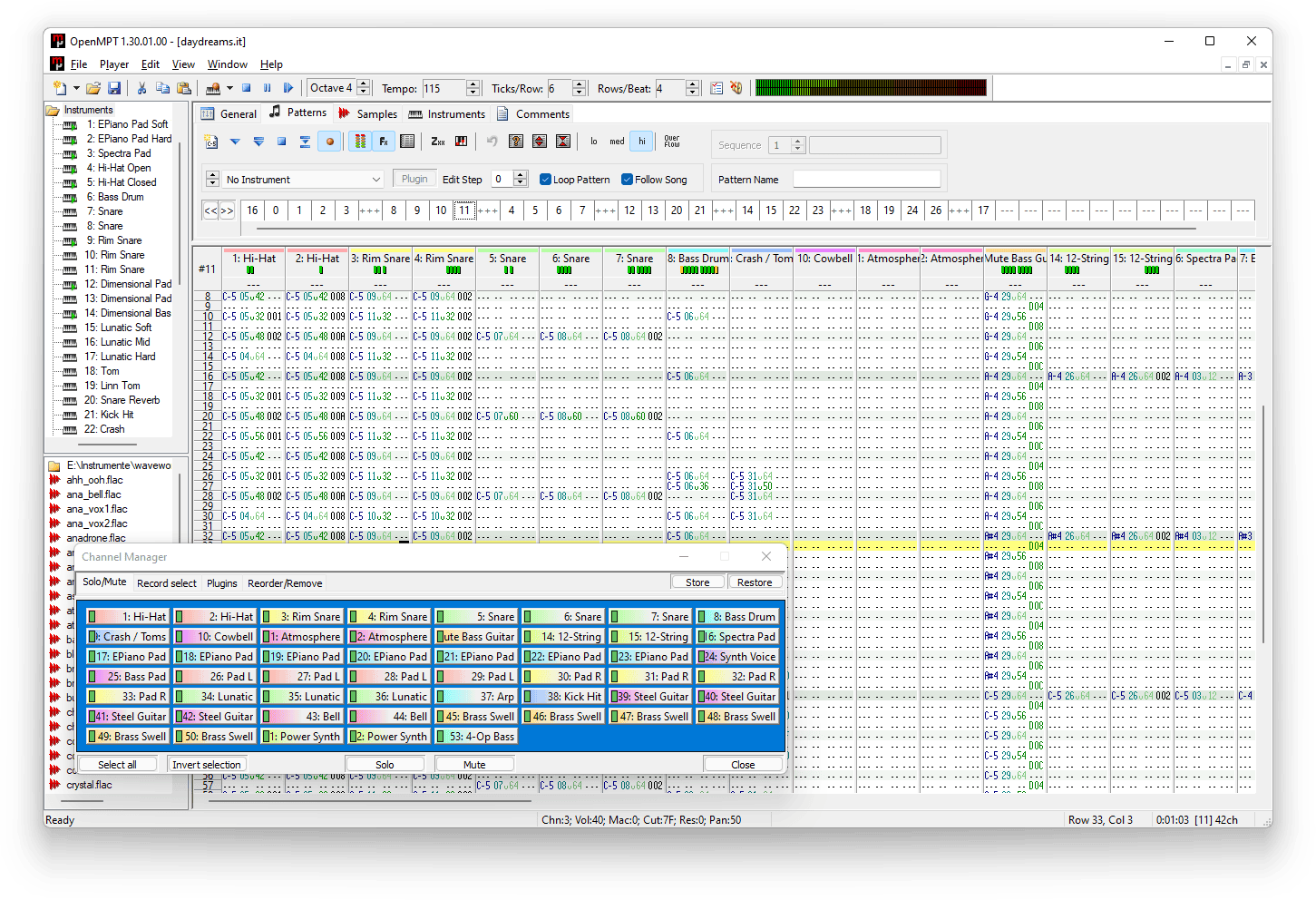
OpenMPT, short for Open ModPlug Tracker, is a completely free music tracker and digital audio workstation developed by the OpenMPT community. It is designed around patterns, channels, samples and instruments rather than the horizontal timeline found in most conventional DAWs.
This different approach makes OpenMPT particularly efficient for electronic music, chiptune, breakbeat, game music and detailed sample-based composition. Notes, effects and automation commands are entered into a vertical pattern editor, allowing producers to build precise arrangements with a strong keyboard-focused workflow.
OpenMPT runs natively on Windows 7 SP1 or newer. It can also operate through Wine on Linux and macOS, although these are not native versions. The software is genuinely free, requires no subscription and is distributed under the New BSD License.
| Developer | OpenMPT community |
|---|---|
| Software type | Tracker and pattern-based DAW |
| Platforms | Windows 7 SP1 or newer, Wine supported |
| Audio recording | No conventional multitrack audio recording |
| MIDI production | MIDI keyboard recording into patterns and external MIDI output |
| Plugin support | VST 1.x, VST 2.x and DirectX audio plugins |
| Maximum channels | Up to 128 editing channels and 256 virtual channels |
| Included content | Sample editor, OPL3 emulator, global EQ and tracker effects |
| Price | Completely free |
Pattern-Based Music Production
OpenMPT uses a vertical pattern editor inspired by trackers such as Impulse Tracker, FastTracker 2, Scream Tracker and ProTracker. Each channel can contain notes, instruments, volume information and effect commands.
This layout may initially feel unfamiliar to producers coming from Ableton Live, FL Studio or Studio One. Once learned, however, it can be remarkably fast for programming drums, chopped samples, bass lines and repeating electronic sequences.
Projects can contain multiple sequences within the same module file. This is useful for creating alternative song versions, game soundtracks, short cues or several connected pieces without opening separate sessions.
Sample Editing and Instruments
Samples are one of OpenMPT’s main sound sources. The integrated sample editor can normalize audio, remove DC offset, invert phase, amplify material, change sample length and apply high-quality resampling. Producers can also create or draw samples directly inside the editor.
The application supports a wide range of sample and instrument formats, including WAV, FLAC, AIFF, MP3, Ogg, Opus, SF2, SF3, SFZ and several classic tracker formats. Its built-in OPL3 emulator also allows users to create FM-style sounds associated with retro computers and game soundtracks.
OpenMPT does not include the kind of large preset library found in commercial production suites. Users should expect to provide their own samples, SoundFonts or compatible plugins.
MIDI Recording and Automation
Notes can be recorded from a MIDI keyboard directly into the pattern editor. Keyboard shortcuts may also be assigned to MIDI note and control-change messages, making it possible to trigger commands and control the software from external hardware.
Plugin parameters can be automated directly within patterns. OpenMPT can write parameter changes while controls are moved on a compatible plugin interface, giving producers detailed control over filters, modulation, effects and instrument settings.
MIDI functionality remains more limited than in a traditional piano-roll-based DAW. OpenMPT can load and export MIDI files, but the developers clearly describe it as a tracker rather than a complete conventional MIDI editor.
VST Plugin Support
OpenMPT officially supports VST 1.x and VST 2.x instruments and effects, along with DirectX audio plugins. Plugins can be scanned from folders, loaded into available slots and controlled from the pattern editor.
Native VST3 hosting is not currently part of the standard plugin system. Recent versions can work with VST shell plugins, which may allow certain VST3 plugins to be loaded through an additional wrapper, but this should not be confused with direct native VST3 compatibility.
The application also includes a plugin bridge for mixing 32-bit and 64-bit plugins. The developers warn that bridged plugins can reduce performance, so matching the plugin architecture to the installed OpenMPT version remains preferable.
Mixing and Audio Export
Each pattern channel includes volume, panning and plugin controls. OpenMPT supports WASAPI, ASIO, WaveRT and legacy WaveOut output, with audio quality reaching 192 kHz and 32-bit resolution.
Finished productions can be rendered to WAV, FLAC, AU, RAW, MP3, Ogg Vorbis or Opus. MIDI export is also available, alongside specialist formats such as VGM, VGZ and DRO for OPL-based work.
OpenMPT is not intended for recording bands, editing long vocal takes or managing large multitrack audio sessions. It can import and manipulate audio samples, but it does not provide a conventional audio-track recording environment.
Best Uses
- Chiptune and retro game music
- Electronic music and breakbeat programming
- Sample-based beatmaking
- Drum sequencing and loop manipulation
- Game soundtracks and compact musical cues
- Experimental composition
- Live pattern-based performance
Compatibility and Installation
The current stable release supports Windows 7 SP1 or newer on compatible x86, x64, ARM and ARM64 processors. A sound device and a display resolution of at least 800 by 600 pixels are required.
The official unified installer automatically installs the appropriate versions for the computer. Portable ZIP editions are also available and can run without a traditional installation. No account, subscription manager or activation system is required.
Main Limitations
- No native macOS or Linux application
- No conventional multitrack audio recording
- No native VST3 plugin hosting
- Limited traditional MIDI editing
- Unfamiliar workflow for producers accustomed to linear timelines
- No extensive factory instrument or sample library
Final Verdict
OpenMPT is an excellent free DAW for producers who enjoy precise pattern programming, sample manipulation and fast keyboard-driven composition. It is particularly strong for chiptune, electronic music, game audio, breakbeats and experimental production.
Its biggest strengths are its speed, portability, extensive tracker-format support, sample tools and completely free license. Its main weaknesses are the absence of conventional audio recording, native VST3 support and a familiar linear arrangement workflow.
OpenMPT will not replace a full recording studio, but it may program drums faster than you can explain to someone why the snare needs another two hours of adjustment.
For Windows users interested in trackers or sample-based composition, OpenMPT is a mature, actively maintained and genuinely useful download.