
ABYZOR Genesis is a free VST plugin designed for electronic music producers, beatmakers, composers, and home studio creators who want to generate musical ideas quickly inside their DAW. Built as a MIDI generator rather than a sound instrument, Genesis creates melodies, basslines, chord progressions, and arpeggios in seconds, then lets producers drag the generated MIDI directly into their project.
For anyone who has ever opened a blank session, stared at the piano roll, moved one note around for fifteen minutes, then suddenly remembered the fridge exists, ABYZOR Genesis answers a very familiar problem: creative momentum. This free music production plugin is made to help producers move from silence to usable musical material without breaking the flow.
What Is ABYZOR Genesis?
ABYZOR Genesis is a free MIDI generator plugin created for modern electronic music production. It does not produce sound by itself. Instead, it generates MIDI patterns that can be sent to a synth, sampler, virtual instrument, piano plugin, bass instrument, or any MIDI-compatible sound source inside a DAW.
The plugin is designed to generate four major types of musical material: melodies, basslines, chord progressions, and arpeggios. This makes it useful during the earliest stage of production, when a track needs direction, groove, harmony, or a starting idea that can be edited and developed into a finished arrangement.
ABYZOR Genesis is available for Windows and macOS, with VST3 support and AU compatibility for macOS users. The plugin is free to download and use, making it an attractive option for producers who want a fast idea-generation tool without paying for a large composition suite.
What This Free VST Plugin Does
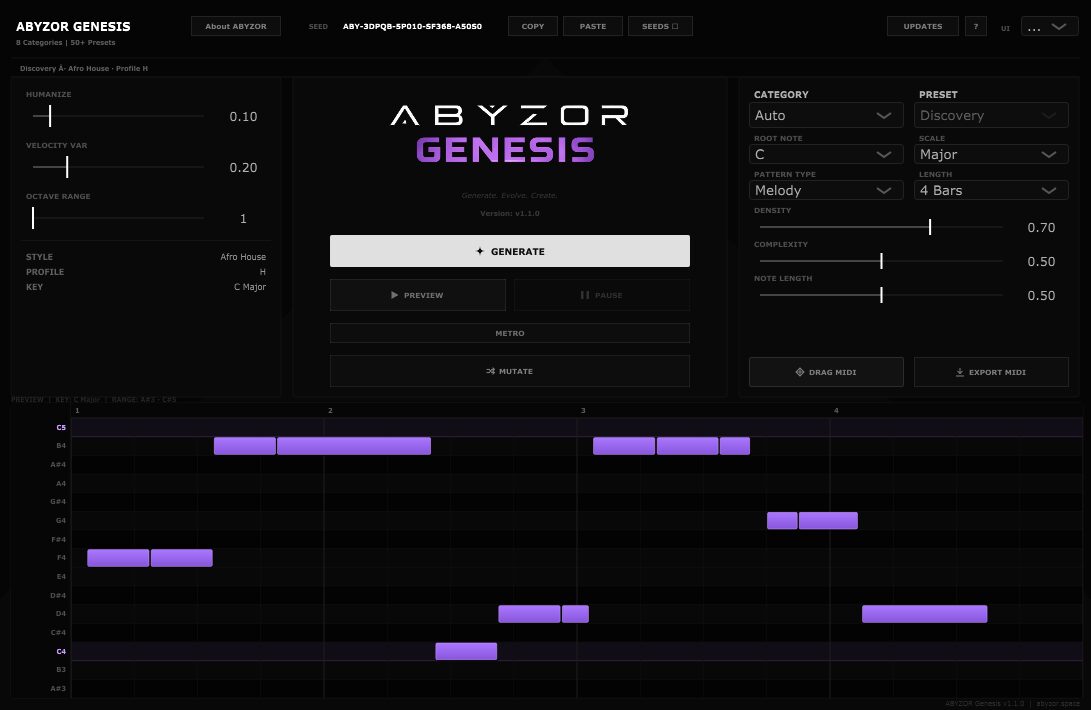
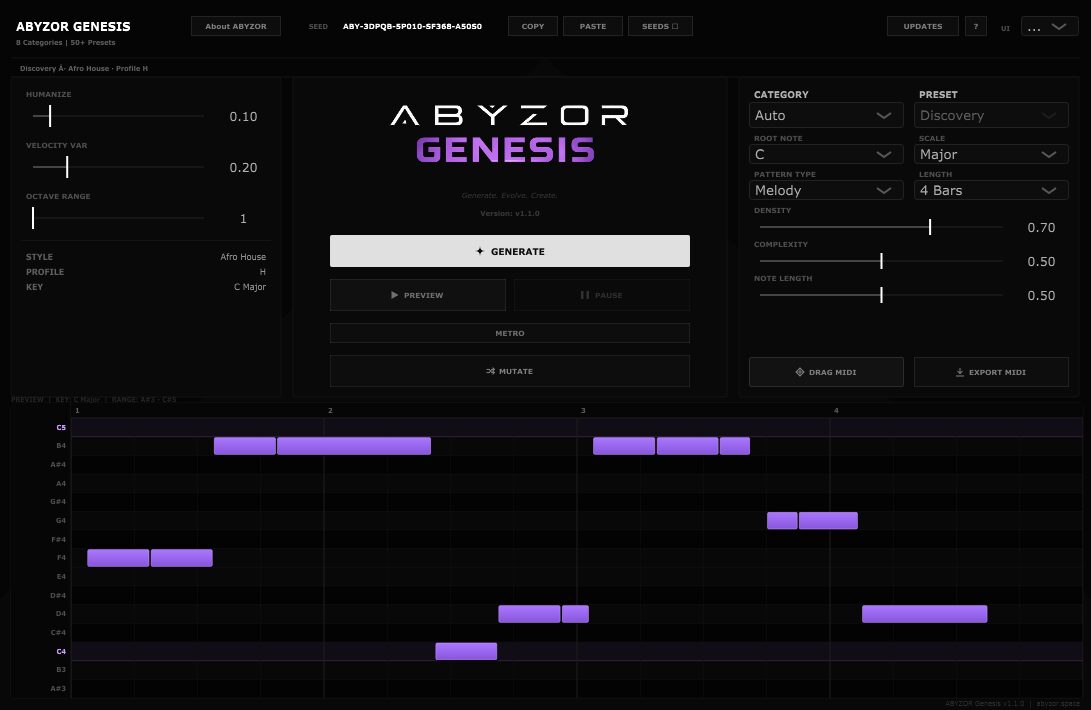
ABYZOR Genesis creates MIDI patterns based on user-selected parameters such as genre, pattern type, root note, scale, length, density, complexity, note length, humanization, velocity variation, and octave range. Once a pattern is generated, it can be previewed, edited, mutated, exported, or dragged into the DAW timeline.
The plugin is especially useful because it keeps the producer in control. It does not replace songwriting, arrangement, taste, or musical editing. Instead, it gives the user a fast pool of ideas that can be refined, changed, layered, simplified, or completely transformed. In that sense, Genesis works more like a creative assistant than an automatic song machine.
Main Features
- Free MIDI generator VST plugin for electronic music production.
- Generates melodies, basslines, chord progressions, and arpeggios in seconds.
- VST3 support for Windows and macOS.
- AU support for macOS users working in compatible hosts.
- Genre-based generation designed for electronic music workflows.
- Pattern type selection for choosing melody, bassline, chords, or arpeggio material.
- Root note and scale controls for generating ideas in the right musical key.
- Density and complexity controls for shaping how busy or simple the generated MIDI feels.
- Note length control for adjusting rhythmic and melodic behavior.
- Humanization and velocity variation for more natural movement.
- Octave range control for keeping generated notes in a useful register.
- Built-in piano roll preview for checking generated notes before export.
- Drag and drop MIDI export for fast arrangement workflow.
- Deterministic seed system for reproducing musical ideas consistently.
- Mutation workflow for evolving a generated idea instead of starting from zero.
Sound, Workflow, and Creative Use
Because ABYZOR Genesis is a MIDI generator, its sound depends on the instrument you connect it to. Load a deep house bass preset, and Genesis can become a bassline starter. Send it into a piano, and it can sketch chord progressions. Pair it with a pluck synth, and it can generate melodic hooks. Route it into an arpeggiated synth, and it can become a fast electronic pattern machine.
The real value is workflow. Genesis is made for the moment when a track needs its first musical spark. A producer can choose a genre direction, select a pattern type, generate a MIDI idea, preview it, mutate it, then drag it into the session. From there, the MIDI can be edited like any other part: notes can be moved, shortened, deleted, doubled, layered, transposed, or rearranged.
This makes the plugin useful across many electronic styles, including house, techno, melodic techno, trance, drum and bass, synthwave, ambient, cinematic music, afro house, organic house, dubstep, breakbeat, and experimental production. It is also useful for pop and hip-hop producers who want a quick harmonic or melodic starting point before building the full beat.
Why MIDI Generation Matters for Modern Producers
Modern music production often moves fast. Producers need to test ideas quickly, compare grooves, build drafts, create hooks, and keep momentum before the session loses energy. A good MIDI generator can speed up that early creative phase without taking away the producer’s artistic decisions.
ABYZOR Genesis is not about pressing one button and calling the result a finished song. Its best role is more practical: generating raw musical material that can be shaped into something personal. A chord progression might become the foundation of a track. A bassline might inspire the groove. An arpeggio might become a background texture. A melody might only need a few edits before it starts to feel like the center of a song.
For home studio producers, this kind of free audio plugin can be especially valuable. It can help overcome writer’s block, build quick demo sections, test different keys and scales, or create multiple variations before committing to one musical direction.
Who Should Use ABYZOR Genesis?
ABYZOR Genesis is ideal for electronic music producers, beatmakers, composers, sound designers, and home studio users who want a free music producer tool for idea generation. It is especially useful for people who work inside the piano roll and want faster ways to create raw MIDI material.
Beginners can use it to understand how melodies, basslines, chords, and arpeggios behave in different keys and styles. More experienced producers can use it as a fast sketching tool, a variation generator, or a way to escape repetitive writing habits. It can also be useful for producers who need quick starting points for sample packs, sync music, game audio, background music, or beat ideas.
Best Use Cases for Producers and Home Studio Users
Starting a Track From Scratch
Genesis is most useful at the beginning of a session. Load the plugin, choose a category, select a pattern type, generate a musical idea, then route or drag the MIDI into your favorite virtual instrument.
Generating Basslines
Use Genesis to create bassline ideas for house, techno, afro house, trap, synthwave, or electronic pop. Once exported, the MIDI can be edited to lock better with the kick drum and groove of the track.
Creating Chord Progressions
For producers who struggle with harmony, Genesis can provide fast chord progression starters. These can be routed to piano, pads, keys, synths, or orchestral instruments, then edited to match the emotional direction of the track.
Building Melodic Hooks
Generate melody patterns, send them into a lead synth or pluck instrument, then refine the notes manually. Even if the first version is not perfect, it can quickly suggest a direction.
Designing Arpeggios
Genesis can create arpeggio-style MIDI patterns that work well with synths, bells, plucks, cinematic textures, and rhythmic electronic layers.
Creating Variations
The mutation workflow is useful when a generated idea is close but not quite right. Instead of starting again completely, producers can evolve the pattern and keep exploring related musical options.
Speeding Up Arrangement Drafts
Genesis can help build rough sections quickly. A producer can generate a chord part, bassline, melody, and arpeggio, then use those MIDI clips as a temporary arrangement before replacing, editing, or improving them.
Official Website and Download
ABYZOR Genesis is available for free from the official ABYZOR website. The download is hosted through GitHub releases, with separate downloads for Windows and macOS.
- Official website: ABYZOR Genesis official page
- Download for Windows: Download ABYZOR Genesis for Windows
- Download for macOS: Download ABYZOR Genesis for macOS
- All releases: View ABYZOR Genesis releases on GitHub
Final Verdict
ABYZOR Genesis is a genuinely useful free VST plugin for producers who want to generate musical ideas quickly without leaving the DAW. Its strength is not that it writes finished music for you. Its strength is that it gives you something to react to: a melody, a bassline, a chord progression, or an arpeggio that can be edited, reshaped, layered, and turned into a real production idea.
For electronic producers, beatmakers, composers, and home studio users, Genesis offers a practical way to beat blank-session syndrome and speed up the early creative phase. The combination of genre-based generation, scale and key selection, piano roll preview, mutation, seed-based recall, and MIDI drag and drop makes it more than a novelty. It is a focused free music production plugin with a clear workflow and real creative value.
If your production process often slows down at the idea stage, ABYZOR Genesis is worth downloading. It is simple, fast, flexible, and free, which is a rather elegant combination for any plugin folder.