Sibalance by nClear is a free vocal de-esser VST plugin designed for producers, vocal mixers, podcasters, singers, voiceover editors and home studio creators who need to control harsh “s”, “sh”, “t” and breathy high-frequency spikes without destroying the brightness of a vocal performance. Instead of simply dulling the entire top end, Sibalance listens for sibilance-like energy and applies reduction only when needed.
This is exactly the kind of free audio plugin that solves a real mixing problem. Sibilance can make an otherwise good vocal feel sharp, painful or amateur, especially on close microphones, bright condensers, heavily compressed vocals or modern pop and rap mixes where the vocal sits right in the listener’s face. Sibalance gives producers a direct, visual and listening-focused way to tame those moments while keeping the voice alive.
What Is Sibalance by nClear?
Sibalance is a free de-esser and sibilance shaping plugin from nClear. It is built specifically for vocal work and focuses on reducing harsh consonants without flattening the whole high-frequency range.
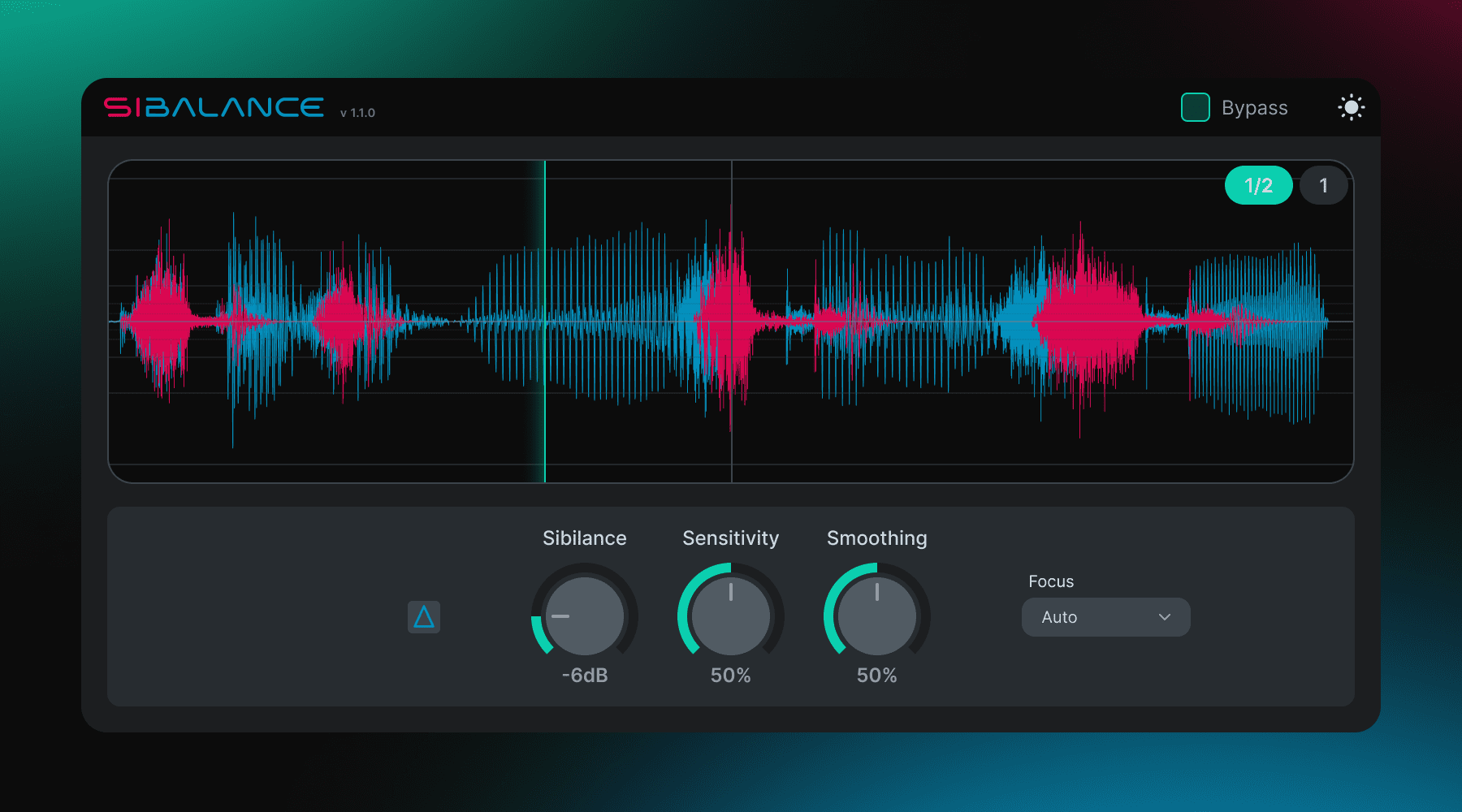
The plugin includes automatic sibilance detection, a Sibilance amount control, Sensitivity, Smoothing, Focus modes, delta monitoring, oscilloscope feedback, output volume and bypass. It is currently listed as version 1.1.0 and is free to use in commercial and non-commercial audio work.
Sibalance is available for macOS, Windows and Linux. The official page lists VST3, CLAP, AU and LV2 support depending on the operating system, with macOS Universal builds, Windows x64 builds and Linux x64 builds.
Why This Free Vocal De-Esser VST Plugin Matters
The free vocal de-esser VST plugin category matters because sibilance is one of the most common vocal mixing problems. A vocal can be well recorded, emotionally strong and perfectly performed, but one sharp consonant can suddenly stab through the mix like it has unresolved personal issues.
Traditional EQ can reduce high frequencies, but it often makes the entire vocal darker. Compression can make the problem worse by raising quieter details and pushing consonants forward. A de-esser is designed to solve the problem more selectively by reducing harsh sibilant moments only when they appear.
Sibalance is useful because it keeps the workflow focused. The producer can hear what is being removed through delta monitoring, choose the area where the plugin listens with Focus modes and adjust the movement with smoothing. That makes the process less like guessing and more like making an informed mixing decision.
Main Features
- Free vocal de-esser plugin from nClear.
- Designed for sung vocals, rap vocals, voiceovers, podcasts and spoken-word recordings.
- Automatic sibilance-like energy detection.
- Sibilance control for setting the amount of reduction.
- Sensitivity control added in version 1.1.0.
- Delta monitoring to hear exactly what the plugin is removing.
- Focus modes: Auto, Low, Natural and Bright.
- Smoothing control with behavior moving between Tight, Normal and Soft.
- Oscilloscope feedback for visual monitoring.
- Output volume control for level matching.
- Bypass option for fast A/B comparison.
- Light and dark theme state saving.
- Technical data copy option for bug reports.
- macOS, Windows and Linux support.
- VST3, CLAP, AU and LV2 formats depending on platform.
- Free for commercial and non-commercial audio work.
A De-Esser That Helps You Hear the Problem
The most important part of Sibalance is not only that it reduces sibilance. It helps users understand what is being reduced. That matters because de-essing is easy to overdo.
If a de-esser is pushed too hard, the vocal can start to sound dull, lispy or unnatural. The brightness disappears, the consonants lose definition and the performance feels less present. On the other hand, if the de-esser is too gentle, sharp consonants still jump out of the mix.
Sibalance’s delta monitoring helps solve that by letting the producer hear the removed signal directly. When delta mode is active, the question becomes simple: are you removing harsh sibilance, or are you removing too much of the vocal tone? That is a very useful reality check.
Sibilance Detection
Sibalance is built to react to sibilance-like vocal energy. In practical terms, it listens for sharp high-frequency moments that behave like sibilance, then applies gain reduction only when needed.
This is different from using a static EQ cut. A static high-frequency cut affects the whole vocal all the time. A de-esser reacts dynamically, reducing harsh moments while leaving the rest of the vocal more intact.
That dynamic behavior is essential for modern vocal mixing. A vocal may only have problem sibilance on a few words, yet those words can be painful enough to ruin the listening experience. Sibalance lets producers target those moments without sacrificing the entire vocal’s air and clarity.
Focus Modes: Auto, Low, Natural and Bright
The Focus section is one of Sibalance’s most practical features. It allows the user to choose where the plugin listens for sibilance depending on the voice, microphone and recording style.
Auto
Auto is the safest starting point. It lets Sibalance find the problem area without forcing the user to choose a specific frequency zone immediately. For most vocals, this is the first mode to try.
Low
Low is useful for darker voices, close microphone recordings or situations where harsh consonants sit lower than expected. Not every sibilance problem lives at the very top of the spectrum, and Low mode helps target those cases.
Natural
Natural is designed for balanced vocals where the goal is gentle control rather than heavy correction. It can soften obvious “s” and “sh” moments while keeping the overall vocal tone more intact.
Bright
Bright targets sharper, airier and more top-end focused sibilance. It is useful on bright microphones, airy vocal chains, close pop vocals and recordings where the harshness clearly lives in the upper frequency range.
Smoothing: Tight, Normal and Soft
The Smoothing control shapes how Sibalance moves while reducing sibilance. This is important because not every vocal needs the same response.
Tight is useful for fast, isolated spikes. It catches quick consonants more aggressively, which can be helpful when individual “s” sounds jump out clearly. However, it can also sound more obvious on exposed vocals if pushed too hard.
Normal is the default starting point for most sung and spoken vocals. It gives a balanced response and should work well in many everyday vocal mixing situations.
Soft is designed for gentler movement. It can be useful in sparse arrangements, acoustic songs, voiceovers, podcasts or intimate performances where hard de-essing would become distracting.
Sensitivity: Finding the Right Trigger Point
Version 1.1.0 adds a Sibilance Sensitivity control, which helps define how easily Sibalance reacts to vocal sibilance. This is useful because vocal recordings vary enormously.
A very bright condenser vocal may trigger a de-esser easily. A darker dynamic microphone recording may need more sensitivity. A rap vocal with heavy compression may need different settings than a soft acoustic vocal recorded from a distance.
Sensitivity gives the producer more control over when the plugin engages. Combined with Focus and Smoothing, it helps Sibalance adapt to different voices instead of forcing every vocal through the same fixed detection behavior.
Oscilloscope Feedback
Sibalance includes oscilloscope feedback, giving users a visual representation of the vocal and the sibilance processing. Visual feedback can be helpful when setting de-essing, especially for beginners who are still learning what harsh consonants look and sound like.
The oscilloscope should not replace listening, but it can guide the ear. When a sharp consonant appears visually and the plugin reacts, the producer can connect what they see with what they hear.
This is especially useful when working quickly. In a long podcast, interview, vocal comp or editing session, visual feedback can help identify problem moments faster.
Sound and Workflow
Sibalance is not a creative effect. Its goal is not to add color, saturation, width, reverb or excitement. Its goal is control. A good de-esser should often be almost invisible when used correctly.
In a vocal chain, Sibalance can sit before or after compression depending on the problem. Placing it before compression can prevent harsh consonants from triggering the compressor too strongly. Placing it after compression can tame sibilance that becomes more obvious once the vocal is compressed.
For many mixes, a practical workflow is simple: set Focus to Auto, adjust Sibilance until harsh moments soften, use delta monitoring to confirm what is being removed, then adjust Sensitivity and Smoothing if the reaction feels too strong or too loose.
Why Sibilance Gets Worse in Modern Vocal Production
Modern vocal production often makes sibilance more noticeable. Close microphones capture more detail. Bright condenser microphones emphasize top-end energy. Vocal compression brings quiet consonants forward. Additive EQ boosts air and presence. Limiters make everything feel closer.
All of those moves can make a vocal sound polished, but they can also exaggerate harsh consonants. The more upfront the vocal becomes, the more obvious sibilance becomes.
This is why de-essing remains essential. It is not only a corrective tool for bad recordings. It is a normal part of polished vocal mixing, especially in pop, rap, R&B, EDM, podcasting, voiceover and commercial audio.
Who Should Use Sibalance?
Sibalance is ideal for vocal producers, mixing engineers, rappers, singers, podcasters, voiceover editors, YouTubers, audiobook creators and home studio users who need a free VST plugin for controlling sibilance.
It is especially useful for producers who mix vocals regularly but do not want a complicated de-esser with too many technical controls. The Focus and Smoothing system keeps the workflow simple while still offering meaningful decisions.
It is less suited to users looking for a broad dynamic EQ, multiband compressor or full vocal channel strip. Sibalance is focused on sibilance. That focus is its strength.
Best Use Cases for Producers
Pop Vocals
Use Sibalance after compression to control sharp “s” and “sh” sounds that become more noticeable in bright, upfront pop vocal chains.
Rap Vocals
Use it to tame aggressive consonants on close, compressed rap vocals while preserving energy and intelligibility.
R&B and Soul Vocals
Use Natural or Soft smoothing settings when the vocal needs to stay smooth, intimate and detailed without harshness.
Podcast Dialogue
Use Sibalance on spoken voice recordings where close microphones create sharp consonants or mouth noise that becomes tiring for listeners.
Voiceover and Narration
Use it to keep narration clean and professional before final loudness processing.
Backing Vocals
Apply gentle de-essing to stacked harmonies so multiple sibilant voices do not build up into a harsh top-end layer.
Bright Microphone Correction
Use Bright mode when a condenser microphone captures too much upper sibilance, especially on close recordings.
Compatibility and Download Details
Sibalance is available from the official nClear plugin website and is distributed through Ko-fi. It is free to download and free to use in commercial and non-commercial audio work.
- Official website: Sibalance by nClear
- Download: Download Sibalance for free
- Current version: 1.1.0
- macOS: Universal VST3, AU and CLAP, macOS 10.13 or later target
- Windows: x64 VST3 and CLAP for Windows 10 and Windows 11
- Linux: x64 VST3, LV2 and CLAP, with Linux builds described as practical or beta
Industry Impact: Free Vocal Tools Are Becoming More Focused
Sibalance shows how useful free plugins can be when they solve one problem clearly. Instead of trying to become a full vocal suite, it focuses on sibilance and gives the user practical tools for hearing, seeing and controlling that issue.
This matters because vocal production is central to modern music. A great beat can still sound unfinished if the vocal is harsh. A strong podcast can still become tiring if the consonants are too sharp. A professional mix often depends on small control tools that listeners never notice directly.
Free vocal processors like Sibalance help independent artists and home studio creators improve vocal quality without needing expensive bundles. That is a real advantage for musicians working with limited budgets.
What Happens Next
Sibalance has already reached version 1.1.0 with meaningful improvements, including updated delta behavior, Sensitivity, smoother smoothing control, a rewritten oscilloscope, saved theme state, technical data copying, Linux builds and host compatibility fixes.
The best way to test it is simple: place Sibalance on a bright vocal, start with Focus set to Auto, lower the Sibilance control until harsh consonants soften, then activate delta monitoring. If the delta signal contains mostly harsh “s” and “sh” sounds rather than the whole vocal tone, the settings are heading in the right direction.
After that, adjust Smoothing and Sensitivity until the reduction feels natural. The goal is not to remove every consonant. The goal is to stop the vocal from hurting while keeping it clear and present.
Final Verdict
Sibalance by nClear is a highly useful free vocal de-esser VST plugin for producers who need cleaner vocals, smoother consonants and better control over harsh sibilance.
With automatic sibilance detection, delta monitoring, Focus modes, Smoothing, Sensitivity, oscilloscope feedback, output control, bypass, cross-platform support and free commercial use, Sibalance offers a practical workflow for vocal mixing, podcast editing, voiceover work and home studio production.
For pop, rap, R&B, spoken word, podcasts, narration, backing vocals and bright vocal recordings, Sibalance is absolutely worth downloading. It is focused, visual and easy to understand, the kind of plugin that quietly saves a vocal from sounding like every “s” was sharpened with a kitchen knife.