
Sound Development AudioDice: A Creative Randomizer Plugin for Producers Who Love Happy Accidents
Some of the best sounds in music production do not come from careful planning. They happen when a synth misbehaves, a parameter lands in an unexpected place, or a plugin chain suddenly becomes more interesting than the idea that started it. Sound Development AudioDice is built around that exact creative moment.
AudioDice is a plugin host that lets producers load another instrument or effect inside it, then randomize its parameters with control, intention, and a healthy dose of chaos. It is not a synth, not an effect, and not a traditional MIDI generator. It is a creative engine for turning plugins you already own into new sources of inspiration.
What Is Sound Development AudioDice?
AudioDice is a creative plugin host developed by Sound Development. It loads inside your DAW as a VST3 or AU plugin, either in Instrument mode or FX mode. Once loaded, it can host another plugin inside its interface, then randomize that plugin’s settings in different ways.
The idea is simple, but powerful. Instead of manually tweaking dozens or even hundreds of parameters, AudioDice lets you roll the dice on selected controls, full plugin states, or carefully limited parameter ranges. It gives producers a way to discover new sounds without completely surrendering control.
Video Overview
A Plugin Host Made for Controlled Chaos
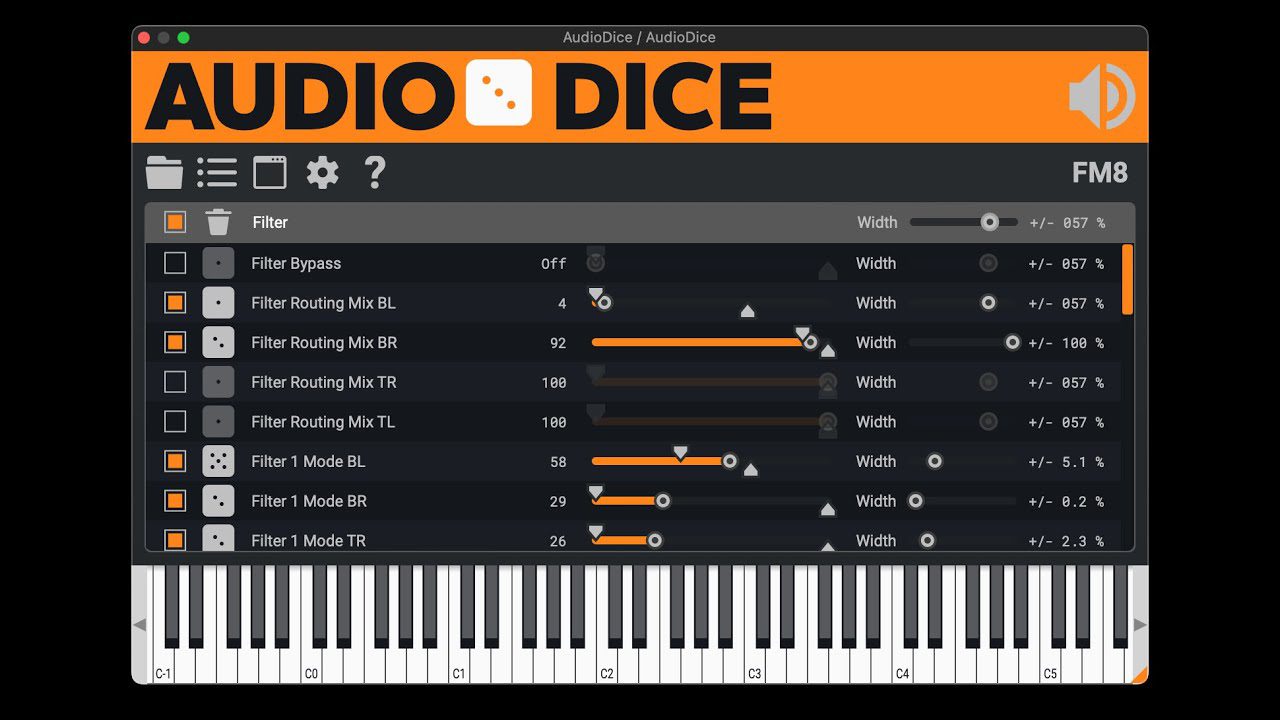
Randomization can be brilliant, but it can also be useless when it has no limits. AudioDice avoids that problem by giving users control over how far each parameter can move. Every exposed parameter can have its own randomization width, up to plus or minus 100 percent, as well as a defined range that sets where the value is allowed to land.
This means AudioDice is not simply throwing your plugin into a blender and hoping for art. You can decide which parameters are allowed to change, how dramatically they change, and which ones should stay locked. That makes it practical for real production work, especially when you want discovery without destroying the musical context.
Randomize One Parameter or the Whole Plugin
AudioDice can randomize individual parameters or the entire hosted plugin state. This opens up very different creative workflows. On a synth, you might randomize filter movement, wavetable position, modulation depth, envelope behavior, or effect settings. On an effect plugin, you might explore unusual delay times, distortion textures, reverb shapes, pitch effects, or modulation combinations.
The more complex the hosted plugin is, the more interesting AudioDice becomes. A simple three-knob processor may not need this treatment. A deep synth, multi-effect, granular processor, or modulation-heavy plugin can suddenly become a playground.
Knob Mode: A Smarter Way to Choose What Changes
One of AudioDice’s most useful workflow ideas is Knob Mode. When enabled, the plugin lets you touch controls inside the hosted plugin, then adds those controls to the active randomization list. This makes the setup process much faster than searching through a huge list of exposed parameters.
For producers, that matters. Many modern plugins expose hundreds or even thousands of parameters to the host. Without a fast selection method, randomization can become more technical than creative. Knob Mode keeps the process musical: touch the controls you care about, set the range, roll the dice, and listen.
Parameter Filtering and Safer Randomization
AudioDice also includes a parameter filter, which helps when working with plugins that expose large parameter lists. You can narrow down what you want to work with and avoid wasting time scrolling through controls that are not relevant to the sound.
Recent updates also added the option to disable discrete parameters by default, because not every parameter behaves well when randomized. This is a useful safety detail, especially for plugins where certain switches, modes, or menu-style controls can create unpredictable results.
Sound and Character: It Depends on What You Load
AudioDice does not have one fixed sonic character, and that is exactly the point. Its sound depends entirely on the plugin you place inside it. Load a synth, and it becomes a sound design randomizer. Load a delay, and it becomes a rhythmic accident machine. Load a distortion plugin, and it can generate aggressive textures. Load a reverb or granular processor, and it can create strange cinematic spaces.
This makes AudioDice more flexible than a standard effect. It does not impose a color. It unlocks hidden behaviors inside tools you already use. For producers who feel stuck with familiar presets, AudioDice can make old plugins feel new again.
Creative Uses in Music Production
Sound Design and Experimental Textures
AudioDice is especially strong for sound design. Use it with complex synths, granular instruments, spectral effects, multi-effects, or modulation-heavy processors to generate unexpected tones, drones, transitions, risers, glitches, and atmospheric layers.
Electronic Music and Beatmaking
For electronic producers and beatmakers, AudioDice can help create fresh synth patches, strange bass variations, vocal chop effects, drum loop transformations, and unusual textures that would take much longer to program manually.
Ambient, Cinematic, and Game Audio
AudioDice is also a strong tool for ambient producers, cinematic composers, and game audio designers. Randomizing selected parameters inside delays, reverbs, drones, and texture generators can quickly produce moods that feel less predictable and more alive.
Refreshing Old Plugins
One of the best uses for AudioDice is simple: load an old plugin you have not opened in months and let it surprise you. The tool can reveal new sides of familiar instruments and effects, especially when you limit the randomization to a few expressive controls.
Why AudioDice Is Worth Trying
AudioDice is worth trying because it changes the relationship between producer and plugin. Instead of starting from a preset browser or a blank patch, you can start from controlled chance. That can be incredibly useful when creativity feels too deliberate or when a session needs something unexpected.
The plugin also includes practical features that make experimentation safer. Undo and redo let you move through rolls without losing a good result. State management helps save and recall randomized setups. A panic function can reset a hosted plugin if things go too far. Background plugin scanning also helps keep the host stable if another plugin behaves badly.
Who Is AudioDice Best Suited For?
AudioDice is best suited for producers, beatmakers, sound designers, composers, and musicians who enjoy experimentation. It is especially useful for electronic music, ambient, cinematic scoring, techno, IDM, trap, lo-fi, hyperpop, game audio, and any genre where unusual sound design can become part of the identity of a track.
It will also appeal to producers who already own powerful plugins but feel they are only using a small part of them. AudioDice can push those tools into unfamiliar territory without requiring hours of manual programming.
Compatibility and Workflow
Sound Development AudioDice is available for macOS and Windows in VST3 and AU formats. It can run as an instrument or an effect inside compatible DAWs such as Ableton Live, FL Studio, Studio One, Logic Pro, Cubase, Reaper, Bitwig Studio, and other hosts that support these formats.
The workflow is direct: load AudioDice in the DAW, load another plugin inside AudioDice, choose which parameters can be randomized, set width and range values, then roll the dice. If the result works, save it. If it goes too far, use undo, refine the settings, or lock the parameters you want to preserve.
Official Website and Download Link
AudioDice is available from the official Sound Development website. The download is available directly from the developer, with no account or activation required at the time of writing.
Official website:
https://www.sounddevelopment.nl/
Conclusion: A Creative Shortcut to New Sounds
Sound Development AudioDice is a clever tool for producers who enjoy discovery. It does not replace sound design skill, but it can push sound design into places you might never reach by hand. By combining randomization with parameter control, ranges, undo, state management, and host-based workflow, it makes creative accidents easier to capture and refine.
For producers who want their plugins to surprise them again, AudioDice is a very interesting addition to the studio. Load a synth, choose a few parameters, roll the dice, and listen for the moment where chaos becomes music.
Product Description
Sound Development AudioDice is a free creative plugin host for macOS and Windows. It loads inside a DAW as a VST3 or AU plugin in Instrument or FX mode, then hosts another plugin and randomizes its parameters. AudioDice includes individual and global parameter randomization, adjustable width and range controls, Knob Mode, parameter filtering, undo and redo, state management, MIDI thru, and safety options for more controlled creative experimentation.
Official website or download link:
https://www.sounddevelopment.nl/