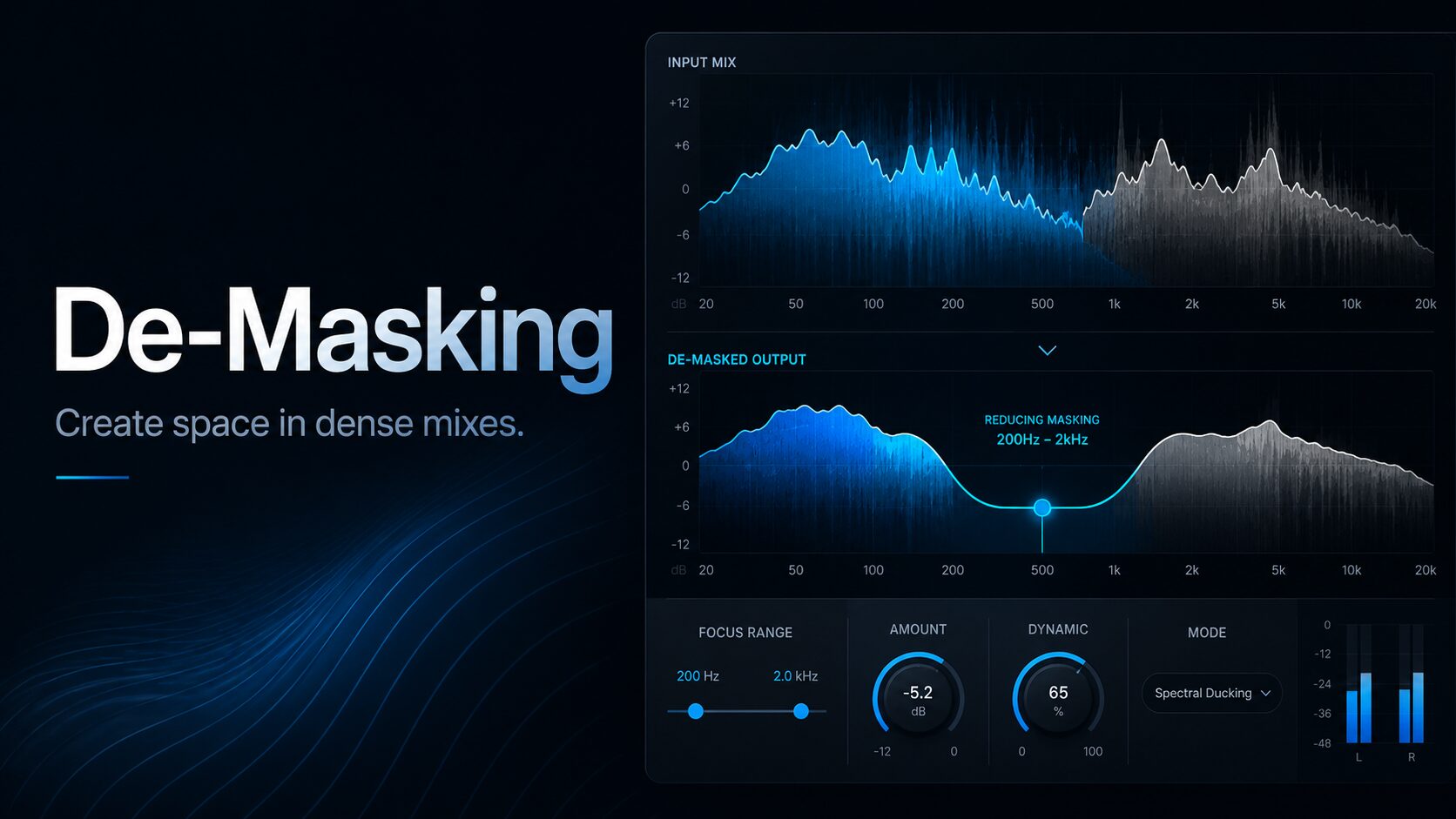

A mix can contain excellent sounds and still feel crowded. The problem is often frequency masking: two instruments occupy similar parts of the spectrum, making one of them harder to hear.
Traditional EQ can create space, but static cuts remain active even when the competing instrument is silent. Modern de-masking plugins offer a more precise solution by reducing only the conflicting frequencies and only when necessary.
This guide compares the best de-masking plugins in 2026, including Wavesfactory Trackspacer, Mastering The Mix FUSER, sonible smart:comp 3 and the free TDR Nova.
Best De-Masking Plugins: Quick Comparison
| Plugin | Price Type | Best For | Workflow |
|---|---|---|---|
| Trackspacer | Paid | Fast sidechain unmasking | Automatic spectral ducking |
| FUSER | Paid | Detailed conflict correction | Analysis, phase and spectral processing |
| smart:comp 3 | Paid | Compression and spectral ducking | Intelligent spectro-dynamic compression |
| TDR Nova | Free | Manual frequency unmasking | Sidechain dynamic EQ |
What Is Frequency Masking?
Frequency masking happens when two sounds compete within the same frequency range. The louder or denser element hides part of the quieter one, even when both tracks sound good in isolation.
Typical examples include:
- a kick drum competing with a bassline;
- a lead vocal disappearing behind guitars or synths;
- a snare being covered by distorted instruments;
- pads masking piano or guitar details;
- backing vocals reducing the clarity of the lead vocal.
A de-masking plugin analyses a sidechain signal and creates dynamic reductions in another track. Unlike conventional sidechain compression, it does not necessarily lower the entire signal. It can reduce only the frequencies that are currently colliding.
1. Wavesfactory Trackspacer: Best Overall De-Masking Plugin
Trackspacer is one of the fastest ways to create space between two competing tracks. It analyses an external sidechain signal and applies an opposing frequency curve to the track carrying the plugin.
Place Trackspacer on the instrumental bus, route the lead vocal into its sidechain input and increase the Amount control. The plugin dynamically creates room for the vocal without permanently removing frequencies from the instrumental.
The high-pass and low-pass controls restrict processing to a selected frequency range. This is particularly useful when separating a kick and bass. The plugin can reduce only the low frequencies of the bass while leaving its upper harmonics untouched.
Best Uses
- lead vocals against dense instrumentals;
- kick and bass separation;
- snare clarity in distorted mixes;
- dialogue over background music;
- lead synths against pads and chords.
Advantages
- extremely fast workflow;
- frequency-selective sidechain ducking;
- Mid/Side processing;
- adjustable attack and release;
- more transparent than full-band ducking.
Limitations
- limited automatic problem diagnosis;
- strong settings can create audible pumping;
- not designed for phase correction;
- requires correct sidechain routing.
Verdict: Trackspacer is the best choice for producers who want a simple and effective de-masking tool. It can solve common vocal, bass and instrument conflicts within seconds.
Visit the official Trackspacer page
2. Mastering The Mix FUSER: Best for Detailed Conflict Correction
FUSER takes a broader approach to frequency conflicts. It analyses two audio signals and identifies areas where masking, phase cancellation and level imbalance may be damaging the mix.
After analysing the sidechain signal, FUSER displays the main conflicting frequency areas and suggests processing. Its intelligent EQ can dynamically reduce overlapping frequencies while its phase optimisation tools help improve the relationship between layered sounds.
The plugin is especially valuable when several issues occur simultaneously. A kick and bass may not only share the same low-frequency range but also create phase cancellation. FUSER provides more diagnostic information than a basic spectral ducking plugin.
Best Uses
- kick and bass alignment;
- layered drum samples;
- lead and backing vocals;
- guitars competing with keyboards;
- dense electronic arrangements.
Advantages
- clear visual conflict analysis;
- automatic frequency reduction;
- phase rotation and polarity tools;
- level balance recommendations;
- useful educational feedback.
Limitations
- slower than Trackspacer for simple tasks;
- analysis results still require critical listening;
- strong correction can make tracks sound disconnected;
- more controls to learn.
Verdict: FUSER is the better option when frequency masking is combined with phase or level problems. It provides more analysis and control than Trackspacer, although its workflow is less immediate.
3. sonible smart:comp 3: Best for Compression and Spectral Ducking
smart:comp 3 is an intelligent spectro-dynamic compressor. It combines conventional compression with high-resolution gain reduction across the frequency spectrum.
Its spectral processing can prevent dominant frequency areas from triggering excessive broadband compression. The external sidechain and spectral ducking tools can also create space for another track while maintaining a more natural tonal balance.
Unlike a dedicated unmasking plugin, smart:comp 3 can control dynamics and frequency conflicts in the same processing stage. This makes it useful on vocals, instrument groups and buses where both problems need attention.
Advantages
- intelligent compression analysis;
- spectral gain reduction;
- external sidechain support;
- transparent dynamic control;
- useful on tracks, buses and full mixes.
Limitations
- more complex than a single-purpose de-masking plugin;
- not the cheapest solution for frequency separation alone;
- automatic suggestions still need manual adjustment.
Verdict: smart:comp 3 is ideal for producers who want one advanced plugin for compression, spectral balancing and sidechain ducking.
Visit the official smart:comp 3 page
4. TDR Nova: Best Free De-Masking Plugin
TDR Nova is a free dynamic EQ that can perform precise frequency-dependent sidechain ducking.
To separate a kick and bass, place Nova on the bass and route the kick into the external sidechain. Create a dynamic EQ band around the kick’s fundamental frequency, activate sidechain detection and adjust the threshold until the bass moves aside only when the kick plays.
The same method can create room for vocals in guitars, keyboards or a complete instrumental bus. Nova requires more manual setup than Trackspacer, but it provides excellent control without any cost.
Advantages
- completely free;
- four dynamic EQ bands;
- external sidechain processing;
- Delta monitoring;
- precise frequency selection.
Limitations
- frequency conflicts must be identified manually;
- slower setup than automatic alternatives;
- limited number of bands;
- requires a basic understanding of dynamic EQ.
Verdict: TDR Nova is the best free alternative for producers willing to configure their own frequency-selective sidechain processing.
Read the complete Audiartist guide: TDR Nova Free Dynamic EQ.
Trackspacer vs FUSER
Trackspacer is faster and better suited to routine sidechain unmasking. FUSER provides a deeper analysis of frequency, phase and level conflicts.
| Choose Trackspacer If | Choose FUSER If |
|---|---|
| You want immediate results | You want detailed visual analysis |
| You mainly treat frequency masking | You also need phase correction |
| You prefer minimal controls | You prefer guided recommendations |
| You frequently separate vocals or bass | You work with layered or complex sources |
How to Use De-Masking Plugins Correctly
Use the Smallest Effective Amount
The goal is to improve separation without making the processed track disappear. A few decibels of targeted reduction is often enough.
Restrict the Frequency Range
Do not process the entire spectrum when the conflict exists only in one area. Restricting the range preserves the original weight and character of the track.
Adjust Attack and Release
A very fast attack can reduce punch, while an excessively slow release can keep the track suppressed for too long. Adjust the timing to follow the musical source.
Check the Mix Without the Plugin
De-masking plugins can make a mix appear cleaner while also removing energy. Bypass the processor regularly and compare both versions at the same loudness.
Which De-Masking Plugin Should You Choose?
Best overall: Wavesfactory Trackspacer
Best for detailed correction: Mastering The Mix FUSER
Best for compression and unmasking: sonible smart:comp 3
Best free option: TDR Nova
Frequently Asked Questions
What Is the Best Plugin for Frequency Masking?
Trackspacer is the best general option for fast frequency-selective sidechain ducking. FUSER is better when the problem also involves phase or level conflicts.
Is There a Free Alternative to Trackspacer?
TDR Nova can create frequency-dependent sidechain ducking for free. It requires manual configuration but can produce very precise results.
Is De-Masking Better Than Sidechain Compression?
De-masking is usually more transparent because it reduces only the competing frequencies. Full-band sidechain compression is more suitable when an obvious pumping effect or complete level reduction is desired.
Can De-Masking Plugins Fix a Bad Arrangement?
No. They can improve separation, but they cannot completely repair several instruments playing in the same register with similar sounds. Arrangement, sound selection, level balance and panning should be addressed first.
Final Verdict
Trackspacer remains the most efficient choice for everyday frequency unmasking. It is fast, transparent and particularly effective for vocals, kick drums and basslines.
FUSER offers a more complete diagnostic workflow, while smart:comp 3 combines spectral separation with advanced compression. Producers looking for a free solution can achieve excellent results with TDR Nova, provided they are prepared to configure the processing manually.
De-masking should create a small opening in the mix, not a private motorway for every instrument. When everything demands its own enormous space, the arrangement may be the plugin that needs updating.