
The problem is no longer access. The problem is selection. A producer can download twenty EQs before breakfast, install six compressors before lunch, then spend the evening wondering why the kick and bass still fight like two angry neighbors in a thin-walled apartment. More plugins do not automatically mean better mixes. Better choices do.
This guide focuses on the best mixing plugins in 2026 for producers who want to build a serious and practical toolkit. It covers free and paid tools for EQ, compression, saturation, metering, vocal control, mix balance, and problem-solving. The goal is not to collect every plugin on the internet. The goal is to understand what each type of plugin does, when to use it, and how it helps a track move from raw production to a clear, powerful, release-ready mix.
What Mixing Plugins Do You Actually Need in 2026?
Mixing is the art of making every element of a song work together. That means balance, tone, dynamics, space, stereo placement, depth, and emotional impact. A good mix lets the listener understand the song without feeling the technical work behind it.
For most producers, a strong mixing setup needs five core categories: an EQ, a compressor, a saturation tool, a metering plugin, and at least one problem-solving plugin for harshness, masking, or dynamic control. Reverb and delay are important too, but they belong more naturally to the creative FX stage. In mixing, the priority is clarity and control.
The best mixing plugins should help you make decisions faster. They should reveal problems, not create more confusion. A beginner does not need ten vintage compressor emulations, three console strips, and a spectral wizard from another galaxy. A beginner needs reliable tools that teach good habits.
Best Free Mixing Plugins in 2026
TDR Nova, A Free Dynamic EQ That Still Feels Professional
TDR Nova is one of the most useful free mixing plugins available because it combines the familiar workflow of a parametric EQ with dynamic processing. That means it can work as a clean EQ, a dynamic EQ, a frequency-selective compressor, and a problem-solving tool for harsh vocals, muddy instruments, sharp guitars, boxy drums, or uneven synths.
The reason TDR Nova is so valuable for beginners is simple: it teaches the difference between static EQ and dynamic control. A normal EQ cut reduces a frequency all the time. A dynamic EQ reduces it only when it becomes a problem. That makes Nova especially helpful on vocals, where harshness and sibilance often appear only on certain words, or on bass, where some notes jump out more than others.
Use Nova gently. Try it on a vocal around harsh upper mids, on a bass around boomy notes, or on a drum bus to control aggressive cymbals. It is the kind of free plugin that can stay in a professional workflow long after the beginner phase is over.
TDR Kotelnikov, Free Compression for Transparent Control
TDR Kotelnikov is a free wideband dynamics processor designed for clean and transparent compression. It is particularly useful on the stereo bus, drum bus, acoustic instruments, vocals, and any source that needs control without obvious color.
Many beginners think compression is supposed to make everything louder and more exciting. In reality, compression is often about movement, stability, and shape. Kotelnikov is a strong learning tool because it does not hide behind vintage character. It forces the producer to listen to attack, release, ratio, threshold, and gain reduction without being distracted by heavy coloration.
On a mix bus, Kotelnikov can gently bring elements together. On a drum bus, it can control peaks while keeping punch. On vocals, it can smooth performance dynamics before more colorful processing. The best advice is to start with low ratios, slow enough attack to preserve transients, and moderate gain reduction. If the mix suddenly feels smaller, back off. Compression is not a wrestling match, even if the waveform looks like it asked for trouble.
Klanghelm IVGI, Free Saturation for Warmth and Character
Klanghelm IVGI is a free saturation and distortion plugin that can add subtle warmth, density, and character to individual tracks or buses. It is simple, musical, and still highly relevant for producers who want analog-style color without buying a full saturation suite.
Saturation is one of the most misunderstood tools in mixing. It is not only distortion. At low levels, it can add harmonics that help sounds feel fuller and more present. A bass can become easier to hear on small speakers. A vocal can feel closer. Drums can gain energy. Synths can move from flat to alive.
IVGI is useful because it encourages small moves. Add a little drive, match the output level, then bypass the plugin. If the sound feels better without simply becoming louder, you are on the right path. If it sounds like the track was dragged behind a motorcycle, maybe reduce the drive, unless that was the artistic vision, in which case, congratulations, chaos has entered the session.
Voxengo SPAN, Free Spectrum Analysis for Better Decisions
Voxengo SPAN is a free real-time spectrum analyzer that helps producers understand what is happening across the frequency range. It does not process sound. It shows information. That makes it one of the most important free tools in a mixing setup.
SPAN is useful for checking low-end balance, identifying frequency buildup, comparing tonal balance, observing harsh upper mids, and understanding how different mix elements occupy the spectrum. It is especially helpful for producers working in untreated rooms, where bass response can lie with impressive confidence.
The important point is not to mix with your eyes. SPAN should confirm what you hear, not replace listening. If the bass sounds muddy and SPAN shows a strong buildup around the low mids, that is useful information. If the graph looks strange but the mix sounds right, trust the music first. The screen is a guide, not the producer.
Youlean Loudness Meter 2, Free Loudness and True Peak Monitoring
Youlean Loudness Meter 2 is often associated with mastering, but it is also useful during mixing. Loudness, true peak level, loudness range, and dynamic movement are not only final-stage concerns. They affect how a mix feels long before mastering begins.
For producers preparing music for streaming platforms, Youlean helps avoid one of the most common mistakes: chasing loudness too early. A mix that is crushed before mastering leaves little room for final processing. A mix with healthy peaks, stable dynamics, and musical balance gives the mastering stage something to work with.
Use Youlean on the mix bus to monitor level, not to force a target too soon. The mix should feel open, balanced, and controlled before it becomes loud. Loudness is not a personality trait. It is a delivery decision.
Best Paid Mixing Plugins Worth Considering in 2026
FabFilter Pro-Q 4, Surgical EQ With Modern Workflow
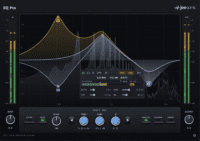
FabFilter Pro-Q 4 is one of the most complete EQ plugins available for modern mixing. It is fast, precise, visual, and flexible enough for surgical correction, musical shaping, dynamic EQ moves, mid-side processing, spectrum analysis, and detailed mix problem-solving.
What makes Pro-Q 4 especially powerful is workflow. A good EQ should let the producer move quickly from hearing a problem to fixing it. Pro-Q 4 does that elegantly. It can clean low-end rumble, remove harshness, carve space between instruments, shape vocals, tighten drums, and correct resonant peaks without turning the process into a technical obstacle course.
For beginners, the danger is overuse. A powerful EQ can make every tiny frequency problem look like an emergency. The best approach is to make fewer, better moves. Cut what truly hurts the mix. Boost what genuinely improves the musical message. Leave the rest alone. Silence is also a plugin, sadly not sold in a bundle.
FabFilter Pro-C 2, A Flexible Compressor for Almost Every Mixing Task
FabFilter Pro-C 2 remains a strong paid compressor because it offers multiple compression styles, clear metering, sidechain EQ, parallel compression control, and a visual interface that helps producers understand how compression is behaving.
Compression can be difficult because it is not always obvious. A beginner may turn knobs and hear only “a bit louder” or “a bit worse”. Pro-C 2 helps by showing gain reduction, timing, knee behavior, and levels in a way that connects the visual feedback to the sound.
Use it on vocals for consistency, drums for punch, bass for stability, and buses for glue. The most important controls are still attack and release. A fast attack can reduce punch. A slower attack can let transients breathe. A fast release can create energy or pumping. A slower release can feel smoother. Pro-C 2 makes those choices easier to hear and easier to learn.
iZotope Neutron 5, A Complete Mixing Suite for Fast Problem Solving
iZotope Neutron 5 is a complete mixing suite built around modules for EQ, compression, transient shaping, saturation, clipping, phase control, masking reduction, and visual mix assistance. It is especially useful for producers who want one environment to handle many practical mixing tasks.
The strength of Neutron 5 is not that it replaces listening. It does not. Its strength is that it helps identify starting points. A producer working alone can use it to understand masking, dynamic balance, tonal issues, and track relationships more quickly. That can be valuable in a home studio where there is no second engineer in the room to say, “Your vocal is fighting the synth, and your bass has eaten the sofa”.
Neutron 5 works best when treated as a guide, not a final authority. Use its suggestions, then adjust with intention. The producer should make the final call, because a mix is not only a technical puzzle. It is a musical story.
Soundtoys Decapitator, Analog-Style Saturation With Attitude
Soundtoys Decapitator is a classic saturation plugin for adding tone, edge, heat, and harmonic character. It can be subtle, aggressive, warm, dirty, bright, thick, or completely unreasonably excited depending on how hard it is driven.
In mixing, Decapitator is especially useful on drums, bass, vocals, guitars, synths, and parallel processing chains. It can help a sound cut through without simply boosting EQ. That matters because harmonic presence often translates better across speakers than raw level.
A strong technique is parallel saturation. Duplicate or send a signal to an aux, add Decapitator, drive it harder than you normally would, filter the result, then blend it underneath the dry signal. This can add weight and energy while keeping the original sound intact. It is the difference between adding spice and dropping the entire jar into the soup.
oeksound soothe2, Dynamic Resonance Control for Harshness and Problem Frequencies
oeksound soothe2 is a dynamic resonance suppressor designed to identify and reduce problematic resonances as they happen. It is often used on vocals, guitars, cymbals, strings, harsh synths, drum overheads, and busy buses where traditional EQ cuts may feel too static.
In a modern mix, harshness can appear in very specific moments. A vocal may sound smooth on one phrase, then painfully sharp on the next. A guitar may have one resonant note that jumps out. A hi-hat may become aggressive only when the chorus arrives. soothe2 is useful because it responds dynamically instead of carving the entire sound permanently.
The danger is using it too heavily. If pushed too far, resonance suppression can remove life and detail. The best use is usually subtle: reduce the painful peaks, keep the energy, preserve the performance. The goal is not to sterilize the sound until it becomes a polite beige rectangle.
How to Build a Simple Mixing Chain
A mixing chain should solve problems in a logical order. There is no universal chain that works for every track, but a simple structure helps beginners avoid random plugin stacking.
For Vocals
Start with cleanup EQ. Remove low-end rumble and reduce obvious mud. Use dynamic EQ for harshness or sibilance if needed. Add compression to control performance level. Use saturation for presence and warmth. Add a resonance suppressor only if the vocal remains sharp or nasal in specific moments. Finish with level automation. A vocal should not rely only on compression to stay present.
For Drums
Begin with balance. The kick and snare must work before plugins enter the room. Use EQ to clean unnecessary low-end from non-bass elements. Use compression for punch or control, not automatically on every drum channel. Add saturation to the drum bus for energy. Use metering to check low-end and transient peaks. If the cymbals hurt, treat them carefully rather than darkening the whole drum bus.
For Bass
The bass needs consistency, translation, and space. Use EQ to remove mud and make room for the kick. Use compression to stabilize notes. Add saturation to create harmonics that help the bass translate on small speakers. Check the relationship between kick and bass in both spectrum and mono. If the low end sounds impressive only in your studio chair, it may not survive the real world.
For Synths, Guitars and Keys
These elements often compete with vocals and each other. Use EQ to carve space. Reduce low mids if the arrangement feels cloudy. Use compression only when dynamics need control. Add saturation for character. Use stereo width carefully, keeping important center information clear. A wide synth is beautiful until it hides the vocal and turns the chorus into fog.
For the Mix Bus
The mix bus is not a repair shop. It should enhance a mix that already works. Use gentle EQ, light compression, subtle saturation, and metering. Avoid heavy moves unless you know exactly why they are needed. If the mix bus needs extreme correction, return to the individual tracks. The problem usually started earlier.
Free vs Paid Mixing Plugins: What Should You Choose First?
A producer can build a serious mixing workflow with free plugins. TDR Nova, TDR Kotelnikov, Klanghelm IVGI, Voxengo SPAN, and Youlean Loudness Meter 2 can already cover dynamic EQ, compression, saturation, spectrum analysis, and loudness monitoring. That is enough to learn the fundamentals and finish real music.
Paid plugins become valuable when they improve speed, precision, workflow, or sound character. FabFilter Pro-Q 4 offers faster and deeper EQ work. FabFilter Pro-C 2 makes compression easier to understand and control. iZotope Neutron 5 provides a broad mixing environment for modern workflows. Soundtoys Decapitator delivers recognizable harmonic color. oeksound soothe2 solves resonance problems that can be difficult to manage manually.
The best approach is simple: start with free tools, learn the fundamentals, then buy paid plugins only when you understand the problem they solve. A paid plugin should answer a need, not decorate a plugin folder.
Recommended Mixing Toolkit for 2026
| Mixing Role | Free Option | Paid Option | Best Use |
|---|---|---|---|
| Corrective EQ | TDR Nova | FabFilter Pro-Q 4 | Cleaning mud, harshness, resonances, masking |
| Compression | TDR Kotelnikov | FabFilter Pro-C 2 | Vocal control, bus glue, drum punch, bass stability |
| Saturation | Klanghelm IVGI | Soundtoys Decapitator | Warmth, presence, density, parallel energy |
| Metering | Voxengo SPAN | Advanced analyzer or full metering suite | Frequency balance, low-end control, mix checking |
| Loudness monitoring | Youlean Loudness Meter 2 | Youlean Loudness Meter 2 Pro | LUFS, true peak, loudness range, level discipline |
| All-in-one mixing | Stock DAW tools | iZotope Neutron 5 | Modern channel processing, masking control, mix assistance |
| Resonance control | Manual dynamic EQ | oeksound soothe2 | Harsh vocals, sharp guitars, aggressive cymbals, resonant instruments |
Common Mixing Mistakes Beginners Should Avoid
Mixing Too Loud
Loud monitoring makes everything feel exciting, but it can hide balance problems and fatigue the ears quickly. Mix at a moderate level, then check louder for short moments. If a mix only works when played loud, it probably does not work yet.
Using EQ Like a Paint Roller
Big EQ moves can be useful, but beginners often boost too much and cut too randomly. Before touching an EQ, identify the problem. Is the vocal muddy? Is the bass masking the kick? Is the guitar too sharp? Fix the specific issue instead of reshaping every track by habit.
Overcompressing Everything
Compression can make a mix feel controlled, but too much compression removes impact. Drums lose punch, vocals lose emotion, bass loses movement, and the whole track starts breathing like it ran up five flights of stairs. Use compression with purpose.
Adding Saturation Without Level Matching
Saturation often makes a sound louder, and louder often tricks the ear into thinking it is better. Always match the output level before judging. If the plugin still improves the sound at the same loudness, keep it. If not, it was just volume wearing a nice jacket.
Ignoring Mono Compatibility
Wide sounds can be exciting, but many playback systems still punish poor phase decisions. Check the mix in mono regularly, especially the kick, bass, vocal, snare, and main hook elements. If the track collapses in mono, the stereo image needs attention.
Conclusion: Better Mixing Comes From Better Decisions
The best mixing plugins in 2026 are powerful, accessible, and often surprisingly affordable. Free tools such as TDR Nova, TDR Kotelnikov, Klanghelm IVGI, Voxengo SPAN, and Youlean Loudness Meter 2 can form a serious foundation for any independent producer. Paid tools such as FabFilter Pro-Q 4, FabFilter Pro-C 2, iZotope Neutron 5, Soundtoys Decapitator, and oeksound soothe2 can speed up the workflow, improve precision, and solve more complex problems.
But the plugin is never the mix. The mix is the decision behind the plugin. EQ should create space. Compression should shape movement. Saturation should add character. Metering should confirm what the ear suspects. Problem-solving tools should support the song, not flatten it into perfection without emotion.
In 2026, the smartest producers will not be the ones with the largest plugin folders. They will be the ones who understand their tools deeply, use them with intention, and know when the best mixing move is not adding another plugin, but turning something down, muting a layer, or trusting the song.