Dagon by Mercurial Tones is a free VST plugin designed for producers, beatmakers, and mixing engineers who want cleaner tracks without destroying the natural character of the source. In modern music production, harsh resonances, ringing notes, and sudden frequency spikes can quickly turn a good recording into a tiring listening experience. Dagon focuses on that exact problem.
This free audio plugin works as a smart resonance control and volume suppression tool, helping users reduce painful frequencies while keeping the musical shape of the sound intact. Instead of forcing producers to hunt harsh frequencies manually with a narrow EQ boost, Dagon offers a faster and more musical way to smooth problematic material.
For a home studio producer, this kind of free music production plugin can be extremely useful. Vocals, drum buses, synths, guitars, loops, and full instrumental layers can all develop harsh areas, especially when multiple sounds compete in the same frequency range. Dagon gives producers a modern cleanup tool that feels practical, focused, and surprisingly relevant in a world where clarity matters more than ever.
What Is Dagon?
Dagon is a free resonance suppressor plugin created by Mercurial Tones. Its purpose is simple: detect harsh, resonant, or overly prominent areas in a sound and reduce them in a transparent way. The plugin is built for mixing situations where a track feels sharp, nasal, metallic, boxy, piercing, or dynamically unstable.
Unlike a traditional static EQ, Dagon reacts to the signal in real time. This matters because harshness is often not constant. A vocal may only become aggressive on certain notes. A hi-hat loop may only become painful when specific transients hit. A synth may sound smooth in one section, then harsh in another when the filter opens. Dagon is designed to follow those changes and suppress the problem areas only when needed.
This makes it an interesting free VST plugin for producers who want cleaner mixes but do not want to over-process their tracks. It is not about making everything dull or overly polished. The goal is to keep the source alive while reducing the parts that distract the listener.
What This Free VST Plugin Does
Dagon combines resonance control, spectral suppression, and dynamic volume management. The plugin analyzes the incoming signal and helps pull down frequencies that stand out too much. This can be useful on individual channels, buses, loops, and complex audio material.
One of its strongest advantages is that it does not treat every sound in the same way. Dagon includes several suppression modes, allowing users to move from direct resonance reduction to smoother and more perceptual cleanup. This gives producers flexibility depending on the source.
On vocals, it can help control sharp notes and edgy upper mids. On drum buses, it can reduce brittle cymbals or harsh snare overtones. On synths, it can tame resonant filter movement. On loops, it can smooth aggressive peaks without flattening the groove. For mastering or premaster cleanup, it can also help reduce small frequency spikes before final limiting, as long as it is used with restraint.
Main Features
- Smart resonance control: Dagon detects harsh resonances and reduces them dynamically, helping the sound remain natural.
- Volume suppression: The plugin can also manage sudden level spikes when the issue is not only tonal but dynamic.
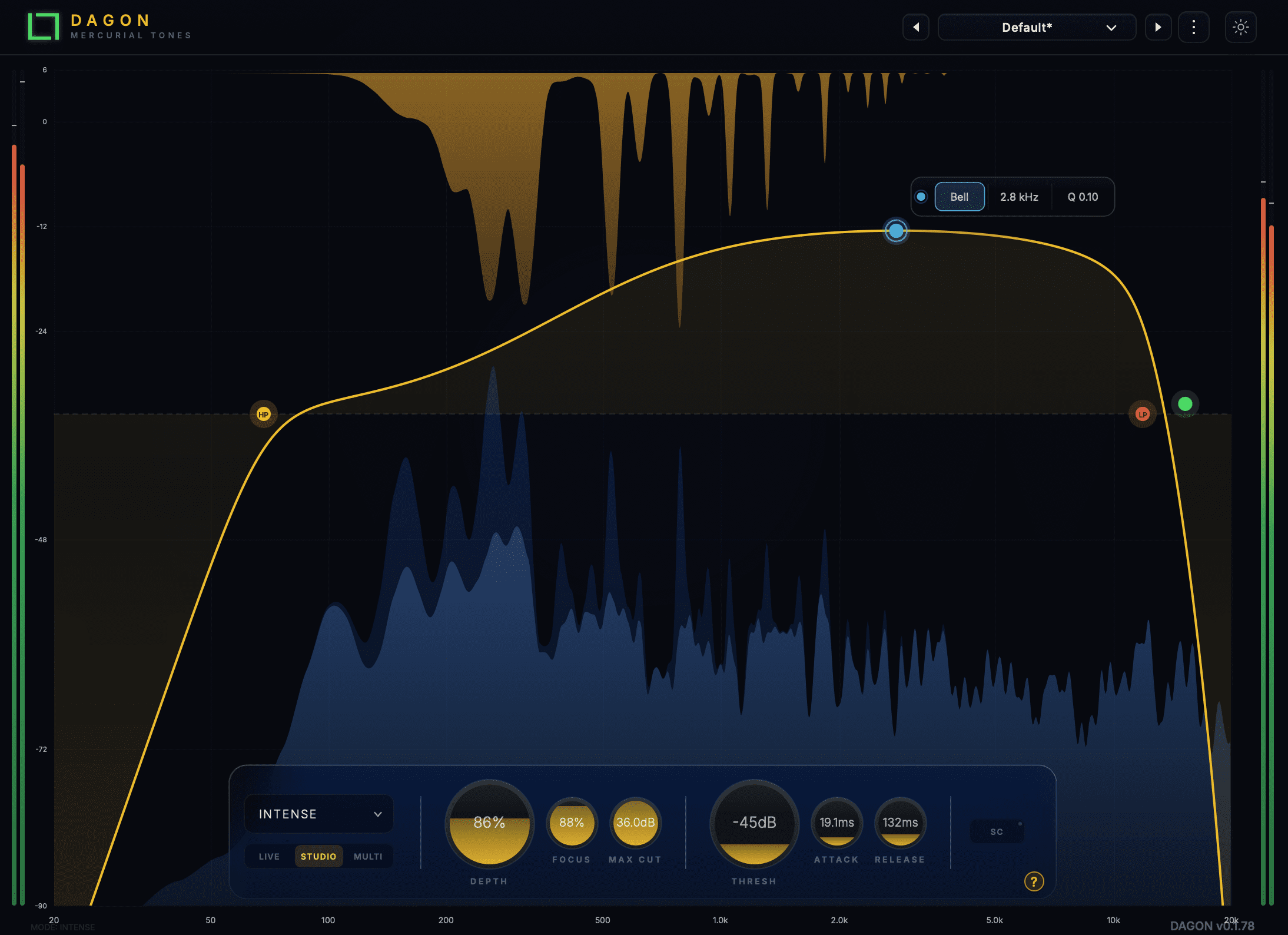
- Five suppression modes: Dagon includes Modern, Natural, Smart, Perceptual, and Intense modes for different styles of cleanup.
- Depth control: Adjusts how strongly the plugin reduces problematic areas.
- Focus control: Allows broader or more surgical processing depending on the source.
- Max Cut control: Limits how much reduction can be applied, useful for keeping processing under control.
- Attack and release controls: Shape how quickly Dagon reacts and how naturally it lets go.
- Live and Studio quality modes: Useful for choosing between low-latency work and higher-quality processing.
- VST3 and AU formats: Compatible with modern DAWs on Windows and macOS.
- Free product: Dagon can be claimed for free and installed through Mercurial Tones Hub.
Sound, Workflow, and Creative Use
Dagon is the kind of mixing tool that becomes useful when a sound is already good but slightly uncomfortable. This is an important distinction. It is not a dramatic effect designed to transform a track beyond recognition. It is a problem-solving plugin built to make audio more controlled, more balanced, and easier to place in a mix.
The workflow is straightforward. Load Dagon on the track that needs cleaning, choose a mode, then adjust the processing amount until the harshness moves backward. The Focus control is especially important. Lower settings can create a smoother, broader cleanup, while higher settings can target more narrow and obvious resonances.
For sound design, Dagon can also be used creatively. Electronic producers often push synths, distortion, saturation, and filter movement very hard. That energy can be exciting, but it can also create aggressive peaks. Dagon allows producers to keep the attitude of a sound while controlling the painful parts. Used after saturation or distortion, it can make a tone feel more expensive and less chaotic.
On drum buses, it can be useful when cymbals, hats, or snare overtones become too sharp. On vocals, it can reduce harsh upper mids without forcing the engineer to darken the entire performance. On full loops, it can help rebalance material that was already processed before being imported into the session.
Who Should Use Dagon?
Dagon is a strong choice for producers who need a free audio plugin for mix cleanup. It is especially useful for people who work in a home studio, where room acoustics, headphones, and monitoring limitations can make harsh frequencies difficult to judge. A tool like this can help identify and reduce problem areas quickly.
Beatmakers can use it on samples, drum loops, melodies, and instrumental buses. Mixing engineers can use it on vocals, guitars, synths, and percussion. Electronic music producers can place it after aggressive sound design chains to keep energy under control. Mastering-focused users can try it gently on a premaster, although subtle settings are essential in that context.
This plugin is also useful for producers who want an alternative to more expensive resonance suppressors. While premium tools may offer deeper ecosystems, Dagon delivers a focused free option that covers one very important job: making harsh material easier to listen to.
Best Use Cases for Producers and Mixing Engineers
Vocal Harshness Control
Vocals often contain sharp resonances around the upper mids and presence range. These frequencies can make a singer cut through the mix, but they can also become painful when pushed too far. Dagon can help smooth those moments without making the vocal sound dull or buried.
Drum Bus Cleanup
Modern drums are often bright, compressed, and saturated. Hi-hats, crashes, snares, and claps can create sharp peaks that fatigue the ear. Placing Dagon on a drum bus can help reduce harshness while preserving punch and movement.
Synth and Lead Control
Synth leads, acid-style lines, resonant filters, and distorted electronic sounds can easily become aggressive. Dagon is useful when a sound has the right attitude but too much bite. It helps the track stay powerful without cutting through the listener’s head like a badly sharpened kitchen knife.
Sample and Loop Repair
Many producers work with samples that are already compressed, limited, or processed. These sounds may include hidden resonances that become obvious once placed in a full arrangement. Dagon can help clean those loops before they cause problems in the mix.
Home Studio Mixing
In a home studio, the biggest challenge is often translation. A mix may sound exciting on headphones but harsh on speakers, or smooth on monitors but muddy on earbuds. Dagon can help reduce excessive resonances and make important elements feel more balanced across different playback systems.
Official Website and Download
Dagon is available as a free product from Mercurial Tones. The plugin is claimed through the official store and installed through Mercurial Tones Hub.
- Official website: Visit the official Dagon page
- Download: Download Dagon for free
Final Verdict
Dagon is a serious free VST plugin for producers who care about clean, controlled, professional mixes. It solves a real problem: harsh resonances and sudden frequency spikes that make tracks feel rough, crowded, or tiring. The plugin does not try to be everything at once. It focuses on resonance control, and that focus is exactly what makes it interesting.
The interface is modern, the controls are musical, and the five processing modes give users enough flexibility to treat different sources without overcomplicating the workflow. For vocals, drums, synths, loops, and full production buses, Dagon can quickly become a useful home studio tool.
The need to install it through Mercurial Tones Hub may not please everyone, especially producers who prefer direct installers. Still, for a free audio plugin that offers smart suppression, VST3 and AU support, and compatibility with macOS and Windows, Dagon deserves attention.
For producers looking for a free music production plugin that improves clarity without draining life from the sound, Dagon is one of the most interesting recent releases in the resonance control category. Used with taste, it can make a mix breathe, soften the painful edges, and help each track sit more naturally in the arrangement.